What is OpenClaw? How it works, use cases, and setup options
Aug 06, 2026
/
By Larassatti D.
/
8 min Read
OpenClaw is an open-source AI agent that can understand requests, remember context, and perform tasks autonomously instead of simply responding to prompts. Unlike traditional AI chatbots, OpenClaw can run continuously, connect to external tools and services, and execute multi-step workflows on your behalf.
You can run OpenClaw on a local computer, a self-hosted virtual private server (VPS), or through a managed hosting environment, depending on how much control and server management you want. While OpenClaw is designed as open-source software, managed hosting can simplify deployment by handling much of the underlying server setup and maintenance.
This guide explains what OpenClaw is, how it works, common use cases, deployment options, security considerations, and how to get started with the platform.
OpenClaw explained: Meaning and core characteristics
OpenClaw is best understood as a proactive AI assistant – it doesn’t simply wait for commands and respond to prompts. Instead, it runs continuously in the background, tracking tasks, monitoring conditions, and following up on work without requiring constant user input.
It has several distinct characteristics:
- Always-on, continuous operation. OpenClaw runs persistently instead of resetting after each interaction. It can remember ongoing objectives, continue long-running processes, and send updates or reminders while you focus on other work. This makes it ideal for automation scenarios where timing, continuity, and follow-through matter.
- Memory and context awareness. Using a long-term memory, OpenClaw recalls previous instructions, preferences, and relevant background across conversations. This context retention reduces repetition and enables more accurate, consistent outcomes over time.
- Open-source by design. As an open-source AI agent, OpenClaw emphasizes transparency and trust. Users can inspect how it works, customize its behavior, and extend it to fit their workflows.
- Local-first AI execution. OpenClaw prioritizes execution and data handling on user-controlled infrastructure rather than managed cloud services. Whether deployed on your personal computer, a VPS, or dedicated hardware, this approach improves privacy, flexibility, and system-level integration, while still allowing you to build powerful automations in your own environment.
Local-first AI execution does not mean every user must install and maintain OpenClaw manually. You can run OpenClaw on your own computer, deploy it on a self-hosted VPS, or use managed OpenClaw hosting, depending on how much setup work and server-level control you want.
Together, these characteristics position OpenClaw as a proactive AI automation assistant that handles routine work autonomously. It manages tasks, coordinates workflows, and automates everyday operations without constant supervision.
How OpenClaw works
OpenClaw operates as a self-hosted AI agent controlled through chat interfaces, combining natural language understanding with real-world task execution.
Instead of interacting through a traditional dashboard, users communicate with OpenClaw through familiar messaging platforms, turning everyday chat into a command layer for automation.
1. Message input and intent detection
You can use popular messaging platforms like WhatsApp, Telegram, or Discord as your OpenClaw messaging interface, which acts as the entry point for all actions.
Instead of rigid commands or syntax, users describe tasks in natural language, such as asking OpenClaw to organize files or check something online.
OpenClaw also performs intent detection, translating conversational input into executable actions. This enables true chat-based automation, where instructions feel natural but trigger real operations.
2. Context retrieval and memory usage
Once a task is received, OpenClaw retrieves relevant context from past conversations and stored data. This conversational memory allows the system to remember preferences, ongoing tasks, and prior instructions, maintaining continuity across interactions and enabling more natural long-term collaboration.
3. Tool selection and task planning
Before taking action, OpenClaw determines how the task should be completed. It breaks requests into logical steps and selects the most appropriate tools – whether terminal access, file management utilities, or browser automation. This planning phase ensures actions are coherent, efficient, and aligned with the user’s intent.
4. Execution in your OpenClaw environment
OpenClaw executes approved tasks in the environment where it runs. This environment can be your local computer, a self-hosted VPS, or a managed hosting setup.
The deployment option affects how much control and responsibility you have. A local or VPS setup gives you more direct control over files, commands, containers, and server configuration. Managed hosting reduces manual server administration, but the same basic principle remains: OpenClaw acts through the tools, permissions, and integrations you allow.
5. Proactive responses and follow-ups
Unlike traditional chatbots that only respond when prompted, OpenClaw can initiate communication on its own. It sends notifications, confirmations, and reminders as tasks progress or conditions change. These follow-ups keep users informed without requiring check-ins, reinforcing OpenClaw’s role as an autonomous agent rather than a passive conversational tool.
How can you run OpenClaw?
There are three main ways to use OpenClaw: running it locally, self-hosting it on a VPS, or using managed OpenClaw hosting. The best option depends on how much control, setup work, and always-on availability you need.
| Setup option | Best for | Main benefit | Main trade-off |
|---|---|---|---|
| Local OpenClaw setup | Testing, privacy-focused users, and personal device workflows | Runs on your own computer or hardware | Not ideal for 24/7 use if the device goes offline |
| Self-hosted OpenClaw on a VPS | Developers and technical users | Gives more control over the server, Docker, and configuration | Requires manual setup and maintenance |
| Managed OpenClaw hosting | Beginners and users who want a faster setup | Reduces server setup, simplifies onboarding, and keeps OpenClaw online | Gives less server-level control than full VPS self-hosting |
The right deployment option depends on your priorities, including privacy, always-on availability, server control, and the overall cost of running OpenClaw. Running OpenClaw locally gives you maximum privacy and is ideal for experimenting or personal use. A self-hosted VPS is better suited to users who want an always-on AI agent and complete control over the server environment. Managed hosting provides the easiest way to get started by reducing the amount of server administration required while still letting you configure OpenClaw, connect AI models, and build your own automations.
What is managed OpenClaw hosting?
In short, Managed OpenClaw hosting is a hosted service for running OpenClaw without manually configuring the full server environment. Comparing OpenClaw hosting options can help you decide whether managed hosting or VPS deployment fits your needs. The hosting provider helps with deployment, infrastructure setup, and keeping the agent online, while you still control which AI models, messaging channels, tools, automations, and permissions OpenClaw uses.
This option is useful for beginners, non-technical users, and anyone who wants an always-on AI assistant without spending time on Docker, SSH, or VPS maintenance. The main trade-off is control. Managed hosting simplifies server administration, but a self-hosted VPS is still the better option if you need root access, custom containers, or deeper control over the runtime environment.
What is OpenClaw used for?
OpenClaw is used for AI tasks that require memory, access to tools, and continuous execution. Instead of answering one prompt at a time, it can receive a request or trigger, choose the right tools, and return an action, summary, reminder, or status update.
For personal productivity, OpenClaw can receive your daily schedule and create a morning briefing with calendar events, reminders, weather updates, and priority tasks. It can also turn meeting notes into action items or summarize research into key findings and next steps.
For communication, OpenClaw can review new emails, summarize important messages, and draft follow-up replies for approval. It can also work through messaging platforms like Telegram or WhatsApp, letting you interact with the agent from the same apps you already use.
For developer workflows, OpenClaw can check logs, inspect environments, run approved terminal commands, or perform scripted maintenance tasks. For example, it can receive a scheduled server check and return a status update or alert.
For business and browser-based OpenClaw use cases, the agent can collect information, monitor web pages, summarize reports, organize files, or track competitors when the workflow requires repeatable steps, remembered context, and continuous execution.

OpenClaw vs n8n
OpenClaw interprets natural language and acts autonomously through conversation, while n8n executes predefined, trigger-based workflows built through visual logic.
OpenClaw is an AI workflow automation tool that runs continuously and responds to natural-language instructions via chat apps like WhatsApp, Telegram, or Slack. It can act on your behalf, remember context, and execute tasks autonomously.
Meanwhile, n8n is a visual workflow automation tool. It lets you connect apps and services with a node-based editor and build automated processes that trigger based on events like receiving an email, a webhook firing, or a schedule.
See the table below for a quick comparison of OpenClaw and n8n.
| Feature | OpenClaw | n8n |
| Primary interface | Conversational (natural language chat) | Visual workflow builder |
| Execution logic | Autonomous agent decides how to act | Predefined steps executed in order |
| Memory | Remembers context over time | Stateless per workflow run |
| Use case | Ad-hoc, personal task interpretation | Structured, repeated process automation |
| Trigger | Natural language or ongoing context | Scheduled time, API, webhook triggers |
While both OpenClaw and n8n enable automations, they solve different problems, so you can even use both together. For instance, you can use OpenClaw to decide what needs to happen based on a chat interaction, then trigger an n8n workflow to execute the automation behind the scenes.
But, if you want to choose only one tool, OpenClaw is great for:
- Personal assistance for dynamic or unpredictable tasks.
- Ad-hoc task execution where you don’t want to predefine every step.
- Natural language control with simply instructing what you want the tool to do.
- System-level control and device integration with context-aware actions that evolve over time.
Alternatively, choose n8n when you need:
- Repeatable automations that run predictably on triggers.
- Structured integrations between services (CRM → Sheets → Email).
- Visual control over every step for debugging and visibility.
- Business process automation at scale.
OpenClaw vs traditional chatbots and AI assistants
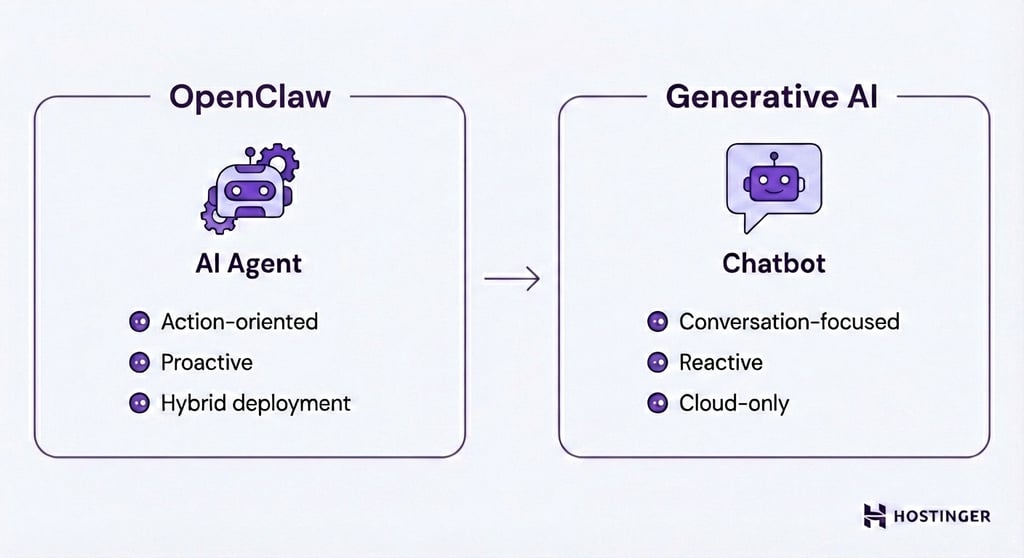
Execution capability is a fundamental architectural difference between OpenClaw, ChatGPT, and other large language models (LLMs).
Traditional cloud chatbots generate conversational responses and provide guidance, but they don’t execute tasks directly. OpenClaw, by contrast, is built as an AI agent that interprets natural-language instructions and carries out tasks rather than simply describing how to accomplish them.
OpenClaw is also proactive rather than reactive. While most generative AI tools only respond when prompted, OpenClaw can initiate messages, send reminders, and continue tasks over time without repeated instructions.
Additionally, from a deployment standpoint, OpenClaw offers greater flexibility than cloud-only assistants.
You can run OpenClaw on your own hardware for maximum privacy and control, deploy it on a VPS for 24/7 availability, or use managed OpenClaw hosting to reduce manual server setup.
You can also choose which AI models to connect, including models from Anthropic and OpenAI. This makes OpenClaw more flexible than cloud-only assistants, which limit where the agent runs and how deeply it integrates with your environment.
OpenClaw vs Hermes Agent
OpenClaw and Hermes Agent are both AI agent tools, but they are designed for different levels of control and technical involvement. OpenClaw is better suited to users who want an open-source assistant that can run locally, on a VPS, or in a managed hosting environment while connecting to custom tools, messaging channels, and automations.
Hermes Agent is a better fit for users who want a more guided AI agent experience with less emphasis on self-hosted infrastructure and manual configuration. The right choice depends on whether you prioritize customization and deployment control or a more streamlined agent setup.
Users comparing Hermes Agent with OpenClaw should consider how much control they need over hosting, permissions, integrations, and long-running automations before choosing a tool.
Is OpenClaw secure?
OpenClaw is not secure out of the box and should be handled with care, as it can access files, terminals, web accounts, messaging apps, and third-party tools on the user’s behalf. OpenClaw security depends on four main factors: where it runs, which permissions it has, whether the interface is exposed publicly, and how carefully skills or plugins are reviewed.
Local and VPS setups give you more control over files, credentials, containers, and network access, but they also make you responsible for isolating the environment, protecting API keys, and preventing public exposure. Managed OpenClaw hosting can reduce some server-level setup and maintenance risks, but it does not remove agent-level risks like prompt injection, over-permissioned integrations, unsafe automations, or malicious skills.
To use OpenClaw more safely, follow OpenClaw best practices such as running it in an isolated environment, avoiding public exposure, disabling high-risk tools unless needed, reviewing third-party skills, and giving the agent only the permissions required for each workflow.
Who OpenClaw is for?
OpenClaw is best suited to people who want an AI agent that can do more than answer questions. It works well for users who need an assistant that can remember context, interact with external tools, automate multi-step tasks, and run continuously in the background.
Technical users and developers will benefit most from self-hosting because it gives them complete control over the environment, integrations, permissions, and server configuration. This flexibility makes it easier to customize workflows and connect OpenClaw to existing tools and infrastructure.
At the same time, OpenClaw is becoming more accessible to beginners through managed hosting, which reduces the amount of server setup and maintenance required. Users still need to configure AI models, integrations, and automations, but they don’t have to manage the underlying infrastructure themselves.
OpenClaw may not be the best choice if you only need a conversational AI chatbot or don’t want to manage permissions, integrations, and automated workflows. In those cases, a traditional AI assistant may be a simpler option.
How to get started with OpenClaw
OpenClaw can be set up in two main ways: through managed OpenClaw hosting or on a VPS. The right option depends on whether you want the fastest onboarding experience or more control over the server environment.
Option 1: Self-managed installation
Managed OpenClaw hosting is the simpler option for users who want to start using OpenClaw without manually configuring the full server environment. It helps with deployment, infrastructure setup, and keeping OpenClaw available online, while you still control the AI models, messaging channels, integrations, permissions, and automations you connect.
Choose this option if you want a faster setup process and less hands-on server maintenance.
Option 2: VPS-based deployment
VPS-based OpenClaw deployment is better for users who want more control over the server, Docker configuration, runtime environment, and maintenance process. This option keeps OpenClaw online 24/7 without depending on your personal computer, but it requires more technical involvement than managed hosting.
Choose this option if you want server-level control, custom configuration, or a more hands-on self-hosted setup.
To compare both paths and configure the option that fits your needs, follow our step-by-step guide on how to set up OpenClaw.

Larassatti Dharma is a content writer with 5+ years of experience in the web hosting industry. She has populated the internet with over 100 YouTube scripts and articles around web hosting, digital marketing, and email marketing. When she's not writing, Laras enjoys solo traveling around the globe or trying new recipes in her kitchen. Follow her on LinkedIn