15 common Docker use cases
Mar 10, 2026
/
By Marta P.
/
11 min Read
Docker use cases refer to the practical ways developers can utilize the containerization tool for various scenarios and tasks. Given this tool’s flexibility and powerful features, it’s useful for a wide range of purposes:
- Streamlined software development and deployment. Docker packs your applications, including their runtime components, in portable containers.
- Microservices deployment. By utilizing Docker, you can build an application comprising smaller, modular components that are isolated from each other.
- Continuous integration/continuous deployment (CI/CD). Docker standardizes the build, test, and deployment of your CI/CD pipeline, ensuring the testing environment mirrors production.
- Application isolation for development. The isolation of containers enables you to run multiple applications with conflicting dependencies without interference.
- Scalable web applications. Containers are portable, meaning they can be scaled down and up automatically to meet the traffic needs using an orchestration tool.
- Hybrid cloud deployments. You can develop applications in a local on-premises environment and then deploy the same containers to the cloud for scalability.
- Cloud-native apps and Kubernetes integration. Running containerized applications in Kubernetes and a cloud infrastructure allows them to scale automatically based on load.
- Running legacy applications. Docker allows you to wrap older applications and their specific, outdated dependencies into a secure, isolated container.
- Big data and analytics. Containerization simplifies the deployment of specific tools for processing large amounts of data, such as transforming large CSV files into JSON format.
- Testing and staging environments. Docker streamlines the process of creating testing environments that mirror the production and staging sites with different configurations to test specific scenarios.
- Data processing pipelines. You can chain containers to create efficient pipelines that use streams to connect readable sources to writable destinations.
- DevOps automation. Docker helps maintain a consistent environment across automation stages, ensuring integrity and preventing compatibility issues.
- Edge computing and IoT. Docker’s lightweight nature allows you to deploy applications to devices with limited resources, enabling the provisioning of services at the edge and on less-powerful devices.
- Security and isolation. Containers isolate applications from the host system, which limits the risk of a single compromised service affecting the entire server and enables more granular access control.
- Database containerization. Docker enables you to instantly spin up isolated database environments, such as MongoDB or MySQL, and set up a persistent volume easily.
Let’s dive in and explore each of these use cases in more detail.
Download free docker cheat sheet
1. Simplified software development and deployment
Docker supports the entire development and deployment lifecycle by packaging your app runtime in an isolated environment. Without this tool, keeping code running consistently across different environments is complicated.
Apps on the same machine could conflict with each other. For example, two projects needing different versions of the same library could easily break things and lead to unexpected behaviors, causing bugs and crashes.
The whole “it works on my system” problem was a thing, and while solutions like virtual machines help with some of the issues, they still entail a good degree of overhead. Docker, however, packages code, dependencies, and runtime into one container that developers can now replicate across environments as they are, keeping each application separate and functioning on its own.
You can also separate features, services, or code in your application into their own Docker container for easier development and maintenance.
2. Application isolation for development
Developers often use Docker to organize features and branches in separate containers. During development, it separates concerns and helps simplify testing because you can replicate production environments for the particular component as closely as possible.
Fortunately, with Docker, both are within reach. When building an app, Docker can:
- Replicate production setups. Get a feel for the application in its true, live state as you work.
- Reduces environment-related bugs. When you run an app in Docker, you’re not just executing your code, but you’re also bundling everything the app needs. This way, you can avoid build failure caused by missing dependencies.
- Simplifies debugging. Developers can debug in a controlled environment that remains consistent.
- Avoids local pollution. Each feature and development branch runs in its own isolated Docker container, meaning logs or other residual data won’t affect the main development environment.
Running features in dedicated containers is especially common when deploying applications with a microservices architecture, but this approach also works with a monolithic project.
3. Microservices architecture
Implementing microservices is easy with Docker because this tool allows modular app development where each service resides in its own isolated container. Take, for example, a multifaceted application such as an e-commerce platform.
If your team and code base are big enough, microservices architecture is a common choice. In a microservices architecture, each part of your application (such as accounts, payment, and shipping) is built and deployed separately. If your team or codebase is large, keeping components independent just makes sense.
Here are some of the benefits of using Docker for microservices architecture:
- Isolation. You can run each microservice with its own dependencies, libraries, and packages, saying goodbye to conflicts. This means a microservice can run independently and be transferred as-is across environments with no extra setup beyond its Docker container.
- Infrastructure support. Containers can run on various platforms, such as VPS providers (like Hostinger VPS) and Kubernetes clusters.
- Scalability. Scaling is easy with Docker, and can be further simplified using orchestration tools like Kubernetes, Docker Swarm, and Amazon Elastic Container Service (ECS) to manage scaling and availability automatically.
- Polyglot architecture. You can write code in any language—Python, Java, Node.js, Go, and more—and deploy it uniformly using Docker containers.
- Consistency. Developers and operations teams share the same container image, ensuring development, staging, and production environments behave identically.
- Speed and tools. Docker is fast, lightweight, and provides built-in tools for logging, monitoring, and network management out of the box.
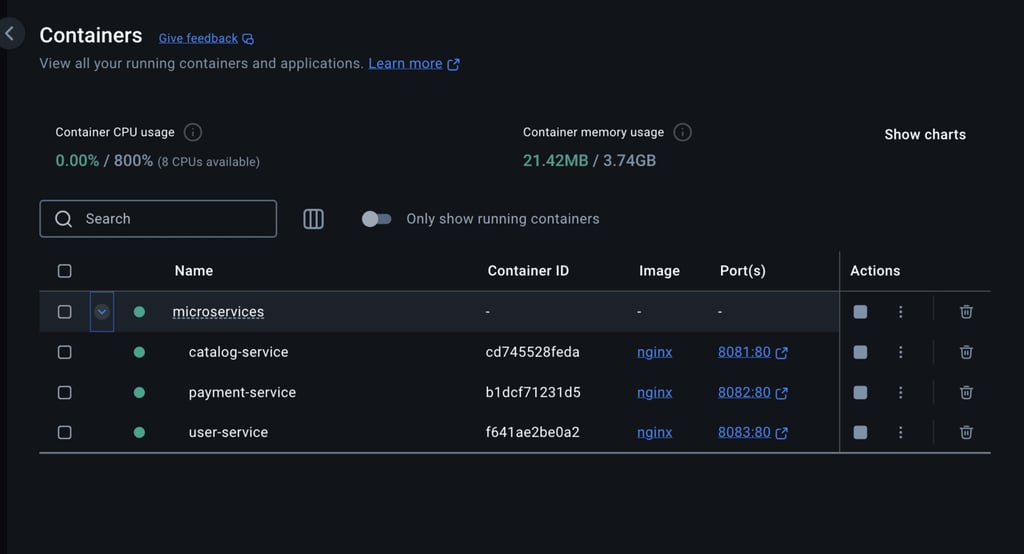
One of the main benefits of deploying applications as containerized microservices is their scalability. Using an orchestration tool, for instance, enables you to provision more instances of the service to distribute the load more evenly.
4. Scalable web applications
Docker can support your team’s efforts to deploy apps that never leave your customers in the dark by packaging them in a portable, stateless, and ephemeral environment. Consider our ecommerce platform example again, but this time, imagine it as an application that only just recently begun to see a large influx of visitors.
Things are taking off, and sudden high traffic can be as exciting as it can be problematic if your app doesn’t scale properly. Here’s how Docker can help:
- Stateless architecture. Apps in Docker tend to be stateless, which makes it easier for containers to handle any request.
- Rapid horizontal scaling. Docker containers are fast and lightweight, allowing you to run more container instances to scale out your web app with ease. You can quickly add 5-10 more containers to your app to handle a sudden increase in traffic.
- Orchestration. Adding Kubernetes to the mix will give you load balancing, health checks, rolling updates, and traffic-based autoscaling, all of which support production-grade scalability with very little manual setup required.
- Consistent deployments. Because Docker ensures the same app environment everywhere, you can scale the same image without worrying about inconsistencies.
The consistency and portability of containerized applications also help developers beyond the deployment, particularly during the testing stage.
5. Testing and staging environments
By hosting Docker on your server, you can set up throwaway test environments that mirror production, which helps you identify issues and bugs early and get faster feedback during development. If you are adopting the test-driven development (TDD) approach, this tool is especially helpful because it enables you to create:
- Reproducible test environments. You can safely run tests in the same environment every time, forgetting overhead and dependency issues.
- Isolated test runs. Each test suite or feature can run in its own container, which prevents side effects from shared state or config.
- Parallel testing. Multiple containers can run tests in parallel, speeding up the CI/CD pipeline.
- Clean rollbacks. You can destroy and rebuild containers quickly, making it easy to reset the environment between test runs.
- Staging environments mirroring production. Stage environments can be built from the same Docker images used in production, ensuring they behave identically.
- Safe experimentation plans. You can try out new configurations, integrations, or services in staging without risking the production environment.
Maintaining a consistent and accurate testing environment is particularly crucial if you automate the process, such as when implementing continuous integration/continuous deployment (CI/CD).
6. Continuous integration/continuous deployment (CI/CD)
Docker fits into CI/CD because it provides portable containers and a consistent runtime throughout different stages of the automation pipeline. This consistency is crucial for maintaining rapid deployment, which keeps apps live even during frequent releases.
Here are the benefits of using Docker with continuous deployment platforms:
- Immutable images. Once an image is built, it’s immutable, which means you can deploy it across multiple development environments.
- Consistency. Developers and CI/CD tools (like Jenkins, GitLab CI, GitHub Actions) can run containers using the same Docker image.
- Standardized deployment. Whether you’re pushing to dev, staging, or production, deploying containers remains the same.
- Isolation. Docker allows each step in the CI/CD pipeline to run in a clean environment, which prevents conflicts and disruptions.
- Reproducibility. You can redeploy previous versions of containers with a simple tag change.
- Speed. Containers can spin up in seconds, making build and test cycles are faster, and cached Docker layers reduce the need to rebuild entire environments each time.
In addition to improving the CI/CD pipeline, Docker also streamlines other tasks within a bigger DevOps automation workflow.
7. DevOps automation
Docker slots into DevOps by streamlining operations from environment setup all the way to deployment. It facilitates the whole process with automation, efficient resource utilization, and scalability. Here are the benefits of using Docker for DevOps automation:
- Consistent and reproducible environments. Docker keeps environments consistent and manageable and eliminates environment drifts.
- Simplified infrastructure management. Infrastructure components and dependencies are defined as code in Dockerfiles, making it easier to provision, update, and version control environments.
- Seamless integration with CI/CD tools. Docker’s portability and image layering facilitate the management and scaling of automated builds, tests, and rollouts.
- Improved scalability and flexibility. Microservices packaged as containers can be deployed independently and scaled automatically based on demand.
- Quick rollback and fault isolation. Versioned Docker images make it easy to roll back faulty deployments, which means issues are isolated and don’t affect the entire system.
Docker’s role is most prevalent if you are automating deployments across different environments, such as both on-premise and cloud infrastructure.
8. Hybrid cloud deployments
Many developers use Docker with hybrid cloud deployments, where they have workloads run across both on-premise and cloud environments. This requires consistency at the application runtime level paired with flexibility to handle differences in the underlying infrastructure between those environments.
Docker helps with hybrid cloud deployments by providing:
- Portability and flexibility. Your Docker self-contained image that stores your application and all its dependencies can run as-is on multiple cloud environments, on-premise services, and Edge devices.
- Consistency. Docker makes sure that your app behaves the same everywhere thanks to an identical OS layer, stable environment variable, and pre-installed dependencies.
- Gradual cloud migration and cloud bursting. With Docker, you can start on-premise, then shift workloads to the cloud over time (gradual cloud migration) or move workloads to the cloud temporarily when on-premise capacity is full (cloud bursting), which lets you avoid the headache of re-architecting your application.
- Cost-efficiency. Docker makes hybrid cloud deployments more cost-effective by letting you use resources more efficiently, scale only when you need it, and avoid expensive infrastructure overhead.
For cloud-native apps, Docker also helps with deployment and scaling, which you can automate with the help of an orchestration platform like Kubernetes.
9. Cloud-native apps and Kubernetes integration
Docker is often integrated with Kubernetes to run cloud-based containerized applications. Docker containers are Kubernetes-native workloads, meaning they can work seamlessly to support automated deployment, scaling, and management of cloud-native applications.
Here are the main benefits of Docker in this scenario:
- Cloud-agnostic portability. Docker and Kubernetes work together across AWS, Azure, GCP, or on-premise, which gives your team the freedom to choose or change platforms without rewriting code.
- Automated deployment. Kubernetes uses manifests to automatically deploy or update containers without manual intervention, which in turn enables rolling updates and zero-downtime deployments, meaning your users will never be left out.
- Automated scaling. Kubernetes supports automated scaling, too. It monitors container resource usage (CPU, memory), automatically adds or removes container instances based on demand, and quickly adapts to spiking or dropping traffic.
- Automated management. Kubernetes also continuously monitors container health and restarts failed containers automatically. Additionally, it manages networking, storage, and service discovery automatically.
Aside from the application code itself, you can also deploy other components using Docker, including a database and its data processing pipelines.
10. Data processing pipelines
Docker lets you easily build a data processing pipeline by helping you set up tools and environments so you can reliably automate ETL (Extract, Transform, Load) processes. Otherwise, you would need to set up all the required components manually, which often leads to hardware overhead, dependency conflicts, and inconsistent behavior across machines.
Docker offers the following advantages that help eliminate these problems when building a data processing:
- Consistency across environments. Each stage of your pipeline goes in an isolated and reproducible container so that you can run it without worrying about lengthy manual setups.
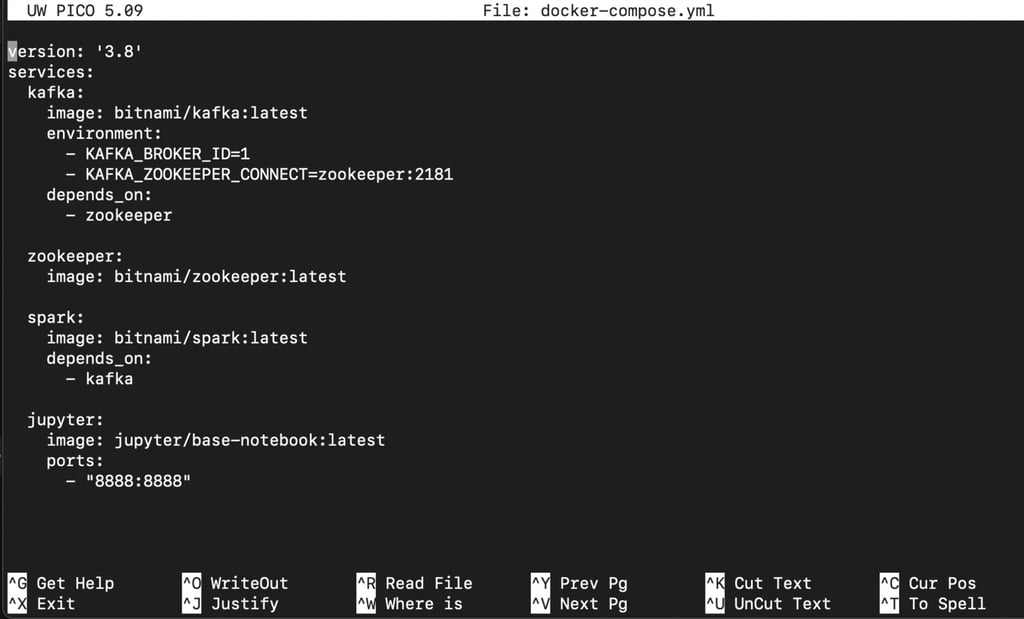
- Isolation of components. With each tool (such as Kafka, Spark, Airflow, or PostgreSQL) running in its own container, your data processing pipeline becomes modular and easily maintainable.
- Scalability for large datasets. With Docker, you can scale components of your pipeline that may need to handle large workloads (like data processors or workers) horizontally and independently.
- Lower resource overhead. Containers are lighter and nimbler than virtual machines, which makes them better suited for distributed data processing tasks.
To enable seamless and secure connection via the Docker network, you can also containerize the database that you would connect with your data processing pipeline.
11. Database containerization
Using Docker to containerize your database minimizes the performance overhead and prevents hurdles like manual setup, environment drift, and difficult versioning. Several popular databases like MySQL, PostgreSQL, and MongoDB support containerization, which is great news for your database-dependent application. Here are a few other ways Docker can help your database:
- Portability. Packaged into Docker containers, databases can run easily across environments or be moved between servers and cloud platforms.
- Rapid provisioning. You can launch databases quickly using preconfigured images for local testing, CI/CD pipelines, or rapid software development.
- Backups and restores: You can automate backups and restores with minimal downtime.
- Version control. Developers are free to run different database versions in parallel for testing or gradual migrations thanks to snapshots of data volumes or containerized tools.
- Simple management. You can automate lifecycle tasks like setup, scaling, and updates by using Docker Compose or orchestration tools.
12. Big data and analytics
Data scientists and engineers utilize Docker containers to package their analytics tools and big data jobs, which lets them easily recreate the same setup anywhere and scale complex workflows without delay. Here are the main benefits of using Docker when working with big data:
- Fast, experimentation-friendly setup. Big data stacks can be tricky to configure. Fortunately, Docker can load pre-configured containers in seconds, helping data scientists and analysts who need quick and disposable environments.
- Workload isolation. With containers that isolate tools, processing jobs, and environments, you can easily run multiple user experiments or frameworks in parallel, avoiding dependency conflicts entirely.
- Reproducibility for pipelines and ML models. Docker is critical for data pipelines and ML research that needs to be reproducible. You can reuse the exact same code, libraries, and configurations in every run or training pipeline.
- Scalable architecture. Docker’s affinity with orchestration tools like Kubernetes and Docker Swarm allows for easy scalability of data processing pipelines based on workload.
13. Edge computing and IoT
Docker is a reliable solution when deploying software for edge computing and IoT. Its containers are independent and lightweight, allowing developers to run their code in diverse hardware architectures, inconsistent underlying environments, and low-power devices.
Here’s how Docker helps developers manage and deploy IoT devices:
- Resource efficiency. Docker containers running Linux share the host OS kernel and don’t require a full operating system for each instance, so they drastically reduce CPU, memory, and storage usage. This makes them a great choice for edge devices with limited hardware resources. On platforms like macOS and Windows that run Linux containers, Docker uses a lightweight virtual machine to support Linux while still offering better efficiency than traditional VMs.
- Remote deployment and updates. Containers can be remotely deployed, updated, or rolled back across thousands of IoT devices from a central location, which reduces the need for on-site maintenance.
- Modular and isolated workloads. Multiple services (data collection, local processing, alerts) can run at the same time in separate containers, which enhances both maintainability and fault tolerance.
- Improved network efficiency. Docker allows services to run locally on edge devices, so data can be processed (filtered, aggregated, and analyzed) locally before being sent to the cloud. This reduces the amount of data sent over the network, lowering bandwidth consumption and cutting down latency.
14. Running legacy applications
Docker lets you reliably run legacy applications by containerizing old dependencies and configurations. This allows you to deploy old apps in modern development environments without any need for extensive re-engineering. Here’s how:
- Dependency encapsulation. We saw that what Docker does best is isolation and encapsulation. This proves particularly helpful when working with legacy code, as Docker can run apps with outdated libraries or OS versions without polluting your host system.
- Improved portability. Docker lets you swiftly package your legacy apps to run on any infrastructure (cloud, on-prem, dev machine).
- Extended lifespan. Efficient packaging means that you can keep legacy apps running safely even if the original environment is no longer supported.
- Simplified migration. If you want to move your legacy app into newer infrastructure (like Kubernetes or cloud VMs), you can do it with Docker without full rewrites.
15. Security and isolation
Docker containers improve isolation between runtime environments, so they provide enhanced security across your development and deployment. Here’s how:
- Reduced attack surface. Containers only include the dependencies an application needs to run, minimizing exposure to unnecessary system components that could be exploited in case of an attack.
- Isolation by design. If one container happens to be compromised, it doesn’t affect others or the host OS.
- Secure immutable infrastructure. Containers are typically deployed from read-only images, which prevent unauthorized changes during runtime.
- Controlled access. Docker supports granular permissions, such as user namespaces, seccomp, AppArmor, and SELinux, which restrict what containers can do on the host system.
- Faster patching and rollback. You can easily reduce vulnerability windows by applying security patches, updating container images, and redeploying in a matter of minutes.

How can you apply Docker in a real development project?
Depending on your use case, Docker fits differently into your development and deployment processes. However, its primary role remains to standardize the environment, ensuring that code runs exactly the same way on a developer’s laptop as it does on a production server.
This consistency is vital for modern web frameworks, where version mismatches can break features. For instance, in a JavaScript project, you often need to coordinate database connections, API endpoints, and specific runtime versions. You also have to maintain consistent npm packages across environments.
If you are working on a JavaScript project, read our guide on how to use Node.js with Docker. It will help you understand Docker’s concrete use case in the development and deployment of JavaScript applications.

Marta Palandri is a senior technical editor with over six years of experience as a developer, working extensively with APIs and backend systems. She now combines her development experience with her editorial background to create content focused on accessibility and storytelling. Find her on LinkedIn.

Comments
0 responses