What is no-code automation? Benefits, tools, popular use cases and more
Mar 21, 2025
/
Alanas M.
/
10 min Read
In the past, coding and technical skills were a necessity when looking into automation. But now, with no-code automation tools available, that is no longer the case.
Tasks like scheduling emails, processing customer requests, or syncing data across platforms can be done without any coding. Instead, simply get the tool that can do those tasks for you and enjoy the convenience of automation.
This article will walk you through everything you need to know about no-code automation software, starting with how it works, where it’s most useful, and what tools are available on the market. By the end, you’ll understand how no-code automation can help your situation.
What is no-code automation?
No-code automation is a method of automating tasks and processes without writing code. Instead, it uses visual interfaces, drag-and-drop tools, or even chat prompts to create workflows that automate your processes.
Let’s have a look at how it all came to be.
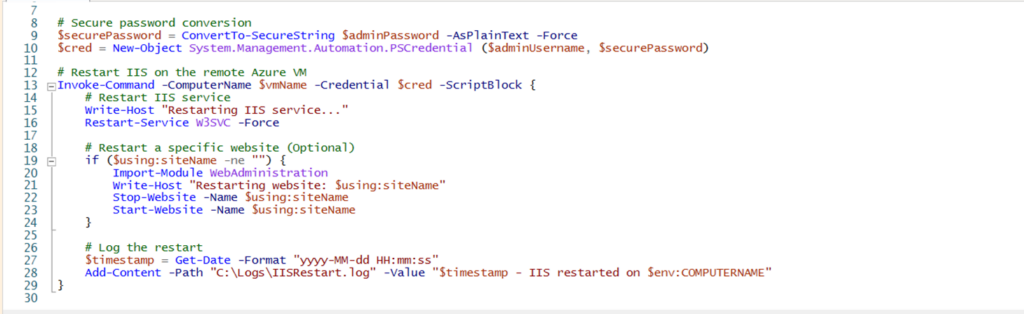
In the early days of automation, it was both complex and expensive. Traditional automation was typically custom, so a dedicated IT team was needed to create and maintain it, making it accessible only to large enterprises. A real-life example of this could be a custom PowerShell or Bash script to automatically manage IT resources.
Eventually, low-code platforms emerged as an improvement. It made automation much simpler, but it was utilized primarily in application development and used primarily by IT professionals.
API generation is a great low-code automation example. Developers can use existing code to create new APIs for a legacy application.
Nowadays, with the constant growth in demand for automation, no-code automation tools have become a practical and user-friendly choice, making it possible for everyone to automate practically anything they can think of.
Here’s how it works:
- A trigger is set up – it can be a manual trigger, a schedule, an event in a connected system, or even a text prompt.
- Automation steps are defined – specific tasks are configured to be executed once the automation gets triggered.
- Automation is enabled – once created, the automation will run consistently based on your triggers.
No-code automation has become a game-changer in the automation market by making it a standard instead of a luxury. By utilizing it, you can stay competitive, get rid of tasks that cause you headaches, and focus your efforts where it matters.
Benefits of no-code automation
No-code automation offers many benefits compared to both manual efforts and traditional automation. Let’s have a quick glance at what you can accomplish with no-code automation:
- Increase efficiency – automates repetitive tasks, freeing up time for more strategic work.
- Reduce costs – eliminates the need for hiring developers or investing in complex custom-built solutions.
- Minimize human error – standardizes processes to ensure accuracy and consistency.
- Improve scalability – allows you to automate processes as they grow without requiring additional technical resources.
- Enhance accessibility – enables non-technical users to build automation without relying on IT teams.
Let’s examine some of these in greater detail.
Typically, the reason you would look into automation is for saving time. With no-code automation, you can set up automated workflows that run on their own, and spend your time on more important work. This also drastically reduces human error, saving time from fixing an issue a human would make.
Cost savings are another major benefit. Traditional automation requires either coding knowledge or custom-built solutions, which can get quite expensive. No-code automation is much more wallet-friendly in most cases.
Most importantly, it makes automation accessible to all. By allowing any user to build and manage automation on their own, no-code tools enable them to fix their pain points themselves and lessen the reliance on IT teams.
Types of no-code automation
No-code automation comes in different types, each offering a unique approach to building workflows. Here’s a breakdown of the three main types.
Prompt-based automation
Prompt-based automation relies on AI-driven commands. You describe what you want to automate in natural language, and the automation platform generates a workflow automatically based on the input.
For example, if you type, “Whenever I receive an email with an attachment, save it to Google Drive,” the automation tool will generate and configure the workflow accordingly.
These are typically less common in the industry due to their niche use cases, but they can be powerful for both research and creative tasks.
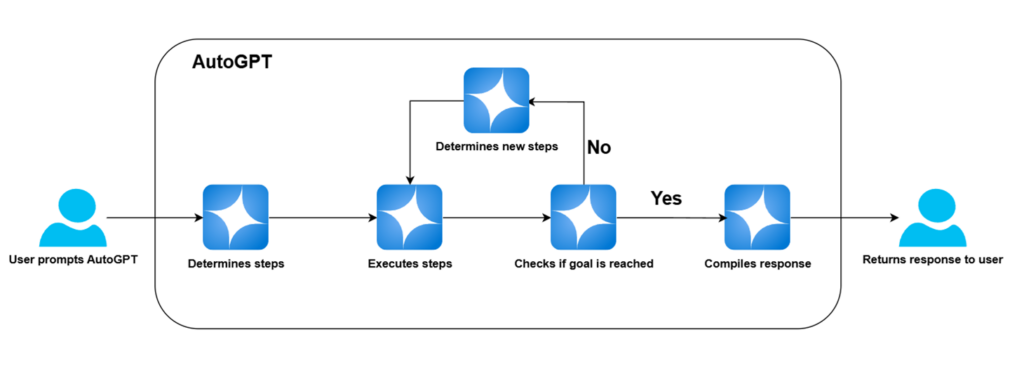
Here’s a visual representation of how AutoGPT, a prompt-based automation tool, operates behind the scenes:
Text-based automation
Text-based automation uses structured input, predefined conditions, or command-based logic to trigger workflows. You typically define specific rules that determine when and how automation occurs.
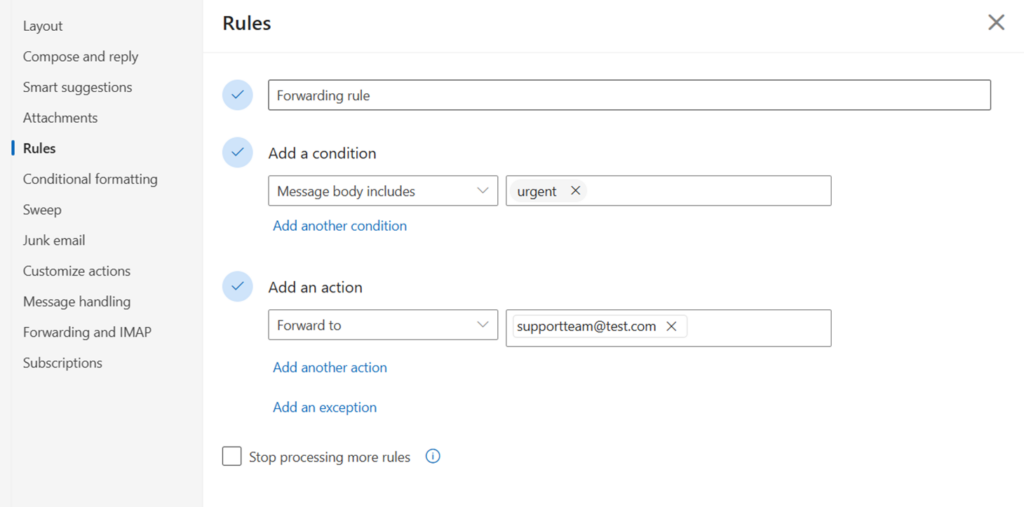
A practical example of this is an email filtering system, where you might configure a rule like:
- “If an email contains the word ‘urgent,’ forward it to the support team.”
- “If an invoice arrives in my inbox, extract the data and update my accounting software.”
Here’s how it can look like in practice for Microsoft Outlook:
Visual no-code automation
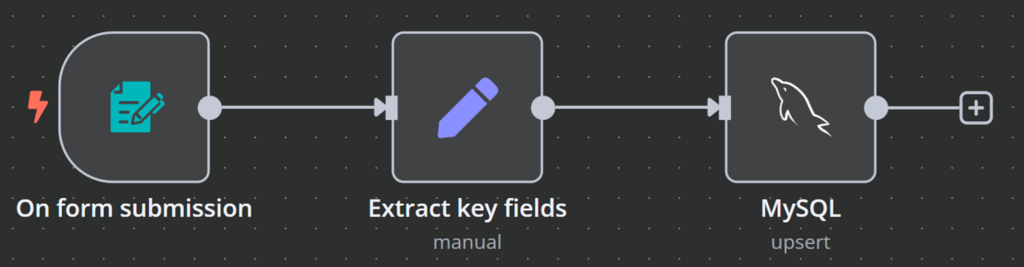
Visual no-code automation is the most common and flexible method. It uses a drag-and-drop interface to connect different actions in a flowchart-like interface. You map out workflows visually, linking triggers, conditions, and actions in a clear sequence.
For example, a business could create an automation that:
- Detects new form submissions.
- Extracts key details from the form.
- Updates a customer database.
And here’s how it looks like in n8n, a no-code automation platform:
To recap, let’s compare the three types side-by-side.
| Feature | Prompt-based | Text-based | Visual no-code |
| Working mechanism | Artificial intelligence (AI) interprets a natural language request and generates automation. | Uses structured text input or predefined conditions to trigger workflows. | Drag-and-drop tools allow users to create workflows visually. |
| Ease of use | Requires minimal setup, using it is as simple as using general AI. | Simple for rigid rule-based automation. | Intuitive interface but requires workflow design. |
| Best for | Non-repeatable creative or research tasks | Common tasks with clear conditions. | Complex workflows requiring multiple steps and integrations. |
| Level of control | Low – AI defines the automation steps. | High – all rules are defined manually. | High – full control over every step of the automation. |
| Scalability | Limited – best for one-time use or simple continuous automations. | Moderate – can scale but becomes difficult to manage. | High – designed to handle complex, growing workflows. |
| Customization | Very limited – you cannot customize the automation beyond your prompts. | Moderate – rules can be customized, but remain rigid. | High – every step can be configured and tailored to your needs. |
| Setup time | Instant – AI generates the automation. | Quick – requires manual rule input. | Long – requires defining every step of the workflow. |
| Skills needed | None – fully AI-driven. | Low – basic understanding of logic that is needed. | Moderate – logic understanding is needed for workflow structuring. |
No-code automation use cases
As no-code automation is targeted at making automation available to everyone, the use cases are just as varied. Across industries, teams use automation very creatively to target their pain points and enhance productivity.
Below are just a few real-life examples of how some industries use these no-code tools in their daily operations.
Marketing and sales
Marketing and sales teams need consistent customer engagement and efficient data management. With no-code automation, business process management, like setting up meetings or running email campaigns, becomes easy.
Here are some ways they do this:
- Personalized email campaigns – ecommerce businesses usually segment customers based on past purchases and automatically send personalized product recommendations. For example, when a customer buys running shoes, the system schedules a follow-up email showcasing complementary items, like socks or other fitness gear.
- Meeting scheduling – a B2B sales team may use automation to handle meeting bookings. When a prospect fills out a request form, the system checks for available times, schedules a meeting, sends a confirmation email, and adds the event to the sales team’s calendar.
Human resources
HR teams are responsible for business workflows such as employee onboarding and day-to-day administrative tasks, all of which can be streamlined by using automation.
Here’s how business process automation can help HR teams:
- Employee onboarding – a software company may onboard new employees by automatically creating email accounts, assigning system access, and sending welcome materials to new hires.
- Time-off request approvals – a corporate HR department can automate vacation approvals by integrating leave request forms with payroll and scheduling tools. When an employee submits a request, the system checks team availability, notifies the manager for approval, and updates payroll records.
Customer support
Providing fast, efficient service is critical for customer satisfaction. No-code automation improves task management for support teams, increasing the speed of their efficiency. Here are a few examples of how no-code automation can help customer support:
- Ticket routing – an IT company can automatically assign support tickets based on issue type and urgency. For example, if they get a ticket for an incorrect invoice, it would automatically get routed to the finance team.
- Instant FAQ responses – an online retailer can speed up their response times by using automated chatbots to handle common questions. When a potential customer asks about pricing, the chatbot retrieves the information from the FAQ and returns an answer without any delay.
Software development
Developers can use no-code solutions to accelerate software deployment, reduce bugs, and manage issue tracking without manual intervention. Here are some real life examples of how developers automate processes:
- Code testing – a fintech company may run scheduled automated tests on new software releases. Every time developers push new code, the system executes predefined tests, detects bugs, and reports failures before deployment.
- Bug tracking and notifications – a game studio can integrate bug reporting automation into its project management system. When a tester submits a bug, the system assigns the task to a developer and prioritizes it automatically.
IT operations
IT teams must maintain secure, efficient, and scalable infrastructure. To do this effectively, automation has become a necessity. Here are some common ways IT teams utilize automation systems:
- Server monitoring – a cloud hosting provider monitors server performance in real-time. When CPU usage spikes beyond a set threshold, the system can automatically add resources to prevent downtime.
- New user provisioning – a multinational corporation can automate user account creation for new hires. When HR creates a new employee record, the automation assigns access permissions and notifies IT of any special requests.
No matter your industry, no-code automation is very likely capable of making your daily life easier. By automating repetitive business processes, you can focus on more important work.
Popular no-code automation tools
With so many no-code AI automation tools in the market, it can be difficult to pick the right one for you. Each of them contains their own quirks and nuances.
Below, we explore the top no-code tools, focusing on their key benefits and differences.
n8n
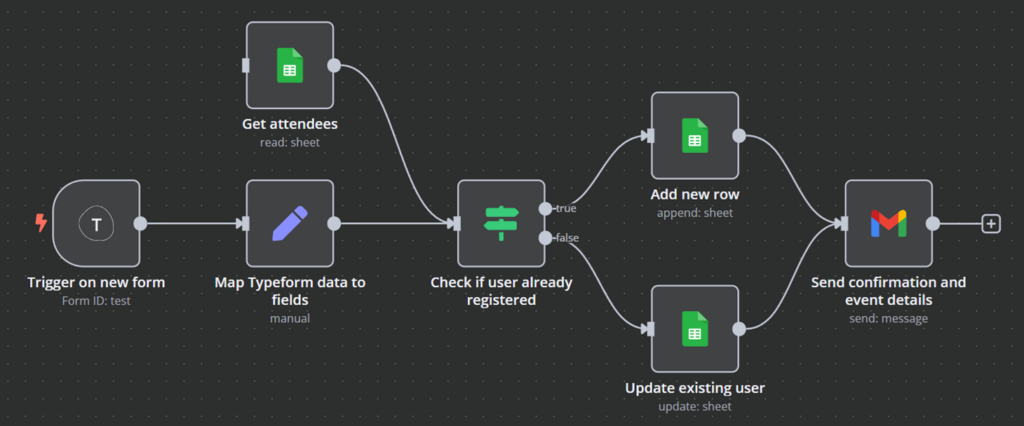
n8n is a no-code workflow automation tool designed specifically to make the most of what automation can offer while still keeping it easy for all users.
It lets you create highly customizable automation workflows using both pre-built components and custom nodes. n8n focuses on structured, repeatable, and scalable automation that integrates seamlessly with many popular tools and services.
Key benefits:
- Intuitive user interface with drag-and-drop functionality makes it easy to automate both simple and complex business processes.
- Has both self-hosting and cloud-based plans.
- Supports advanced logic, high levels of customization, and the ability to run custom code.
- Contains many out-of-the-box API integrations.
- Very cost-effective compared to other no-code solutions.
Limitations:
- Advanced functionality can be difficult to implement for non-technical users.
n8n is built for flexibility and customization. With a minimal learning curve, it’s easy to get used to for users of all skill levels.
Due to its hosting options, simple flat-fee pricing and great customization options, it’s the preferred no-code automation platform to many.
Make
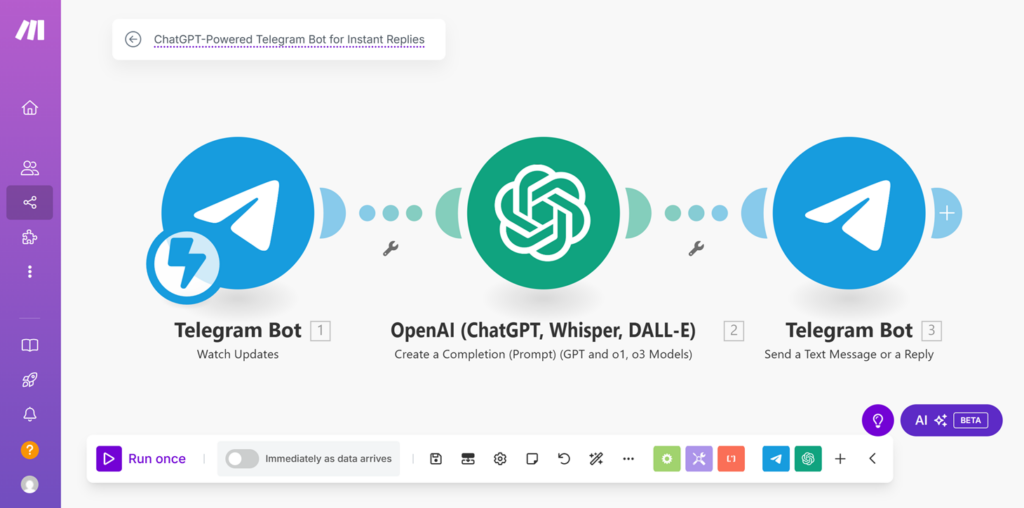
Make is a no-code platform designed for users who prefer visual workflow creation. It features an intuitive drag-and-drop editor but comes with limited self-hosting options.
Key benefits:
- Powerful visual editor for complex process automation.
- Has pre-built templates for quick workflow creation.
- Natively integrates with a large number of services.
Limitations:
- No true self-hosting option, limiting data control.
- Pricing scales with usage, which can become costly for heavy automation users
You can check out our article comparing n8n and Make for a detailed review.
Zapier
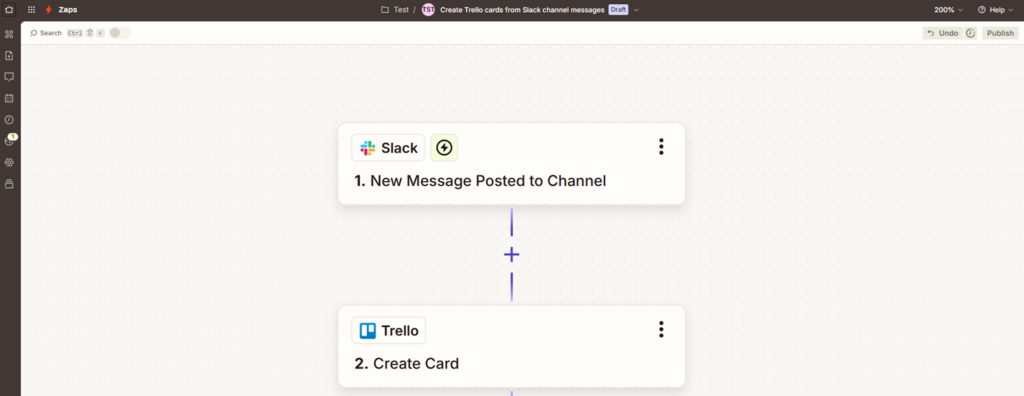
Zapier is one of the most widely used no-code platforms, known primarily for its ease of use. If you want quick, simple automation without technical complexity that has AI capabilities, it’s the no-code platform for you.
Key benefits:
- User-friendly interface, which is perfect for non-technical users.
- Massive library of pre-built integrations.
- Reliable, cloud-based automation.
- Built-in artificial intelligence support.
Limitations:
- No self-hosting support. All data is stored on Zapier’s servers.
- Lacks advanced features like workflow customization.
- Expensive at scale, as pricing is based on task volume.
You can read this article to see how Zapier stacks up against n8n.
Let’s have a look at a side-by-side comparison between the three no-code automation tools mentioned above:
| Feature | n8n | Make | Zapier |
| Self-hosting | Yes | No | No |
| Advanced workflow logic | Yes | Yes | Limited |
| Custom code | Yes | Limited | No |
| Pricing model | Hosting costs + optional paid licenses | Task-based pricing, expensive at high volumes | Task-based pricing, expensive at high volumes |
| Best use case | Flexible and customizable workflows | Intuitive visual workflows | Simple automation |
Getting started with no-code automation
No-code automation is designed to make automating quick and simple, but starting out can feel intimidating. To help you kickstart your automation journey, we’ve listed the key considerations to have in mind when picking the right no-code automation tool. We have also compiled some general tips to help you along the way.
Choosing the right tool depends on your specific needs and technical requirements. Here are some key factors to consider:
- Ease of use – Zapier and Make are beginner-friendly tools mainly tailored for businesses tackling simple problems. However, to keep that simplicity, they sacrifice deeper customization options. n8n, on the other hand, strikes a balance between ease of use with advanced functionality, making it a great option for all skill levels.
- Costs and scalability – typically, cloud-based automation tools follow a usage-based pricing model, charging per task execution, which can become expensive. This is true for both Zapier and Make. n8n, if self-hosted, scales directly with your infrastructure, letting you automate without incurring per-task costs.
- Deployment options – some no-code automation platforms offer only cloud-hosting options as managed services. n8n, on the other hand, comes with a cloud-hosted version, as well as a self-hosting option, allowing you to choose where and how you run it.
- Integration capabilities – the power of an automation tool lies in how it connects with your existing systems. n8n natively supports API integrations with many popular services, and where it doesn’t, custom nodes can create those connections for you. That makes it one of the most flexible no-code automation platforms out there.
In most cases, n8n will be the most suitable choice due to its flexibility, affordability, and customization. With its long list of features, easy usage, large community support, and plenty of available documentation, it’s the no-code platform of choice for many businesses and individuals.
If you’re looking for an even easier way to install n8n on a self-hosted service, check out our VPS hosting plans that include a n8n template. Staring at £4.99/month, you get all the resources required to run n8n smoothly, as well as a 1-click installation method for maximum efficiency.

General advice
Once you’ve selected your no-code automation tool, follow these best practices to make your start with automation easier and more effective:
- Start simple – don’t overwhelm yourself. Begin with easy, quick tasks like email notifications or data syncing. This will help you get familiar with automation logic while providing immediate productivity benefits.
- Research solutions – it’s likely that others have solved the same automation challenges before. Browse online forums, documentation, and template libraries to find solutions. Check out n8n’s template repository for pre-built workflows you can deploy instantly. We also have a hand-picked list of n8n templates that are going to cover common automation use cases.
- Plan for failures – automation isn’t foolproof. Workflows can fail due to external factors like API downtime or misconfigurations. Monitor execution logs, implement retry mechanisms, and set up alerts for failures to catch issues quickly. Regularly test your workflows to ensure they function as expected.
- Scale up gradually – once comfortable with automation, expand workflows in scale and complexity. Introduce AI-driven automation, conditional logic, and integrations with other systems. With enough effort, your automation capabilities can be limitless.
By choosing the right tool and starting with simple automations, you’ll quickly see the benefits of it. You will free up your hands from mundane manual tasks and be able to spend your time where it matters most.
Conclusion
No-code automation takes the effort out of repetitive tasks, helping you save time and letting you focus on more important work. It’s no longer a complicated process – anyone can create useful automations without technical knowledge as long as they have the right tools.
The most difficult part is getting started, but once you do, you’ll see how easy it is to set up and improve your workflows. Automation makes everyday work easier, and now is the best time to take advantage of it.
What is no-code automation FAQs
How does no-code automation differ from traditional automation?
Traditional automation often requires coding knowledge, IT support, and custom scripts, making it complex and expensive to implement. No-code automation, on the other hand, uses visual tools and drag-and-drop interfaces, letting non-technical users to implement automated workflows easily. It makes automation more accessible and cost-effective for both personal and business uses.
Can I automate tasks without coding skills?
No-code tools are specifically designed to offer automation without coding. They come with visual interfaces, pre-built templates, and simple logic-based workflows that let anyone automate tasks. You can make your automation projects come true without writing a single line of code.
What types of tasks can be automated with no code?
No-code automation can handle a wide range of tasks, including email notifications, data entry, lead management, social media posting, and customer support ticketing. It’s also used for file organization, invoice processing, and syncing data between apps. These tools help both businesses and individuals save time and streamline operations.
All of the tutorial content on this website is subject to Hostinger's rigorous editorial standards and values.

Alanas is a Content Writer with a foundation in IT and Operations. His expertise spans cloud engineering, DevOps, and process definition and optimization, gained through his experience in fintech and data-driven organizations of various sizes. Outside of work, he enjoys traveling, exploring history, gaming, and spending quality time with his family. Find him on LinkedIn.