How to set up subscriptions in WooCommerce: Step-by-step guide
Dec 02, 2025
/
Dennis H.
/
6 min Read
WooCommerce subscriptions have the power to create steady revenue and boost customer loyalty.
Instead of relying solely on one-time sales, you can offer recurring products like digital content, regular services, membership access, or even regular deliveries of physical goods. Customers love the convenience and you’ll love the predictable income.
In this tutorial, we’ll show you how to set up subscriptions in WooCommerce using three different methods.
How to set up a subscription in WooCommerce with the YITH Subscription plugin
Store owners who want a quick and inexpensive way to offer subscriptions without a complex setup process should look into YITH WooCommerce Subscription. It allows you to configure billing intervals, payment gateways, and renewal settings so customers are automatically charged based on designated times.
After installing the plugin, follow these steps to set up a subscription product. If you’ve never installed a plugin before, read our guide on how to install WordPress plugins.
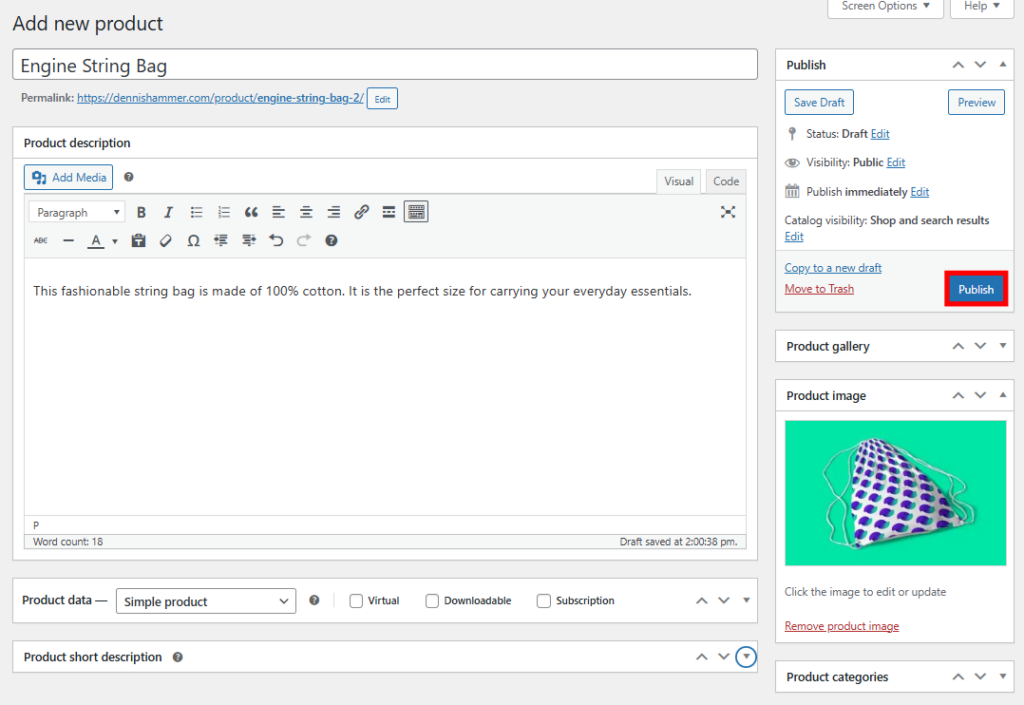
- Go to Products → Add new product.
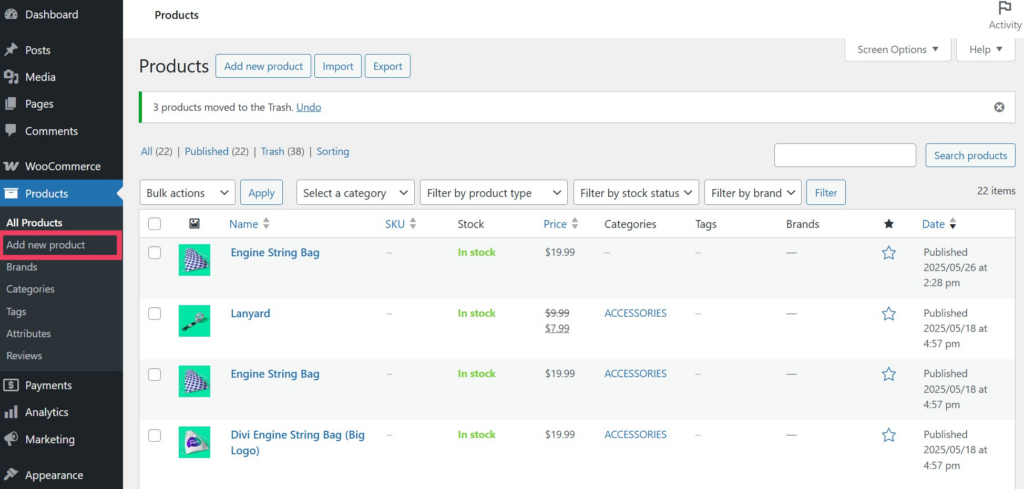
- Fill out the basic fields for your product, such as the title and description, and add a featured image.

- Scroll down to the Product data section and add a regular price.
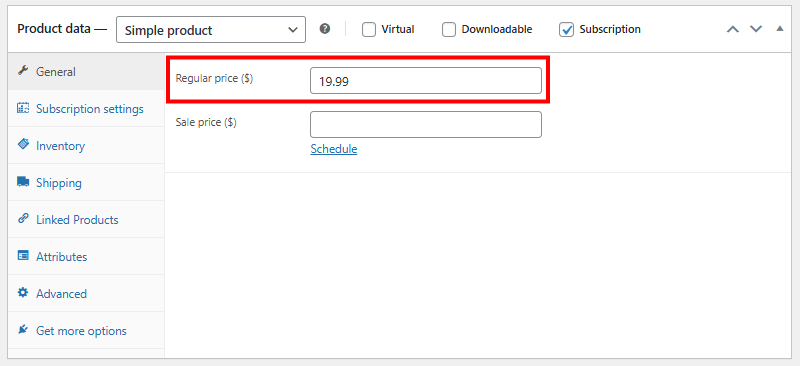
- Check the box next to Subscription.

- Open the Subscription settings tab.
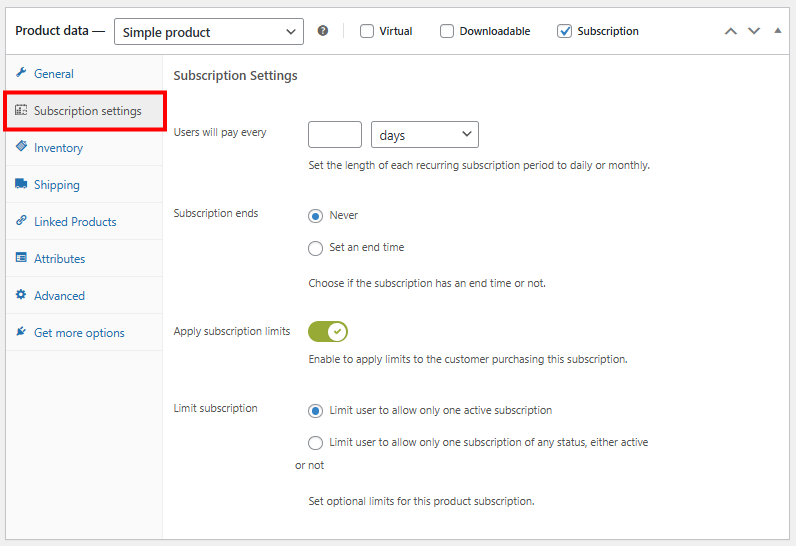
- Configure the subscription settings to your needs. You’ll need to decide how often users will pay, when the subscription ends, and if there are any limits to the subscription.
- Users will pay every – Set the length of each recurring subscription.
- Subscription ends – Decide whether the subscription ends after a certain period or continues indefinitely until canceled by the customer.
- Apply subscription limits – Enable to apply limits to the customer.
- Limit subscription – Choose whether to limit customers to one active subscription or limit them to one subscription of any status (either active or inactive).
- Click Publish to save the product and make it live on your site.
Customers can use any payment method that you have enabled in WooCommerce → Settings for the first subscription payment. Renewal payments are processed in one of two ways:
- Automatic charges – Customers can be charged automatically for renewals. However, the free version of the plugin only allows automatic renewals through the PayPal Payments for WooCommerce integration. If you need another gateway for automatic charges, you’ll need to purchase the premium version of YITH Subscriptions.
- Manual charges – If you don’t enable PayPal Payments for WooCommerce or your customer checked out using a different payment method, customers must pay manually for their renewal. YITH Subscriptions will create a new order one day before the renewal date, visible to users in My account → Subscriptions. Customers must click the Pay button to be redirected to the checkout page, where they can then complete the payment with any gateway they prefer.

Customers can also view their subscription details and cancel their subscription from the My account → Subscriptions page at any time.
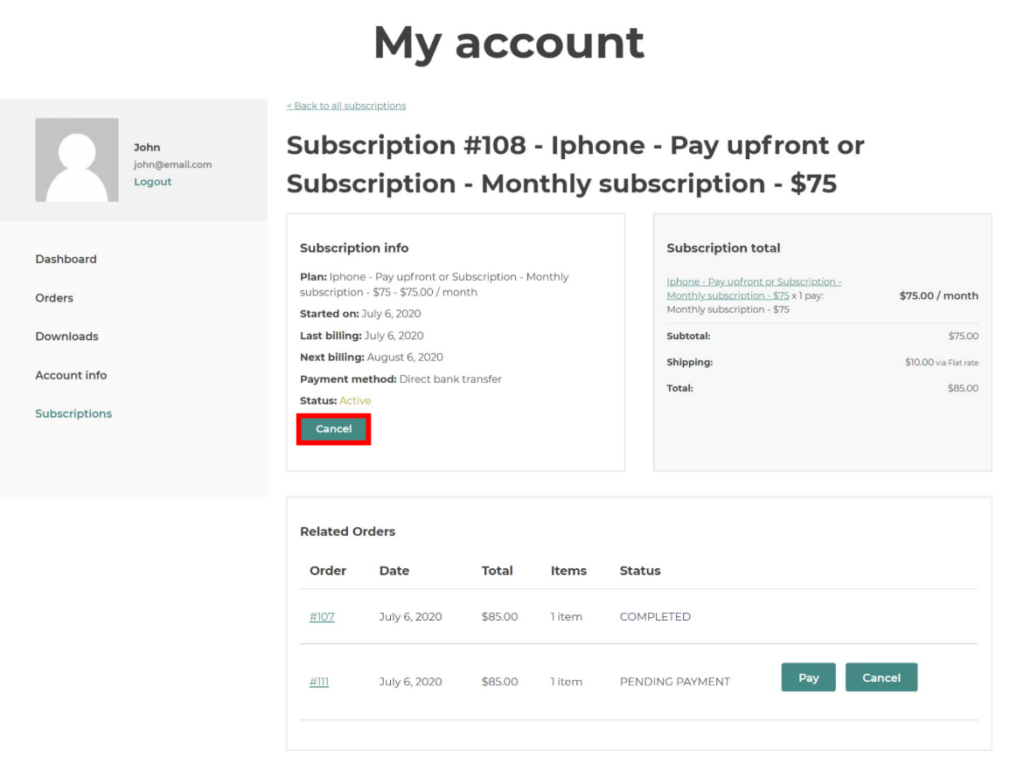
In order to reactivate their subscription, they’ll need to purchase it again. The free version of YITH Subscriptions does not let users pause, upgrade, or downgrade their subscription.
Other methods of enabling subscriptions in WordPress
YITH is a popular choice, but it’s not the only way to set up subscriptions in WooCommerce. You can also use the official WooCommerce subscription plugin or set up a full membership site.
Using the WooCommerce Subscriptions extension
If you’re looking for more advanced features and official support from WooCommerce, the WooCommerce Subscriptions extension is a useful alternative to the free YITH plugin.
It’s a premium plugin developed by the WooCommerce team and lets you manage subscription payments, billing schedules, and customer subscriptions with lots of flexibility. After installing the plugin, follow these steps to build your first subscription product.
- Go to Products → Add new product.

- Fill out the basic fields for your product, such as the title and description, and add a featured image.
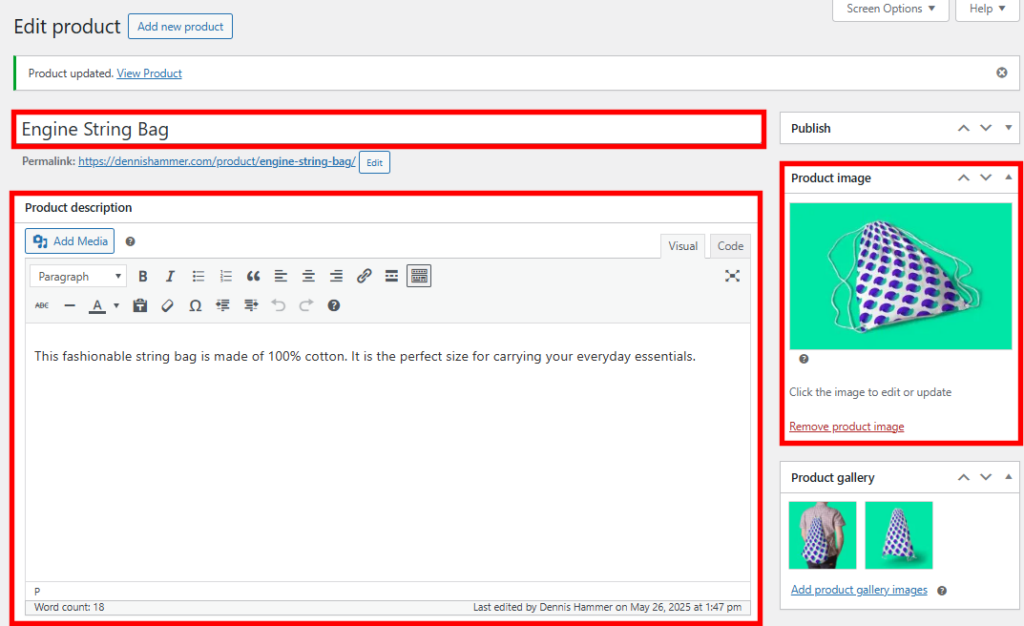
- Scroll down to the Product data section and select Simple subscription or Variable subscription from the Product Type dropdown menu.
A simple subscription is a single product with a fixed subscription plan. Customers can subscribe to one version only, with no options or variations.
Example: A monthly magazine subscription for $10/month with no choices of format or delivery method.
A variable subscription lets you create multiple variations of a subscription product, each with different pricing, billing periods, or features. Customers can choose the variation that best suits them.
Example: A streaming service with Basic ($5/month), Standard ($10/month), and Premium ($15/month) subscription tiers.

- If you choose a simple subscription, enter the subscription’s details. Set the price and interval, decide if and when to stop renewing, then set a sign-up fee and a free trial period (if any). Then skip to step eight.

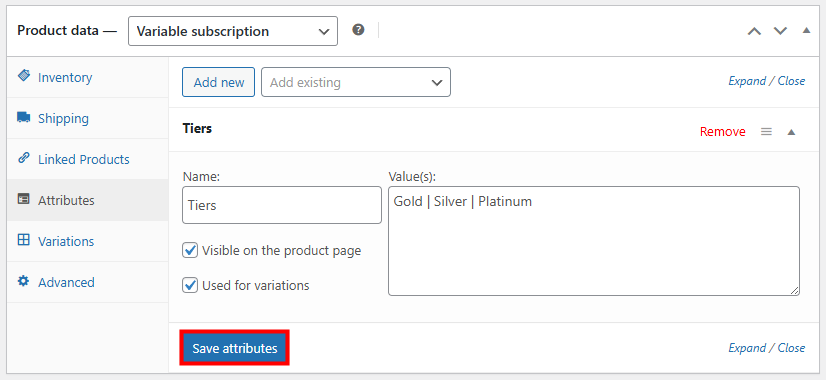
- If you choose a variable subscription, you’ll first need to define an attribute (a characteristic of your product) in the Attributes tab. Give your attribute a name and enter values separated by pipes. In this example, we created “Tiers” with values of “Gold,” “Silver,” and “Platinum.” Check the Used for variations box and click Save attributes.
- In the Variations tab, click Generate variations.
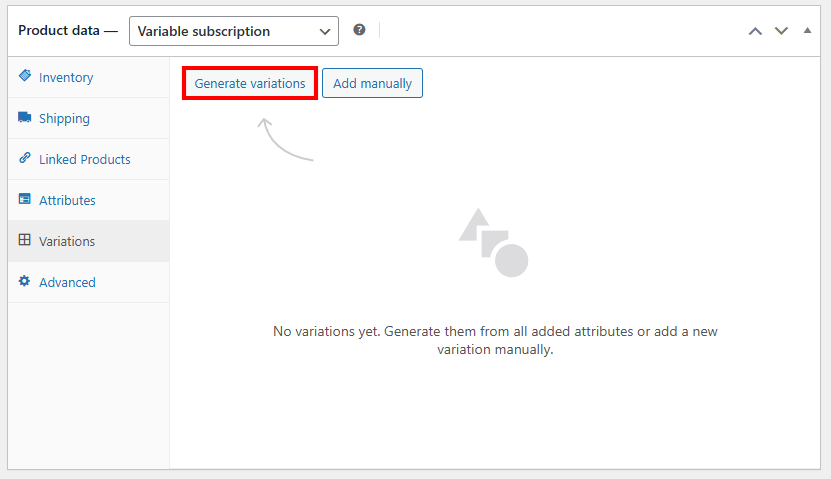
- WooCommerce will generate your variations as clickable tabs. Open the first tab to edit its subscription details. Set the price and interval, decide if and when to stop renewing, then set a sign-up fee and a free trial period (if any). Repeat this for all of your variations.

- Click Publish to save the product and make it live on your site.
Subscribers can review their subscriptions on the My account page under the Subscriptions tab.
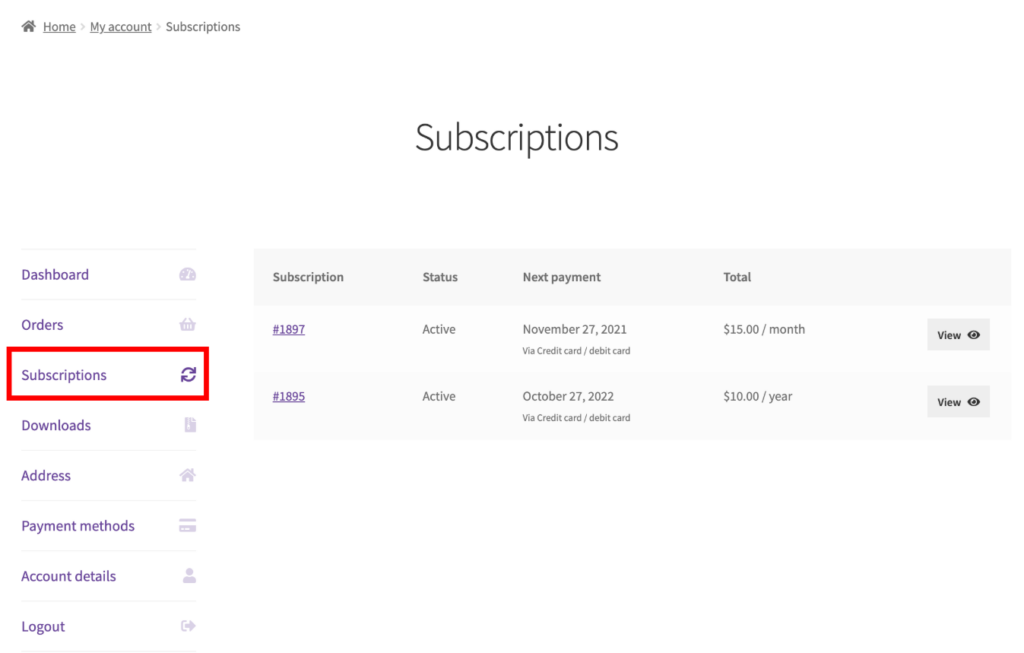
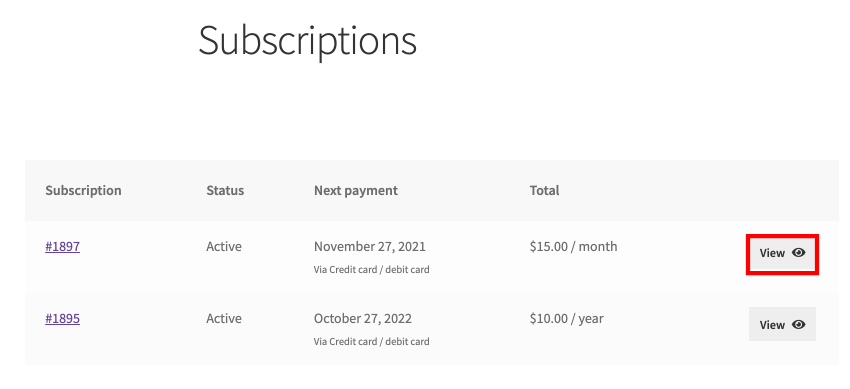
They can review the details of individual subscriptions by clicking the View button next to each subscription.
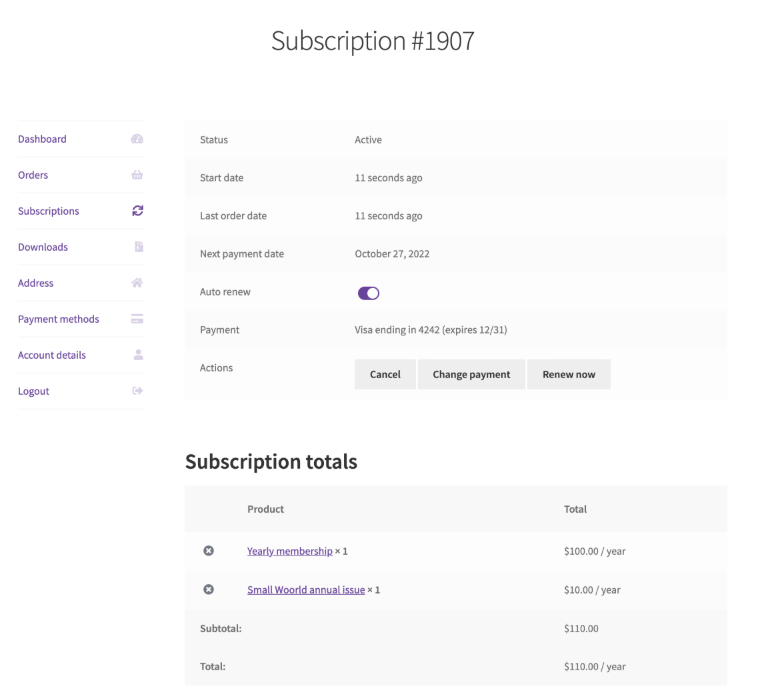
On the detail page for a single subscription, customers can view several key pieces of information:
- The subscription’s status (active or inactive)
- The start date, trial end, next payment, and end date (if any)
- Line items, including products, shipping, fees, and taxes
- The total amount charged for each renewal
- The payment method currently being used
- An order history relating to the subscription
- A contact email and phone number
- Billing and shipping addresses
- Any downloadable content attached to the subscription
Creating a membership website
You can also offer subscription products through a membership website. Where subscriptions charge customers on a recurring schedule for access to products or services, memberships control access to content, resources, experiences, or features based on user roles.
This method works best for private forums, online courses, coaching programs, premium content libraries, or community-generated content.
Membership websites benefit your business by creating a stable revenue stream and encouraging customer loyalty. Customers love the exclusive content, community engagement, and ongoing value.
If you’re interested in building a full-fledged membership site, we have a detailed guide covering everything you need. Check out our tutorial on how to create a membership website with WordPress.
Best practices for WooCommerce subscriptions
WooCommerce subscription products are great ways to create recurring revenue for your business, but only if you set them up properly. Follow these tips to make sure your WooCommerce subscription setup is reliable and attractive to customers.
Provide clear pricing and subscription terms
Customers appreciate transparency. In order to build trust, it’s important to clearly state your billing intervals, renewal dates, cancellation policies, and any additional fees.
Send timely email notifications
Keep subscribers informed by sending friendly reminders about upcoming payments, subscription expirations, or renewal confirmations. Notifications prevent customers from being caught off guard, which reduces complaints, customer service requests, and cancellations.
Offer flexible subscription management
If your customers can’t adjust their subscriptions, they may feel unfairly locked in. Give them a user-friendly subscriber dashboard where they can view subscription details, manage payment methods, and pause, upgrade, downgrade, or cancel their own subscriptions without contacting you. These tools can make them more likely to stay loyal to your business over the long term.
Monitor subscriber feedback
Collect feedback or reviews from your subscribers through surveys, email requests, or customer support interactions. This helps you identify areas for improvement so you can continue to meet their expectations.
Offer incentives for longer subscriptions
Everyone likes a good deal! Encourage your subscribers to choose longer-term commitments (such as annual plans) by offering discounts, bonus products, or exclusive perks. Longer commitments improve your cash flow, reduce churn, and increase customer lifetime value.
Highlight subscription benefits clearly
Clearly communicate how your subscription model delivers ongoing value compared to one-time purchases. Showcase the exclusive perks, convenience, savings, or special access that customers get for subscribing.
Provide exceptional customer support
Subscribers aren’t one-off customers, so they often expect more personalized support. Respond promptly to their issues. Keep in mind that you’re working to build a long-lasting relationship.
Analyze your subscription metrics
Consistently track key metrics like churn rate, renewal rate, average subscription length, and customer lifetime value. This data will help you understand subscriber behavior, identify patterns, optimize your pricing, and improve your strategy.
Test the full subscription flow before going live
Complete a thorough test run, from sign-up to renewal as well as to cancellation, to make sure everything works perfectly. It helps to do this through a dummy user account so you see the whole process from the customer’s perspective.
Conclusion
Subscriptions give you a reliable way to earn recurring revenue while offering your customers convenience and ongoing value.
Whether you choose the free YITH WooCommerce Subscription plugin, the official WooCommerce Subscriptions extension, or explore a full membership model, you should be able to find a solution that fits your business goals.
Looking for more great tools for your online store? Check out our list of the best WooCommerce plugins.
How to create a coupon code in WooCommerce FAQ
Can I offer free trials or sign-up fees with my subscriptions?
Yes, WooCommerce subscription plugins like YITH WooCommerce Subscription and WooCommerce Subscriptions both let you set free trial periods or one-time sign-up fees. These features can help attract new subscribers by reducing their initial commitment and letting them try your subscription risk-free before regular billing kicks in.
Do I need to purchase WooCommerce Subscriptions separately?
If you’re using the premium WooCommerce Subscriptions plugin, yes, you’ll need to purchase it separately. However, if you’re using a free plugin like YITH WooCommerce Subscription, there’s no additional purchase required. You can download it from the WordPress plugin directory.
Is it possible to sell subscription and one-time products in the same store?
Absolutely. WooCommerce easily supports both subscription-based and one-time purchase products within the same store. Your customers can browse your shop, add either product type to their carts, and check out all at once. WooCommerce is ideal if you offer both standalone items and recurring subscriptions.
All of the tutorial content on this website is subject to Hostinger's rigorous editorial standards and values.

Dennis Hammer is a content strategist, web developer, and WooCommerce store owner. He has extensive experience building and growing online stores for diverse audiences as well as crafting engaging and strategic storytelling content. Follow him on LinkedIn.