How to Use Bash Arrays
Apr 23, 2025
/
Ignas R.
/
4 min Read

Bash is the go-to choice for automation for Linux users. Since automation often deals with thousands of elements, it’s essential to know what a bash array is.
With bash arrays, managing VPS or physical servers is much easier. This tutorial will show you different types of bash arrays and provide useful examples.

What Is a Bash Array?
A bash array is a data structure designed to store information in an indexed way. In other words, a bash array is a large group of variables. Unlike typical arrays used in other programming languages, bash arrays can store different types of elements. For example, you can use a bash array to store both strings and numbers.
There are two types of bash arrays:
- Indexed – the array is referred via integers or numbers.
- Associative – the array is referred via strings or a set of characters and words.
Remember that bash does not support multidimensional arrays, so it’s not possible to add an array within an array.
How to Declare Array in Bash
There are a few ways to declare indexed and associative arrays in bash. It’s worth noting that the bash array size does not need to be declared beforehand because bash arrays have no upper limit on the number of elements they can store.
Indexed Array
We will start with a simple bash indexed array. For example, we’ll use it to create a list of different means of transportation.
The first option is to declare an array by using the shell builtin declare with the -a flag and give the array its elements:
declare -a IndexedArray
IndexedArray[0]=car
IndexedArray[1]=plane
IndexedArray[2]=bike
The same can be achieved without the declare builtin:
IndexedArray[0]=car
IndexedArray[1]=plane
IndexedArray[2]=bike
Or, make it even simpler by going with:
IndexedArray=(car plane bike)
Remember that indexing starts at 0, so the above example will assign the car element of the array to the 0 index.
However, there is an option to set an array with indices:
IndexedArray=([0]=’car’ [1]=’plane’ [2]=’bike’)
An interesting feature of bash arrays is that following index numbers in order is not necessary. For example, you can declare only the first and third elements while leaving the second element of an array empty:
IndexedArray[0]=car
IndexedArray[2]=bike
Associative Array
While indexed arrays don’t require the declare builtin, it won’t be possible to create an associative bash array without declaring it first:
declare -A AssociativeArray
Next, add the values. Keep in mind that the key must be a string:
AssociativeArray[color]=blue
AssociativeArray[type]=car
AssociativeArray[topspeed]=200
An alternative way would be:
declare -A AssociativeArray=( [color]=blue [type]=car [topspeed]=200 )
How to Add a Variable to a Bash Array
Easily add bash variables using the += operator. For example, the process for an indexed array would look like this:
IndexedArray=(car plane bike)
IndexedArray+=(motorcycle)
The indexed array has a new element now. Remember that this method appends to the end of an array. Therefore, the motorcycle element will be added as the last element.
For associative arrays, the process is very similar. Except, you need to specify the keys along with all the elements:
declare -A AssociativeArray
AssociativeArray[color]=blue
AssociativeArray+=([tires]=alloy [engine]=gasoline)
How to Reference and Print an Array Element
Users can reference bash array values using the element index or key. To do this, create an indexed array:
IndexedArray=(car plane bike)
To reference the first array variable, use the following syntax:
${IndexedArray[0]}Combine it with echo, and you will get the following:
echo ${IndexedArray[0]}The output will show you the first element. In this case, it’s car. The same logic applies when referencing and printing an associative array:
declare -A AssociativeArray=( [color]=blue [type]=car [topspeed]=200 )
echo ${AssociativeArray[type]}
The output will be car as well.
To print the whole array, use @ as an index. The full script looks like this:
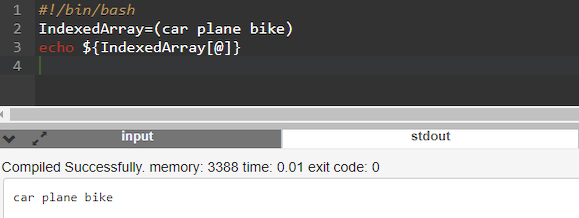
You can also print the keys of an array instead. To do this, add an exclamation mark before the array name:
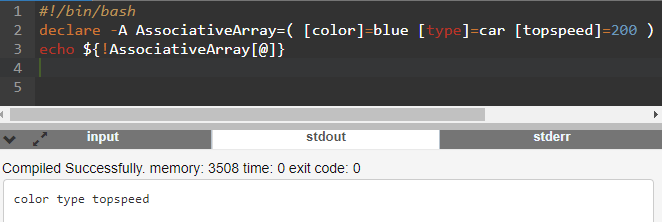
How to Remove Bash Array Elements
Deleting array elements is similar to referencing them. Use an index or a key combined with the unset builtin to delete an array element.
Here’s an example of deleting a single element from an indexed array:
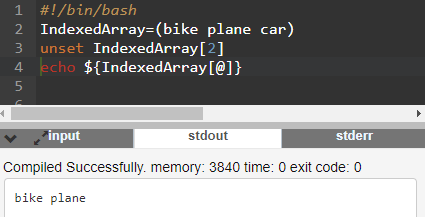
A similar logic applies to associative arrays:
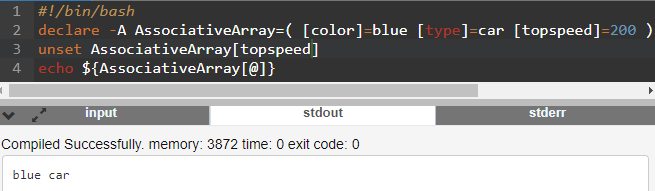
To delete an entire array, specify unset with the array name as shown here:
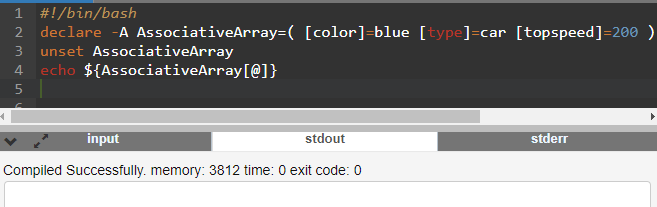
Nothing is shown after trying to print the array elements because the unset builtin deleted them.
How to Loop Through an Array
Creating bash loops is a fundamental aspect of learning bash scripting basics. You can use loops with arrays as well. For example, the most common use case is to iterate over each array item:
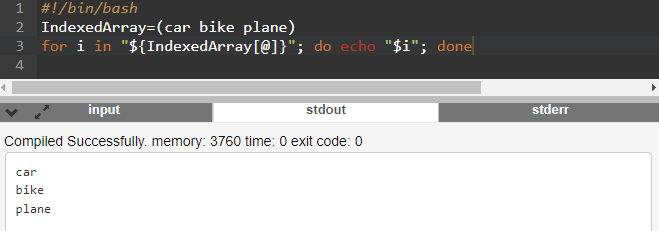
You can also combine keys with the array elements and print them all together like this:

How to Pass an Array to a Function
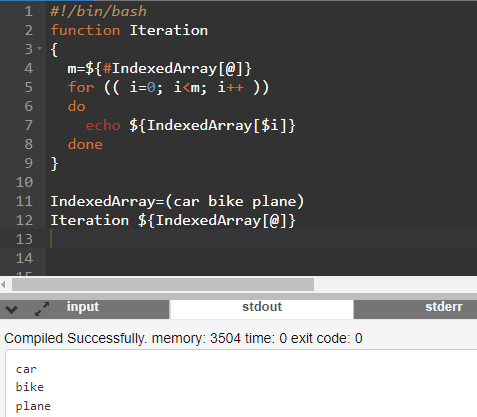
Functions save a considerable amount of time when scripting. Instead of writing the same code repeatedly, you can call out an already written function. We will combine the previously mentioned iteration loop and make a function out of it:
function Iteration
{
m=${#IndexedArray[@]}
for (( i=0; i<m; i++ ))
do
echo ${IndexedArray[$i]}
done
}
IndexedArray=(car bike plane)
Iteration ${IndexedArray[@]}
Running it on the command line will get you the following result:
Conclusion
Bash is one of the most popular shells and command languages for virtual servers as well as physical Linux-based servers. With bash scripting and arrays, users can automate their work and save hundreds of hours manually doing tasks.
In this tutorial, we’ve covered the majority of array operations:
- Declaring and creating indexed and associative arrays.
- Adding and removing variables from arrays.
- Referencing and printing arrays.
- Looping through arrays and passing them to functions.
We also provided some examples that you can use when tinkering around with bash. If you have any questions or comments, leave them below.

How to Use Bash Arrays FAQ
Bash Array vs String
A bash array stores a set of elements – for example, a set of numbers along with a list of words. On the other hand, a string can be considered an array, but it can only store characters and nothing else.
Bash Array vs List
A bash list is a sequence of one or more pipelines separated by one of the operators. As such, lists are not related to arrays. However, indexed arrays are sometimes referred to as lists.
What Do {} Mean in Bash?
Curly braces without a $ sign are considered brace expansions and are used to create arbitrary strings. You can use braces to build arrays. For example, echo {0..100} will print numbers from zero to 100.
Is Bash a Language?
Yes, bash is a command language. It is used to either automate tasks or run commands on the command line. Compared to most programming languages, the bash command language is easier to learn, and the syntax is relatively straightforward.
How to Echo a Bash Array?
To echo an array, use the format echo ${Array[0]}. Array is your array name, and 0 is the index or the key if you are echoing an associative array. You can also use @ or * symbols instead of an index to print the entire array.
All of the tutorial content on this website is subject to Hostinger's rigorous editorial standards and values.

Ignas takes great satisfaction in helping people tackle even the most complex technical issues. His current goal is to write easy-to-follow articles so that these issues will not happen at all. During his free time, Ignas likes to play video games and fix up things around his house.


Comments
April 13 2023
Looks like in the last section, the function formatting got a little mangled (the image is correct but the preceding text is mangled) As of 4/13/2023 it shows this in the for loop text section for (( i=0; i<m; i++ )) It should be... for (( i=0; i<m; i++ ))
April 14 2023
Hello! Thank you, I've fixed it.