What is a personal domain? How a personal domain works
Mar 27, 2026
/
By Ariffud M.
/
8 min Read
A personal domain is a custom-registered web address (like yourname.com) that represents your unique digital identity on the internet.
Unlike free subdomains or platform-hosted URLs such as yourname.wordpress.com, a personal domain gives you full ownership and control over your online address. You can move it between hosting providers or platforms whenever you want.
People use personal domains to build a professional online brand, host a portfolio or resume, create personalized email addresses like contact@yourname.com, and add credibility when applying for jobs or offering freelance services.
A personal domain also works as a long-term investment in your digital reputation. It stays with you even as platforms and social networks change, so you can always point it to a new host or platform without losing your web address.
Every personal domain relies on four core components:
- Domain name. The readable web address visitors type into their browser.
- Domain registrar. The service where you register and manage your domain name.
- Web hosting. The server space that stores and delivers your website content.
- Domain name system (DNS). The configuration that connects your domain name to the correct hosting server.
What are the key characteristics of a personal domain?
A personal domain differs from business or generic domains because it connects directly to an individual’s name, brand, or identity.
For example, a business domain like companyname.com represents an organization, while a personal domain like alexjohnson.com represents a person. It gives the owner a centralized hub they fully control for their online presence.
Five key features define a personal domain. Each one builds on the fundamentals of what a domain is and how registration works.
- Uniqueness. Every domain name is unique. Once you register yourname.com, no one else can use that exact address as long as you maintain the registration.
- Customization. You choose the name and extension, then decide what content to host. This could be a portfolio website, blog, or a simple one-page digital business card. You can redesign, rebrand, or repurpose the domain at any time without starting over.
- Ownership. As long as you renew the registration, the domain stays yours. This differs from social media handles, which are controlled by the platforms and may be suspended or reclaimed.
- Privacy options. Most registrars offer WHOIS privacy protection, which hides your contact details from public WHOIS databases. This helps keep your home address, phone number, and email out of public records.
- Full control. You decide where the domain points, what content it shows, and how visitors interact with it. A personal domain gives you full authority over your web address, while a rented subdomain keeps you dependent on another platform’s rules.
Common use cases for personal domains include personal blogs, freelance portfolios, professional profiles, custom email addresses, and digital resumes.
For example, a job candidate who shares alexjohnson.com on their resume immediately looks more credible than someone linking to a free Wix or WordPress subdomain.
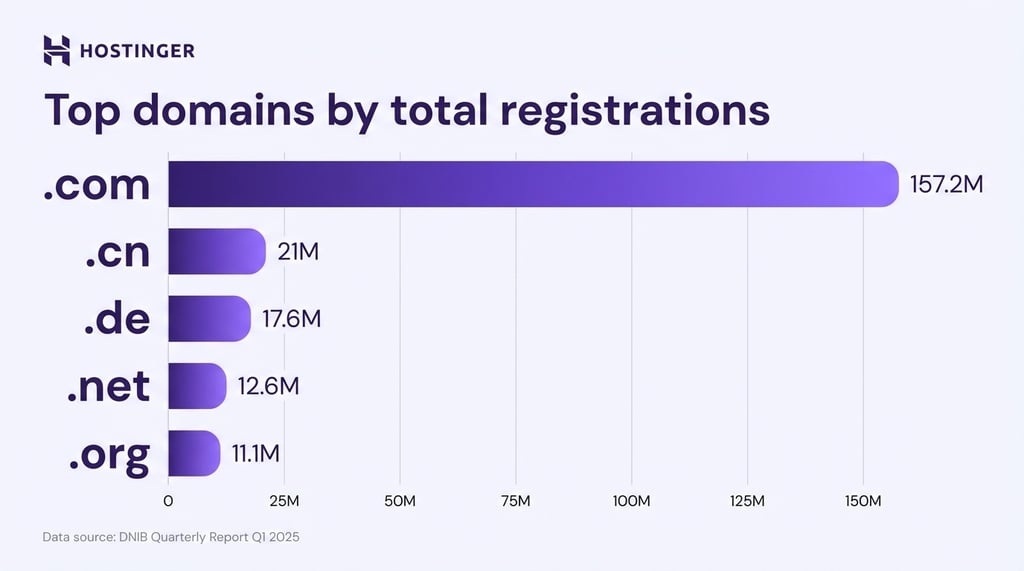
The top-level domain (TLD) you choose can also shape how people perceive your site. The .com extension remains the most recognized and trusted, with more than 157 million registrations as of Q1 2025, according to domain industry statistics.
The .me extension is Montenegro’s country code TLD but highly suitable for personal use, as it reads naturally in sentences, for example, “visit alex.me.”
The .name TLD was created specifically for individuals, but it has much lower adoption compared to .com or .me, so many visitors may not recognize it.
Newer extensions like .blog, .dev, and .art also work well when your personal brand focuses on a specific skill or industry.
What are the benefits of a personal domain?
A personal domain offers several practical benefits: stronger professional credibility, a personalized email address, full control over your online identity, portability across hosting providers, SEO benefits for personal branding, and long-term ownership of your digital presence.
These advantages apply whether you’re a job seeker, freelancer, blogger, or creative professional.
- Professional credibility and first impressions. Sharing alexjohnson.com on a business card or LinkedIn profile makes it look polished and intentional. It shows you take your online presence seriously, which matters when potential employers or clients search for your name.
- Personalized email address. An email that matches your personal domain, like contact@yourname.com for yourname.com, builds brand consistency and looks far more professional than a generic Gmail or Yahoo address.
- Full control over branding and online identity. You decide what visitors see, how the site looks, and what story it tells. Social media platforms limit layouts and often change algorithms or features overnight. With your own domain and website, you control the design, messaging, and structure without platform restrictions.
- Portability across hosting providers. A personal domain works like a phone number you own. If you switch hosting providers, you take the domain with you. Your email, website, and online identity stay the same.
- SEO advantages for personal branding. A personal domain lets you build your own backlink profile, search history, and content authority independent of any platform. Over time, publishing consistent and relevant content on your domain can help it rank for your name and related keywords. This gives you more control over what people see when they search for you.
- Privacy and ownership of your digital presence. When you own the domain, you control the data and traffic connected to it. Your web address stays yours even if a third-party platform changes its policies or shuts down, so you can redirect visitors to a new destination without starting from scratch.
- Long-term investment in your reputation. A personal domain becomes more valuable the longer you use it. Backlinks, indexed content, and brand recognition build over time. Starting early gives you a head start that grows year after year.
How to register a personal domain name
Registering a personal domain involves choosing a name, checking its availability, registering it through a domain registrar, connecting it to web hosting, setting up a personalized email address, and managing renewals.
Each step builds on the previous one, so following them in order helps keep the process smooth.
1. Choose a domain name
Choosing a domain name is the foundation of your personal brand online because it affects how people find, remember, and perceive you. A good personal domain is short, easy to spell, and clearly connected to your real name or brand identity.
Start with your full name, such as firstnamelastname.com, if it’s available. This format is usually the most recognizable and professional.
If your name is common and already taken, try a few variations. You could add your middle initial, for example, alexrjohnson.com, use a profession-based suffix like alexdesigns.com, or choose an alternative TLD such as .me or .net.
Avoid common mistakes when registering a domain. Don’t choose a name that’s too long or hard to spell. Skip trendy names that might not age well, and avoid obscure TLDs that visitors may not recognize.
Keep the domain to three words or fewer and avoid hyphens, numbers, and slang. These make the address harder to type, remember, and share.
2. Check if the domain name is available
Before registering a domain, check whether your preferred name is already taken.
Most domain registrars, including Hostinger, offer a domain name search tool. Type in your desired name to instantly see which extensions are available.
If your first choice is taken, the tool usually suggests alternatives with different TLDs or slight name variations.
Domain Name Checker
Instantly check domain name availability.
3. Register your domain name
To register your personal domain, choose a domain registrar that offers competitive pricing, free WHOIS privacy protection, and an easy-to-use management dashboard.
Check the renewal price, not just the promotional rate for the first year. You’ll pay the renewal cost for as long as you keep the domain.
At Hostinger, you can buy a domain name in just a few clicks and in under five minutes. Search for your domain, add it to your cart, choose your registration period, and complete the purchase.
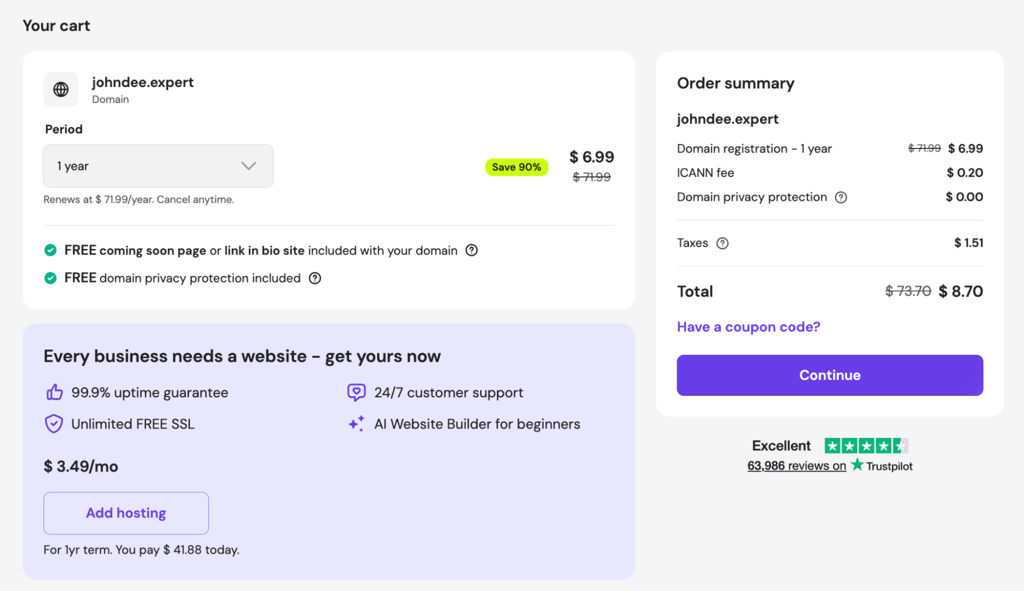
Hostinger includes free WHOIS privacy protection with every domain. You can also get a free domain for the first year when you purchase an annual hosting plan.
After purchasing, verify the confirmation email. Then review what to do after buying a domain to ensure everything connects correctly.
4. Connect the domain to web hosting and automatic DNS setup
After registering your domain, the next step is connecting it to a web hosting account so it can serve content to visitors. A domain without hosting is like a street address for a building that doesn’t exist yet.
When you buy a domain and hosting together at Hostinger, the system automatically links the domain to your hosting plan and configures the DNS settings for you. This makes the setup much easier for beginners.
Your DNS setup works like the internet’s phone book. It converts a readable domain name into the server’s IP address.
5. Set up your personalized email
Setting up a personalized email is optional, but it adds a level of professionalism that free email providers can’t match. An address like contact@yourname.com reinforces your personal brand every time you send a message.
You get consistent branding across your website and email, a more memorable address for clients or employers, and a stronger professional impression. People also tend to trust and open emails from a custom domain more than from a generic provider.
Many hosting plans, including Hostinger’s, come with basic email features. You can also set up a dedicated email hosting service through your registrar’s control panel.
6. Manage renewals and security
After the initial setup, managing your personal domain involves three ongoing responsibilities: renewing your domain name, protecting your privacy, and maintaining strong security.
Ignoring any of these can lead to losing your domain or exposing personal information.
Domain registration isn’t a one-time purchase. If you miss the renewal deadline, someone else may register your domain. Enable auto-renewal in your registrar’s dashboard to prevent the domain from expiring.
WHOIS privacy protection should be active from day one to protect your personal information. Most registrars, including Hostinger, include it as a standard feature.
For security, enable two-factor authentication (2FA) on your registrar account and use a strong, unique password. This helps prevent unauthorized transfers or changes to your domain settings.
Types and examples of personal domains
People use personal domains for branding, portfolios, email, and professional identity. Common types include exact-name domains, profession-based domains, branded project domains, and creative combinations that merge a name with a keyword or abbreviation.
Professional portfolio domains are the most common type. Freelancers, designers, developers, and photographers use them to showcase their work, list services, and collect inquiries.
Designer Jon Sorrentino runs jonsorrentino.com as his main portfolio. Photographer and YouTuber Peter McKinnon uses petermckinnon.com to display his client work and galleries.
Personal blog domains suit writers, hobbyists, and thought leaders who publish content regularly. One well-known example is WordPress co-founder Matt Mullenweg, who regularly publishes on matt.blog.
Some entrepreneurs use a personal domain as a central hub that connects everything they do. For example, garyvaynerchuk.com brings together blog posts, podcast episodes, speaking engagements, and product launches in one place.

Digital business card domains are the simplest format. They usually feature a single page with a photo, short bio, contact information, and links to portfolios and social profiles.
Hostinger content writer Simon Lim runs simonlim.me as a personal brand page that introduces who he is, shares his story, and links to his writing work samples.
Best practices for personal domain management
Manage your personal domain effectively by keeping your branding consistent, updating content regularly, securing your registrar account with two-factor authentication (2FA), and enabling WHOIS privacy protection.
Use the same name, profile image, and color scheme across your domain, email, and social profiles so visitors recognize you instantly.
Update your site’s content at least every few months. A personal domain stuck on a “coming soon” page or listing an outdated job title signals neglect rather than professionalism.
Keep your registrar account secure by periodically reviewing your 2FA settings and password. Make sure your registration contact email is one you actively check.
Also, confirm that WHOIS privacy protection is enabled. Without it, anyone, including spammers and data scrapers, can look up your name, address, phone number, and email in the WHOIS directory.
Common domain management mistakes include letting a domain expire after missing a renewal notice, using a registrar email you no longer check, and ignoring DNS settings after switching hosting providers.
Set calendar reminders for renewal dates and review your domain configuration at least once a year to catch issues before they affect your site.
Alternative step: Forward your personal domain to your desired destination
After getting your personal domain, the most common next step is to link it to a hosting plan and build a website. However, if you already have a presence on another platform and don’t want to create a separate site yet, you can forward your domain to that destination instead.
Domain forwarding sends visitors to a URL you choose. This could be a portfolio, an online store, a link-in-bio page, or a full website hosted on another platform.
The redirect happens instantly and transparently. Visitors type your clean personal URL and arrive at the destination without seeing a loading screen or intermediate page.
This approach works well if you already have an active page on platforms like Behance, LinkedIn, or a link-in-bio service. It gives people a cleaner and more memorable URL to reach you.
To set this up, decide where your domain should point and configure the redirect. Most registrars, including Hostinger, offer free domain forwarding in their management panels, so the setup usually takes just a few clicks and requires no technical knowledge.
All of the tutorial content on this website is subject to Hostinger's rigorous editorial standards and values.

Ariffud is a Technical Content Writer with an educational background in Informatics. He has extensive expertise in Linux and VPS, authoring over 200 articles on server management and web development. Follow him on LinkedIn.