How to use the Hostinger AI WordPress plugin for faster workflow
Feb 13, 2025
/
Larassatti D.
/
4 min Read
With Hostinger AI Plugin, you no longer have to switch between AI tools and your WordPress post page to write content. Simply integrate it into your WordPress dashboard and use it to streamline your site creation workflow by preparing a written content draft. Moreover, it can help you distribute focus keywords into your content to make it SEO-friendly.
Continue reading for an extensive guide on how to use the Hostinger AI plugin for improved productivity.
Download all in one WordPress cheat sheet
How to get the Hostinger AI WordPress plugin
The Hostinger AI plugin is an extra feature in our Business and Cloud WordPress hosting plans that are recommended by WordPress.org.
With the price that starts from ₱169.00/month, you can use the Business plan to host up to 100 websites, and it’s stable to receive up to 100,000 monthly visitors. Choose this plan if you want to build medium-to-large-scale websites.
Meanwhile, you can opt for the Cloud hosting plan to host resource-intensive websites, like large online stores, communities, or content-rich projects with plenty of active processes.
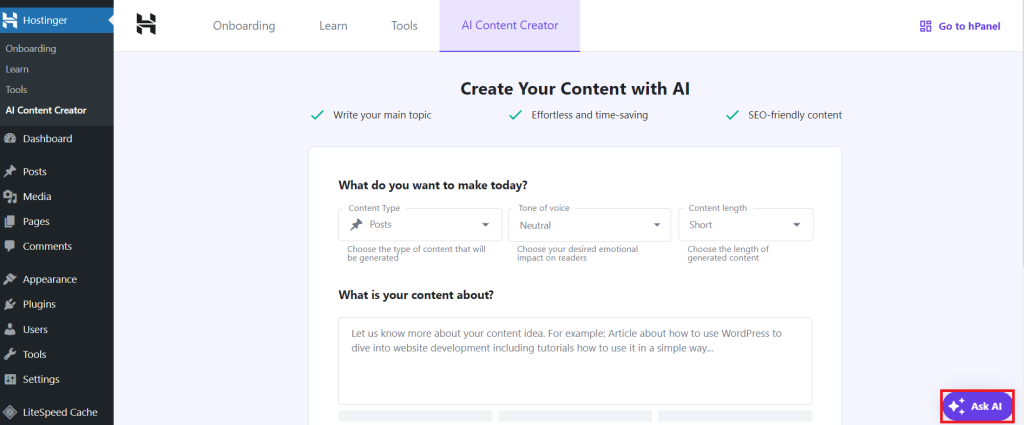
After purchasing a plan, you can install WordPress with one click, and the Hostinger AI plugin will be automatically activated.
Once you can access the WordPress admin dashboard, you’ll find the AI Content Creator tab within the Hostinger menu. You should also see the Ask AI button at the bottom right corner of your WordPress dashboard where you can chat to Kodee, our AI assistant.
If you’ve been a Hostinger’s Business or Cloud hosting client for a while, you can activate the AI plugin via hPanel:
- Navigate to the Websites tab.
- Click the Dashboard button beside the WordPress site in question.
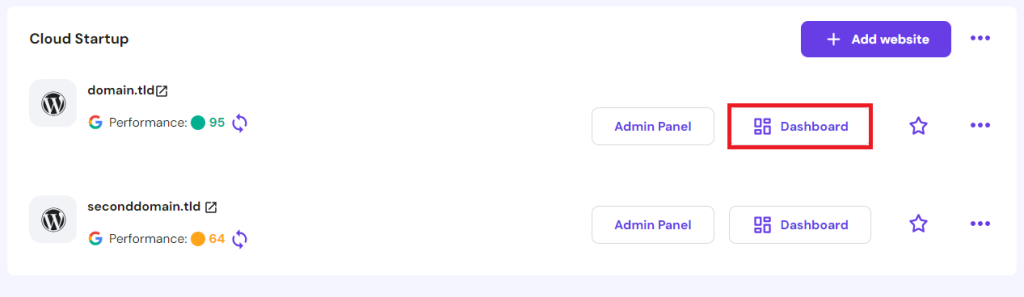
- The Tips to improve section on the main dashboard will show a banner for the Hostinger AI plugin.
- Click Try now to take you to your WordPress dashboard with the plugin installed.
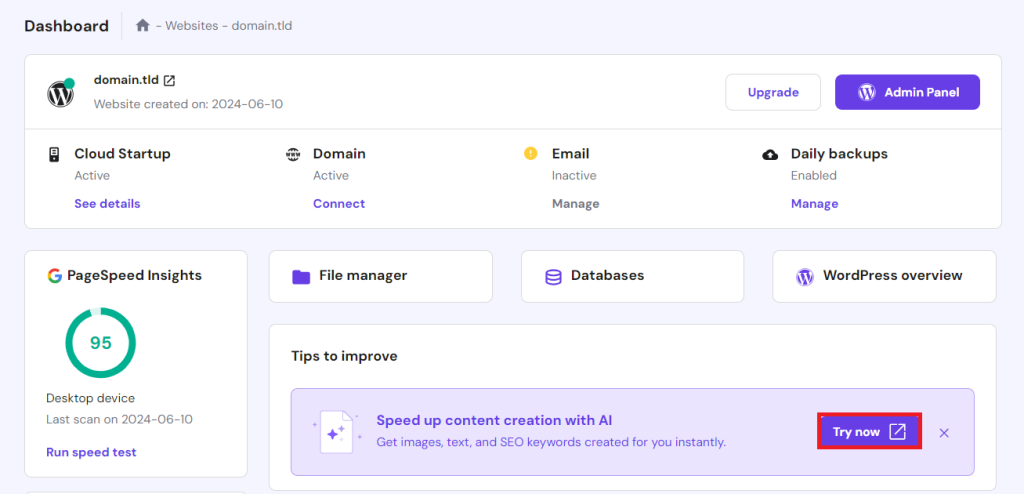
How to use the Hostinger AI on the WordPress dashboard
The Hostinger AI plugin comes with an AI Content Creator and Kodee, our an AI assistant chatbot, to streamline your content creation workflow.
Avoid writer’s block by using the AI Content Creator to write the first draft of your post. You can also use it to distribute semantically related keywords throughout the content, while Kodee can answer your WordPress-related queries quickly.
What’s even better is that both AI tools work in any language. You can write prompts in your native language, and the answers will follow.
Let’s now look at how you can maximize the use of this Hostinger WordPress plugin.
How to create content using the Hostinger AI plugin
Access the AI Content Creator tool by opening the Hostinger menu on the left sidebar of your WordPress admin dashboard.
Then, follow these steps to streamline your website content creation with AI:
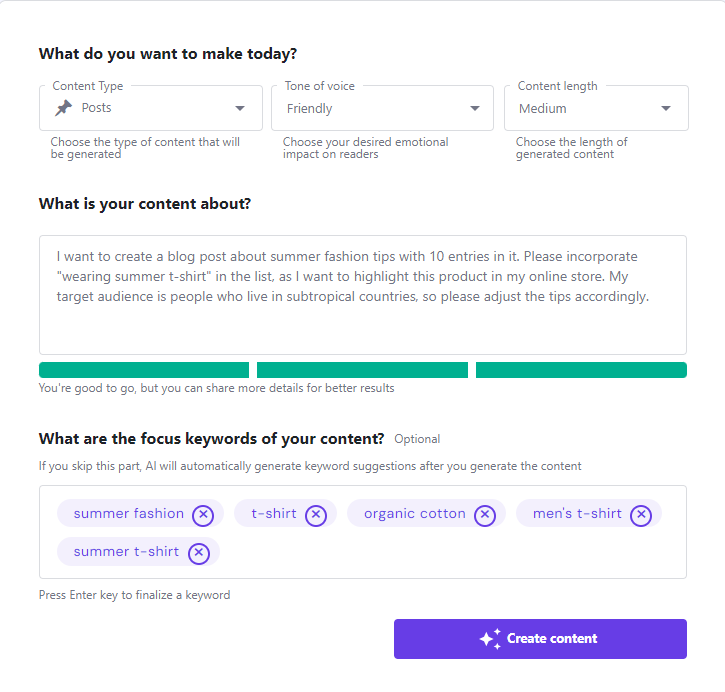
- Choose the content type from the dropdown menu.
- Select the tone of voice that best suits your brand. You can choose more than one.
- Set the content length you prefer.
- Describe the topic you want to write about. Providing more details will help the tool give a higher-quality answer.
- Insert the focus keywords you want to include in the content. Separate each entry by pressing Enter.
- Hit Create Content for the tool to start writing.
You’ll see more keywords, a meta title, and featured image recommendations on the results page. You can choose to edit or use them in your content.
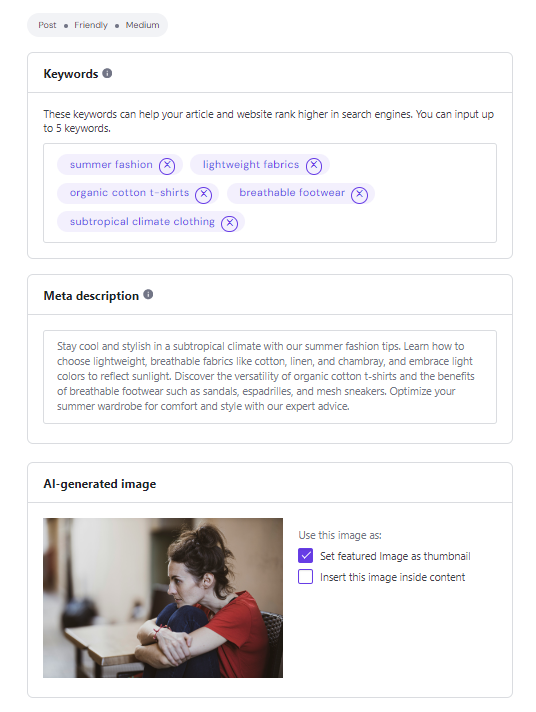
Then, as you scroll down, you’ll find the Edit as a draft button to take you to the post editor. Alternatively, you can Publish the post right away.

How to create a post or page using the Hostinger AI plugin
You can also access the AI Content Creator tool via the post and page editor. Simply take the steps to create a new WordPress post or page as usual:
- Go to Post → Add New Post from your WordPress dashboard.
- Click the Add block button and search for AI Content Creator.
- Once you see the block inserted, add your content description and focus keywords.

- Set your preferred content tone and length from the dropdown menus.
- Turn on the Add an image inside my content toggle button if you want to insert a featured image.
- Hit Create Content to start the writing process.
- Click Use this content to edit the post, or select Edit prompt to get another content draft.
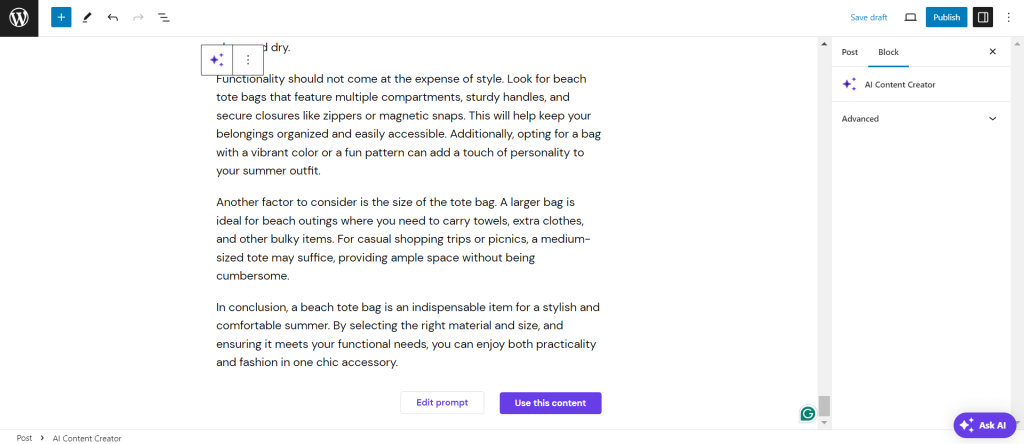
- Don’t forget to hit Publish once you’re done editing the content.
How to create a WooCommerce product page using the Hostinger AI plugin
If you’re building an online store with WooCommerce, you can benefit from the AI Content Creator tool to write product descriptions:
- Navigate to Products → Add New on your WordPress dashboard.
- Type your product specifications in the given field.
- Set your preferred content length and tone of voice from the dropdown menus.
- Click Create product with AI to get your product description draft.
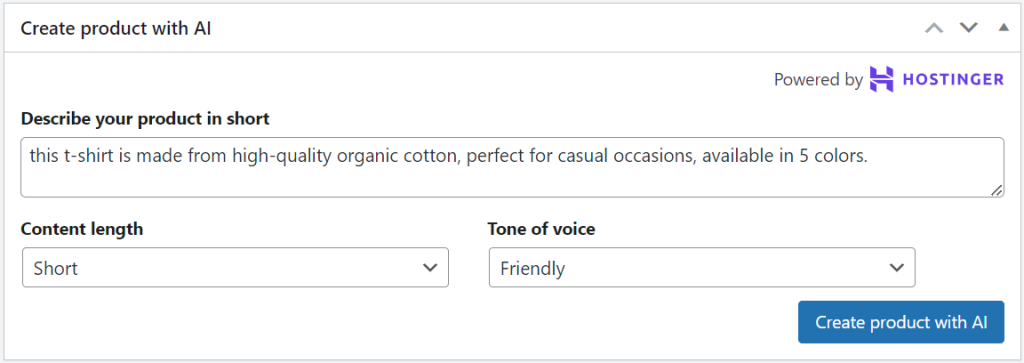
- Adjust the written draft according to your brand guidelines and add more product details.
- Hit Publish to finish.
You can also use the AI Content Creator tool to edit existing product descriptions, not only for creating new products.
How to use the Hostinger AI assistant chatbot Kodee
By activating the Hostinger AI plugin, you’ll also get Kodee, the chatbot tool, to help you navigate WordPress.
For instance, if you encounter a problem or need guidance on performing actions like changing your theme, assigning user roles, or editing your site header, simply consult Kodee.
All you need to do is click the Ask AI button to open the chatbot window and explain your situation in the text box. Kodee will provide an instant reply with helpful links included, too.
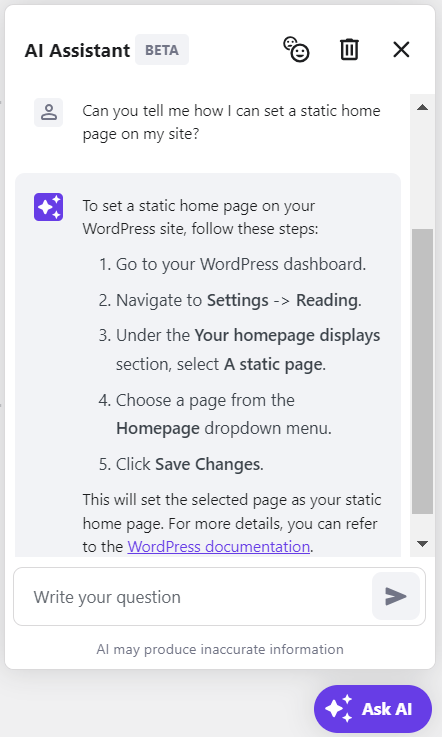
To delete all the previous chats, simply click the trash bin icon at the top of the chatbot window.
Suggested Reading
Explore the other ways you can leverage AI in WordPress website creation.
Conclusion
The Hostinger AI plugin comes with an AI Content Creator and a WordPress AI assistant chatbot, Kodee. Each tool serves a different purpose, with the primary goal of helping to streamline your website development workflow. Additionally, Hostinger Tools plugin, included in all Hostinger plans, helps manage WordPress tasks from a single dashboard, further enhancing your site management experience.
We hope this article helps you understand how to use the Hostinger AI WordPress plugin. Once you try it, feel free to comment below if you have any feedback or features you’d like to see in the future.
Hostinger AI WordPress plugin FAQ
How much does the Hostinger AI plugin cost?
You can benefit from the Hostinger AI plugin for free if you buy Hostinger’s Business or Cloud hosting plan, with the price starting from ₱169.00/month.
Is the AI Content Creator good for SEO?
Hostinger AI Content Creator uses advanced algorithms to help write post drafts and incorporate focus keywords. However, we recommend adjusting the writing to your style and following other SEO best practices for the best results.
Do I need a Hostinger managed WordPress hosting plan to use the plugin?
Yes. By purchasing the Business or Cloud plan, you’ll get the Hostinger AI plugin alongside the optimized WordPress site hosting recommended by WordPress.org.
All of the tutorial content on this website is subject to Hostinger's rigorous editorial standards and values.

Larassatti Dharma is a content writer with 4+ years of experience in the web hosting industry. She has populated the internet with over 100 YouTube scripts and articles around web hosting, digital marketing, and email marketing. When she's not writing, Laras enjoys solo traveling around the globe or trying new recipes in her kitchen. Follow her on LinkedIn