What is a database? Components and types
Jun 11, 2026
/
By Ksenija
/
13 min Read
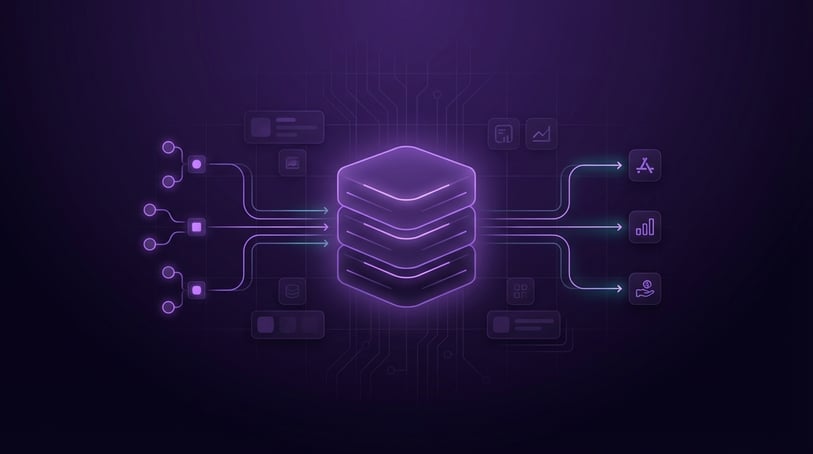
A database is a structured system for storing, organizing, and managing data so it can be easily accessed, updated, and used. Databases handle everything from customer accounts and product lists to orders and website content, keeping records accurate and consistent as systems grow.
They are managed by a database management system (DBMS), which stores and retrieves data on demand, controls who can access it, and keeps it secure.
Because systems handle different kinds of data, databases come in different types – some built for structured data like tables of users and orders, others for flexible or large-scale data like logs, messages, or real-time activity.
What is a database?
A database is an organized electronic collection of information structured for fast, reliable access, updates, and management – think of it as the backbone that keeps data consistent and queryable across an entire system.
Rather than scattered files, data is stored in a structured or semi-structured format (such as JSON, which organizes data in a flexible, nested way), allowing multiple users and applications to read and write simultaneously without conflict. Several customers can shop at the same time, adding items and completing purchases, without interfering with each other.
To understand how this works, it helps to look at what a full database system includes:
- Data – the actual information, such as customer records, products, or transactions.
- Database management system (DBMS) – the software that stores, organizes, and controls access to the data.
- Storage infrastructure – where the data is physically stored, such as servers or cloud systems.
- Applications – the tools or apps that interact with the database, like websites or mobile apps.
Why databases exist
Databases exist because managing large amounts of data with files or spreadsheets becomes unreliable, slow, and hard to scale.
This problem appears quickly as data grows. A spreadsheet may work with a small dataset, but once you have thousands of records or multiple people updating it, things start to break down.
Managing large volumes of data
What starts as a simple list can grow into thousands or millions of records. At that point, searching, updating, or organizing data becomes slow and error-prone. Even small changes can take time, and performance drops as the file grows.
Databases are built to handle this scale. They can store and retrieve large amounts of data quickly without losing structure or performance.
Ensuring consistent data
Databases maintain data accuracy by applying rules set by developers in advance.
Without those rules, data quickly becomes messy. For example, imagine you’re storing customer information in a spreadsheet.
One person writes “USA,” another writes “United States,” and someone else leaves the field blank. Over time, this makes it hard to filter, group, or analyze correctly.
The same thing happens with duplicates. You might end up with the same customer listed twice with slightly different details, which leads to errors in reporting or communication.
A database prevents this by setting clear rules. For example, it can require every customer to have a valid email address, ensure fields are filled in correctly, and prevent duplicate records.
Because of this, your data stays clean, consistent, and reliable as it grows.
Supporting multiple users
Databases are designed to handle many users and applications accessing data at the same time without conflicts.
This is important in real systems where activity happens simultaneously. Without a database, two people editing the same data can overwrite each other’s changes or create conflicts.
For example, in an online store, multiple customers can browse products, add items to their carts, and complete purchases simultaneously while inventory updates in the background. The database keeps everything in sync, so the data stays correct.
Enabling complex queries
In a database, you can use structured queries to search, filter, and analyze large datasets efficiently.
With files or spreadsheets, answering anything beyond simple questions becomes difficult and time-consuming. Databases are designed to handle more complex requests efficiently.
For example, you can:
- Find all products under $50 that are in stock
- Retrieve all transactions from the last 30 days
- Track seat availability across multiple flights
- Load a user’s profile, posts, and connections instantly
Core components of a database system
A database system consists of four main components: the data itself, a DBMS, a schema that defines structure, and queries used to interact with the data.
Each of these plays a specific role in how data is stored, organized, and accessed in real applications.
Data
Data is the actual information stored in the database.
This can be anything your system needs to keep track of, such as customer records, product details and orders and transactions.
For example, in an online store, data includes product names, prices, stock levels, and customer orders.
Database management system (DBMS)
The database management system is the software that controls how the data is stored, accessed, and managed.
The DBMS acts as a layer between the data and the applications using it. You don’t interact with raw data directly.
Its main responsibilities include:
- Storing and organizing data
- Processing queries (requests for data)
- Enforcing rules to keep data consistent
- Managing user access and security
- Handling backups and recovery
For example, when you log into a website and see your account details, the application sends a request to the DBMS. The DBMS retrieves the correct data and returns it safely.
Common DBMS tools include MySQL and PostgreSQL (relational databases) and MongoDB (a non-relational database).
Schema
The schema defines how data is organized in the database and which data types are allowed.
Think of it as a set of rules that answers:
- What data do we store?
- What does each piece of data look like?
- How is everything connected?
Imagine you’re building a simple online store. The schema might define a customers table with columns like name and email.
An orders table will include elements like order ID, customer ID, and total price.
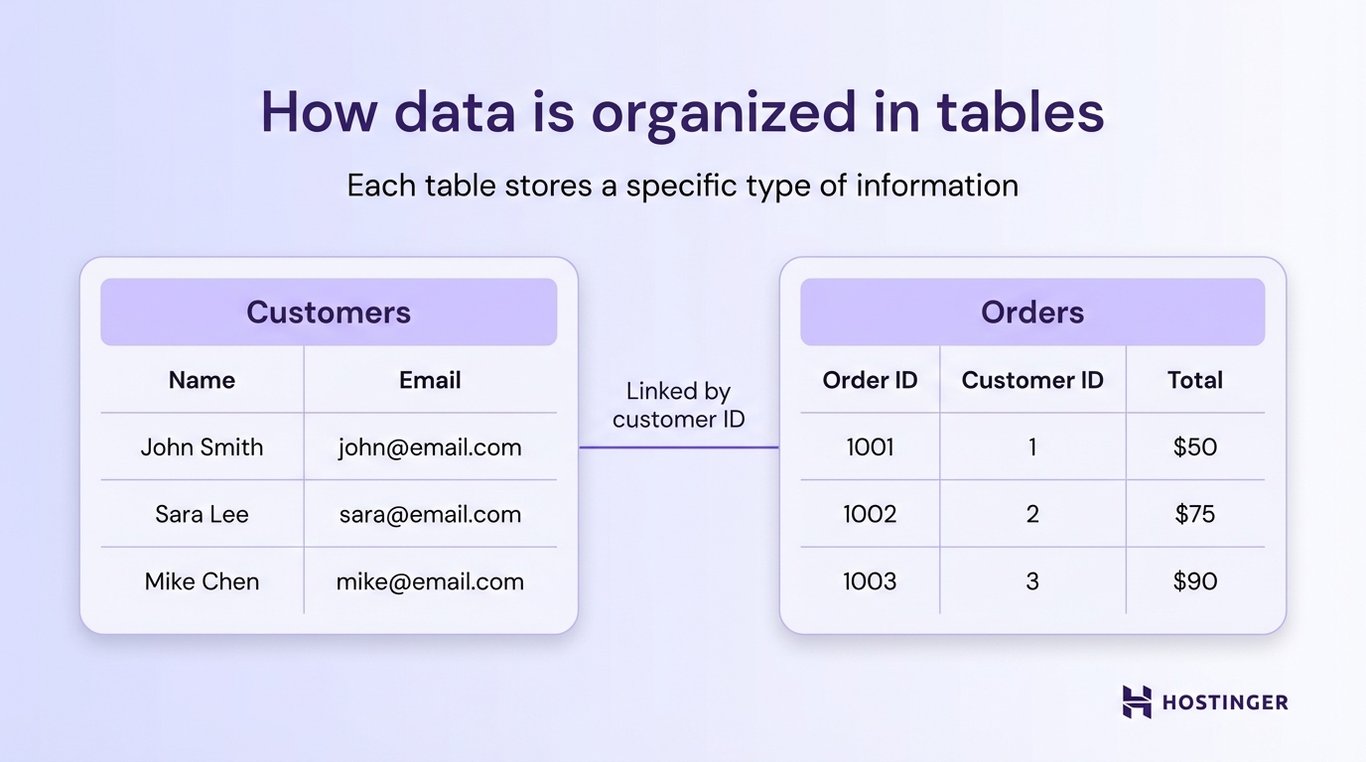
It also defines how these are connected.
For example, each order must be linked to a real customer, and you cannot create an order without a valid customer ID.
Without a schema, you’d run the risk of creating orders that don’t belong to any customer, storing emails in the wrong format, or mixing unrelated data together.
With a schema in place, the database knows what data is allowed, where it belongs, and how different pieces of data relate to each other.
Tables, rows, and columns
Data inside a database is organized into tables.
- A table represents a collection of related data (e.g., customers).
- A row represents a single record (e.g., one customer).
- A column represents a specific attribute (e.g., name or email).
Here’s a simple example:
Customer ID | Name | |
1 | John Smith | john@email.com |
2 | Sara Lee | sara@email.com |
This structure makes it easy to store, search for, and update information consistently.
Queries
Queries are the way you interact with a database. They are used to retrieve, update, or delete data. Many databases use SQL (Structured Query Language) for this.
For example, you can use queries to:
- Retrieve all customers
- Find orders from the last 30 days
- Update a product’s price
- Delete an inactive account
In practice, queries are how applications “talk” to the database.
For example, when you search for a product on a website, the application sends a query to the database asking for matching items. The database processes that request and returns the results, which are then shown to you.
The same happens when you update your profile or place an order. Every action triggers a query that reads or changes data behind the scenes.
How a database works
A database stores structured data and processes requests through a database management system (DBMS), which reads, writes, and updates information in storage systems.
In practice, this follows a simple workflow: data is added, stored based on rules, retrieved when needed, updated over time, and protected from loss.
1. Adding and storing data
Data is added to a database through user actions, system processes, or direct input. This happens in three ways:
- Applications – users interact with a website or app.
- APIs – systems send data to each other automatically.
- Administrative tools – developers or admins add or update data directly.
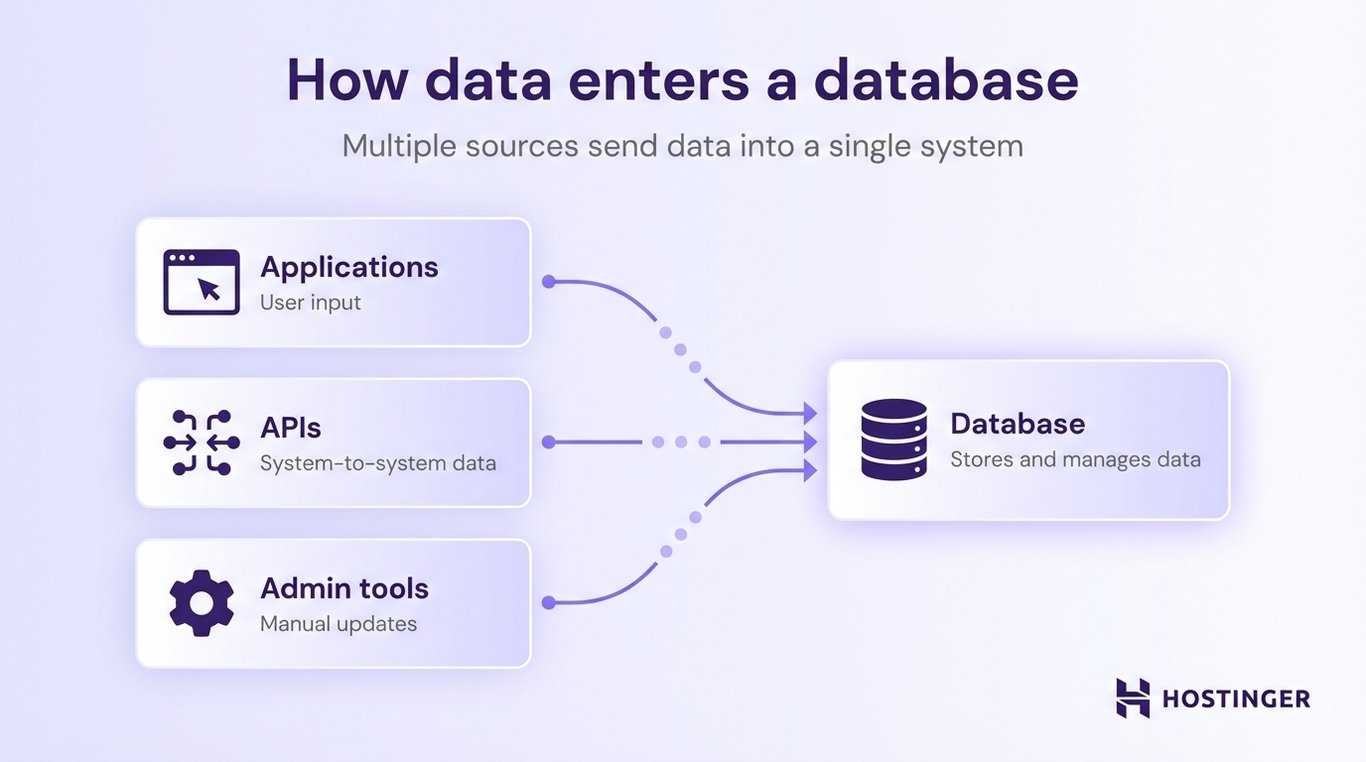
For instance, when you create an account on a website, fill out a form, or place an order, that information is sent from the application to the database.
Once the data reaches the database, it is checked and organized according to predefined rules, called a schema.
The schema defines what kind of data is allowed and how it should be stored. It can enforce rules like:
- An email field must contain a valid email format
- A price must be a number
- An order must be linked to an existing customer
If the data does not follow these rules, the database can reject it instead of storing incorrect or incomplete information.
This step is what keeps the database reliable over time. Even as thousands or millions of records are added, the structure stays consistent, and the data remains usable.
2. Finding and returning data
Finding and returning data is how a database locates the information you request and sends it back.
When an application needs information, it sends a query to the database. The database reads that request, finds the matching data, and sends it back.
For example, when you search for a product on an online store, the app sends a request like: “Find products that match this name or keyword.” The database processes that request and returns the results you see on the page.
Most databases use SQL to handle these requests. You don’t see this directly, but behind the scenes, applications use SQL to ask for specific data, such as:
- All customers
- Orders from the last 30 days
- Products under a certain price
Queries almost always include filtering. This means the database does not return everything, only the data that matches certain conditions.
So, instead of returning all orders, a query can ask for:
- Orders placed this week
- Products that are in stock
- Users from a specific country
Filtering keeps the results relevant and reduces unnecessary data.
As databases grow, finding data can become slow if every record has to be checked. To solve this, databases use indexing.
An index works like the index in a book. Instead of scanning every page, you jump directly to the section you need. In the same way, a database can use an index to quickly find a record, such as a user by email, without having to search the entire dataset.
3. Updating or removing data
In a database, you can modify existing records or remove outdated data to keep information accurate over time.
After data is stored, it rarely stays the same. People change their details, products go out of stock, and orders are completed or canceled. The database needs a way to handle these changes without breaking the structure or creating inconsistencies.
This is done through three basic operations: insert, update, and delete.
Insert means adding new data to the database, such as when a new customer signs up, or a new product is added to an online store: a new record is created and stored.
Update means changing existing data. For example, if a user updates their email address or a product price changes, the database modifies the existing record instead of creating a new one.
Delete means removing data that is no longer needed, like deleting an inactive account or removing a discontinued product from the catalog.
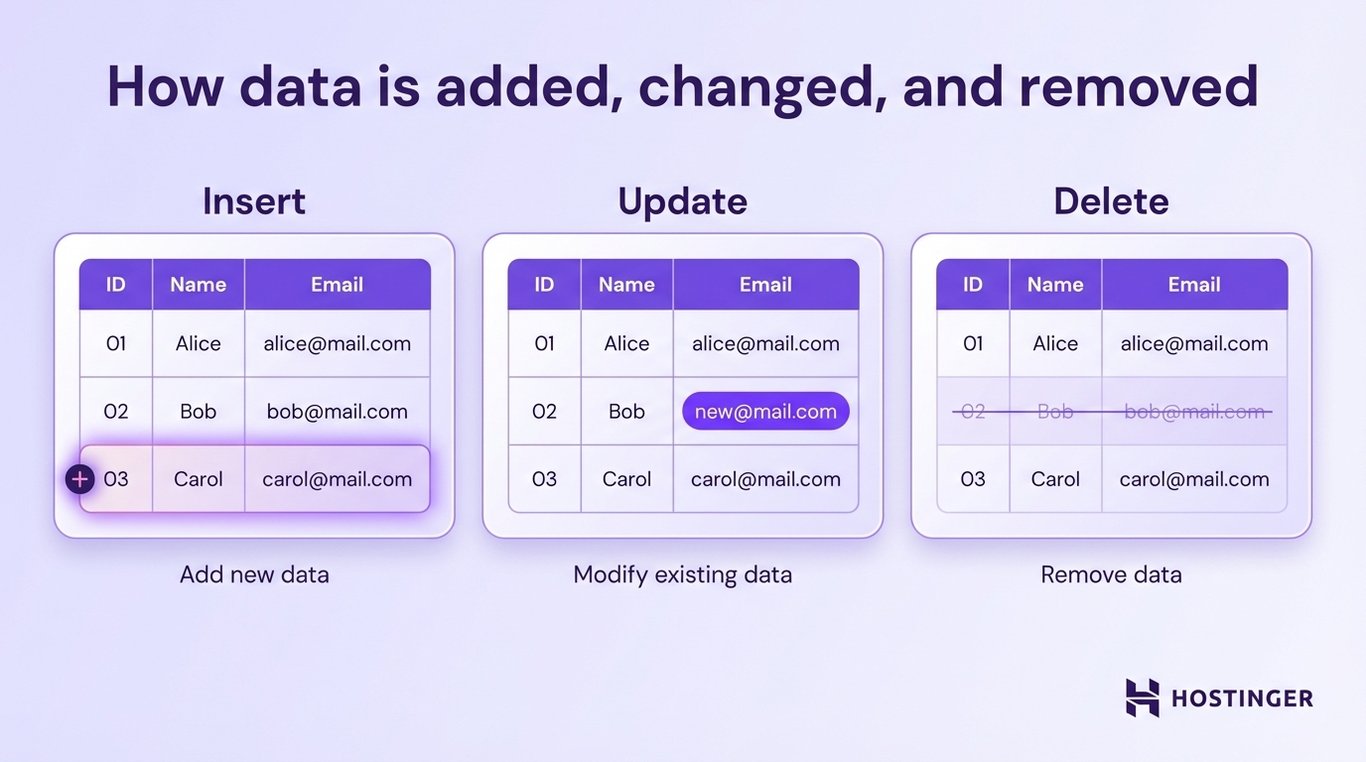
What makes databases different from simple file storage is that these changes happen while preserving data integrity.
This means the database ensures that changes do not break relationships or create invalid data.
For example, you cannot update an order to link to a customer who does not exist. Similarly, you cannot delete a product if there are still active orders depending on it (depending on the rules set).
These rules are enforced automatically by the database, so even as data is inserted, updated, or deleted, everything stays consistent and reliable.
4. Keeping data consistent during changes
You can group related actions in a database into a single transaction so they either succeed or fail together.
Many real-world operations involve a sequence of changes that depend on each other.
For example, imagine transferring money between two bank accounts:
- Subtract money from Account A
- Add money to Account B
If only the first step happens and the second fails, the money is lost. That’s a serious problem.
A transaction solves this by grouping both steps into a single unit. Either both actions succeed, or neither of them does. If something goes wrong in the middle, the database rolls everything back to the previous state.
This is what keeps data accurate and prevents partial or broken updates.
Databases use a set of rules called ACID to guarantee that transactions work reliably:
- Atomicity – all steps in a transaction succeed or fail together.
- Consistency – the data remains valid and follows all rules before and after the transaction.
- Isolation – multiple transactions can run at the same time without interfering with each other.
- Durability – once a transaction is completed, the changes are permanently saved, even if the system crashes.
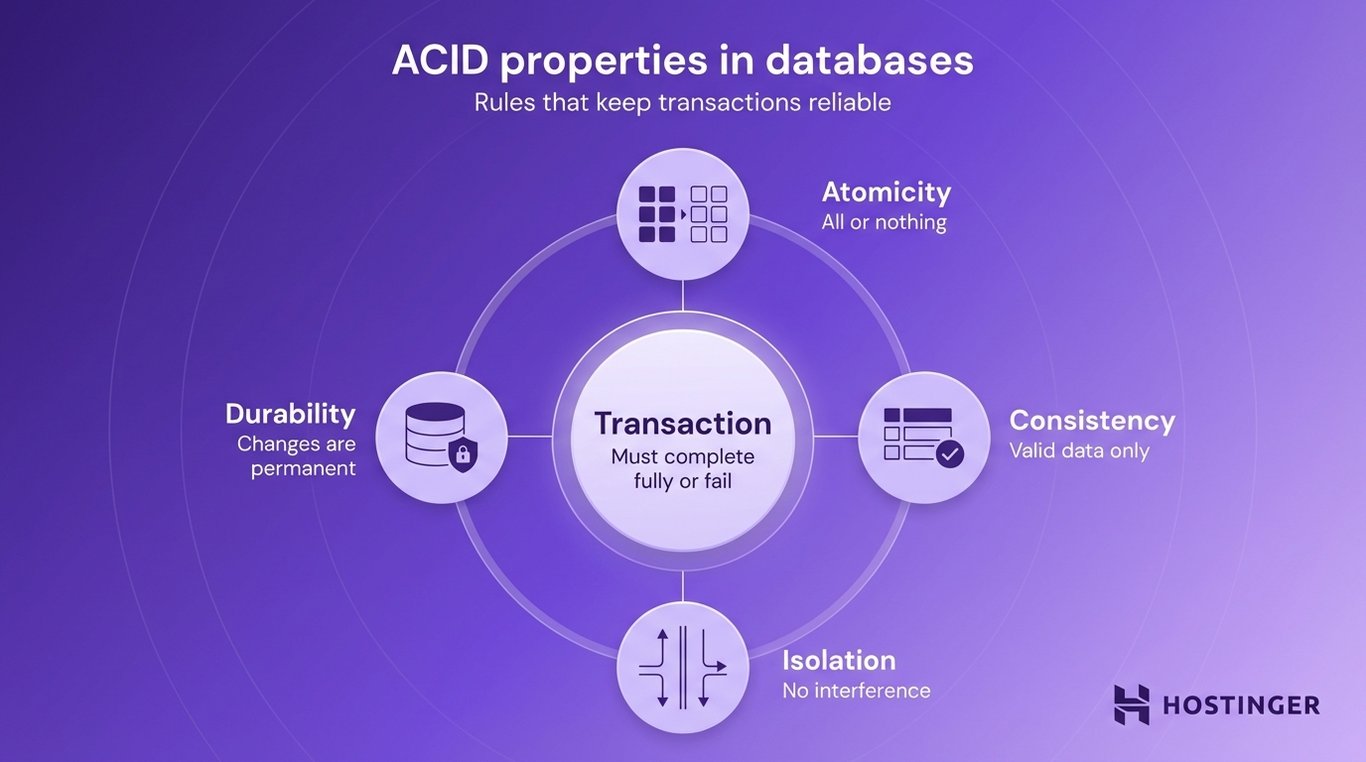
For example, when you place an order in an online store, several things happen at once:
- The order is created
- The payment is processed
- The inventory is updated
All of this is handled as a transaction. If any step fails, the entire process is canceled to avoid incorrect data, like charging a customer without creating an order.
5. Protecting and recovering data
In a database, you can create backups of your data and restore it if something goes wrong.
No system is perfect. Servers can fail, software can crash, or data can be accidentally deleted. Databases are designed to handle these situations by keeping copies of data and providing ways to restore it.
Backups are copies of your data saved at a specific point in time. For instance, a database might create daily backups of all customer records, orders, and products.
If something goes wrong, such as accidental deletion or corruption, you can restore the database to a previous state using a backup. This prevents permanent data loss.
Replication means keeping copies of the same data in multiple locations. Instead of storing everything on a single server, the database continuously copies data to other servers.
Replication is also used to improve performance. Some systems send read requests to replicas, reducing the load on the main database.
Recovery after failures is the process of restoring the database when something breaks.
This can include:
- Restoring data from a backup
- Switching to a replicated copy if a server fails
- Replaying recent changes to bring the database back to its latest state
This means that if a server crashes in the middle of processing orders, the database can recover to a consistent state, so no partial or broken data remains.
Types and examples of databases
The most common types of databases are:
- Relational databases (SQL) – store data in structured tables with clear relationships.
- NoSQL databases – store flexible or unstructured data in formats like documents, key-value pairs, or graphs.
- Cloud databases – hosted on cloud infrastructure and accessed over the internet.
- Distributed databases – spread data across multiple systems for scalability and reliability.
Each type is designed for a different use case. Some focus on structure and consistency, while others prioritize flexibility, speed, or the ability to handle large-scale data.
Relational databases (SQL)
Relational databases store data in structured tables and connect that data using relationships.
Data is organized into tables (like spreadsheets), each representing a specific type of information, such as customers or orders. These tables can be linked together, so related data stays connected and consistent.
An online store might have a customers table (name, email), and an orders table (order ID, date, customer ID). The database links these tables using shared values (like customer ID), so you can easily find which orders belong to which customer.
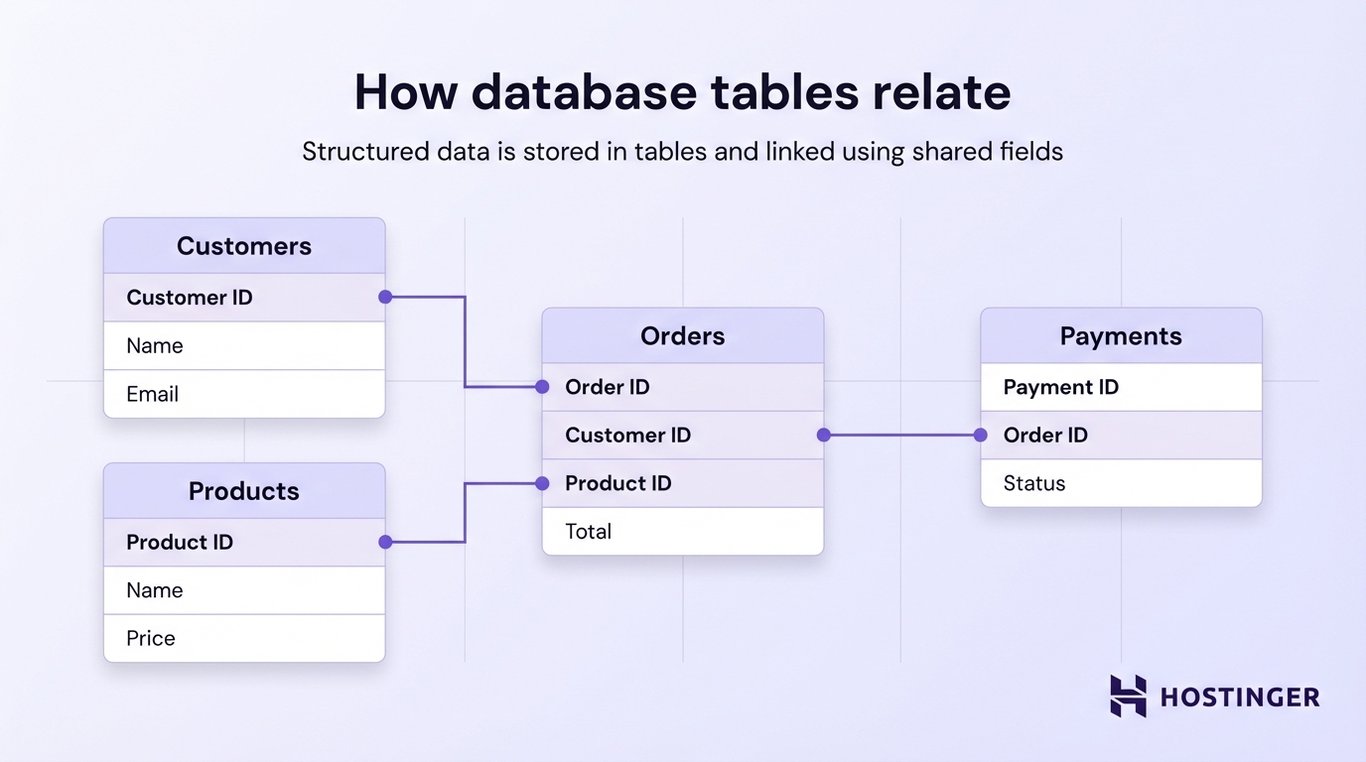
Relational databases follow a structured schema, which means the format of the data is defined in advance. Every record must follow the same structure, which keeps the data clean and predictable.
They use SQL to read and manage data. SQL allows you to retrieve specific records, filter and sort data, and update or delete entries.
Another key feature is strong consistency. The database ensures that all data follows the defined rules and remains accurate, even when many users or systems are interacting with it at the same time.
Common examples of relational databases include:
- MySQL
- PostgreSQL
- Oracle Database
- Microsoft SQL Server
Pros and cons of relational databases | |
Pros | Cons |
Clear structure makes data easy to organize and understand | Less flexible when data structure changes frequently |
Strong data consistency and reliability | Can be harder to scale for very large or distributed systems |
Powerful querying with SQL | They require predefined schema before storing data |
Well-suited for complex relationships (e.g., users and orders) | Not ideal for highly unstructured or rapidly changing data |
NoSQL databases
NoSQL databases are designed to store flexible or unstructured data, where the format does not need to be predefined.
This makes NoSQL databases useful when your data changes often, grows quickly, or does not fit neatly into tables.
Instead of one standard structure, NoSQL databases use different models depending on the use case.
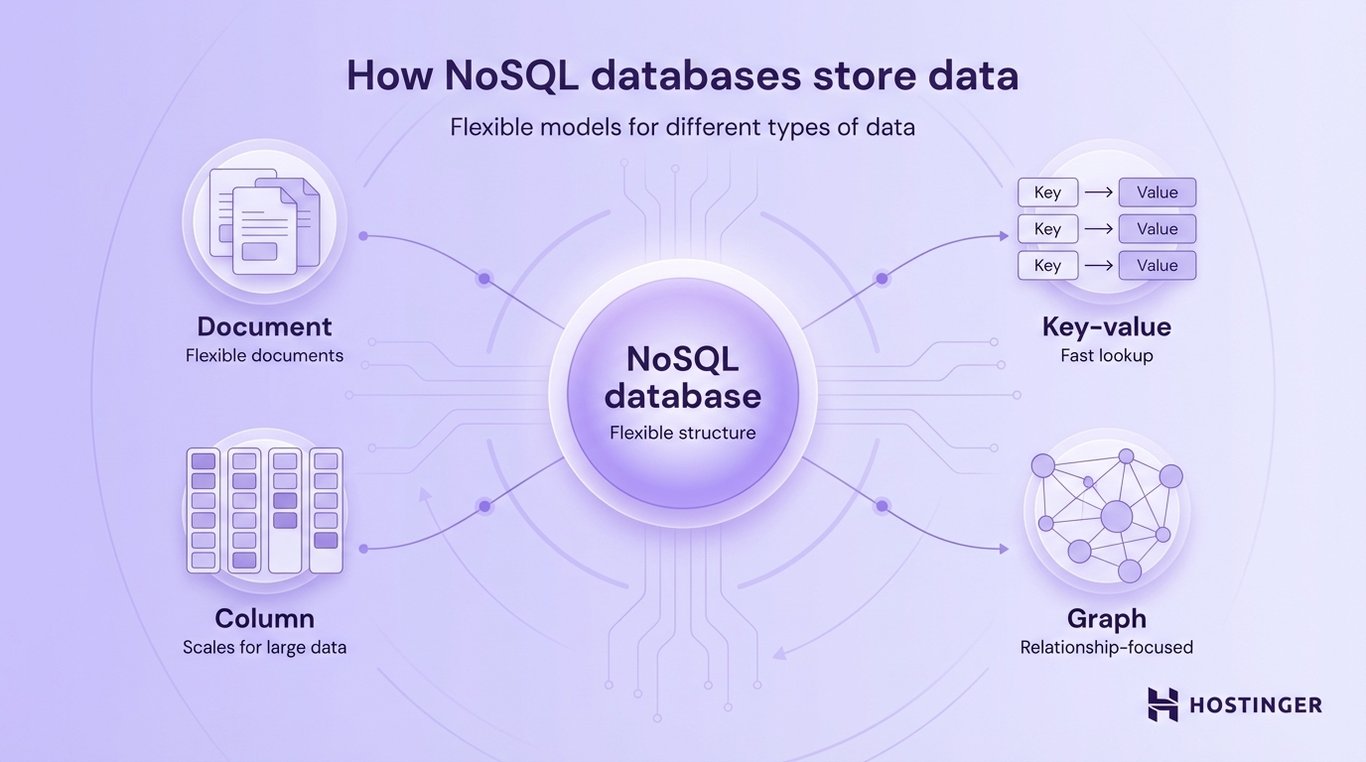
Document databases
These store data as flexible documents, often in JSON format.
Each record can have a different structure. For example, one product might include color and size, while another includes different attributes.
This makes document databases useful for ecommerce catalogs and content management systems.
Key-value databases
Key-value databases store data as simple pairs: a key and a value.
Think of it like a dictionary:
- key → user123
- value → user data
They are very fast and are often used for caching or session storage (e.g., keeping users logged in).
Column-based databases
In column-based databases, data is organized by columns instead of rows, making them efficient for handling large amounts of data and analytics.
Column-based databases are often used for big data processing and analytics systems.
Graph databases
Graph databases focus on relationships between data points by using nodes and edges instead of tables.
This makes them ideal for social networks, recommendation systems, and fraud detection.
Pros and cons of NoSQL databases | |
Pros | Cons |
Flexible structure (no strict schema required) | Less standardized than SQL databases |
Easy to scale for large or fast-growing data | Can be harder to maintain data consistency |
They handle unstructured or changing data well | Querying can be less powerful or consistent across systems |
High performance for specific use cases (e.g., caching, real-time apps) | They require choosing the right model for your use case |
Cloud databases
Cloud databases are hosted on cloud infrastructure instead of being stored and managed on your own servers.
This means you don’t have to set up hardware, install database software, or handle maintenance yourself. Instead, a cloud provider runs the database for you, and you access it over the internet.
Cloud databases work the same way as other databases in terms of storing and retrieving data, but they handle a lot of the operational work behind the scenes, such as:
- Setup and configuration
- Updates and maintenance
- Scaling resources as your data grows
- Backups and recovery
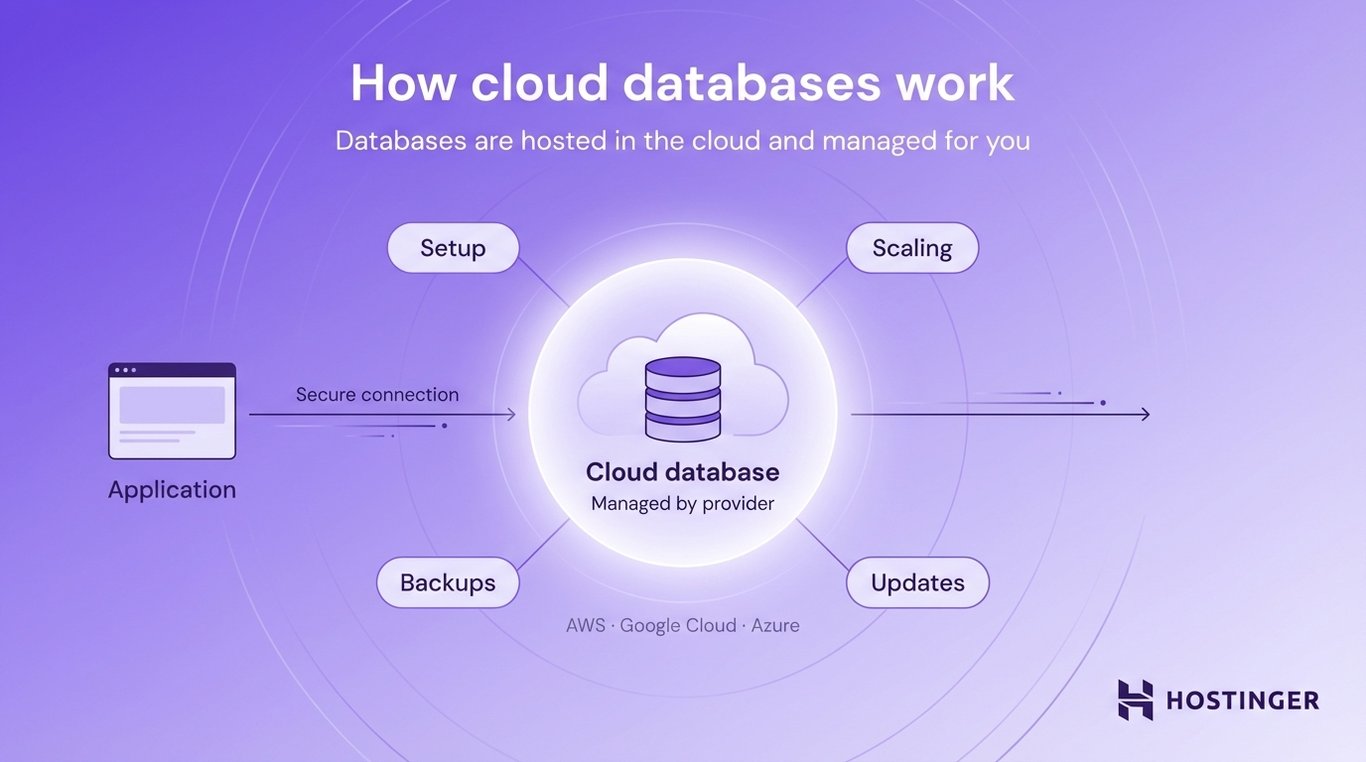
This makes them especially useful for modern applications that need to scale quickly or be available globally.
Pros and cons of cloud databases | |
Pros | Cons |
No need to manage servers or infrastructure | Ongoing costs (pay-as-you-use) |
Easy to scale as your app grows | Less control over the underlying hardware |
Built-in backups, updates, and security features | They require internet access across systems |
High availability and reliability | Vendor lock-in (harder to switch providers) |
Distributed databases
Distributed databases store data across multiple physical systems instead of keeping everything on a single server.
This means the database is spread across different machines, which can be in the same data center or in different locations around the world. All these systems work together as one database.
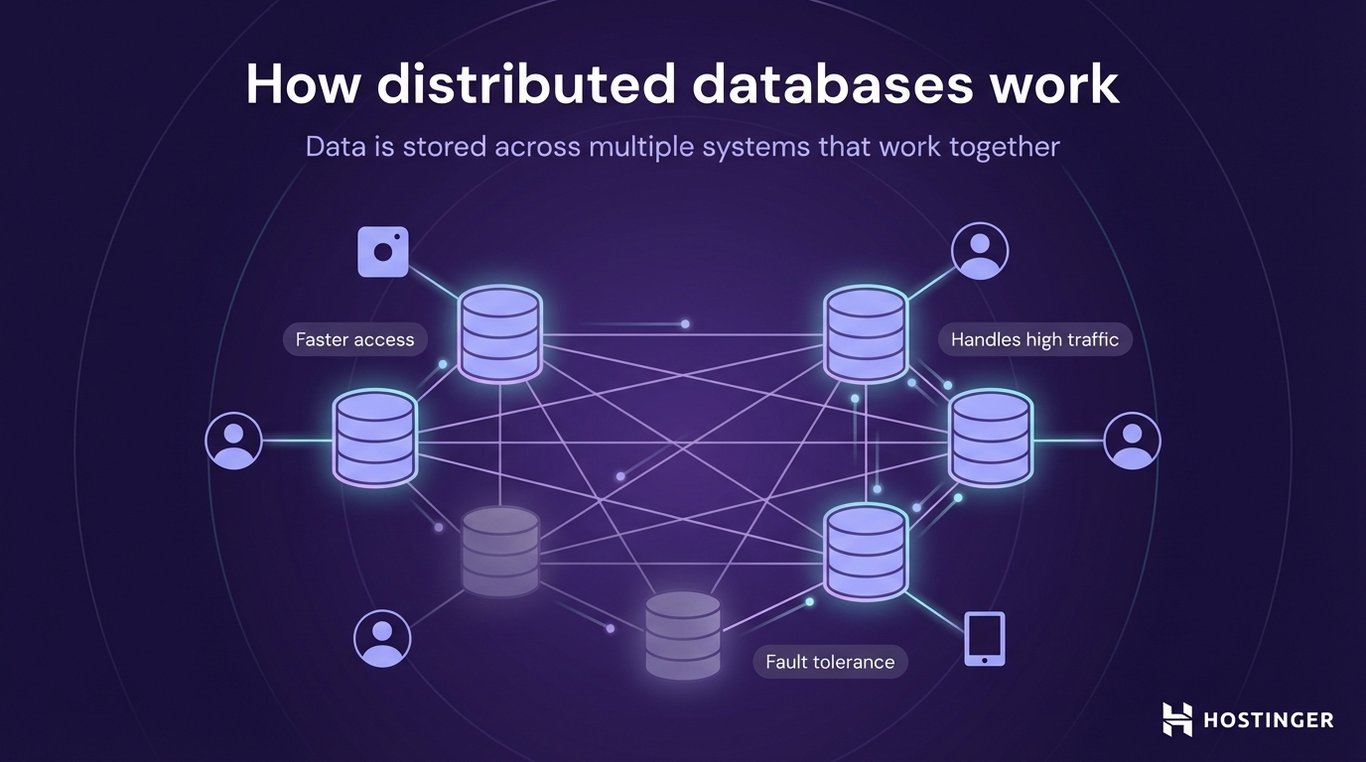
The main reason for this design is scale and reliability.
For example, imagine a global app like an online store with users in different countries. Instead of sending every request to one central server, a distributed database can store data closer to users (faster access), handle more traffic by spreading the load, and keep the system running even if one server fails.
Pros and cons of distributed databases | |
Pros | Cons |
Can handle very large amounts of data and traffic | More complex to design and manage |
High availability (system keeps running even if one node fails) | Harder to maintain strong consistency across all nodes |
Faster access for global users (data closer to location) | Debugging and troubleshooting can be more difficult |
They scale horizontally by adding more machines | They require careful planning of data distribution |
Database vs spreadsheet vs file storage
Databases are designed for large, multi-user systems where data needs to stay organized, consistent, and easy to query, while spreadsheets and file storage are better suited for smaller, simpler, or less structured data.
Here’s how they compare:
Feature | Database | Spreadsheet | File storage |
Data volume | Very large (millions or billions of records) | Limited (performance drops as data grows) | Variable (depends on storage, but not structured) |
Multi-user access | Built-in support for many users at once | Limited (conflicts can happen) | Basic (files can be shared, but not managed as a system) |
Query capability | Advanced (search, filter, join data across tables) | Basic (sorting and filtering) | None (manual search) |
Structure | Defined schema with relationships | Flat tables (rows and columns) | Unstructured (documents, images, files) |
Here are some of the specific uses:
- A database is what powers ecommerce operations, where thousands of users can browse products, place orders, and update data at the same time.
- A spreadsheet is useful for tracking a small list, like monthly expenses or a simple inventory.
- File storage is where you keep documents, images, or videos without a structured system for querying or linking data.
How databases are used in real applications
Databases are used in almost every application that needs to store and manage data.
Whenever you use a website or app, there is usually a database working in the background. It stores information, updates it as things change, and returns it when needed.
For example:
- Ecommerce stores use databases to manage products, customers, orders, and payments
- Banking systems store account balances, transactions, and customer data
- Social media platforms keep track of profiles, posts, likes, and connections
- Booking systems (like airlines or hotels) manage availability, reservations, and schedules
A common example many people interact with is the WordPress database.
WordPress uses a database to store all of your website content and settings. This includes posts and pages, user accounts, comments, and site configuration.
When you open a blog post, WordPress retrieves that content from the database and displays it on the page. When you publish a new post or update a page, that data is saved back into the database.
In each case, the database handles the same core tasks: storing data, retrieving it quickly, and keeping everything accurate even when many users interact with the system at the same time.
In simple terms, databases are the foundation behind modern applications. They make it possible to store information reliably and use it in real time.

All of the tutorial content on this website is subject to Hostinger's rigorous editorial standards and values.

Ksenija is a digital marketing enthusiast with extensive expertise in content creation and website optimization. Specializing in WordPress, she enjoys writing about the platform’s nuances, from design to functionality, and sharing her insights with others. When she’s not perfecting her trade, you’ll find her on the local basketball court or at home enjoying a crime story. Follow her on LinkedIn.