WordPress cookie notice: how to display it without plugins
Mar 09, 2026
/
Domantas G.
/
2 min Read
In this article, we will show you how to display the cookie notice on a WordPress website without using any plugins. Let’s check it out!
Download all-in-one WordPress cheat sheet
Why Do We Need a Cookie Notice
Since cookies collect users’ information and store them for a certain period of time, disclosing the use of cookies on your website is required by the EU Cookie Law. It’s a European Union directive that demands that any website gets consent from their visitors about the use of their data.
It doesn’t matter whether your website is based in Europe, chances are that EU visitors are still visiting it, therefore becoming a subject to the EU Cookie Laws.
Besides, adding a cookie notice for your WordPress website doesn’t cost a dime and is easy to implement! It’s also an important aspect of complying with WordPress GDPR.

How to Display WordPress Cookie Notice Without a Plugin
Adding unnecessary plugins to your WordPress site may slow down. So, it’d be wise to limit plugin installations and tweaking everything manually, if possible.
To display WordPress cookie notice, follow these simple steps:
- Generate cookie notice code by visiting WebsitePolicies.
- Head to Configuration wizard section and personalize a cookie notice template by adjusting its position, layout, color, and its custom text.
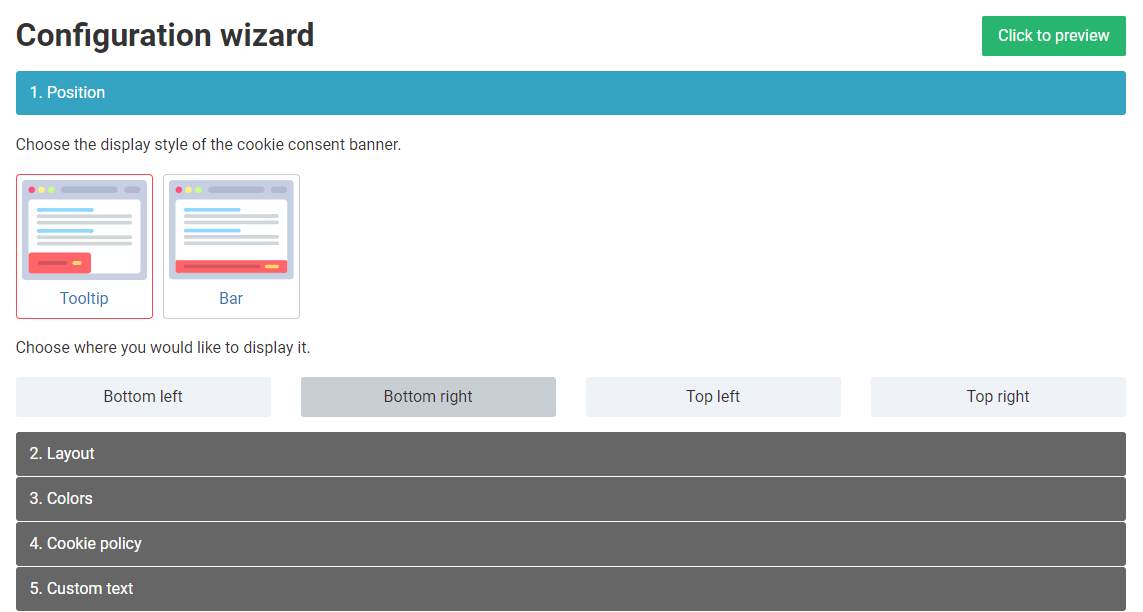
- You can preview the template you’re creating using the Click to preview option.
- Once you’re done, press Copy code.

- Log in to your WordPress dashboard and navigate to Appearance -> Theme Editor.
- Locate header.php file under Theme Files.
- Open the file and paste the code under the <head> tag.
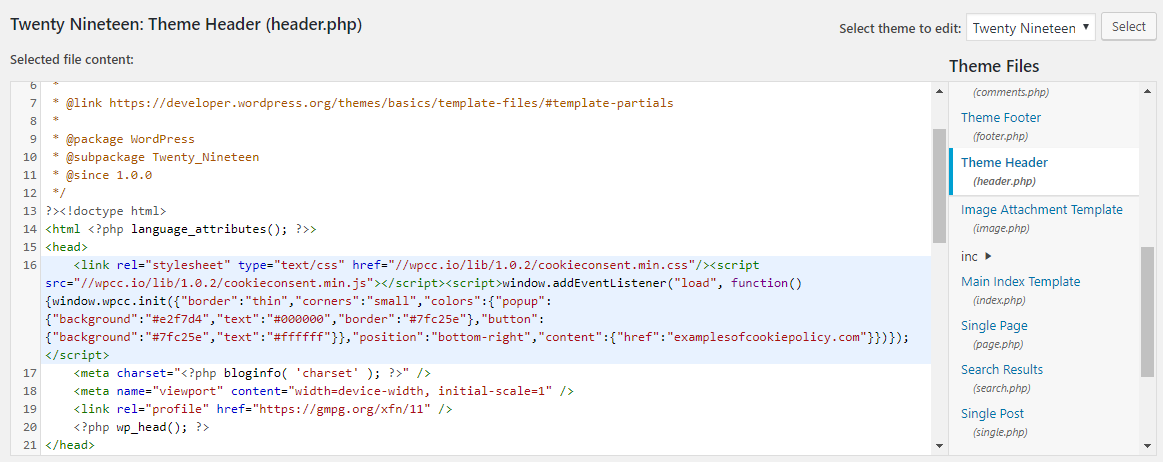
- Click on Update File to save your changes.
If you want to check if your settings are live, simply visit your website. Make sure your cookie notice is showing and works properly.
Pro Tip
The cookie generator website will ask you to link your own cookie or privacy policy. If you don’t have one already, you can generate it for free.
Conclusion
There you have it! Your website now complies with the EU Cookie Laws, and you’ve learned how to display WordPress Cookie Notice by merely pasting the generated code. Here’s a quick recap:
- Generate a free cookie notice code from WebsitePolicies.
- Copy-paste the code to your header.php file on WordPress.
That was pretty easy, right? Good luck!
Learn Other Advanced WordPress Techniques
WordPress Pagination Guide
How to Add a WordPress Privacy Policy Page
Guide to Lazy Loading on WordPress
WordPress Excerpt Length: What It Is, How to Change It + Plugin Recommendations
A/B Testing With WordPress: Best Practices and Tools to Optimize Conversion
How to Hide Page Title in WordPress

Domantas leads the content and SEO teams forward with fresh ideas and out of the box approaches. Armed with extensive SEO and marketing knowledge, he aims to spread the word of Hostinger to every corner of the world. During his free time, Domantas likes to hone his web development skills and travel to exotic places.