Ecommerce SEO guide: How to drive traffic to your online store
Mar 09, 2026
/
Simon L.
/
13 min Read

Ecommerce SEO (Search Engine Optimization) involves optimizing your online store to rank higher in search results and attract customers actively looking to buy.
Unlike regular SEO, which often focuses on informational content like blog posts and guides, ecommerce SEO is about getting your products in front of shoppers at the exact moment they’re ready to purchase.
SEO drives organic traffic without the ongoing costs of paid ads, and it increases sales by connecting you with high-intent shoppers.
Here are the key steps to building a solid ecommerce SEO foundation:
- Keyword research for your niche. Identify search terms your potential customers use when they’re ready to buy, focusing on buyer intent and product categories.
- Search engine submission. Submit your store’s sitemap to search engines so they can discover and index your pages.
- Product page optimization. Have unique, keyword-rich titles, descriptions, images, and URLs that rank well and convert visitors into buyers.
- Site structure improvement. Use clear hierarchies and internal linking that help both customers and search engines navigate efficiently.
- Mobile-ready experience. Ensure your store works beautifully on phones with responsive design and fast load times.
- Technical SEO essentials. Implement behind-the-scenes elements like site speed, security, sitemaps, and error fixes that keep your store running smoothly.
- Content marketing strategies. Create blog posts, buying guides, and how-to articles that attract visitors earlier in their buying journey.
- Link-building tactics. Earn quality backlinks from reputable sites that signal authority to search engines.
- Local SEO implementation. Optimize for location-based searches if you have physical stores or serve specific geographic areas.
- Performance measurement. Track metrics like traffic, rankings, and conversions to understand what’s working and what needs adjustment.
1. Do keyword research for your niche
Keyword research means finding out what words and phrases people use when they’re looking for products like yours. It’s about finding search terms you can actually rank for – ones where the competition isn’t too fierce, and the searchers are ready to buy.
Focus on long-tail keywords
Start with your product categories and think about how someone would search for them.
A general term like “running shoes” might have massive search volume, but “women’s trail running shoes size 8” shows someone much closer to making a purchase.
That specific searcher has usually done their research and knows exactly what they want, making them far more likely to buy than someone just browsing with broad, exploratory terms.
Use keyword research tools effectively
Use tools like Google Keyword Planner and Ahrefs to uncover opportunities.
For example, in Google Keyword Planner, enter a seed keyword like “running shoes,” and you’ll get a list of related terms with search volumes and competition levels.
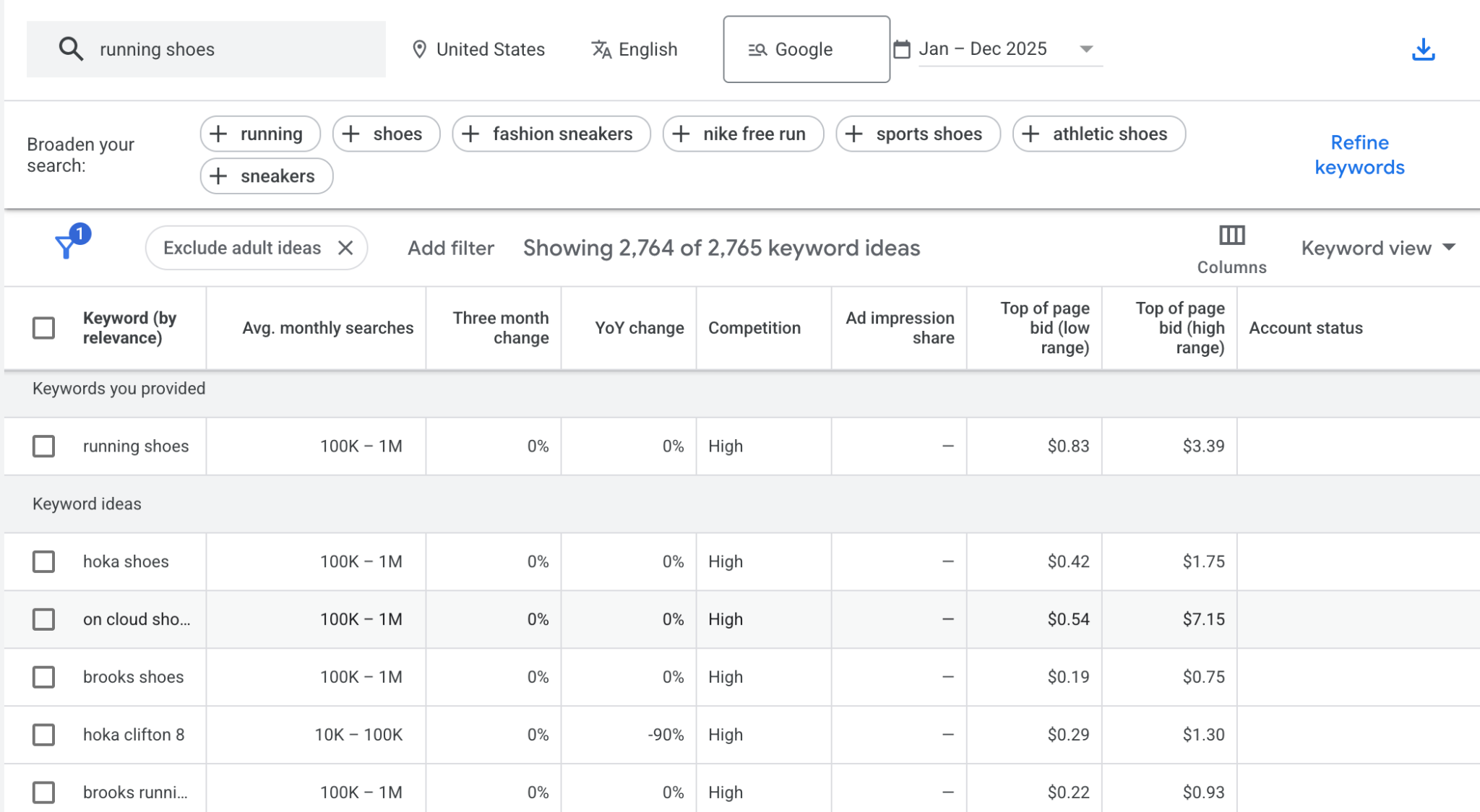
Look for keywords with 500+ monthly searches and low to medium competition. The 500+ threshold ensures enough people are actually searching for the term to make your effort worthwhile.
The low to medium competition means you won’t be fighting against massive retailers with huge SEO budgets, allowing you to gradually build authority before targeting more competitive keywords.
Once you’ve identified promising keywords, prioritize them based on relevance to your products. Start with 5-10 primary keywords for your main product categories, then expand to 20-30 long-tail variations.
Don’t just focus on product terms. Question-based searches like “best running shoes for flat feet” or “how to choose hiking boots” are gold for content marketing and often have less competition than direct product keywords.
Understanding what SEO is and how it works will give you the foundation to approach keyword research strategically rather than just guessing what might work.
2. Submit your website to search engines
Before search engines can rank your store, they need to know it exists. Submitting your website to search engines like Google and Bing tells them to start crawling and indexing your pages.
The process is straightforward. You’ll typically verify ownership of your site through tools like Google Search Console, then submit your sitemap. This XML file acts like a roadmap of your store, showing search engines all your important pages and how they connect.
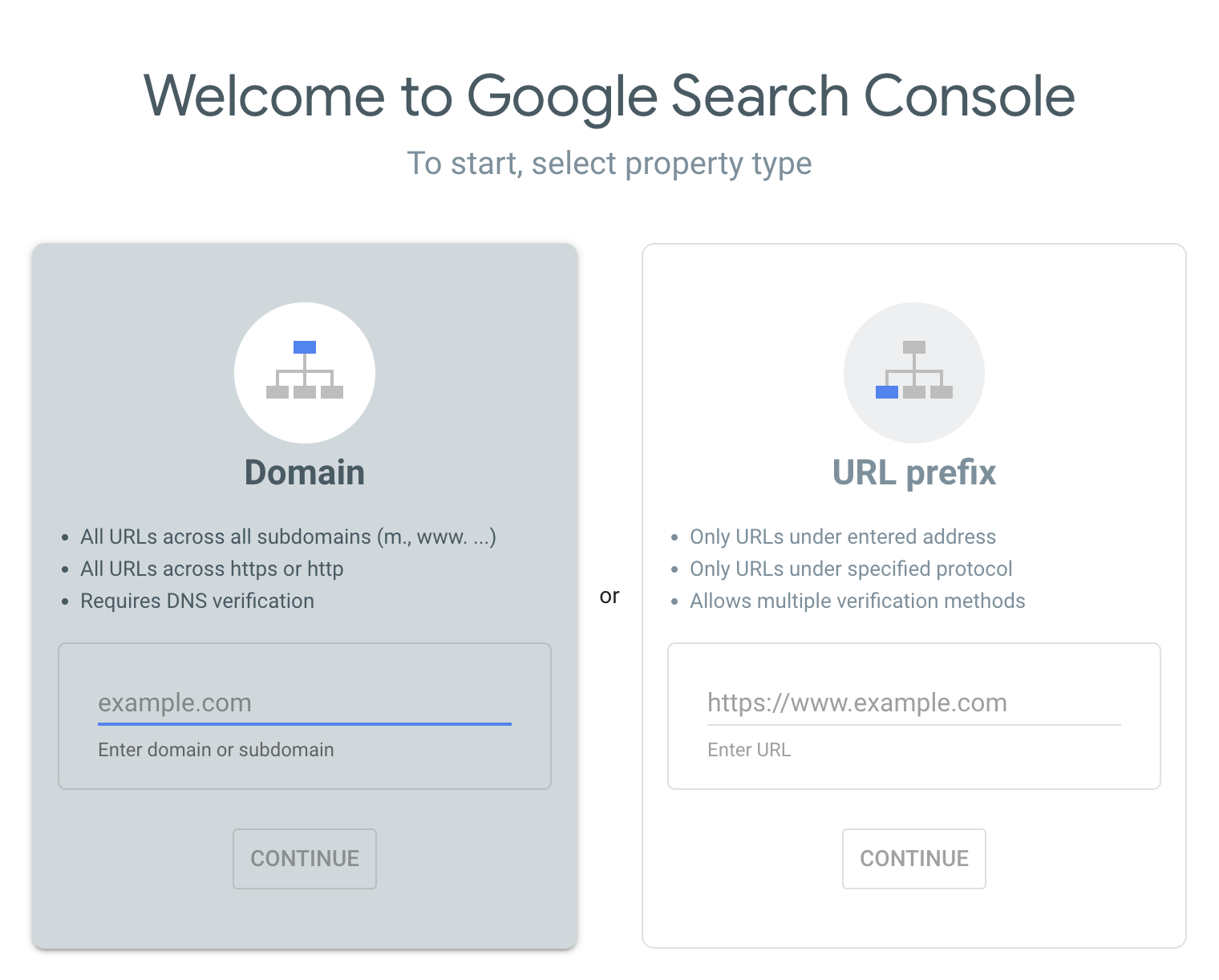
Most ecommerce platforms generate sitemaps automatically, so you’re mainly just telling Google and Bing where to find it. The submission itself takes minutes, but the indexing process typically takes one to two weeks for small stores, or up to a month for larger sites with thousands of pages.
For a complete walkthrough of the process and platform-specific tips, check out how to submit your website to search engines. It covers everything from verification to troubleshooting common issues.
3. Optimize product pages
Your product pages are what shows up in search results and what converts visitors into customers.
Product titles and descriptions
To optimize your product pages, start with your product title. Include your main keyword naturally, along with key details like brand, model, or defining features. “Nike Air Zoom Pegasus 40 Men’s Running Shoe – Black/White” beats “Running Shoe Product #4729” every time.
When writing compelling product descriptions, they need to be unique and persuasive. Don’t just copy manufacturer descriptions – Google hates duplicate content and customers need more than generic specs.
Explain benefits, answer common questions, and naturally incorporate your target keywords while keeping the tone engaging.
Images and URLs
Use descriptive file names like “red-leather-crossbody-bag.jpg” instead of “IMG_4729.jpg,” and always add alt text that describes what’s in the image. This helps with accessibility and image search rankings.
In the same way, keep URLs clean and keyword-rich. For example, yourstore.com/womens-hiking-boots beats yourstore.com/p?id=8472.
Structured data for rich results
Schema markup is code you add to your product pages that explicitly tells search engines “this is the price,” “this is the brand,” “this is the rating.” It removes any guesswork about what information means.
This can get you detailed results in search, showing star ratings, prices, availability, and even product images right in the search listings before someone clicks. These visual enhancements improve click-through rates because your listing stands out and provides more information at a glance.
Most ecommerce platforms like Hostinger’s ecommerce website builder, have built-in features that automatically add product schema markup.

Optimize for AI SEO
Beyond traditional search engines, AI-powered search tools like ChatGPT, Perplexity, and Google’s AI Overviews are increasingly shaping how customers discover products.
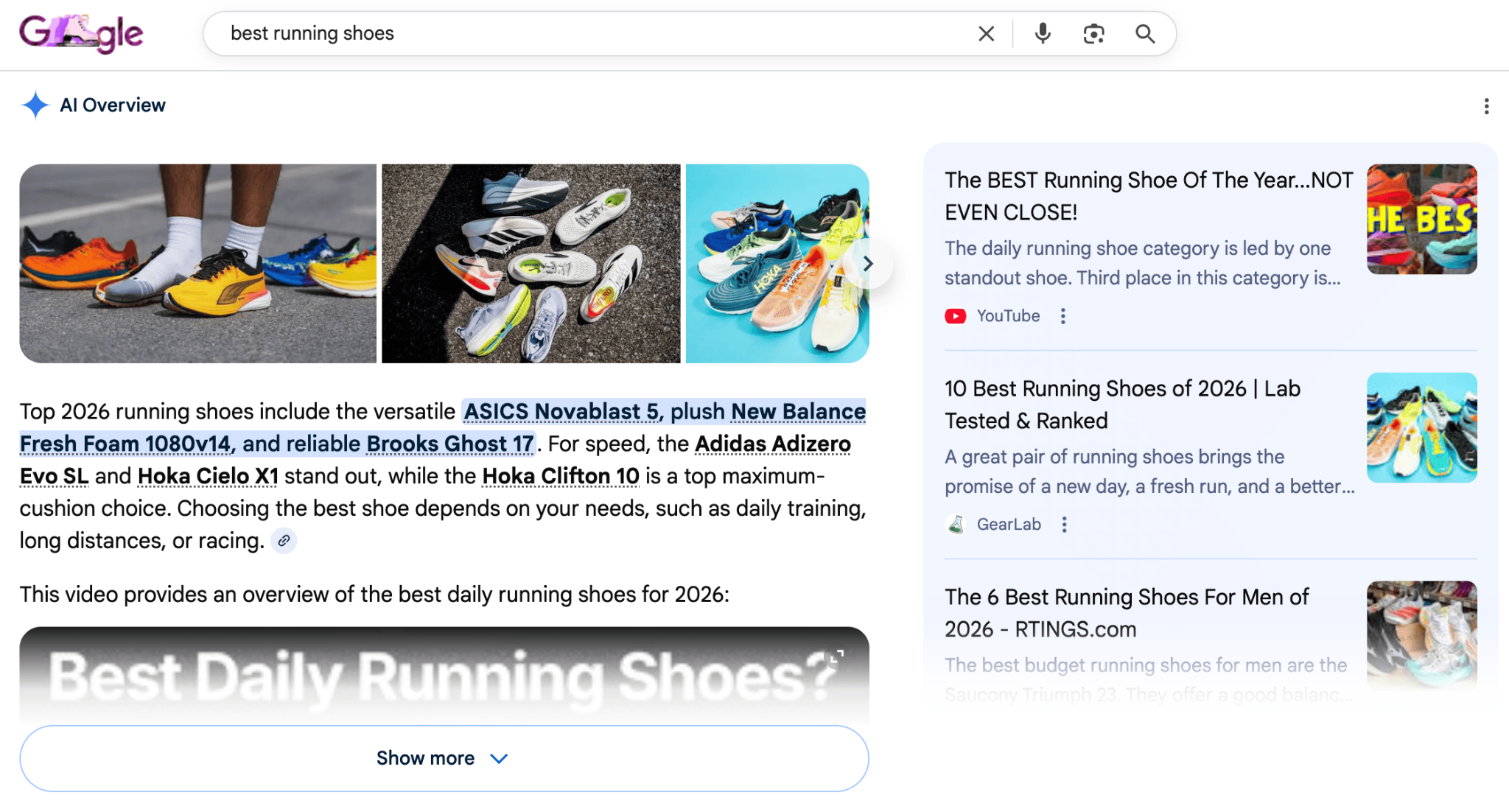
These systems prioritize comprehensive, natural information that directly answers questions.
Ensure your product pages include complete specifications, clear sizing charts, material details, and care instructions.
This thoroughness is essential for optimizing for AI search and helps both traditional search engines and AI tools understand and recommend your products.
4. Improve site structure
Improving your site structure involves organizing your pages into a clear hierarchy, connecting them with strategic internal links, and preventing duplicate content issues.
A well-structured site helps both customers and search engines navigate your store efficiently.
Create a clear hierarchy
Your site structure should make sense at a glance.
Think: Homepage → Category Pages → Subcategory Pages → Product Pages.
This clear hierarchy helps search engines understand the relationship between your pages and prioritize what’s most important.
Use strategic internal linking
Link related products to each other, connect category pages to relevant blog content, and guide customers through logical paths.
Each page should be reachable within three clicks from your homepage.
Why three clicks? Search engines allocate a limited “crawl budget” to each site (the number of pages they’ll crawl in one session) and pages buried deep in your structure might never get crawled.
Plus, customers lose patience clicking through multiple layers. Three clicks keep both search engines and shoppers happy.
Breadcrumb navigation (you know, those “Home > Women’s Clothing > Dresses” links at the top of pages) helps both users and search engines understand where they are in your site structure. They also create additional internal links and can show up in search results.
Avoid duplicate content
Duplicate content is a common ecommerce problem. If the same product appears in multiple categories or you have separate URLs for color variations, search engines see these as different pages with identical content, and they don’t know which one to rank.
You’ll need to tell search engines which version is the “main” one to avoid diluting your rankings.
Most ecommerce platforms have a setting for this (usually called canonical URL) that points all duplicate versions back to your primary product page.
Without this, you’re essentially competing against yourself in search results.
5. Optimize for mobile experience
Most online shopping now happens on mobile devices. If your store doesn’t work well on phones, you’re losing sales and hurting your SEO.
Why mobile-first matters
Google uses mobile-first indexing, meaning it primarily looks at the mobile version of your site when determining rankings.
So, a clunky mobile experience frustrates customers and actively damages your search visibility.
Implement responsive design
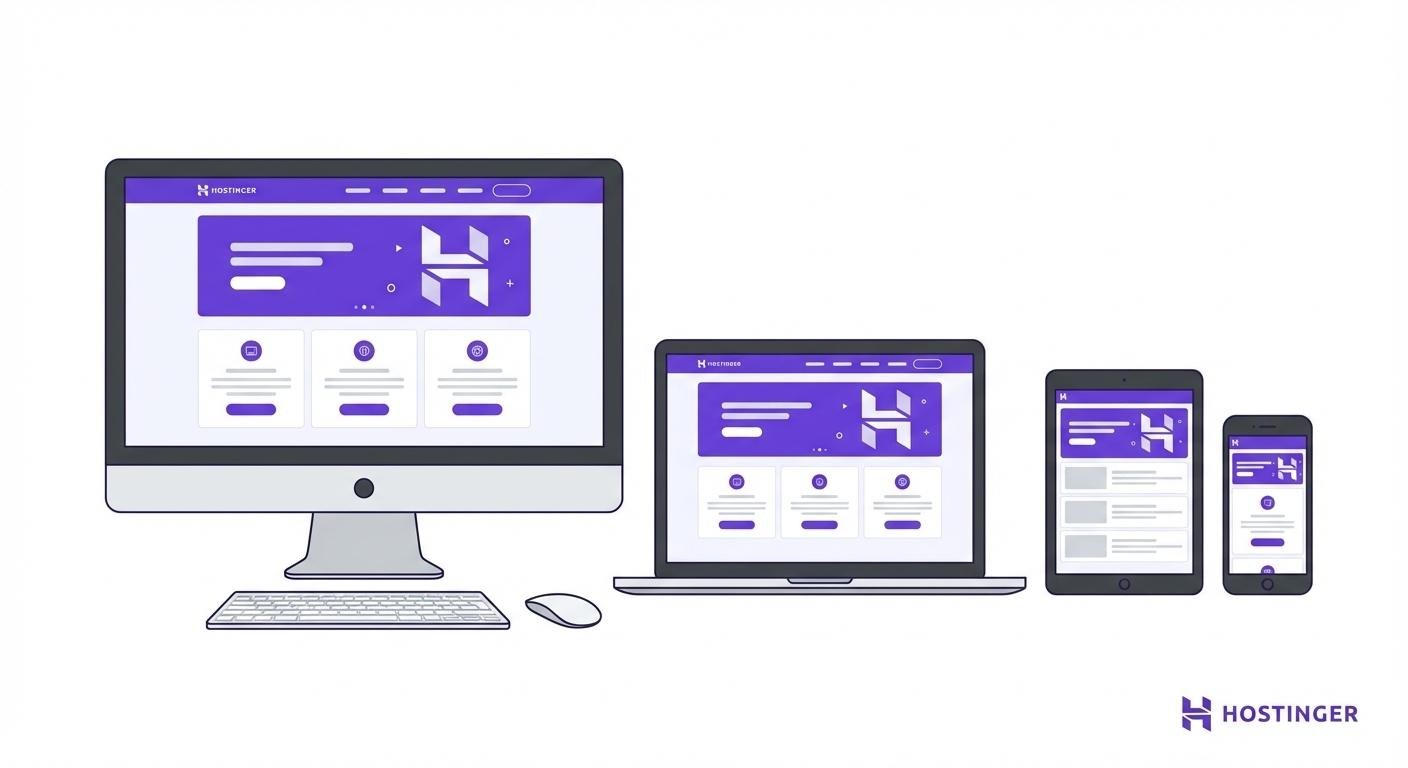
Responsive design is the standard approach. Your site should automatically adjust to fit any screen size, with text that’s readable without zooming and buttons large enough to tap accurately.
Images should resize properly, and navigation should be simple on a small screen.
Improve page speed on mobile
Page speed matters even more on mobile, where connections might be slower. Aim for mobile load times under 3 seconds.
Compress images, minimize code, and use lazy loading – a technique where images only load as users scroll to them, rather than all at once when the page opens. This significantly improves initial load times.
For a deeper dive into creating excellent mobile shopping experiences, explore mobile commerce strategies that can transform your mobile performance.
6. Implement technical SEO essentials
Technical SEO involves behind-the-scenes factors, such as page speed, security, proper indexing, and error fixes, that help search engines crawl, understand, and rank your site.
Monitor your technical health using Google Search Console or dedicated tools like Ahrefs Site Audit. These platforms automatically scan for issues and prioritize what needs fixing.
Here’s what you need to pay attention to:
- Site speed. Use tools like Google PageSpeed Insights to identify bottlenecks, compress images, enable browser caching, and consider a content delivery network (CDN) if you serve customers globally.
- HTTPS. Google explicitly considers it a ranking factor, and customers need to trust your site with their payment information. If you’re still on HTTP, switching to HTTPS should be your top priority.
- XML sitemaps. Make sure yours is up-to-date and submitted. If you have thousands of products, you might need multiple sitemaps or a sitemap index file.
- Crawl errors. Google Search Console shows you which pages search engines are having trouble accessing. Broken links, server errors, and redirect chains all waste your crawl budget and hurt rankings. Check weekly for new stores, monthly once you’re established.
Optimize for AI crawlers
For AI-focused optimization, consider implementing an llms.txt file. It’s a simple text file in your root directory that provides AI systems with a structured overview of your site’s key pages and purposes.
Think of it as a sitemap specifically for AI tools like ChatGPT or Claude. You can create one manually using any text editor or use AI-focused SEO tools that generate them automatically.
For a detailed guide on what llms.txt is and how to implement it, check out our comprehensive tutorial.
7. Start content marketing for ecommerce
Product pages alone won’t maximize your SEO potential. Content marketing attracts people earlier in their buying journey and establishes your store as a trusted resource.
Create helpful, keyword-rich content
Think blog posts, buying guides, how-to articles, comparison pieces, and answers to common questions.
Aim to publish at least 2-4 blog posts per month to build momentum. Each article should be 1,000-2,000 words, which is long enough to thoroughly cover the topic and rank well, but focused enough to stay useful.
This content should integrate keywords naturally while actually being useful. Don’t write for search engines – write for people. Answer real questions your customers ask and solve problems they’re facing.
Link strategically to products
A gift guide for hikers should link to your hiking gear. A care guide for leather shoes should link to your leather care products.
This internal linking serves two purposes: it boosts product page authority in search engines’ eyes (more quality internal links signal to Google that a page is important), and it creates natural conversion paths for readers who are ready to buy.
For example, a running shoe store might create “How to choose running shoes for your foot type” that ranks for question-based searches. The article explains pronation, arch support, and cushioning, then naturally links to specific shoe models for each foot type.
Content marketing is a deep topic with countless approaches. Ecommerce content marketing strategies can help you develop a comprehensive plan that fits your niche and audience.
8. Create link-building strategies
Backlinks are links from other websites to yours. They act as votes of confidence that signal to search engines your site is trustworthy and authoritative.
When reputable sites link to yours, search engines interpret this as validation of your content quality and relevance, making backlinks one of the strongest ranking signals they use.
But chasing links the wrong way can backfire spectacularly. Buying links, participating in link schemes, or spamming forums with your URLs can get you penalized.
How to identify safe link opportunities
Look for sites that are relevant to your niche, have genuine organic traffic (check if they rank for real keywords using tools like Ahrefs), publish quality content regularly, and have clear editorial standards.
Avoid sites that sell links openly, exist solely for SEO with thin content, or have thousands of outbound links with little original content. If an opportunity seems too easy (“$50 for a permanent link!”), it’s probably risky.
For a complete beginner, expect your first few backlinks to take 2-3 months of consistent outreach.
As you build relationships and create more link-worthy content, you can realistically aim for 2-5 quality backlinks per month.
Remember: quality matters far more than quantity. Ten links from respected industry sites matter more than a hundred links from random directories.
Legitimate link-building methods
Start by identifying potential link partners.
Use Google to search for “[your niche] blogs,” “[your niche] resources,” or “[your product type] buying guides” to find sites that write about your industry.
Look at who’s linking to your competitors using tools like Ahrefs or Moz. If they linked to a competitor, they might link to you too.
Check industry forums, Reddit communities, and social media groups to find influencers and publications your target customers follow.
Here’s how this can work:
- Partnerships. Collaborate with complementary brands, sponsor events, or join industry associations that link to members.
- Influencer outreach. Earn links when influencers mention or review your products. Focus on genuine relationships, not just transactional exchanges.
- Guest blogging. Write genuinely useful content for relevant industry sites to build links and exposure.
- Create link-worthy content. These can include original research, comprehensive guides, or tools that others naturally want to reference. A detailed sizing chart or material care guide might earn links from blogs and forums.
- Digital PR. This means getting coverage in online publications. New product launches, unique company stories, or expert commentary can all earn media mentions and links.
9. Implement local SEO
Local SEO connects you with nearby customers through location-based searches. This applies if you have physical retail locations, offer local pickup, or target specific delivery areas.
Even purely online stores can benefit. For example, a bakery offering same-day delivery only in Chicago, or a store selling region-specific products like state-themed merchandise.
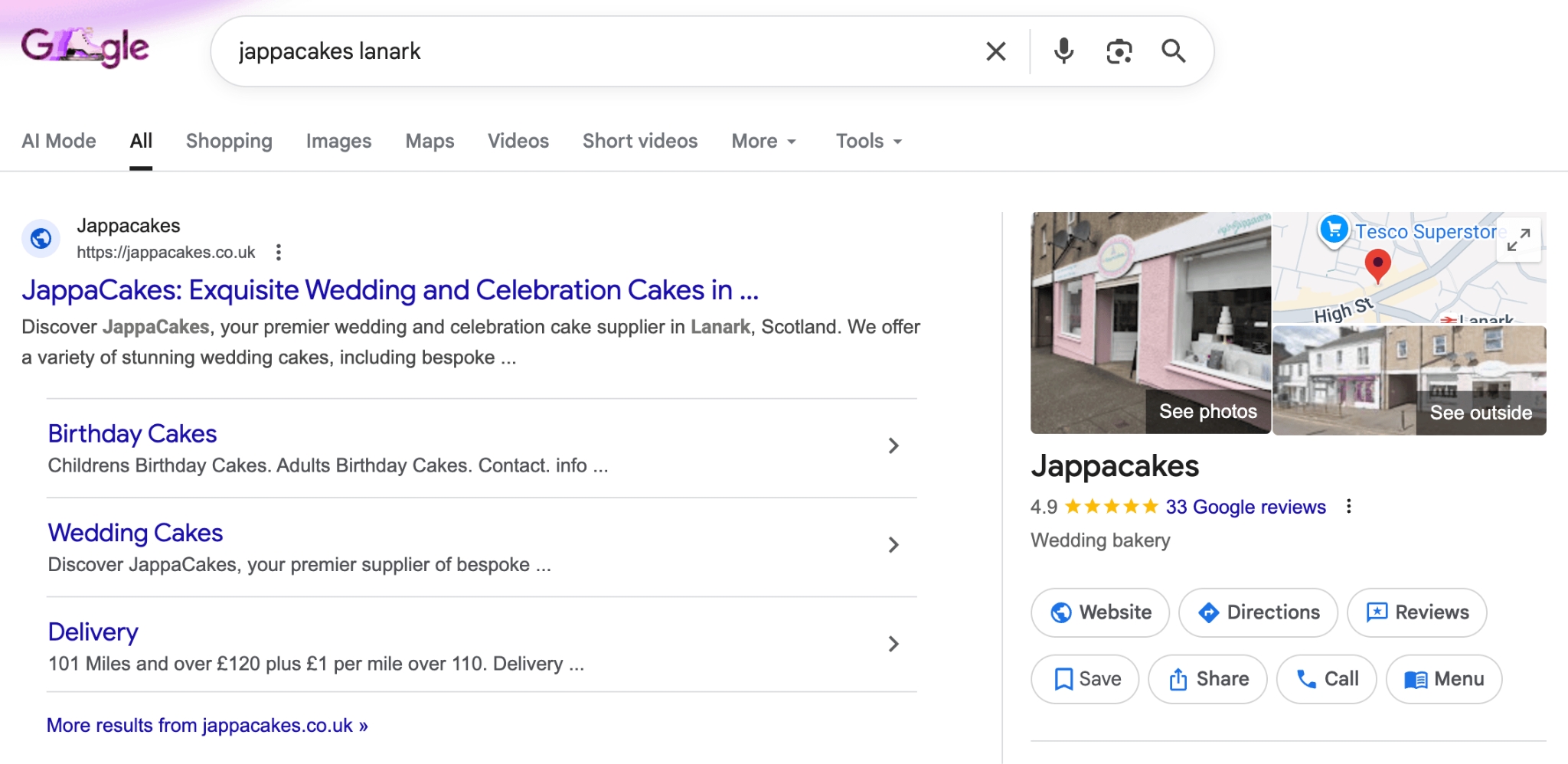
Set up Google Business Profile
Start with your Google Business Profile. Claim and fully optimize your listing with accurate information, photos, business hours, and your product/service categories.
This gets you into Google Maps results and local pack listings, which are those map results that appear above regular search results.
Maintain consistent citations
Consistency matters across all your local citations in business directories, review sites, and social platforms.
Your business name, address, and phone number (NAP) should match exactly everywhere they appear. Even small differences like “Street” vs. “St.” can confuse search engines.
Encourage and respond to reviews
Encourage customer reviews on Google and other relevant platforms. Positive reviews improve rankings and conversion rates.
Respond to reviews, both positive and negative, to show you’re engaged and care about customers.
Create location-specific content
Landing pages for different cities or regions help you rank for “product + location” searches like “organic dog food delivery Chicago” or “same-day flower delivery Brooklyn.”
For stores with multiple physical locations, create individual pages for each location with unique content, not just templated text with the city name swapped out. Include local landmarks, neighborhood-specific information, and unique store photos.
For a complete breakdown of optimizing your local presence, Google Business Profile SEO covers everything from setup to advanced optimization.
10. Measure and analyze SEO performance
You can’t improve what you don’t measure. Tracking the right metrics shows you what’s working and where you need to adjust.
Here’s what you need to keep an eye on.
Traffic and visibility metrics
- Organic traffic is the obvious starting point. How many people find your site through search? Google Analytics breaks this down by page, showing which products and content attract the most visitors. Expect to see measurable increases within 3-6 months of consistent SEO effort, with significant gains after 6-12 months.
- Keyword rankings tell you if you’re moving up for your target terms. Tools like Ahrefs, SEMrush, or even Google Search Console show where you rank and how it changes over time. Track your top 10-15 target keywords weekly.
Engagement metrics
- Bounce rate indicates whether visitors find what they’re looking for. A bounce rate of 40-60% is typical for ecommerce stores. Higher bounce rates might signal irrelevant traffic or poor page quality.
- Page speed metrics affect both user experience and rankings. Monitor load times and Core Web Vitals through Google Search Console. Aim to keep all Core Web Vitals in the “good” range.
Business impact metrics
- Conversion rate is what really matters. Traffic is great, but are those visitors buying? Track which keywords and pages drive actual sales, not just clicks. Organic traffic typically converts at 2-4% for ecommerce stores. If you’re below 2%, focus on improving product pages and user experience, not just driving more traffic.
- Backlink growth shows if your link-building efforts are paying off. Are you earning new links? From quality sources? Track total backlinks monthly, but focus on the quality and relevance of new links rather than just the total count.
How to use your data
Set up regular reporting – weekly for new stores actively making changes, monthly once you’re established – and look for trends rather than obsessing over daily fluctuations.
SEO typically takes 3-6 months to show initial results and 6-12 months for substantial traffic gains.
Use this data to refine your strategy. If certain product categories attract tons of traffic but don’t convert, maybe your prices aren’t competitive, descriptions need work, or you’re ranking for the wrong keywords (informational rather than transactional).
If specific blog posts drive lots of engagement, create more content on similar topics and link them together in a content cluster.
Common ecommerce SEO mistakes to avoid
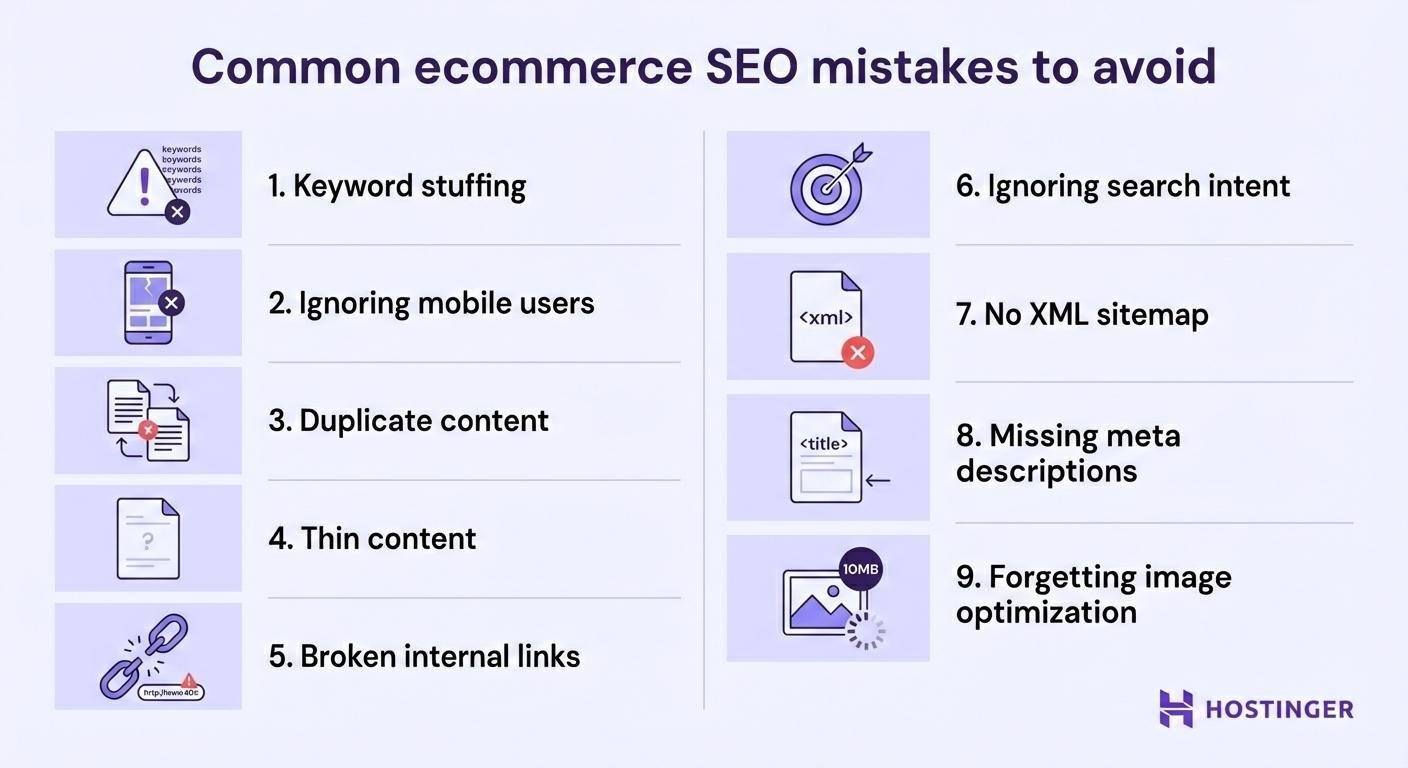
Common ecommerce mistakes include keyword stuffing, ignoring mobile optimization, creating duplicate content, and neglecting regular updates.
These missteps can seriously damage your rankings and frustrate potential customers. Here’s what to watch out for:
- Keyword stuffing. Cramming keywords unnaturally into titles and descriptions looks spammy and turns off both search engines and customers. Write for humans first, optimize second. If it sounds awkward to read aloud, rewrite it.
- Ignoring mobile users. Failing to optimize for mobile is basically turning away more than half your potential customers. Test your site on actual phones regularly, not just in desktop browser preview modes.
- Duplicate content. Using manufacturer descriptions across multiple products or having the same content on different URLs confuses search engines and wastes your ranking potential. Write unique descriptions and use canonical tags properly.
- Thin content. Product pages with just a title, price, and “Add to Cart” button don’t give search engines much to work with. Add detailed descriptions, specs, uses, and benefits to give pages substance.
- Broken internal links. Dead links waste crawl budget and create poor user experiences. Regularly audit your site for broken links, especially after removing products or restructuring categories. Run a full site crawl monthly using tools like Screaming Frog.
- Ignoring search intent. Ranking for high-volume keywords that don’t match what you sell wastes effort. Someone searching “how to fix broken headphones” probably isn’t ready to buy new ones yet – they’re looking for repair guides. Focus on commercial keywords (“best wireless headphones under $100”) and transactional keywords (“buy Sony WH-1000XM5”) instead.
- No XML sitemap. This files guide search engines through your site. Without it, important pages might never get crawled or indexed. Every ecommerce site should have this file properly configured from day one.
- Missing or poor meta descriptions. While not a direct ranking factor, meta descriptions affect click-through rates. A generic “Buy products online” meta description performs far worse than “Shop handcrafted leather bags with free shipping. Lifetime warranty on all bags. 30-day returns.” Write unique, compelling descriptions under 160 characters for your main category and product pages.
- Forgetting image optimization. Large, uncompressed images slow your site down significantly. Images without alt text are invisible to search engines and inaccessible to screen readers. Use image compression tools to compress images and always add descriptive alt text.
Start optimizing your ecommerce store
Now you’ve got the roadmap, don’t feel like you need to tackle everything at once.
Pick one area where you know you’re weak and start there. Maybe that’s finally writing unique product descriptions, or setting up Google Search Console, or creating your first blog post.
Your first 30 days: Quick wins
If you’re just starting, focus on these three things first:
- Set up Google Search Console and submit your sitemap. Takes 30 minutes and gives search engines immediate access to your site.
- Write unique descriptions for your top 10-20 best-selling products. These pages get the most traffic, so optimizing them has the biggest impact.
- Fix your site speed. Compress images and enable caching. Use Google PageSpeed Insights to identify your biggest bottlenecks.
These three actions will deliver noticeable improvements within 4-6 weeks.
Your next 90 days: Build momentum
Once you’ve handled the basics:
- Research and target 10-15 primary keywords across your product categories.
- Create your first 4-6 blog posts (one every 2 weeks) targeting question-based keywords in your niche.
- Reach out to 5-10 relevant sites for partnership or guest blogging opportunities.
- Set up monthly reporting in Google Analytics to track organic traffic and conversions.
Beyond 90 days: Scale and refine
SEO is just one piece of running a successful ecommerce business. You’ve also got inventory management, customer service, marketing, fulfillment, and a dozen other moving parts competing for your attention.
The good news? AI is increasingly helpful for many of these tasks. From generating product descriptions to analyzing customer behavior and personalizing shopping experiences, AI tools can handle time-consuming work and let you focus on strategy and growth.
Want to explore how AI can transform your ecommerce operations beyond just SEO? Discover how to use AI in ecommerce.

Simon is a dynamic Content Writer who loves helping people transform their creative ideas into thriving businesses. With extensive marketing experience, he constantly strives to connect the right message with the right audience. In his spare time, Simon enjoys long runs, nurturing his chilli plants, and hiking through forests. Follow him on LinkedIn.