What is a title attribute in WordPress and how to add it to a menu
Dec 02, 2025
/
Jordana A.
/
3 min Read

Well-designed WordPress navigation menus help visitors find the information they’re looking for. However, as you can only include so much information on the menu item’s navigation label, visitors might not understand the context of the embedded links.
This is where title attributes come in handy. Also known as HTML attributes, they show additional information about certain links a cursor hovers over. Therefore, you don’t have to worry about hurting your WordPress menu design with too much text.
Keep reading as we dive into what the title attribute can do for your WordPress website. We’ll also provide a step-by-step guide on how to add title attributes to WordPress navigation menus.
Why Add a Title Attribute to a WordPress Menu
A title attribute in your WordPress menu allows visitors to navigate the site more easily. You can use a title attribute to expand the meaning of your menu items’ anchor text without cramming too much information into a small space.
For this reason, adding title attributes for WordPress navigation menus improves user experience. The title attribute provides additional details that help visitors find the page containing the information they’re looking for.
Additionally, using the title attribute improves your WordPress website’s accessibility. The title attribute offers visual information on a particular menu item to assistive technology users, giving them a better understanding of your website through screen readers that support this type of content.

Lastly, the HTML attribute’s SEO value helps your website rank on search engines. A title attribute embedded into a particular link helps pass link equity from one page to another, enhancing the on-site SEO efforts in your WordPress website.
Pro Tip
Adding a title attribute to an image gives you the same benefits as having it on your menu item. Make your image more accessible and SEO-friendly by adding an alt text as well.
How to Add a Title Attribute in WordPress
WordPress removed the title attribute field in version 4.2, leaving the navigation label field and URL option for custom links in the default menu setting. However, you can enable it manually via the WordPress dashboard.
Here’s how to add a title attribute to the WordPress menu:
- Log in to your WordPress dashboard and navigate to Appearance → Menus.
- Select the Screen Options tab in the top right corner of the page, and check the Title Attribute option under the Show advanced menu properties section.

- Click on the menu item you want to add a title attribute from the Menu structure section. The Title Attribute box should appear under Navigation Label.
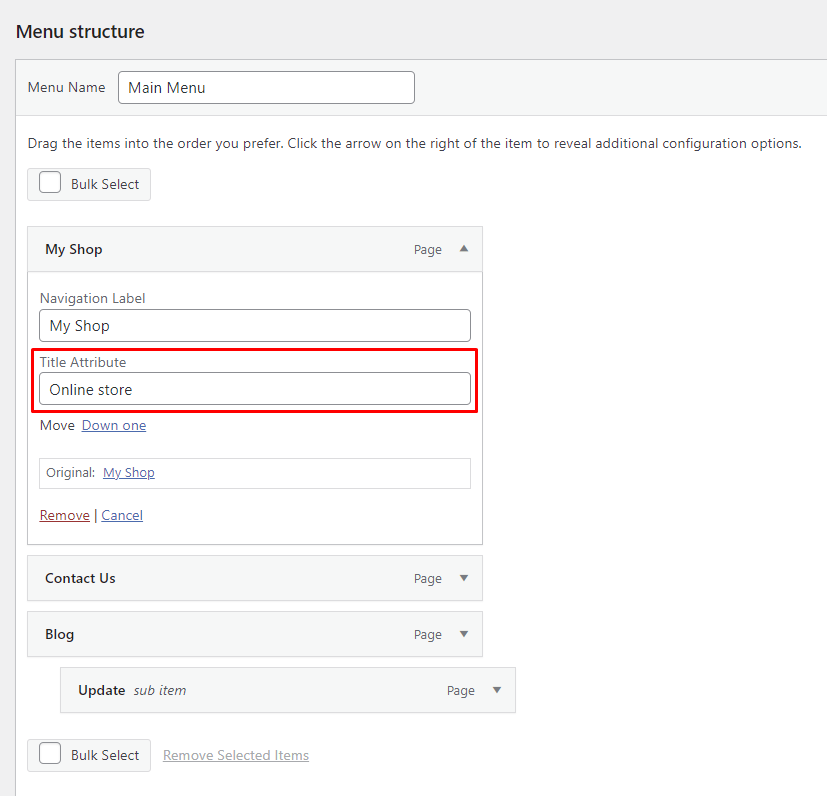
- Type additional information for that specific menu item into the title attribute text box. Repeat the steps for other menu items if needed.
- Once done, click on the Save Menu button. If the process is successful, you should find the title attribute displayed on mouse hover as a tooltip.
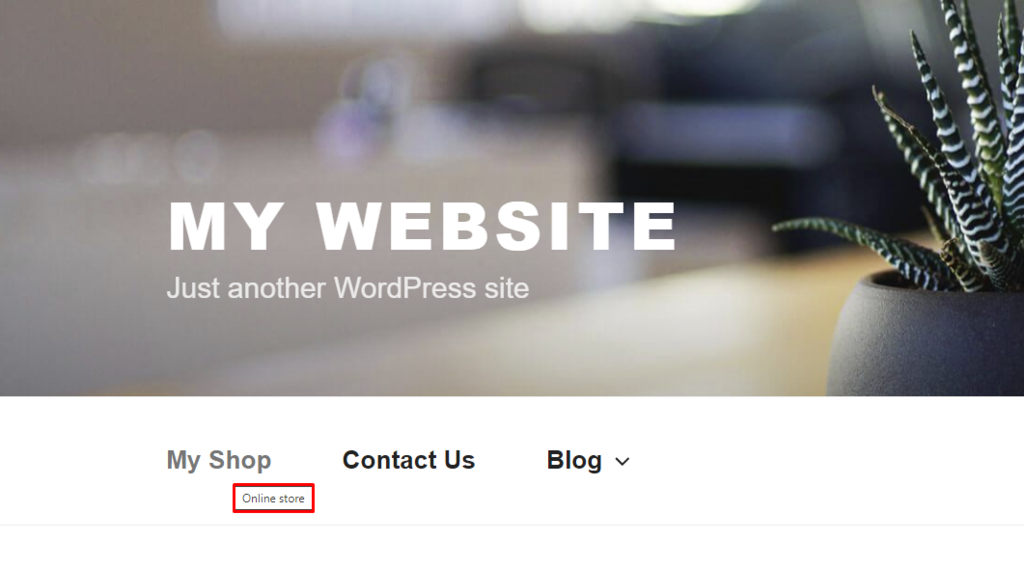
Pro Tip
When adding HTML attributes to menu items, try to provide more information about the linked resource instead of repeating what’s stated in the navigation label.
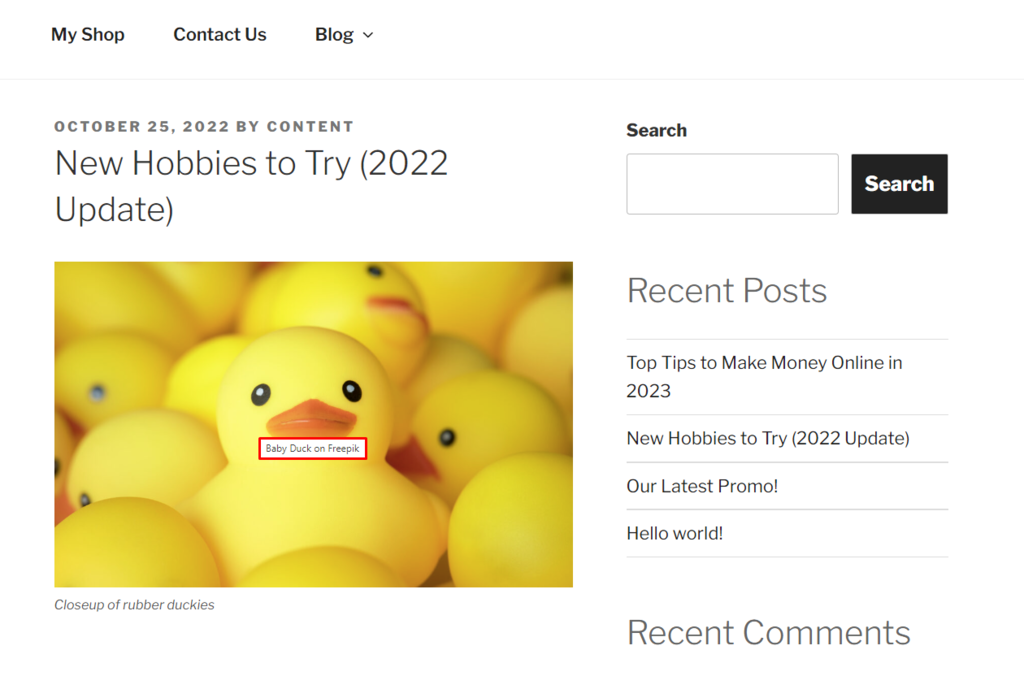
Follow these steps to create image title attributes in WordPress posts, pages, or custom post types:
- Open the page, post, or custom post type where the image is located in the Block Editor. Alternatively, insert a new image via the Media Library.
- Click on the image to activate the block. Expand the Advanced menu under the Block tab on the right side of the screen.
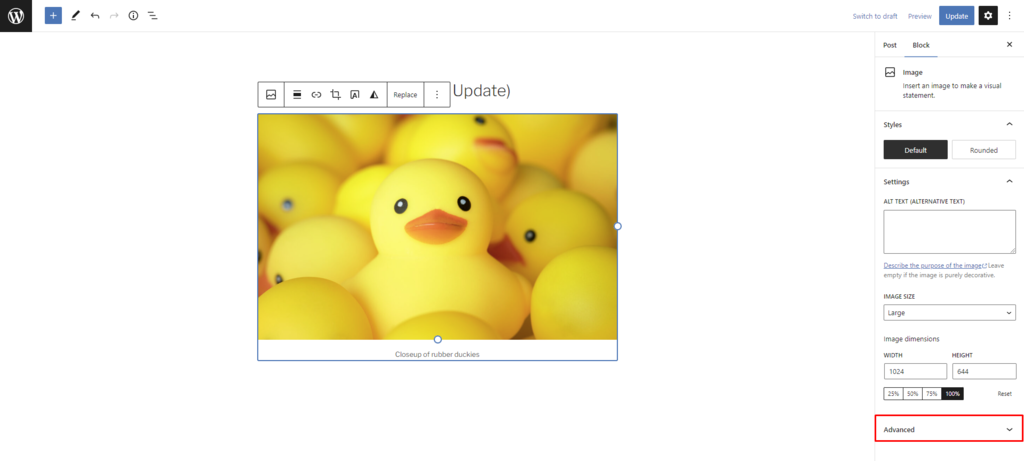
- Type additional information for that specific image into the title attribute field.
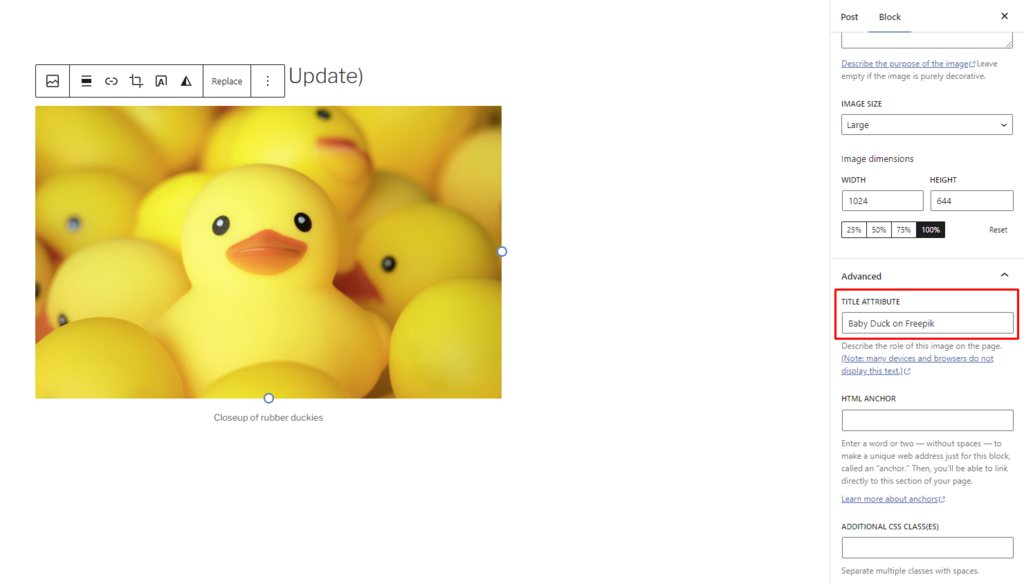
- Publish the new content or save the changes made once you’re done. Open the page and check whether you can see the title attribute when hovering over the image.
Conclusion
Adding a title attribute to your WordPress menu items and images benefits your website and visitors. The extra information provided by the title attribute helps improve your SEO efforts and deliver a better user experience without hurting your web design’s aesthetics.
We hope this article helps you see the title attribute feature in a different light and understand how to add it to your WordPress site. If you have any more questions, don’t hesitate to leave a comment below. Good luck!
What is Title Attribute in WordPress FAQs
Here are some frequently asked questions about the title attribute in WordPress.
What Is Title Attribute in Anchor Tag?
A title attribute in an anchor tag provides additional information about the linked page or resource. It appears as a tooltip when the user hovers over the link and can help provide context or clarify the purpose of the link.
How Can the Title Attribute Improve My WordPress Website?
Using the title attribute in WordPress can improve the user experience by providing additional information or context for links, improving accessibility for visually impaired users, and potentially improving SEO by helping search engines understand the content and purpose of linked pages.
Do All WordPress Themes Support the Title Attribute?
Yes, all WordPress themes should support the title attribute in anchor tags. However, the presentation may vary depending on the theme and may require custom styling or modifications to ensure accessibility and usability.

Jordana is a Senior Content Writer with a background in Information Systems. She has over five years of experience in WordPress and is casually dabbling with PHP and MySQL. Her passion for writing and technology drives her to create tutorials for anyone wanting to build their online presence. Follow her on LinkedIn.


