How to start a podcast: 10 practical steps
Mar 10, 2026
/
Simon L.
/
13 min Read
To start a podcast, you need to define your niche and format, secure the right recording equipment and software, and plan your episodes. Then, you’ll record and edit your content, choose a podcast host for distribution, and finally, promote your show to build an audience.
Breaking it down into manageable steps makes launching your show easier than you might think. Here’s what you need to do:
- Identify your focus and listeners: Pinpoint a specific topic that you’re passionate about and clearly identify the ideal person who will listen to your episodes.
- Determine your show’s structure: Decide on a consistent style for your show, whether it’s a solo monologue, interviews with guests, or a conversational panel format.
- Map out episode ideas: Develop a bank of episode topics and create a content calendar to ensure you publish new episodes consistently.
- Gather your gear and apps: Select the necessary recording equipment, like a microphone, and the right software for recording and editing to ensure high-quality audio.
- Prepare your space: Set up an area for recording, focusing on minimizing background noise and optimizing the room’s acoustics.
- Record and polish the audio: Record your first episodes and use editing software to remove mistakes, enhance the sound quality, and add any music or effects.
- Choose a distribution service: Select a dedicated podcast host to store your audio files and generate the essential RSS feed needed for distribution.
- Build your online hub: Create a website to act as the home base for your show, where listeners can find links, show notes, and contact information.
- Make it public: Submit your show’s RSS feed to major platforms like Spotify and Apple Podcasts so people can find and subscribe to your episodes.
- Increase visibility: Promote your show using social media, email marketing, and collaborations to attract new listeners.
1. Choose your product niche and target audience
Start by choosing a niche and target audience for your podcast. A well-defined niche helps you create relevant content that solves a specific problem for your listeners.
To find your niche, ask what you are passionate about, what expertise you have, and who your ideal listener is.
For example, instead of the broad “personal finance,” narrow it down to “personal finance for college students” to attract a highly specific audience.
This process of identifying your focus is essential whether you’re starting a blog or a podcast. For a deep dive into finding your perfect market, read this guide on how to choose a niche.
2. Select a podcast format
Selecting a podcast format before you record helps you plan content effectively and meet the expectations of your listeners.
Here are the most common podcast formats:
Solo podcast
- Great for: Personal development podcasts and personal journals.
- Description: You are the sole host discussing topics or sharing stories. This format is best suited for subject matter experts who want to impart their knowledge or individuals who want to share personal reflections.
Interview podcast
- Great for: Entrepreneurial podcasts and educational series.
- Description: This format involves the host interviewing guests. It’s a great way to bring in different perspectives and expertise, making it ideal for business, educational, or inspirational podcasts.
Panel podcast
- Great for: Political roundtables and tech news discussions.
- Description: A panel podcast involves multiple hosts or guests discussing a topic. This format creates a dynamic conversation and is often used for news commentary, debates, or entertainment shows.
Storytelling podcast
- Great for: True crime series and audio dramas.
- Description: This podcast format is scripted, featuring voice actors, sound effects, and a narrative arc. It is best suited for drama, horror, or science fiction genres.
Educational podcast
- Great for: History podcasts and science explainers.
- Description: This format aims to educate the listener on a specific topic. It can be presented in a solo or interview format, but is highly researched and often features experts in the field.
News recap
- Great for: Daily news podcasts and weekly industry updates.
- Description: This provides a summary of the latest news in a specific industry or topic area. It is typically brief and published on a regular basis. Sometimes, news podcasts use audio and video from official news sources.
Hybrid
- Great for: Personal development podcasts that feature guest interviews.
- Description: A hybrid podcast combines elements of different formats. For instance, you might have a solo podcast but occasionally bring in guests for interviews.
3. Plan your content and episodes
To plan your content, start by organizing your topics, creating outlines, and setting a consistent episode length and publishing schedule. Using a simple content calendar, like a Trello board, helps you stay consistent.
Conduct market research
Use social media polls to determine what your audience wants to hear. You can also speed up the brainstorming process with AI content generators. When using AI tools, give them your podcast description and detailed prompts, such as “Suggest 10 episode topics for a podcast about sustainable investing.”
Think about your media format
While traditional podcasts are audio-only, video podcasts are a growing trend because they add a visual element. Just remember: video requires more effort and resources than audio. If you plan to record remotely with guests, ensure your setup can handle consistent audio and video quality across all participants.
Incorporate key strategies into your plan
First, use clear calls to action (CTAs). These include asking listeners to subscribe or leave a review, which are your direct lines to engagement. Place them naturally at the beginning, middle, or end of the episode.
Then, consider season planning. Organizing your episodes into thematic seasons makes it easier for listeners to follow along. Seasons also provide natural breaks for production, allowing you time to plan and produce your next batch of great content.
Once you have your content, repurpose it: turn key episode takeaways into social media clips or blog posts to expand your reach.
4. Select the right podcasting tools and software
Plan to invest in a quality microphone, headphones, and an audio interface to ensure your sound is clear and professional.
For recording and editing software
Your needs will vary based on your experience and show format. Audacity is a free, open-source audio editing software perfect for beginners who need basic editing tools.
For advanced editing
Professionals often use Adobe Audition for advanced editing. If your show involves interviews, dedicated remote recording platforms like Riverside, RINGR, and Zencastr can capture high-quality audio from guests anywhere. Auphonic, on the other hand, offers AI-automated editing to help you produce episodes quickly.
For your hardware needs
Your microphone is your most important tool. The Shure SM7B is a high-end option favored by professionals for its excellent sound quality. For beginners or those on a budget, the Audio-Technica ATR2100x or the popular Blue Yeti products are great starting points.
To connect professional mics, you’ll need an audio interface like the reliable and affordable Focusrite Scarlett 2i2 or the PreSonus AudioBox USB 96.
Don’t forget the accessories. For long sessions, comfortable headphones like the Sony MDR7506 or the Audio-Technica ATH-M50x are ideal for monitoring sound quality.
You should also consider essential accessories, such as boom arms to correctly position your microphone and pop filters to reduce harsh plosive sounds. If you plan to record outside of a studio, portable recorders like the Zoom H5 or Tascam DR-40X offer excellent quality on the go.
For backup and storage
You need a reliable system, such as cloud storage or an external hard drive, to keep copies of all your episode files, scripts, and artwork. This safeguards your work against data loss.
5. Set up your recording environment
The quality of your recording setup is just as important as the equipment you choose. Whether you’re in a home studio or a rented professional space, your choice here directly affects your budget and the logistics of coordinating recordings.
Home studio vs professional studio
A home studio offers flexibility, allowing you to record at any time. It is cost-effective and allows you to personalize the space. However, you’ll need to manage background noise and disturbances yourself, and you may have access to only limited equipment.
A rented professional studio comes fully equipped with advanced tools, soundproofing, and often includes expert assistance, such as sound engineers. The downsides are the higher costs and less flexible scheduling, as you’ll have to book time in advance.
| Aspect | Home studio | Professional studio |
| Costs | Lower, budget-friendly | Higher, significant investment |
| Flexibility | High (record anytime) | Low (requires booking) |
| Sound quality | Requires self-managed soundproofing | Excellent (acoustically controlled) |
| Equipment | Limited by budget | Advanced, top-tier tools |
If you’re on a budget, starting with a home setup is a totally viable option. But, as your show grows, consider investing in professional studio time for optimal sound. Always check reviews, factor in the studio’s acoustics and available equipment, and visit the space in person before making a commitment.
Optimizing your home studio
If you choose to work with a home studio, here are some ways to optimize your space.
- Focus on room acoustics. Use soft materials, such as carpets, curtains, and acoustic panels, to dampen sound and reduce echoes. Hard surfaces, such as tile or wood floors, reflect sound, which can lead to audio disturbances. Remember that square rooms often produce more echoes than rectangular ones.
- Consider ergonomics. Comfort matters, especially during long recording sessions. Use a chair with good lumbar support. Your desk should allow for a neutral wrist position when using a computer. The microphone should be positioned at mouth level – use adjustable stands or boom arms to achieve this, so you don’t have to lean or hunch. Take periodic breaks to stretch and rest.
- For video podcasts, plan your lighting and camera setup. You need a balance of natural light (if available) and artificial light, but be careful that direct sunlight doesn’t cause glare. Invest in a high-definition or 4K camera. Use tripods or gimbals for stability, and consider using a secondary camera to capture alternate shot angles, making your viewing experience more dynamic.
6. Record and edit your episodes
The recording phase involves choosing your approach, handling guest logistics, and ensuring legal compliance for any content you use.
Once recorded, you enter post-production, where you’ll polish the audio, remove mistakes, and add final elements using editing software.
Here are some recording best practices to keep in mind:
- Manage your approach. You have two main options: scripting or improvisation. Scripting keeps you on topic and ensures you hit every key point, but it can sound rehearsed. Improvisation sounds more natural but carries the risk of straying off-topic. Choose the style that best suits your show’s format.
- Consider batch recording. This means recording multiple episodes in one session. It’s a huge time-saver that streamlines your entire production process, especially if you have consistent themes. Batch recording enables you to maintain a consistent publishing schedule, which is vital for retaining your audience.
- Handle legalities upfront. Before you record, understand copyright laws. If you use music, sound effects, or clips from other content, obtain the necessary permissions or licenses to avoid legal issues. Stick to royalty-free music platforms or consult resources like Creative Commons for license guidance.
Working with guests
If your format includes interviews, efficient guest management is key. This process involves inviting guests who perfectly align with your show’s theme, preparing questions in advance, and coordinating recording schedules smoothly. Proper management adds significant value by offering varied perspectives and expertise.
Here’s the thing: if your podcast involves co-hosts or regular guests, contracts are essential. These documents outline roles, responsibilities, and revenue-sharing arrangements. They also cover intellectual property rights, providing a clear legal framework for your show.
Post-production editing
Once you finish recording, the post-production process begins. Use your editing software to polish the audio. This involves removing mistakes, long pauses, or unwanted background noise.
You can also enhance the overall audio quality and add effects or background music if it fits your podcast’s style.
7. Choose a reliable podcast host
To host a podcast, you need a service specifically designed to store and distribute audio files. It’s not to be confused with web hosting, which involves storing website files to make them accessible online.
A reliable podcast hosting service should offer more than just a place to store your audio files. Here’s what to look for:
- Easy RSS feed generation. The RSS feed is essential for distributing your podcast to major platforms, such as Apple Podcasts and Spotify.
- In-depth analytics. These tools give you insights into listener demographics, episode downloads, and retention rates. These data points are invaluable for tailoring your content and seeing the true impact of your episodes.
- Simple scalability. As your show gains popularity, you need a service that can handle increasing traffic and storage demands without issue. If you are an advanced user, you can set up podcast hosting using a VPS platform, but a dedicated podcast host is the simplest option for most creators.
8. Create a podcast website
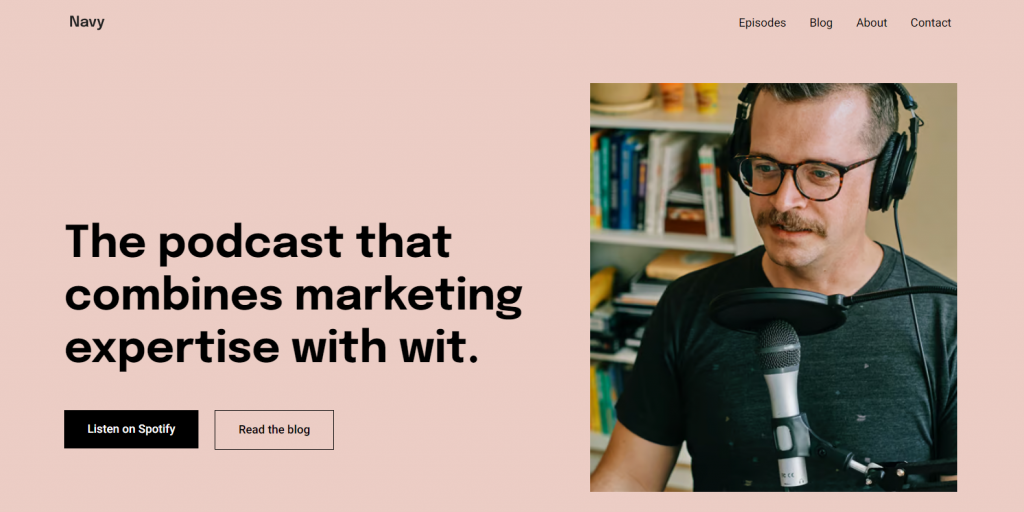
A dedicated podcast website is where you can embed media players, provide detailed show notes for each episode, and integrate your social media channels for engagement.
Your site also serves as a platform for additional content, such as blog posts, transcripts, or downloadable resources, providing extra value to your listeners.
The process of building your site is straightforward: you need a hosting plan with a website builder, preferably one that includes a drag-and-drop editor. Choose and customize a template that fits your show’s brand, and then publish it with your domain.
For a comprehensive walkthrough of the entire process, check out this guide on how to make a website.
If you need design ideas before you start customizing, you can see how others have done it by looking at these podcast websites for inspiration.

9. Publish your podcast
After recording and editing, the next step is getting your episodes out to the world. This involves uploading your audio files to your podcast hosting platform and distributing them to directories using your RSS feed.
To make it easy for people to find your podcast, focus on search engine optimization (SEO). This is where you edit your podcast title, description, and individual episode show notes using relevant keywords so that your show appears in organic search results.
Ensure your cover art and descriptions are both compelling and SEO-friendly. Before you hit the publish button, ensure every episode is polished to attract and retain new listeners.
Once your show is live, submit it to major podcast directories, as these places significantly increase your visibility.
Here are the general steps for submission:
- Get your RSS feed: Your podcast host automatically provides this feed, which is the link you submit to all the directories.
- Review guidelines: Every platform has its own submission rules covering everything from RSS feed requirements to cover art specifications and audio quality standards. Read them carefully and make sure you follow them.
- Submit for review: You typically fill out a form on the directory’s submission page using your RSS feed URL.
- Wait for approval: It can take a few days to a week for your podcast to be reviewed and approved.
- Check your listing: Once approved, verify that your listing appears correctly on the platform.
10. Promote your podcast
After publishing your episodes, promotion is the final step. Consistency in your marketing strategies is vital to building and maintaining a successful show.
Here are some effective promotional strategies to consider:
- Social media: Use platforms like X, Instagram, and LinkedIn to announce new episodes and connect with your audience. Always use relevant hashtags and respond to comments to boost visibility.
- Email marketing: An email list gives you a direct line to your audience. Use it to send out teasers, share exclusive content, and run listener polls. This keeps them engaged and encourages them to come back for more episodes. Platforms like Hostinger Reach can help you manage this list effectively.
- Collaborations: Partner with other podcasters or influencers in your niche to expand your reach and audience. Ensure the partnership aligns with your format and niche so that it resonates with both audiences. This is a great way to introduce your show to a targeted audience.
- Word of mouth and reviews: Encourage your current listeners to share your podcast and leave reviews. High ratings and positive reviews significantly boost your show’s visibility in directory searches.
- Use paid ads. If your budget allows, paid ads can be an effective way to reach a wider audience. You can use platforms like Google Ads to target potential listeners. Be sure to track your ad spend closely and set a monthly budget you’re comfortable with.
- Focus on audience engagement. Create a strong community around your show. Engage listeners through social media polls, listener shout-outs, and Q&A sessions. A dedicated space, like a Facebook group, for listeners to discuss episodes and provide feedback, can become an effective marketing tool.
- Use analytics and metrics. Your podcast host provides in-depth analytics. Use these tools to monitor your show’s performance, tracking listener demographics, episode downloads, and retention rates. This data helps you tailor future content to meet listener preferences.
Pro tip
If you collect listener data or plan to send out newsletters, be aware of privacy laws like GDPR in the European Union. Obtain explicit consent from your audience before collecting their data for newsletters or other marketing activities. Consider including a privacy policy on your website detailing how you handle data.
Benefits of starting a podcast
Starting a podcast helps you build authority in your niche, connect directly with listeners globally, and create new revenue streams. Here’s a breakdown of the key advantages:
- Audience building: One of the most compelling reasons to start a podcast is the opportunity to build a dedicated audience. Podcasts allow you to connect with listeners who share your interests or need your expertise.
- Expertise sharing: Whether you’re an industry expert or a hobbyist, a podcast lets you establish yourself as an authority in your field.
- Networking opportunities: Hosting a podcast can open doors to networking with industry leaders, other podcasters, or professionals in your niche.
- Monetization potential: Once you’ve built a substantial listener base, various monetization methods become viable. These include sponsorships, affiliate marketing, and merchandise sales.
- Low barrier to entry: Starting a podcast doesn’t require a significant financial investment. You can start easily with some basic podcast equipment and recording software.
- Creative outlet: Podcasting allows you to express yourself creatively. Whether it’s through storytelling, interviews, or educational content, you have complete control over your podcast episodes.
- Global reach: Anyone with an internet connection can access and enjoy podcasts, offering you a global platform to share your message or expertise.
- Skill development: Starting a podcast helps you develop various skills, including public speaking, audio editing, and marketing, which are valuable in many professional settings.
How do you get paid for a podcast?
You can get paid for a podcast through sponsorships, affiliate marketing, product sales, donations, and crowdfunding.
The most common way to monetize is through sponsorships. Brands will pay you to read ads for their products or services during your show, especially if your audience demographics align perfectly with their target customers.
Affiliate marketing works in a similar way. It lets you recommend specific products and earn a commission every time a listener uses your unique link or code to make a purchase.
You can also generate income directly from your listeners. Platforms like Patreon enable your most dedicated fans to subscribe to premium content, receive early access, or participate in exclusive Q&A sessions.
Listener donations and crowdfunding are also viable options for raising funds for new equipment or production costs, as is selling your own merchandise, like t-shirts, mugs, or digital downloads.
The key to successful monetization is providing consistent, valuable content and building a substantial, engaged audience.
How much does it cost to start a podcast?
The cost of starting a podcast can range from $100 to $300 for a basic setup. This typically covers a budget-friendly USB microphone, a comfortable pair of headphones, and reliable podcast hosting.
As your podcast grows, you might see costs increase. If you opt for professional-grade microphones, audio interfaces, and advanced editing software like Adobe Audition, your investment will be higher.
You may also want to allocate funds for items such as studio time, a professional sound engineer, or paid promotional campaigns.
Here’s the thing: you don’t need to buy the most expensive gear right away. Start with what you can afford, focusing on a quality microphone, since clear audio is the most critical element.
You can always upgrade your equipment, software, and hosting plan as your audience and revenue grow.
Can I host my podcast on my website, or should I use a podcast hosting service?
You can host your podcast episodes directly on your website, but using a dedicated podcast hosting service is far more efficient and practical.
When you upload large audio files directly to your website’s server, it quickly consumes bandwidth and storage. This can slow down your entire site, leading to a poor experience for visitors trying to browse your content or listen to an episode.
A dedicated podcast host solves these problems by specifically managing and streaming large media files. These platforms also offer essential features that your standard web host doesn’t, such as RSS feed generation and in-depth analytics on listener behavior.
For advanced users seeking maximum control, hosting your podcast using a VPS is a viable alternative. This method gives you complete control over your resources and server configuration, bypassing the limitations of a standard web host.
Is Hostinger good for podcast hosting?
Yes, Hostinger is good for podcast hosting, especially if you opt for VPS hosting. Hostinger provides a range of web hosting options and an AI website builder for creating a professional home for your show.
Hostinger’s VPS platform allows experienced users to manage the storage and RSS feed distribution entirely on their own terms. It also offers full control over your server resources.
It’s a great solution if you prefer complete ownership of your content distribution process to directories like Apple Podcasts and Spotify.

How to make money with a podcast?
Now that you know how to start a podcast, making money from it is the logical next step. As your audience grows and you establish yourself as an authority, you can introduce several income streams.
Monetization is typically done through sponsorships from brands that align with your audience, or by using affiliate marketing to recommend products and earn commissions.
Many podcasters also generate revenue directly from their listeners through donations or by selling products, such as t-shirts or digital downloads.
Regardless of the method you choose, the key to making money with a podcast is to be consistent with great content and provide value to your audience.

Simon is a dynamic Content Writer who loves helping people transform their creative ideas into thriving businesses. With extensive marketing experience, he constantly strives to connect the right message with the right audience. In his spare time, Simon enjoys long runs, nurturing his chilli plants, and hiking through forests. Follow him on LinkedIn.