Email header: what is it + examples
Mar 10, 2026
/
Astari S.
/
6 min Read
Becoming familiar with email headers helps with launching email campaigns and checking the authentication results before clicking on links in a message helps to avoid phishing attacks.
Email headers help to know what email security to include to prevent messages from going to the spam folder by doing test emails and checking their headers.
The steps to view an email header are more or less the same with all mail providers. However, there are some differences in the initial step. So, we will show how to view an email header using Gmail, Microsoft Outlook, Mozilla Thunderbird, iCloud Mail, Zoho Mail, and AOL.
Furthermore, the email providers show various metadata in an email header. This article will explain metadata definitions and the benefits of understanding them.

What Is an Email Header?
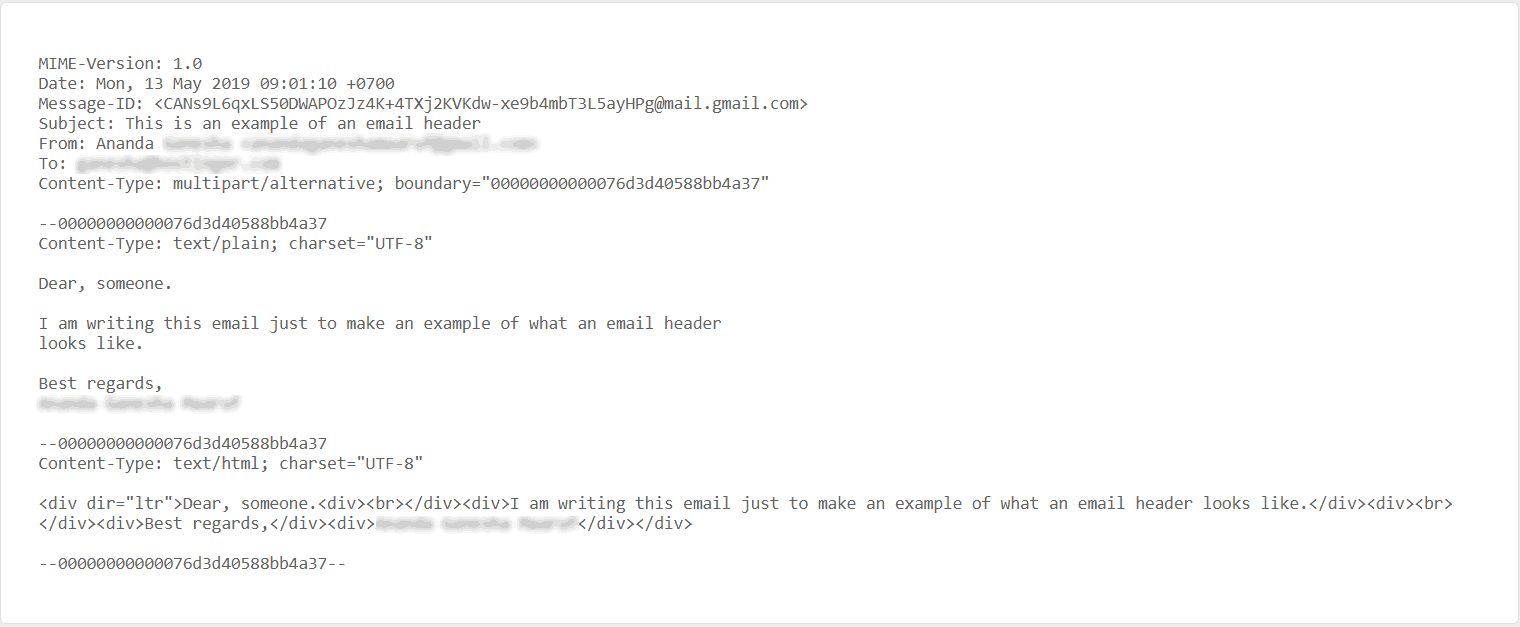
An email header is a code snippet that consists of essential details to authenticate an email message. It precedes the email body and also contains information about the sender and recipient.

An email header is more than the to, from, date, and subject section that precedes an email body. Headers also play an essential role in recording an email’s route since every email message has an email header.
When an email is sent from one address to another, the message will go through mail transfer agents (MTA). So, email headers will show If the email was sent to other addresses before reaching the final destination. If the header information looks suspicious, users can avoid engaging with the email.
Headers use metadata to provide information about the transmission process.
How to View an Email Header
The steps to view an email header depend on the provider. Gmail, Microsoft Outlook, Mozilla Thunderbird, iCloud Mail, Zoho Mail, AOL, and Hostinger webmail users have their own ways to view a header. While some show the entire raw message, others display the header separately from the rest of the HTML code.
Important! Before the next section, make sure to open an email from the recipient’s inbox.
View an Email Header on Gmail
Gmail’s automated machine learning has done a great job with removing spam from an inbox. However, 1 in every 1,000 spam messages can still be found in a user’s inbox. The good news is, Gmail users’ email headers will show how secure a message is.
Below are the steps to view an email header on Google apps:
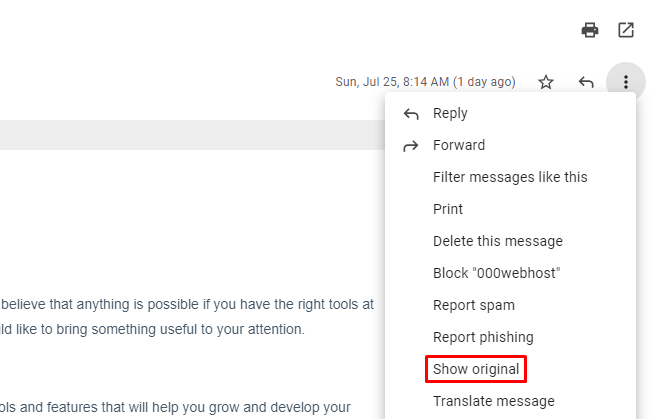
- Next to the reply button, click on the vertical three-dotted icon.
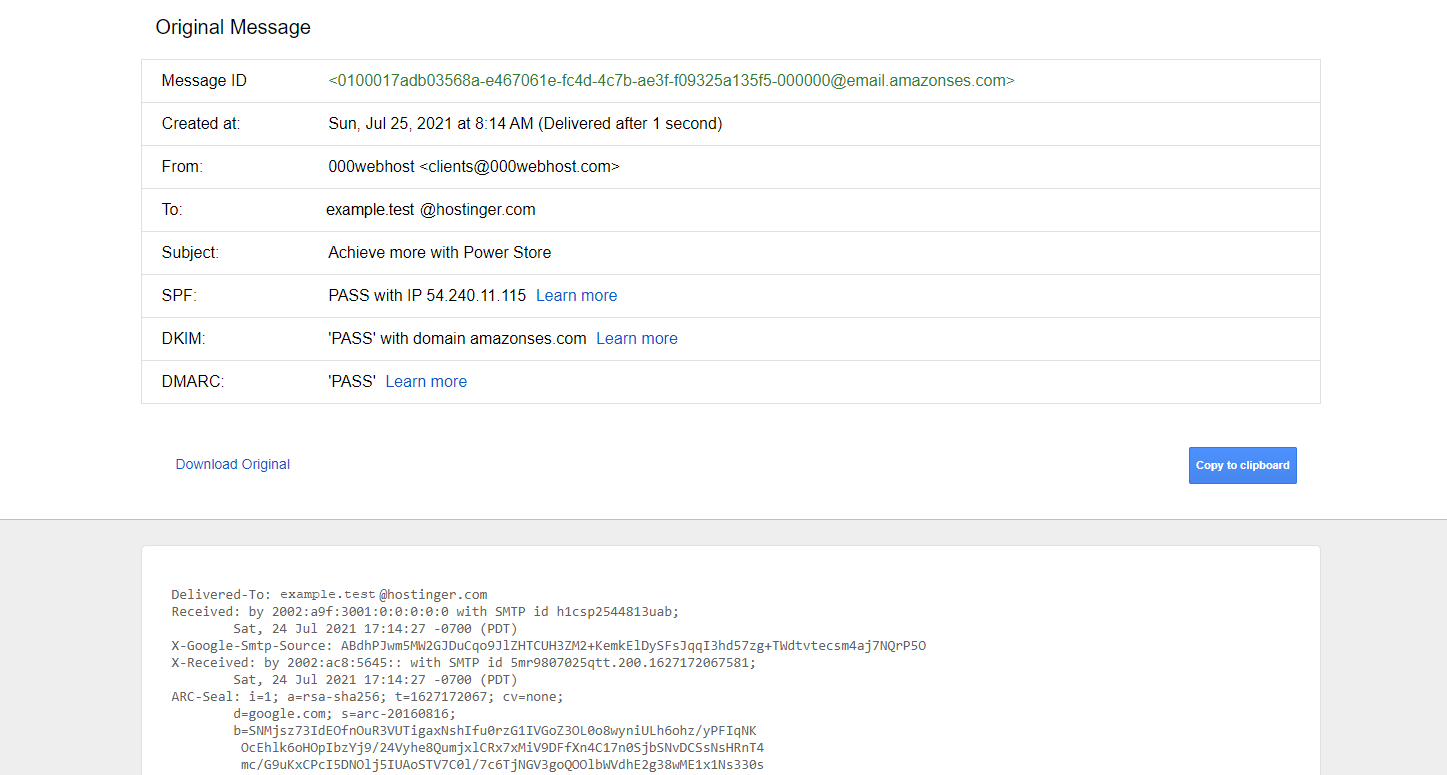
- Select Show original, and you’ll be directed to the overview of the contained information.
- Gmail users can press on the Download Original button to get the header or click on the Copy to clipboard button right away.
View an Email Header on Microsoft Outlook
Microsoft accounts are the most popular target for phishing, accounting for 43% of all phishing attempts. To avoid that, learning how to view an email header is essential for Microsoft Outlook users.
Different versions might have slightly different steps. However, the primary purpose is still to view the HTML source. Follow the steps below to view your internet headers using the most recent version, Office 365:
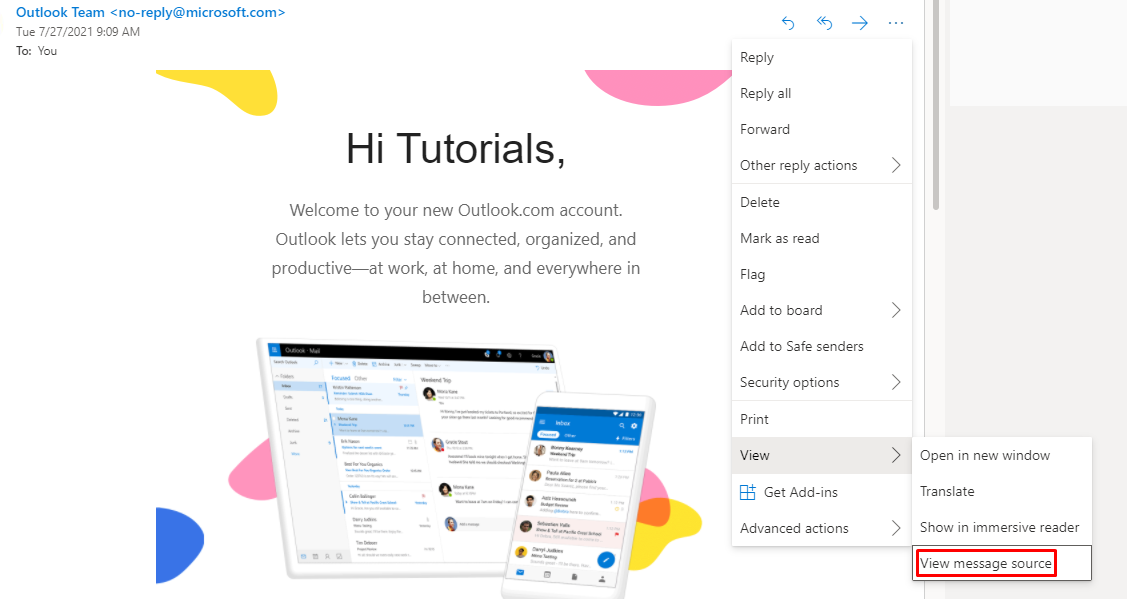
- Click on the three dots menu on the top right of the message.
- Click View -> View message source, which will show a new window. Users will have to scroll down first to find the email header.
View an Email Header on Mozilla Thunderbird
Accessing email headers using the Mozilla Thunderbird application is simple. Open Mozilla Thunderbird and double-click on the message of your choosing. Once it opens a new message tab, follow these steps:
- On the top right of the new tab, click on the three lines icon.
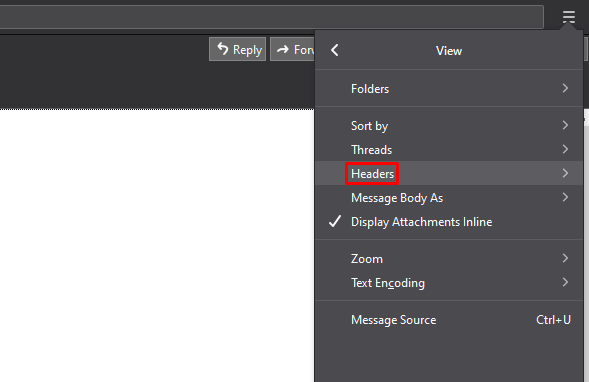
- Click on View -> Headers to see the full header of the message.
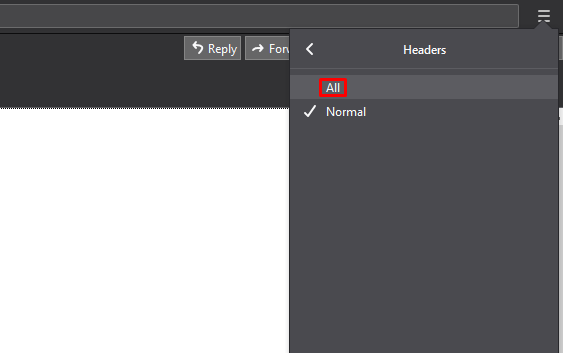
- Select All, and you will see the internet header on top of the email.
Alternatively, you can also simply press Ctrl + U on your keyboard after opening the email. However, it will show much more information than the full header, which might be confusing.
View an Email Header on iCloud Mail
For iCloud Mail users using a browser, click on the gear icon and select Show Long Headers. However, if you are accessing iCloud Mail using the Mac Mail application, follow these instructions:
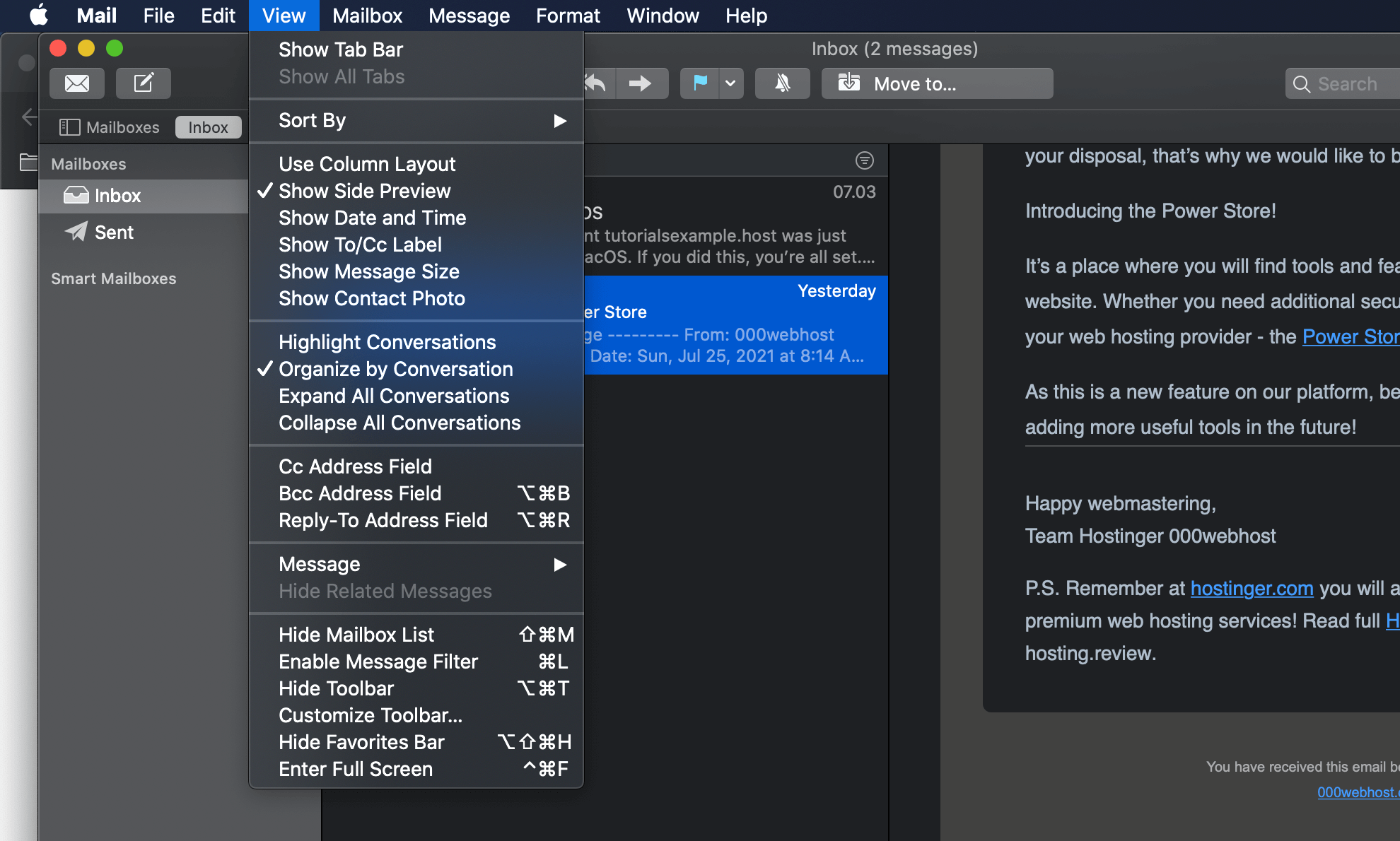
- Select the message you would like to see in the full email header and click on View.
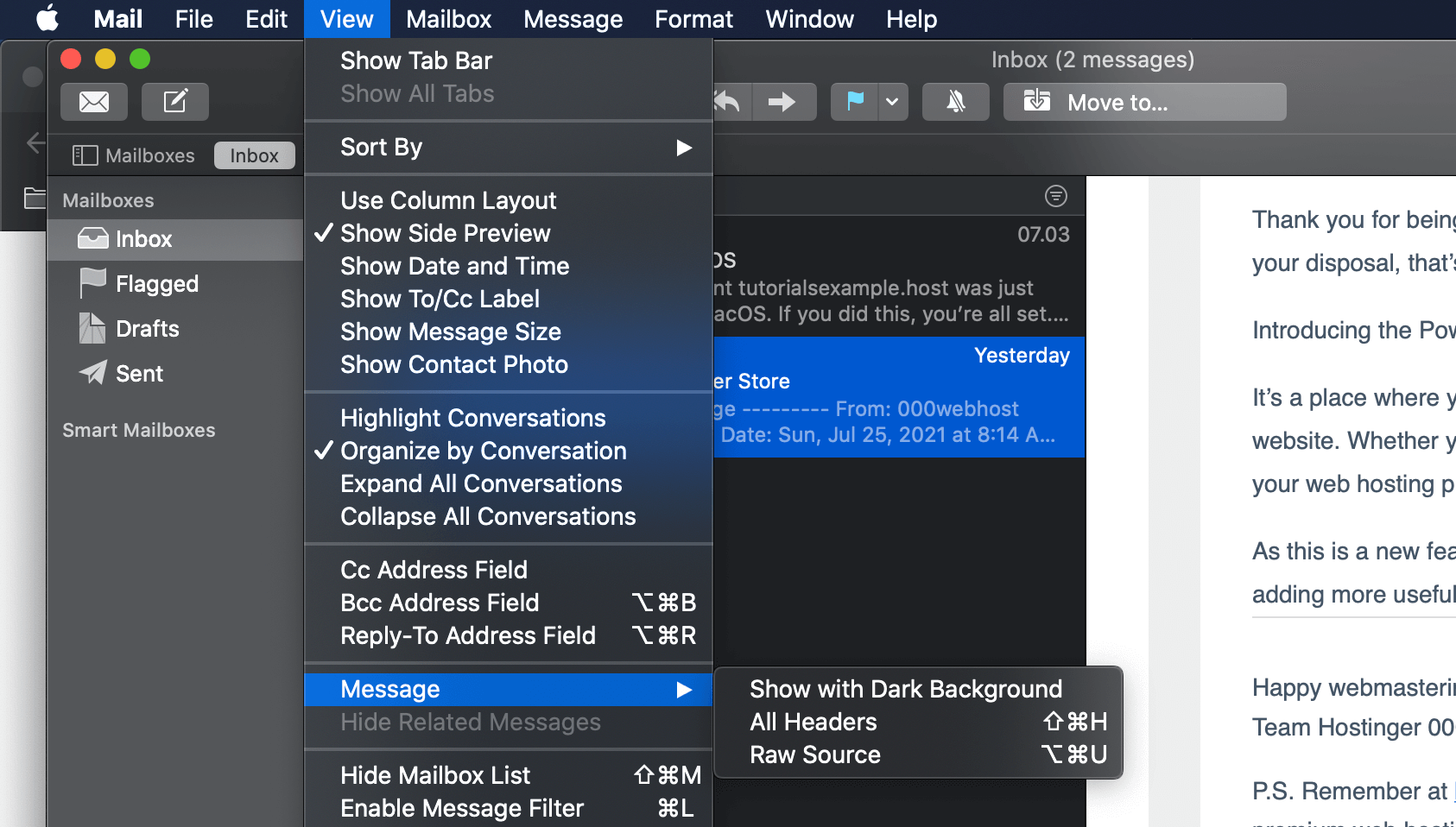
- Select Message -> Raw Source to find the email header.
View an Email Header on Zoho Mail
Zoho Mail is especially popular among business owners with high-traffic sites. The steps are more or less the same to other email clients using Zoho Mail:
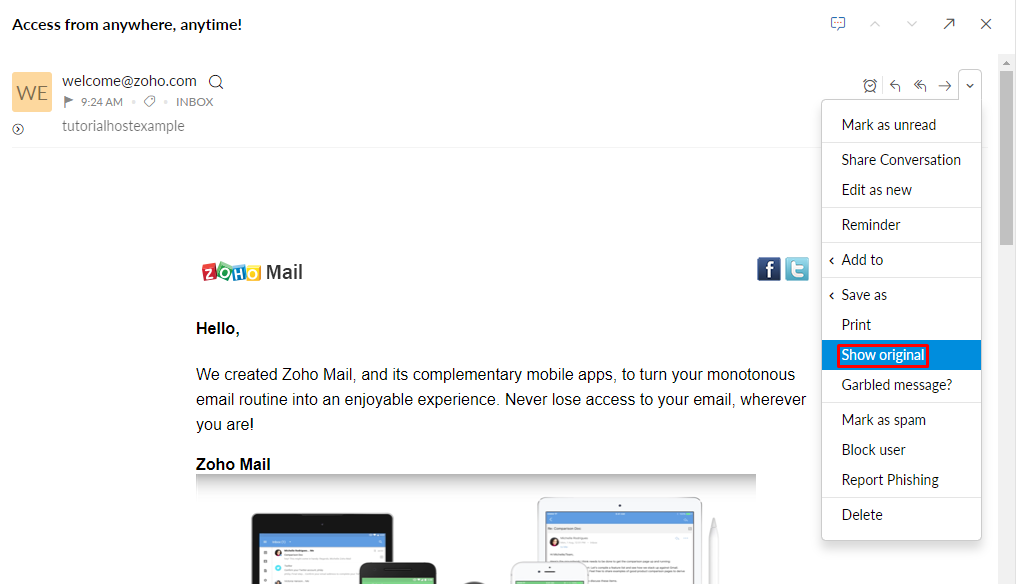
- Select a message and click on the drop-down menu icon, and select Show original.
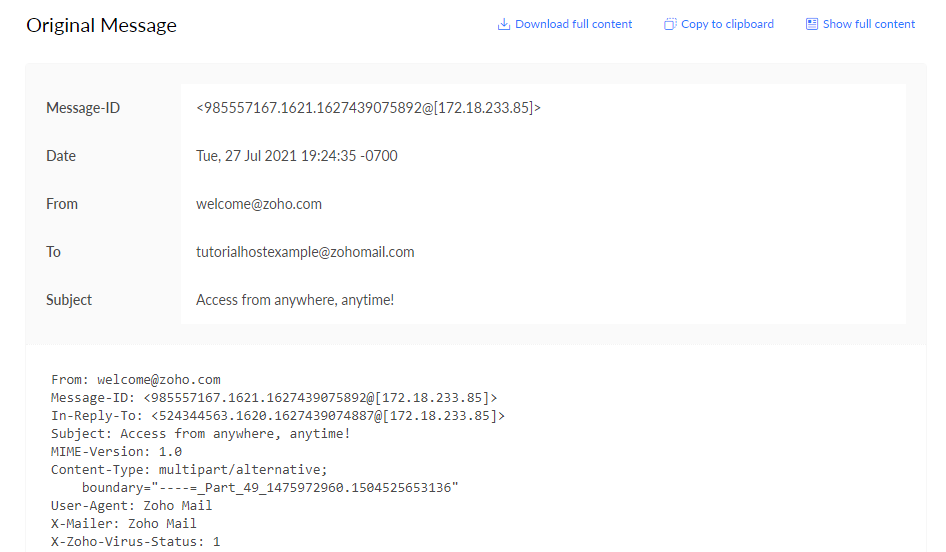
- Like Google, Zoho Mail also has the Download full content and Copy to clipboard buttons to make these actions easier.
View an Email Header on AOL
For an AOL Mail account, there are two simple steps to view an email header:
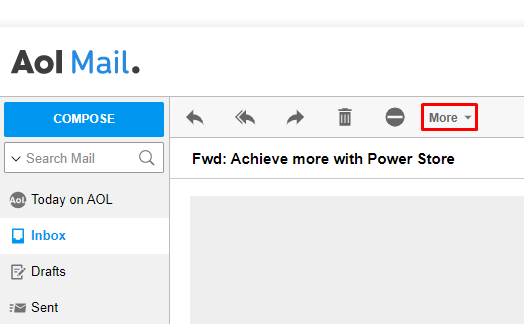
- Above the subject line, click on the More button.
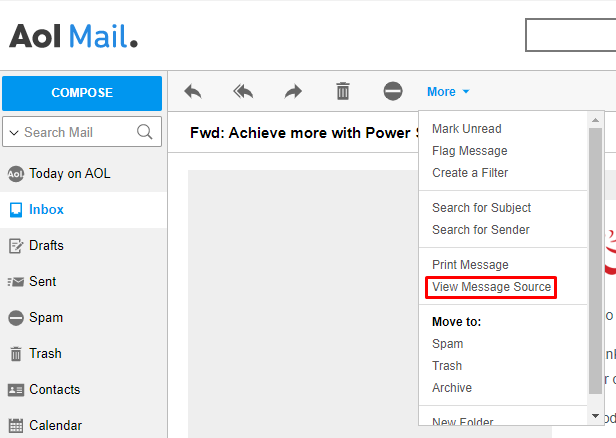
- Choose View Message Source, and it will open a new window with the HTML code of the email.
Understanding the Metadata
The metadata gives further details about the path that a message went through. Understanding these header lines will help protect your emails better.
Warning! Keep in mind that most of this metadata is forgeable. We recommend reading the header carefully every time to check for suspicious information.
Every email header is different, and some metadata is optional. Here are some of the metadata tags you should know:
- From – contains information about the sender. Keep note that the name and email address can be forged by hackers.
- To – shows the name and email address of the recipient, including all of the email addresses on the CC (carbon copy) and BCC (blind carbon copy) fields.
- Subject – the title or the topic that the sender sets on the subject line.
- Return Path – required field which contains the address to which the systems sends back an email. If there is no reply-to, it will be used as the address for recipients to reply to as well.
- Reply-To – optional field which contains the address for recipients to reply to.
- Envelope-To – shows that an email was sent to the address on this line.
- Date – timestamp of when an email client sent an email, usually follows the format of day, dd month yyyy hh:mm:ss. For example, Wed, 16 Dec 2020 16:57:23.
- Received – shows a valid email address of the recipient that cannot be forged. It also shows all the addresses that the email passed through while being sent from one computer to another.
- DKIM signature and DomainKeys – the DomainKeys and DomainKeys Identified Mail (DKIM) signatures help email providers identify and authenticate emails by connecting the domain name with the email.
- Message-ID – a unique identifier of letters and numbers created when first writing an email. Even though no two messages have the same ID, this line is forgeable.
- MIME version – Multipurpose Internet Mail Extensions (MIME) version is an internet standard that extends an email’s format and functionality. An email can have videos, images, and other files attached because of MIME.
- Content-type – tells you whether the sender wrote the email as plain text or using HTML. It will also show when you have an image or video content.
- X-Spam-Status – Apache SpamAssassin feature. It tells you the spam score of an email and whether it has been marked as spam.
- X-Spam-Level – depends on the score of the email’s X-Spam-Status. For every point it gains, the X-Spam-Level will show one asterisk.
- Message body – shows the main content of an email.
Does Email Message Header Matter?
In short, very much so. Even though it is possible to use an email without understanding the headers, it will help keep your messages secure. The information related to the email’s sender, recipient, and subject will enable users to:
- Prevent malicious attacks. Guard your account against phishing and spam attacks, as an email header can help email service providers troubleshoot potential issues. You can later block those unwanted emails from entering your inbox.
- Track email route. Use the email header’s data to track the message’s source by obtaining the sender’s IP address. Knowing how to do so is helpful if you receive malicious attacks and want to identify the attacker by copying the full email header and pasting it on a trace email tool.
- Create an email campaign. Avoid sending messages to spam or junk folders by checking the email header of your email campaign. Send a test email to yourself and see whether the information in the header is accurate to improve your email deliverability.
Conclusion
An email header provides information about the sender and receiver of a message. Not to mention, the message route can help users check whether or not the message is legitimate and safe. Understanding the metadata of an email header helps to avoid malicious attacks.
Before clicking on anything in an email message, we recommend checking the header first. We have also shown how to view an email header on different email providers, including Gmail, Microsoft Outlook, and AOL.
By knowing the benefits of an email header and how to view it, you can protect yourself from phishing attacks.

Astari is a digital marketing expert, with a focus on SEO and WordPress. She loves to share her wealth of knowledge through her writing, and enjoys surfing the internet for new information when she's not out in the waves or hiking a mountain. Her mission is to learn something new every day, and she firmly believes that there is no such thing as too much knowledge.

Comments
October 18 2021
Return Path and Reply-To aren't the same thing. Return Path is a required field that is also used in some anti-spam tech (e.g. SPF). It is the default reply address if one isn't specified. Reply-To is optional and is primarily used when replies should go to a different email address than what is in the Return Path (e.g. system sent emails that may be replied to). Another difference is if an email can't be delivered, notifications will go to the Return Path address, not the Reply-To address.
October 19 2021
Hi Chris! Thanks for pointing it out, the article will be adjusted soon as well :)
December 17 2021
I do not like the new headers on my email it makes it harder to see the right line of e-mail and it doubles the amount of lines in my e-mail account. Maybe after over 30 years with micro soft it maybe time for a change to another company.
December 22 2021
Hi William, sorry to hear that, but we'll be happy to consult you! You can check out our services at Hostinger.com and if you have any questions, just drop a message at support@hostinger.com