What is a subdomain?
Oct 14, 2026
/
By Brian
/
6 min Read

A subdomain is a prefix added before your root domain name, like blog.example.com or support.example.com. It functions as an independent site with its own content, design, and purpose while remaining connected to your primary domain.
Subdomains sit before your root domain in the URL structure – blog.example.com uses “blog” as the subdomain, “example” as the root domain, and “.com” as the top-level domain.
A subdomain appears before your domain (blog.example.com), while a subdirectory appears after it (example.com/blog). Search engines treat subdomains as separate entities that don’t share authority with your primary domain, whereas subdirectories pass SEO value to your root domain.
Here are some facts about subdomains:
- Subdomains function as separate websites with unique designs and content strategies while remaining connected through DNS settings.
- Common subdomain applications include ecommerce stores, support centers, blogs, community forums, regional content, affiliate portals, and staging environments.
- Each subdomain offers scalability, technical flexibility, improved search visibility, enhanced performance, and simplified team management.
- Use subdomains when content serves a different purpose or targets a different audience; use subdirectories when content relates to your main business, and you want consolidated SEO authority.
- Creating a subdomain requires DNS configuration through your hosting provider, with propagation taking 15 minutes to 48 hours.
How subdomains work
A subdomain is located at the beginning of a URL, preceding the root domain and top-level domain (TLD). The structure follows this pattern: subdomain.domain.com – where “subdomain” is your chosen prefix, “domain” is your root domain name, and “.com” is the TLD.
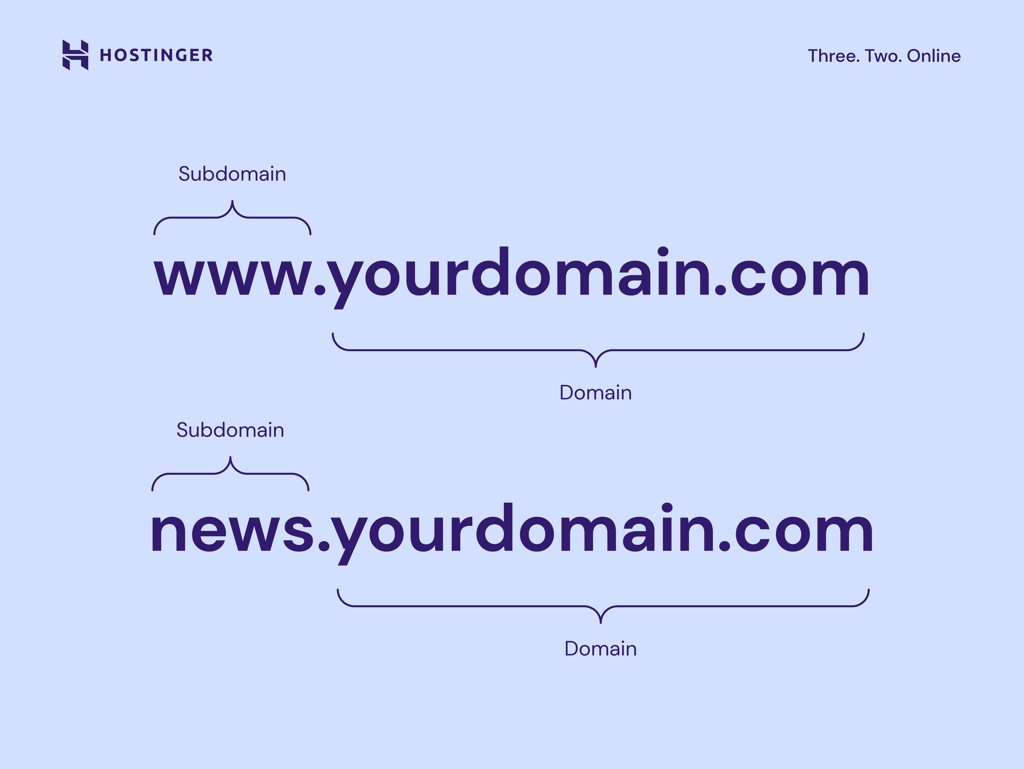
Each subdomain can have a unique design, a distinct navigation structure, and a tailored content strategy. However, the subdomains remain connected to your root domain in the domain name system (DNS) settings and share the same parent domain name.
For example, you’ll use shop.yoursite.com for your ecommerce store, while yoursite.com can focus on introducing your business’s profile and serve as your main online hub.
This independence means each subdomain can use different platforms and hosting configurations.
You can use WordPress for your primary website at yoursite.com while using an ecommerce builder at shop.yoursite.com.
Common subdomain use cases
Subdomains serve distinct functions:
- Ecommerce stores separate shopping from the main site. You can keep informational content at example.com while running your store at shop.example.com.
- Support and help centers provide dedicated customer service spaces. Companies use support.company.com or help.company.com for troubleshooting guides and knowledge bases, away from marketing content.
- Blogs operate independently from main business sites. Starting a blog at a subdomain like blog.example.com lets content teams publish articles without modifying the primary website.
- Community forums create spaces for user discussions. For instance, forum.example.com runs bulletin board software while the main site uses a different system.
- Regional content targets different markets. International companies use uk.domain.com for United Kingdom audiences or de.example.com for German content with local pricing and shipping options.
- Affiliate programs and B2B portals restrict access to specific audiences. For example, partners.business.com requires login credentials for wholesale pricing while the public site remains open.
- Staging environments test changes before going live. Developers may use staging.domain.com to preview updates and fix bugs without affecting the production website.
Benefits of using subdomains
Using subdomains has several advantages:
- Scalability. Add new sections without restructuring your main website. Launch an ecommerce store or support center without modifying your primary site’s navigation or content.
- Technical flexibility. Each subdomain can run different platforms and hosting configurations. Your primary site might use WordPress while your store runs on Hostinger AI Builder.
- Targeted keyword strategy. Search engines index subdomains separately, which helps you rank for different keywords and reach a broader audience.
- Performance isolation. With separate hosting, high-traffic subdomains operate independently without affecting your primary domain’s resources.
- Security containment. Issues in one subdomain remain isolated when properly configured, protecting your main site from subdomain vulnerabilities.
- Simplified team management. Different teams can control separate subdomains without interfering with each other.
- Cost efficiency. Subdomains use your existing domain name instead of requiring new domain purchases and renewal fees.
Subdomain vs subdirectory: What’s the difference?
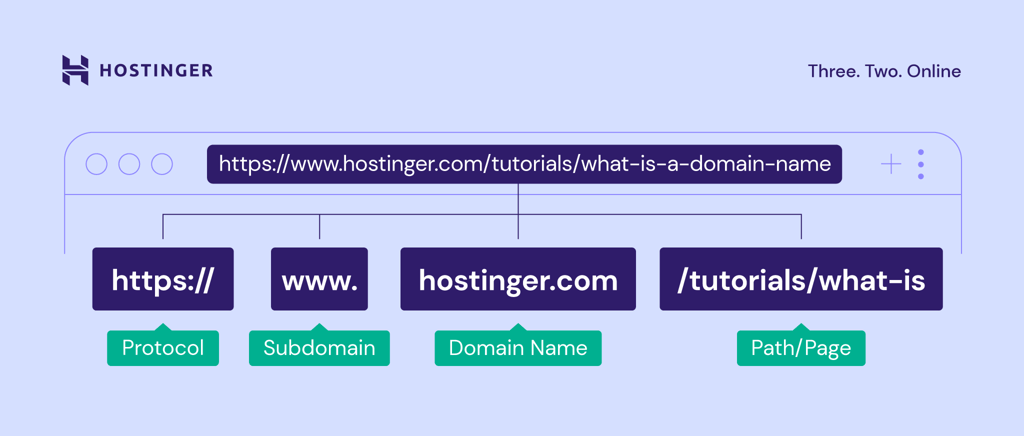
A subdomain appears before your domain name (blog.example.com) and functions as a separate site, while a subdirectory appears after your domain (example.com/blog) and works as part of your main site.
Both subdomains and subdirectories organize website content, but they work differently:
- Subdomain. A separate section with its own interface and content structure that still belongs to the main domain. Subdomains come before the root domain, like blog.example.com. Most subdomains use a single level of structure, although multi-level subdomains, such as uk.blog.example.com, are technically possible but rarely used.
- Subdirectory. A folder containing specific content inside your root domain. The subdirectory comes after the primary domain name, like example.com/blog. This structure means the blog content lives in a folder within the example.com root domain. You can create nested paths like example.com/blog/topic for a more complex organization.
When to use a subdomain vs a subdirectory
Subdirectories share search engine optimization (SEO) authority with your root domain, whereas subdomains operate independently without passing link value back to the main site.
So, search engines recognize subdomains as separate entities from your primary domain. If your subdomain performs well in search rankings, that success won’t benefit your primary domain’s SEO.
Meanwhile, subdirectories work as part of your main website. Content in subdirectories passes authority and links to the primary domain, which helps improve your overall site’s ranking.
Use subdomains when:
- The content serves a different purpose than your primary site
- The section targets an entirely different audience
- SEO benefit to your primary domain isn’t a priority
For example, a software company uses app.example.com as a landing page to download their application while keeping marketing content at example.com. In this case, the app doesn’t need to boost the primary site’s SEO since users access it directly after signing up.
Use subdirectories when:
- The content relates directly to your main business
- You want SEO benefits to strengthen your primary domain
- The section targets the same audience as your main site
- The content fits naturally within your existing site structure
For instance, if you’re running an online store, placing your product pages in a subdirectory, such as example.com/products, is more beneficial than using a subdomain. This structure helps your entire site benefit from the authority those product pages build.
➡️ Explore other methods to implement and build an SEO-friendly website.
How to create a subdomain
Creating a subdomain requires an existing domain and involves configuring DNS settings through your hosting provider or domain registrar.
Here’s how to create a subdomain:
- Access your hosting/domain registrar control panel. Log in to your account and navigate to the domains or DNS management section. Look for options labeled “Subdomains,” “Domain Management,” or similar.
- Enter your subdomain name. Choose a descriptive name that clearly indicates the subdomain’s purpose. Keep it short and relevant.
- Select the root domain. If you manage multiple domains, specify the root domain to which this subdomain belongs. For example, if you own example.com and example.net, indicate whether you’re creating support.example.com or support.example.net.
- Point to a directory. Specify which folder on your server contains the subdomain’s files. Your hosting provider usually creates this automatically, but you can customize the location. The directory path looks like /public_html/support or /home/user/subdomain-name.
- Save and wait for DNS propagation. After confirming your settings, DNS changes need time to spread across the internet. This typically takes between 15 minutes and 48 hours, although most changes are completed within a few hours.
Once propagation completes, you can install a content management system (CMS), upload files, or configure applications specific to that subdomain’s purpose. Each subdomain operates independently, so you’ll set up hosting, security certificates, and content separately from your primary domain.
➡️ Have a domain registered with Hostinger? Follow this guide to create a subdomain on Hostinger dashboard.
Domain Name Checker
Instantly check domain name availability.
Common mistakes to avoid with subdomains
Here are some common mistakes when creating subdomains and tips on how you can avoid them:
- Creating subdomains without a clear strategy. Before creating a subdomain, consider whether a subdirectory would be a better option. For example, a small business making separate subdomains for services and testimonials would benefit more from subdirectories like example.com/services.
- Targeting the same keywords on your main domain and subdomain. Keyword cannibalization confuses search engines and lowers rankings for both pages. If your main site has a blog at example.com/blog covering “email marketing tips” and you create blog.example.com with similar content, both pages compete against each other instead of strengthening your overall presence.
- Not setting up your domain on Google Search Console properly. The URL prefix property only tracks the exact URL you enter, like https://example.com and its subdirectories. Subdomains like support.example.com get excluded.
- Failing to link between your main site and subdomains. Unless your subdomains are widely known, users won’t discover them. Add internal links from your main website to subdomains in navigation menus, footer links, or relevant content. This helps users navigate and allows search engines to crawl all subdomain pages.
- Moving content without proper redirects. When relocating pages from your root domain to a subdomain, ensure that you set up domain redirects. Moving your blog from example.com/blog to blog.example.com without redirects can result in the loss of link equity and ranking power, creating broken links for users and confusing search engines.
How do you pick the right domain name before creating subdomains?
Your subdomain strategy starts with a strong root domain. Before planning your subdomain structure, you need a memorable, relevant primary domain that represents your brand and supports future growth. The right root domain makes all your subdomains instantly recognizable and trustworthy.
So, take time to choose the right domain name for your project – it’s the foundation that every subdomain will build upon.
This article is a localized version of What is a subdomain?, originally published in English.
All of the tutorial content on this website is subject to Hostinger's rigorous editorial standards and values.

Brian is a Content Writer who loves telling complex stories in a simple way. He has written all types of content, including tutorials, blog posts, landing pages, social media posts, white papers, infographics, and YouTube scripts. Follow him on LinkedIn.