What is a link payment?
Jun 11, 2026
/
By Ksenija
/
8 min Read
A link payment is a digital payment method that lets a business request money by sending a customer a clickable URL that opens a secure checkout page.
Instead of building a full ecommerce checkout or taking payment in person, you share a payment link through email, SMS, or chat, and the customer completes the online payment on their phone or computer.
Three core parts handle the transaction: the payment link itself, the payment gateway that creates and processes it, and the customer-facing checkout page where payment details are entered.
The main value is speed and simplicity. Businesses can collect money for products, services, deposits, or one-off orders without needing a website, while customers get a fast, contactless way to pay.
Link payments have become more common in online commerce and remote selling because they fit the way many businesses now work.
Freelancers, consultants, social sellers, and small online stores can send a secure payment link as soon as they confirm an order or finish a job. Most platforms also support familiar payment methods like cards and digital wallets, which makes the process easier for both sides.
In practice, the flow is simple: a business creates a payment link with a provider such as Stripe, PayPal, or Square, sends it to the customer, and the customer clicks through to a hosted checkout page to complete the payment.
The payment gateway then processes the transaction securely and sends the funds to the business based on the provider’s payout schedule.
What are the benefits of link payment?
In general, link payments make it easier to collect money by eliminating the need for a full checkout setup or a physical point of sale.
More specifically, they offer the following benefits:
- Convenience. You can request a payment by simply sending a link through email, SMS, or chat. There’s no need to build a website or ask the customer to install anything. For example, a freelancer can finish a project and send a payment link in the same message thread.
- Speed. Payments happen quickly because the customer goes straight to a ready-to-use checkout page. There are no extra steps like creating accounts or navigating through a complex store. This reduces drop-offs and helps you get paid faster.
- Works for remote selling. Link payments fit perfectly when you don’t meet customers in person. You can sell through social media, messaging apps, or email without setting up a full ecommerce site. A small business taking orders on Instagram can send a payment link right after confirming the order.
- Cross-device support. Customers can open and complete payments on any device, including phones, tablets, and desktops. The payment page adjusts automatically, so the experience stays simple regardless of how they access the link.
- No technical setup required. You don’t need coding skills or a developer. Most payment providers let you create a payment link in a few clicks.
- Flexible payment options. Many link payment tools support cards, digital wallets, and sometimes bank transfers. This gives your customers more ways to pay without extra work on your side.
- Easy to reuse and track. You can create links for specific products, services, or amounts and reuse them when needed. Most platforms also show payment status, so you can see who has paid and follow up if needed.
How does the link payment work
A link payment works by sending your customer a secure checkout page through a URL, where they can complete the transaction without visiting a full website.
You can use this method in many real-world situations. Online stores use it to accept orders through social media or email instead of a full ecommerce checkout.
Service providers like freelancers, consultants, or agencies send payment links after completing work or alongside invoices. It also fits one-off payments, deposits, or custom orders where a standard product page doesn’t make sense.
Behind the scenes, three components handle the payment link process.
The payment gateway (such as Stripe or PayPal) creates the payment link, hosts the checkout page, and connects to card networks and banks to process the transaction.
The customer interacts with that hosted payment page, where they can choose how to pay: credit or debit card, Apple Pay or Google Pay, or other supported methods.
When the customer submits their details, the gateway encrypts the data, sends it to the relevant payment network for authorization, and returns a success or failure response within seconds.
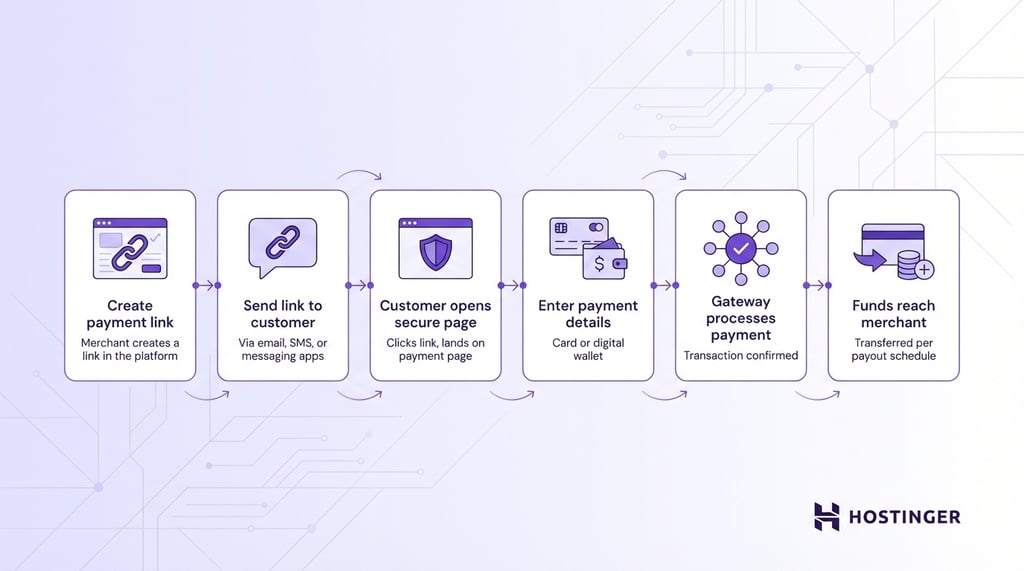
The payment link process follows a simple flow:
- The merchant creates a payment link using a payment gateway or platform such as Stripe or PayPal.
- The merchant sends the link to the customer through email, SMS, or a messaging app.
- The customer clicks the link and lands on a secure payment page.
- The customer enters their payment details, such as a card or digital wallet.
- The payment gateway processes the transaction and confirms whether the payment was successful.
- The funds are transferred to the merchant’s account based on the provider’s payout schedule.
What are the types of link payments?
Link payments can be grouped by how the customer pays and how it’s configured.
By payment method
Different payment links support different ways for customers to pay:
- Credit and debit cards – Standard option across Stripe, PayPal, and Square payment links
- Digital wallets – Apple Pay and Google Pay for faster, one-tap checkout on supported devices
- Bank transfers – Options like SEPA (Europe) and ACH (US), depending on the provider and region
By link configuration
Payment links also differ based on how they’re set up:
- Fixed amount links – Set a specific price (for example, $58) that the customer cannot change.
- Variable amount links – Let the customer enter how much they want to pay, which works well for tips, donations, or flexible pricing.
- Expiring links – Automatically become inactive after a set time (for example, a 24-hour payment window for a custom order).
- Reusable vs single-use links – Use the same link multiple times or limit it to one transaction.
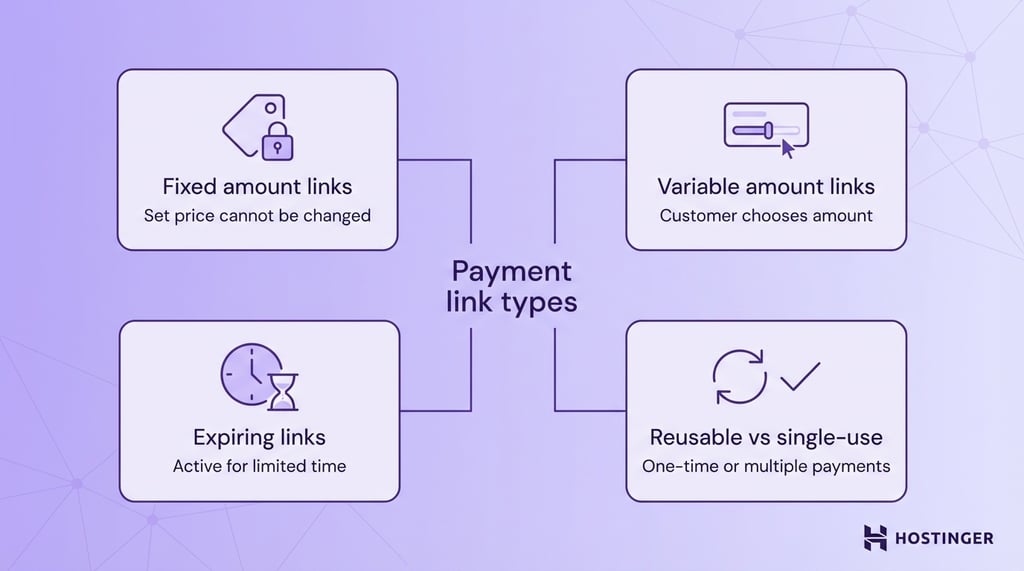
In practice, all link types are created and managed through payment platforms like:
- Stripe Payment Links – Create a hosted checkout page for a product or service in minutes, with support for fixed pricing, subscriptions, promo codes, and automatic tax calculation.
- PayPal.Me – Share a personal payment URL so your customers can pay you directly, with flexible amounts and no setup needed for simple, one-off payments.
- Square Invoices – Send invoices with a built-in payment link, so your customers can pay while you track due dates, send reminders, and manage partial payments
How secure is the link payment?
Link payments are secure when handled through trusted providers, but they still rely on customer trust and proper usage.
The main risk comes from fake or altered links. For example, a customer might receive a payment link that looks like it’s from your business, but actually leads to a fake checkout page designed to steal card details.
This can happen if a scammer copies your branding or slightly changes the URL to make it look legitimate.
This is similar to phishing emails. The payment system itself is secure, but the problem happens when the link is delivered through an untrusted or manipulated message.
Another challenge is customer hesitation. When someone receives a payment link through email, SMS, or chat, they may not trust it right away, especially if they don’t recognize the sender or the payment page.
For example, a new customer might hesitate to click a link sent through Instagram DMs without clear context.
There are also limitations in payment options offered by providers, which affect how familiar the payment experience feels.
If a customer expects to pay with Apple Pay or a local method like SEPA but doesn’t see it on the page, they may question whether the payment is legitimate and abandon the transaction.
To protect against these risks, payment providers follow strict security standards.
Most major platforms, including Stripe, PayPal, and Square, are PCI DSS compliant (Payment Card Industry Data Security Standard), which means they meet industry requirements for handling card data safely.
They also use encryption, so payment details are protected while being transmitted.
As a business owner, you can secure your ecommerce business and any other payment setup that relies on link payments by following a few simple steps:
- Send links through trusted channels – Use your official email, domain, or verified business account so customers recognize it’s you.
- Explain what the payment is for – Add context in your message (for example, “This link is for your website design invoice”).
- Avoid shortening or masking links – Full URLs (for example, https://checkout.stripe.com/…) clearly show the payment provider, which helps customers verify the link is legitimate. Shortened links like bit.ly hide the destination, making them look suspicious and easier to misuse in scams.
- Use reputable payment providers – Stick with platforms like Stripe, PayPal, or Square that handle compliance and security for you.
- Encourage customers to check the page – A legitimate payment page will use HTTPS (look for the lock icon 🔒in the browser) and show the payment provider’s name, such as Stripe or PayPal. If the page looks unfamiliar or lacks branding, customers should avoid entering their details.
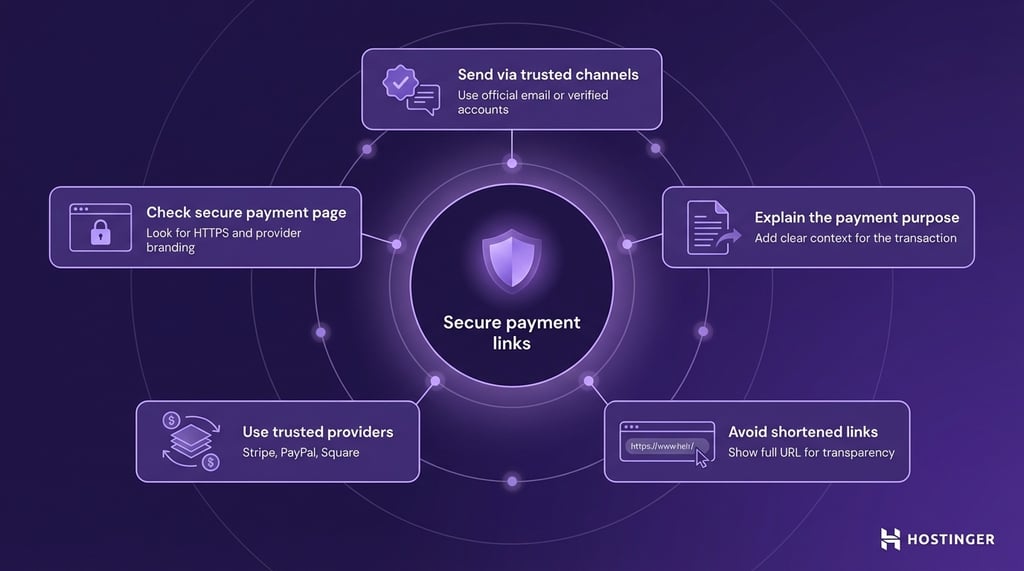
When used correctly, link payments offer the same level of security as standard online checkout pages, while keeping the process simpler and faster for both you and your customers.
What are the limitations of link payment?
Link payments are simple and flexible, but they depend heavily on trust and don’t replace a full checkout setup in every situation.
Before fully relying on link payments, it’s important to understand their limitations:
- Requires trust from the buyer – Your customer needs to feel confident clicking the link and entering their payment details. If they don’t recognize your business or the payment page, they may hesitate or abandon the payment. For example, a new customer receiving a payment link over email or social media may question if it’s safe.
- Not ideal for in-person payments – Link payments work best for remote transactions. In a physical store or face-to-face setting, customers expect faster options like card terminals, tap-to-pay, or cash. Sending a link in that moment can feel slow and unnecessary.
- May come with higher fees – Payment providers charge transaction fees, and these can be higher for certain payment methods or international transactions. If you rely heavily on link payments, these costs can add up compared to direct bank transfers or other methods.
- Limited branding and checkout control – You rely on the payment provider’s hosted page, which gives you less control over design, layout, and user experience compared to your own website checkout.
- Dependent on third-party platforms – Your ability to accept payments depends on the provider’s system, pricing, and availability. If the platform has downtime or changes its fees, it directly affects your business.
- Not built for complex orders – Link payments work best for simple or one-off transactions. Managing large catalogs, bundles, or advanced checkout flows is harder without a full ecommerce setup.
How to adopt link payment for your business?
You can adopt link payments by choosing a provider, setting up payment links, and using them in the channels where you already sell.
- Choose a payment provider that fits your workflow
Pick a tool based on what you sell and how you collect payments.
Stripe Payment Links work well if you want a hosted checkout page for products, services, or subscriptions.
PayPal.Me is simpler and works well for direct, one-off payments. Square Invoices is a better fit if you already bill customers via invoices and want due dates, reminders, or partial payments.
- Choose the right type of payment link
Use a fixed-amount link when the price stays the same, such as $58 for a consultation. Use a variable-amount link when the total changes, such as tips, donations, or custom work billed by the hour. Use expiring or single-use links when you want more control over who can use them and when.
- Set up the payment page clearly
Add your business name, product or service description, amount, currency, and any tax or shipping details the platform supports. This helps customers understand what they are paying for and makes the payment page feel more trustworthy.
- Connect link payments to the tools you already use
Link payments work better when they fit into your existing process. You might connect them to invoicing software, booking tools, mobile apps, or your CRM.
For example, a freelancer can send a payment link through invoicing software, while a small business owner can use a mobile app to create and share links right after confirming an order.
- Test the full payment flow yourself
Before sending links to customers, check the whole process from start to finish. Open the link on your phone and desktop, review the checkout page, and make sure the payment confirmation is clear. This helps you catch small issues before your customers do.
- Track what works and improve it over time
Watch which links get paid quickly, which ones are ignored, and where customers drop off. If a payment link performs poorly, the problem could be the message, the timing, or the payment options offered.
For example, if customers stop at checkout, test if adding Apple Pay or clearer payment details improves results.
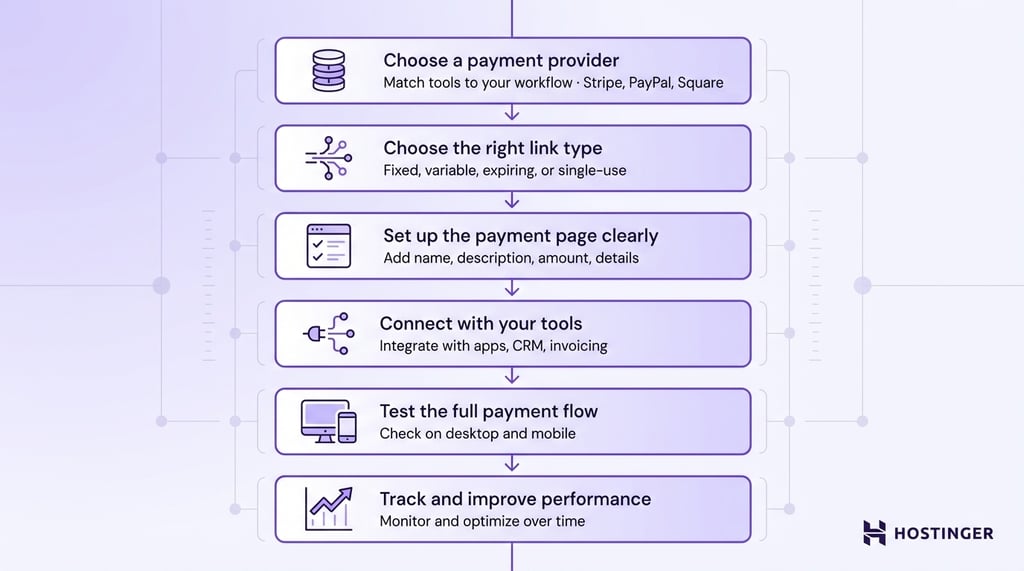
Before you set anything up, ask yourself a few practical questions:
- Do your customers usually contact you directly? If yes, link payments work well because you can send a payment link in the same conversation.
- Do you send manual invoices? If yes, you can replace or simplify them by attaching a payment link instead of waiting for bank transfers.
- Do you sell through Instagram, WhatsApp, or email? If yes, link payments let you collect money without sending customers to a separate website.
- Do you need to collect one-time payments, recurring payments, or both? If it’s mostly one-time or custom amounts, link payments are a strong fit. If you need a full subscription system or complex checkout, you may need more than just payment links.
Your answers will help you decide whether link payment fits your workflow or whether you need a full ecommerce setup instead.
All of the tutorial content on this website is subject to Hostinger's rigorous editorial standards and values.

Ksenija is a digital marketing enthusiast with extensive expertise in content creation and website optimization. Specializing in WordPress, she enjoys writing about the platform’s nuances, from design to functionality, and sharing her insights with others. When she’s not perfecting her trade, you’ll find her on the local basketball court or at home enjoying a crime story. Follow her on LinkedIn.