How to design websites with AI: 6 practical steps
Sep 16, 2026
/
By Larassatti D. & Simon L.
/
8 min Read
To design websites with AI, use a website builder that creates a layout based on your prompts and examples. Then create compelling content, establish your brand identity, and optimize the user experience.
This approach drastically speeds up the process, turning what used to be a weeks-long project into a task you can handle in a single afternoon.
Using AI enables you to bypass complex coding and design work, allowing you to focus more on your business goals and launch your online presence faster.
Here are the essential steps to design a website with AI:
- Choose an AI website builder. Select a tool that will generate a full website based on simple text prompts about your business.
- Leverage AI for design inspiration. Utilize AI to research competitor designs, identify current trends, and create mood boards to establish a visual direction.
- Create layouts based on examples. Provide examples for AI to generate layouts or pages that match your desired style, industry, and functionality.
- Draft content with AI. Get AI to write anything from punchy headlines and product descriptions to full-length “about us” sections and blog posts.
- Establish your site’s brand identity. Use AI to generate logos quickly, select complementary color palettes, and choose typography that fits your brand.
- Improve user experience (UX) using AI. Analyze user behavior and conversion data to suggest and even automatically implement improvements.
1. Get an AI website builder
To build a website with AI, start by choosing the right platform. You have two great options that differ in their approach.
The first is a dedicated platform like Hostinger’s website builder, where the AI creates a full website draft, including initial copy and images, based on a simple description you provide.
The key benefit of an AI-powered website builder is that it enables you to use a drag-and-drop editor to customize every element exactly as you desire.
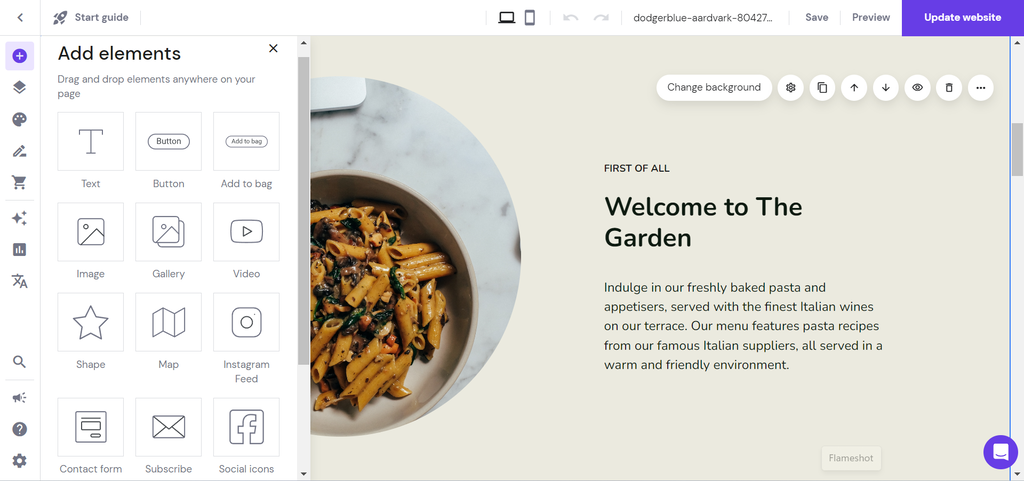
The second path uses an AI development platform, such as Hostinger AI Builder no-code platform. This builder takes a pure prompt-driven approach.
Instead of a visual editor, you chat with the AI and describe the features, design changes, or custom functionality you want, and the AI generates the necessary elements for your site.
Both approaches offer significant benefits for a small business:
- Speed. You can go from an idea to a live, functional website in hours or even minutes, not weeks.
- Affordability. You save thousands by removing the need to hire a professional developer or designer for the initial build.
- Simplicity. There is no need for complex coding, technical setups, or complex SEO configuration as AI handles the technical heavy lifting for you.
- Quality. AI models analyze millions of successful designs to ensure the layout, typography, and color schemes meet professional standards and look fantastic across all devices.
- Control. Whether you prefer using a visual editor or working purely with text prompts, AI tools give you flexible methods for fine-tuning your site’s design and functionality.
Here’s what the AI website creation process looks like in practice using WordPress, from answering three questions to a fully generated site:



2. Gather web design ideas with AI
AI can radically streamline the process of finding visual inspiration for your website project.
Forget spending hours sifting through endless stock photos and competitor designs. Instead, use AI image generators to create custom mood boards and mockups based on your exact creative brief.
This instantly provides you with a unique visual direction for your project.
To do this effectively, consider the following tools.
DALL-E
Created by OpenAI, this tool excels at following complex instructions with high precision, making it great for detailed mockups.
You can access DALL-E 3 for free through Microsoft’s Bing Image Creator or Copilot, where it follows your text prompts to create visual concepts.
Free users receive a weekly allocation of faster image generation. Once this allocation is used, you can still create images, but they will take a bit longer to generate.
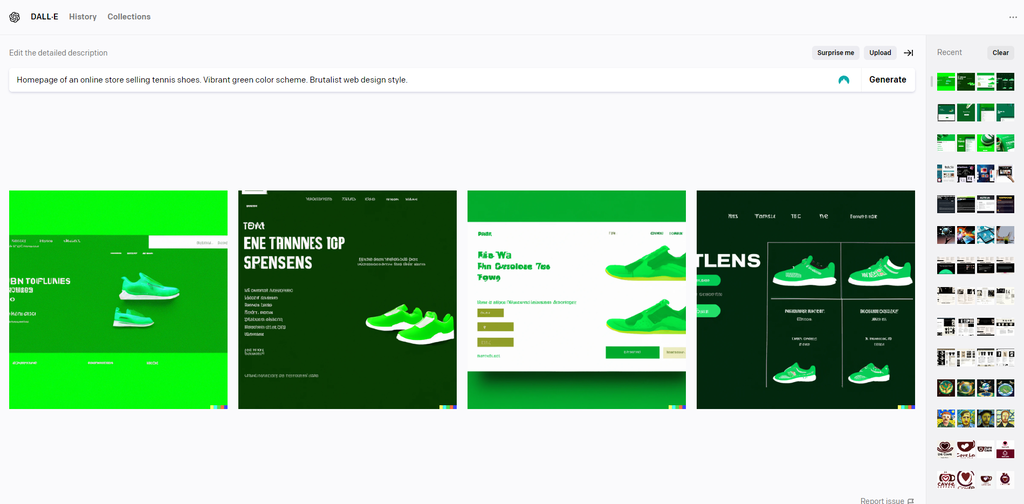
To use DALL-E, provide a detailed web design prompt that describes what you’re looking for. It should include the type of website and page, its purpose, color scheme, and web design style.
Here’s an example: “Homepage of an online store selling tennis shoes. Vibrant green color palette. Brutalist web design style.”
Below is what DALL-E came up with:
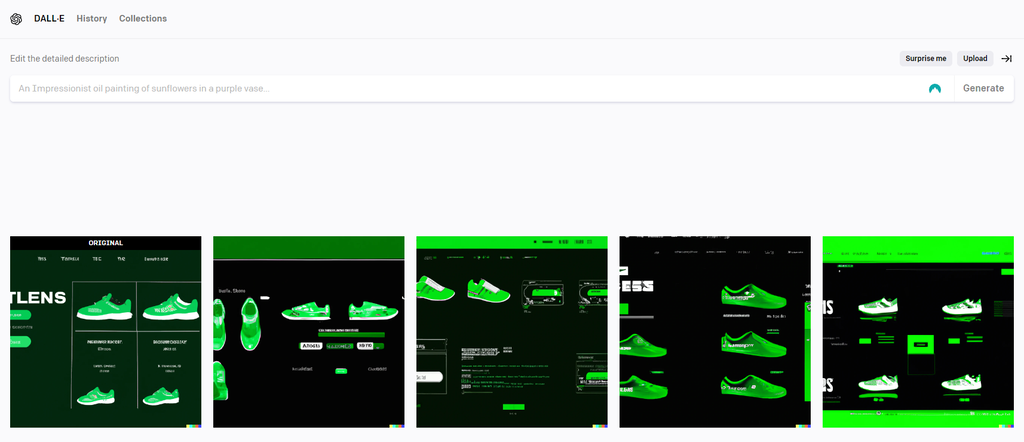
You can pick an image and create more variations for extra inspiration, like this:
Midjourney
Known for its artistic and photorealistic output, Midjourney is often preferred for generating unique, high-quality visuals that resemble professional photography or art more closely than digital art.
Access is available through both a Discord server and the official Midjourney website. Although they don’t offer a consistent free trial, the company occasionally enables temporary free trials during promotional periods.
To use Midjourney, you need to purchase a subscription, with plans starting at $10/month.
As with DALL-E, the key to effective prompt engineering is to make your input as specific as possible.
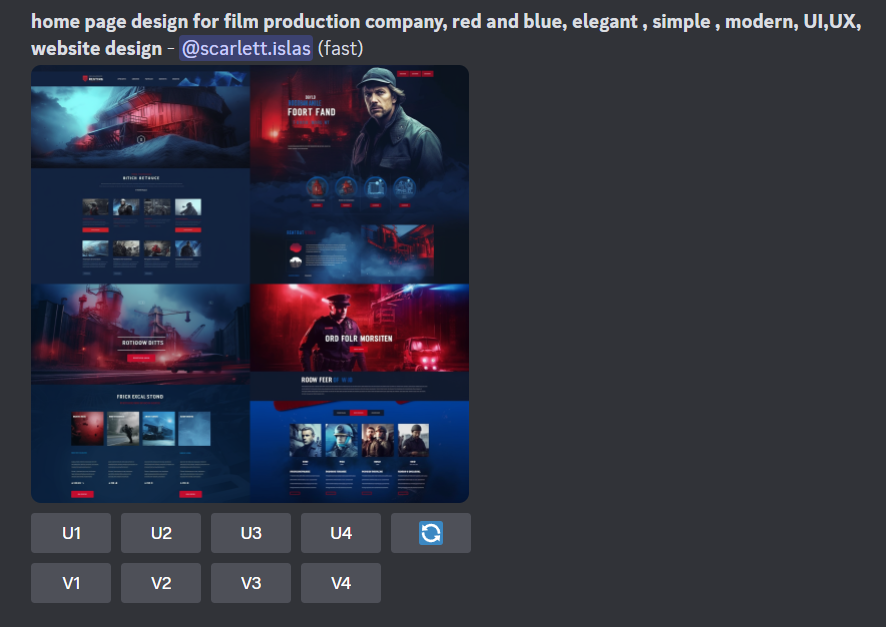
Here’s an example prompt used to generate homepage design examples. The user mentions the type of company that the website is for, its color scheme, and preferred aesthetics.
You can pick a version with your desired visual appeal and create new variations.
3. Make AI-generated website layouts based on an example or sketch
Once you have your design inspiration, the next step is to let your chosen AI platform generate the actual site layout.
Whether you use a visual builder or a prompt-based tool, you can instruct the AI to create not just the homepage design, but also the key inner pages using various page templates.
Describe the structure you want, for example, “a clean, two-column layout for a blog post with a clear table of contents,” or upload a screenshot you created in the previous step.
The AI then will then create web layouts that translate your input into a functional design.
The most important part of this step is evaluation. Don’t simply accept the first draft the AI produces. Actively assess the generated layouts based on your preferences:
- Is the text easy to scan? Does the typography work well together, and is the contrast high enough?
- Does the content flow logically? Are the most important sections, such as your main offer or call to action, placed “above the fold,” where users will see them immediately?
- Is it easy for a visitor to navigate the site and take the intended action? Check the mobile view to ensure all buttons and menus are functional and appropriately sized.
If the initial layouts aren’t quite right, refine your prompts to iterate on the design. Instead of starting over, tell the AI exactly what to fix.
For example, “keep the existing color scheme, but move the hero image to the right side of the screen and make the navigation bar sticky.”
This back-and-forth process of prompt refinement and critical evaluation guides the AI from a basic draft to a professional, high-performing website design.
4. Let AI create content for you
Content creation is one of the most immediate and common ways AI helps with website design. Generative AI tools like ChatGPT and Claude are invaluable for saving time, enabling you to quickly fill your new layouts with unique, high-quality text and visuals.
Your chosen website platform likely includes a built-in content creator. For example, Hostinger Website Builder features an integrated AI writer.
Simply describe the type of copy you need, say, a short paragraph about your services or a product description, and the AI will replace the placeholder text with a customized draft.
You can then accept the result, edit it manually, or prompt the tool to try again with different instructions.
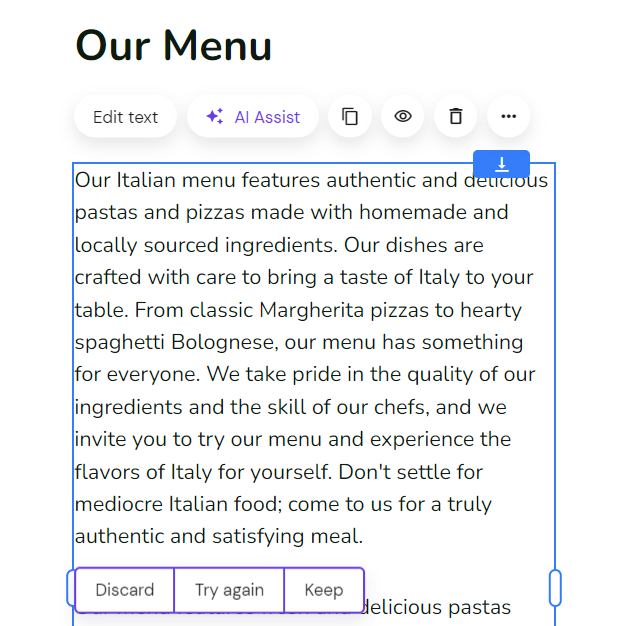
Additionally, AI image generators like DALL-E and Midjourney can help create completely custom pictures or illustrations tailored to your design’s specific style and needs. This means you avoid generic stock photos.
Tools like Canva offer powerful AI photo editors that are perfect for making quick adjustments. Instantly remove backgrounds, enhance photo quality, or use an AI brush to add or remove photo-realistic elements from your existing images.
Using AI for content ensures your text and visuals are ready for launch almost immediately after the layout is finalized.
5. Design your site’s brand identity with AI
AI tools are perfect for establishing your website’s core visual identity quickly and coherently. This includes the three most critical design elements: logos, color palettes, and typography (fonts).
For a custom logo, look for a dedicated tool like Hostinger’s AI Logo Generator.
You can describe your ideal logo in detail, for example, “a modern, minimalist icon of a cat holding a coffee mug, using only deep blue and white. This gives you precise control over the final look.
Alternatively, input your brand name, slogan, and industry, and the logo creator will present a range of design concepts. This is an excellent option if you’re unsure about the style and want to explore different ideas quickly.
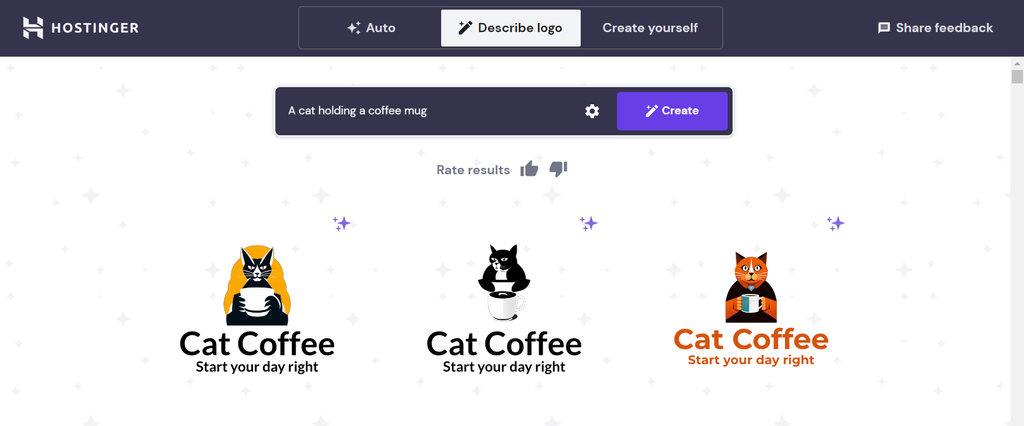
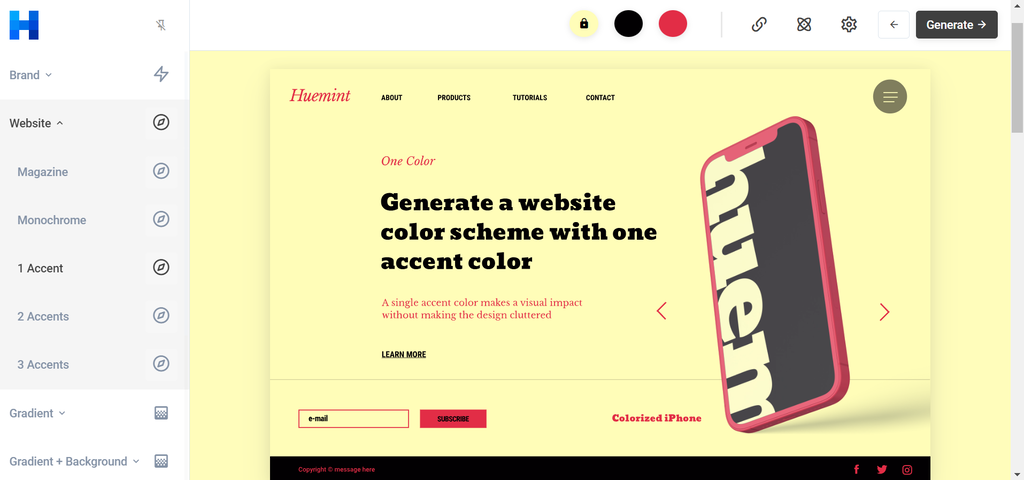
Choosing the right colors is also vital for brand recognition and visual harmony. Tools like Huemint or Coolors use machine learning to suggest palettes.
You select one primary color (the one that represents your brand), and the AI immediately chooses secondary and accent colors that complement it best.
These tools often allow you to set the AI’s creativity level and preview how the colors look together on different website layouts, ensuring readability and visual balance before implementation.
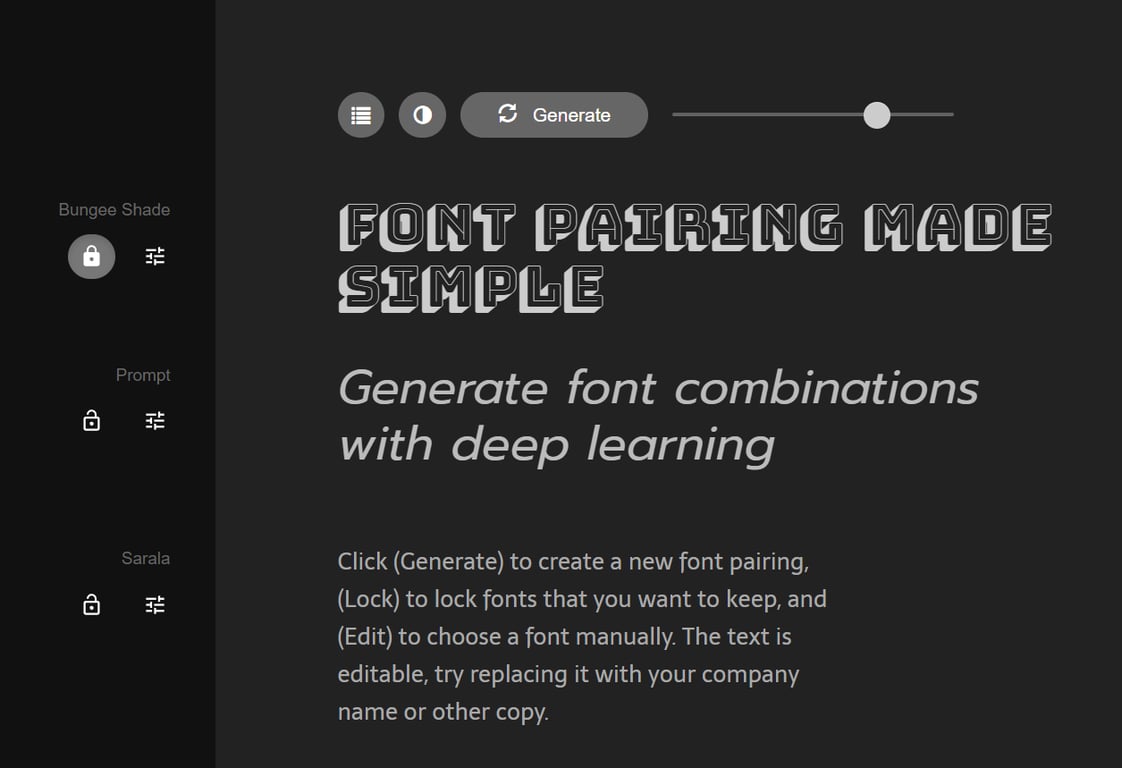
Getting your fonts right is key to both brand personality and readability. Using an AI font pairing tool like Fontjoy removes the guesswork.
Select a primary typeface for your headings, and the AI will suggest a well-matched font for the body text.
The goal is to create a cohesive and visually appealing font hierarchy that ensures contrast between headings and paragraphs, making the entire website easier to read.
6. Optimize user experience (UX) using AI
The final step uses AI to ensure your site performs well and drives conversions.
Various AI tools exist to analyze user data in real-time, pinpoint friction points, and automatically suggest or even implement changes to provide a better experience.
- Ecommerce tools. Recommend products based on a customer’s browsing history and real-time intent. This ensures users see the most relevant items, maximizing sales opportunities.
- Analytics tools. Generate AI heatmaps that predict where users will click before they even visit your site. This will help you place the most important elements, such as call-to-action buttons, exactly where they will be noticed.
- AI chatbots. Provide automated, 24/7 support and instantly answer frequently asked questions. This helps users find the information they need, reducing frustration and increasing satisfaction.
- Interactive elements. Generate interactive elements, such as quizzes, personalized pop-ups, and calculators, that capture leads and enhance the user experience. These elements adapt dynamically to the visitor’s stage in the buying journey, providing tailored micro-experiences.
Best practices for designing a website with artificial intelligence
Regardless of the AI tools you use, following these best practices ensures that your website delivers a successful and user-friendly outcome. Here are some key tips to consider in AI web design:
Focus on UX
Ensure your website is visually appealing, accessible, and intuitive for your target audience.
Always put the user first. Focus on web accessibility, ensure a responsive design that works perfectly on all devices, and create easy navigation to deliver a seamless user journey.
Understand the role of AI
AI website design is most effective when it works in collaboration with your own creative process and critical thinking.
AI is a powerful tool designed to enhance your skills and efficiency, not replace your decision-making. After all, you’re the one with the vision of what you want, and you’re the one who guides the AI.
Review and personalize AI output
While tools like AI website builders streamline the design process, avoid relying too heavily on their first drafts.
Always review and tweak everything the AI generates. Add your personal touch to the design to make it unique and aligned with your specific brand message.
Strive for a balance between AI-generated elements and your human creativity.
Test and optimize regularly
A website is never truly “finished.” You should continually test different elements, actively collect user feedback, and analyze data to identify areas for improvement.
Doing this regularly ensures your website remains relevant, user-friendly, and aligned with evolving trends and user preferences.
Learn how to design a website to deliver exceptional UX, effectively communicate your brand message, and achieve your business goals.
Other ways to use AI in web development
Now that you know how to design websites with AI, let’s look at other uses in web development. AI dramatically speeds up the design process, handling the technical setup so you can focus on strategy and creativity.
But its utility doesn’t end when you hit “Publish” – it extends into ongoing web development and maintenance.
After your website is live, AI tools become essential for:
- Security. AI security tools constantly monitor traffic for anomalies and threats, providing automated defense against malicious attacks.
- Marketing: AI analyzes search engine ranking factors and user behavior, offering automated suggestions for rewrites, optimization, and content updates.
- Scaling. AI cloud management systems predict traffic spikes and automatically allocate resources to ensure your site never slows down under heavy load.
The seamless transition from AI-assisted design to AI-assisted growth ensures your website continues to improve and remains secure long after launch.
This ongoing support is why so many businesses are learning about how to use AI for websites.
All of the tutorial content on this website is subject to Hostinger's rigorous editorial standards and values.

Larassatti Dharma is a content writer with 5+ years of experience in the web hosting industry. She has populated the internet with over 100 YouTube scripts and articles around web hosting, digital marketing, and email marketing. When she's not writing, Laras enjoys solo traveling around the globe or trying new recipes in her kitchen. Follow her on LinkedIn

Simon is a dynamic Content Writer who loves helping people transform their creative ideas into thriving businesses. With extensive marketing experience, he constantly strives to connect the right message with the right audience. In his spare time, Simon enjoys long runs, nurturing his chilli plants, and hiking through forests. Follow him on LinkedIn.