How to redirect a domain without losing SEO rankings
Mar 09, 2026
/
Jordana A.
/
5 min Read
A URL redirect is a server function that sends users from one URL to another, typically using HTTP status codes like 301 or 302 redirects.
Also known as domain forwarding, a simple URL redirect helps direct visitors to the correct website. This helps prevent duplicate content, allowing you to change your site’s structure without impacting rankings.
Domain redirection is a straightforward process:
- Log in to your domain registrar or hosting provider’s control panel.
- Locate the domain forwarding or URL redirect settings.
- Choose the domain you want to redirect.
- Enter the destination URL.
- Select the redirect type: 301 (permanent) or 302 (temporary).
- Save the changes and wait for propagation.
When done correctly, a URL redirect can boost search engine optimization (SEO) by passing link authority from old pages to new ones. This helps maintain rankings and prevents broken links, which helps improve user experience.
The result? Little to no traffic loss during migration.

Prerequisites for domain redirection
To set up a URL redirect, you must meet the following requirements:
- Access to domain settings. You should be able to use the URL redirect tool and manage DNS settings in your hosting provider or domain registrar’s account.
- Website backup. Back up your website’s content and settings to prevent data loss.
- Email forwarding. If your email is linked to the domain and you plan to redirect your web address, set up email forwarding to receive emails on the new domain.
- FTP or SSH access. You need access to your website’s server configuration files to set up URL forwarding using the .htaccess file.
4 ways to redirect a domain name
This section will cover four domain redirection methods, starting with the most flexible. Choose the one that best suits your needs.
Modifying the .htaccess file
This method works best for configuring advanced redirects. It lets you implement complex redirect rules and manage multiple redirects, giving you more control over your website’s URL structure.
The real advantage of using the .htaccess file is its flexibility. It lets you manage redirects based on specific conditions, like certain URL patterns or user agents, making it ideal for complex needs.
You can use a File Manager or FTP client to locate and modify the .htaccess file. In the following steps, we’ll explain how to do it hassle-free with Hostinger’s File Manager:
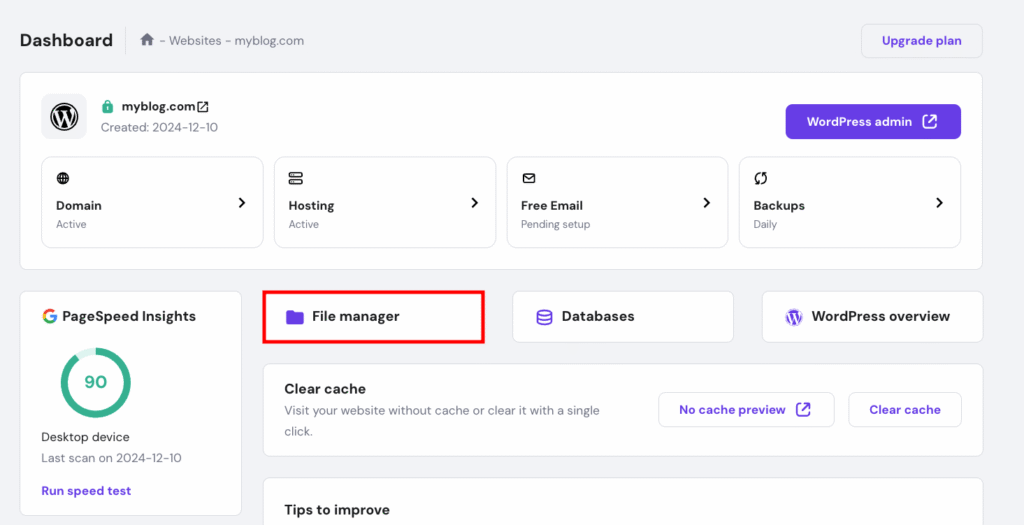
- Open the File manager in your hPanel dashboard.
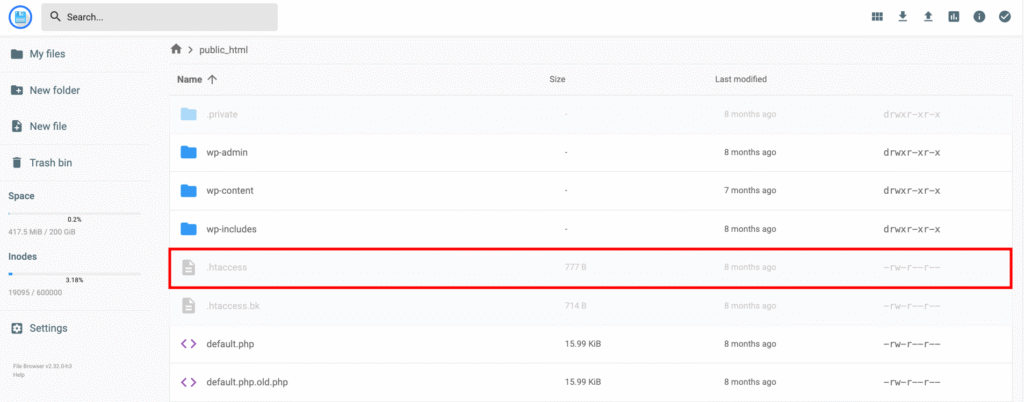
- Enter the public_html directory and double-click the .htaccess file to modify it.
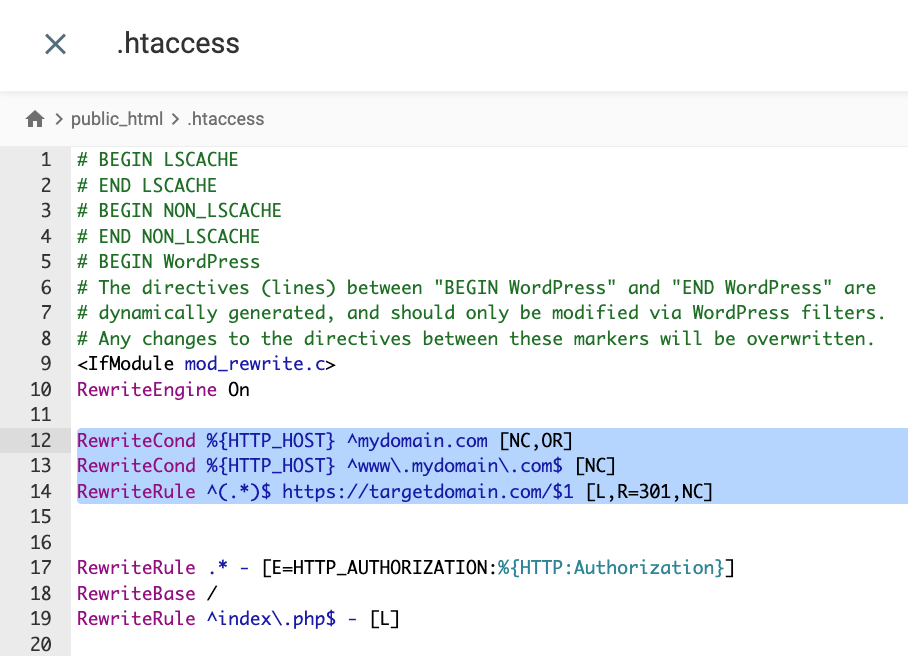
- Add the following redirect rules below the RewriteEngine On line to set up a 301 Permanent Redirect:
RewriteCond %{HTTP_HOST} ^mydomain.com [NC,OR]

RewriteCond %{HTTP_HOST} ^www.mydomain.com$ [NC]

RewriteRule ^(.*)$ https://targetdomain.com/$1 [L,R=301,NC]
Remember to replace mydomain.com and targetdomain.com with the correct web addresses.
To configure 302 Temporary Redirect, replace the R’s value with 302 instead.
- Hit Save once you’re done.
From the web hosting account
Most hosting providers allow users to set up redirects through domain settings, making this method the easiest and most user-friendly option. Here’s how to redirect a domain through Hostinger‘s hPanel:
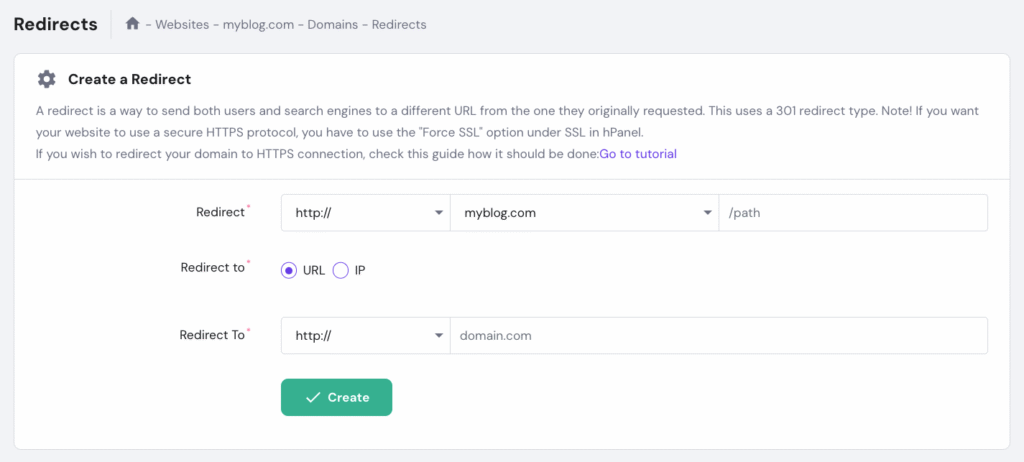
- Head to Domains → Redirects on the left sidebar of your hPanel dashboard.
- Fill in the required information:
- Redirect: choose a domain you want to redirect.
- /path: if needed, specify a custom path to redirect.
- Redirect to URL or IP: pick your preferred type of destination.
- Redirect to: enter the destination for the domain redirect.
- Hit Create once you’re done.

From the domain registrar account
If you don’t have a hosting plan, you can still redirect your domain using Hostinger’s domain forwarding feature. While technically a form of forwarding, it functions like a redirect by sending visitors from your domain to another website.
Here’s how:
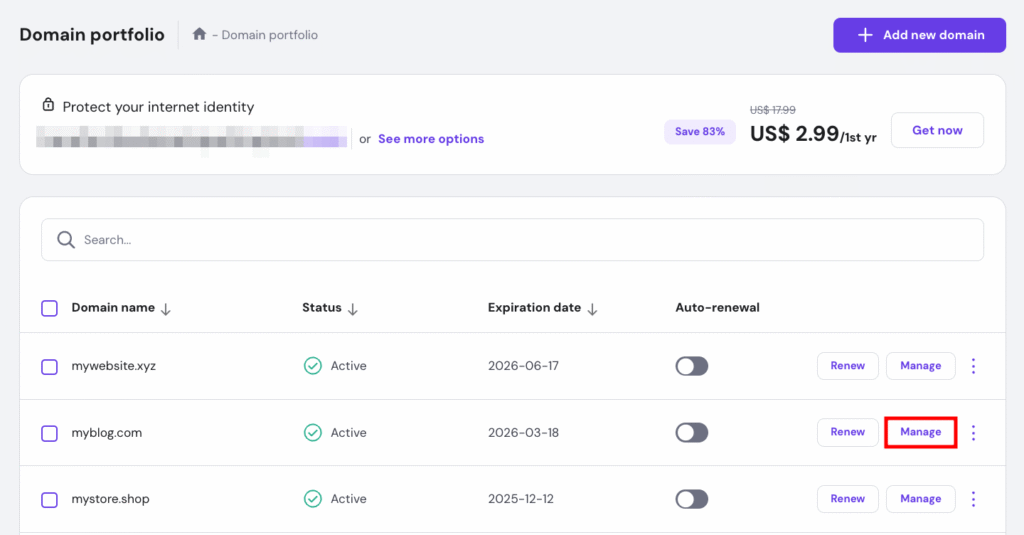
- On hPanel, go to Domains → Domain portfolio and select Manage next to the domain you want to redirect.
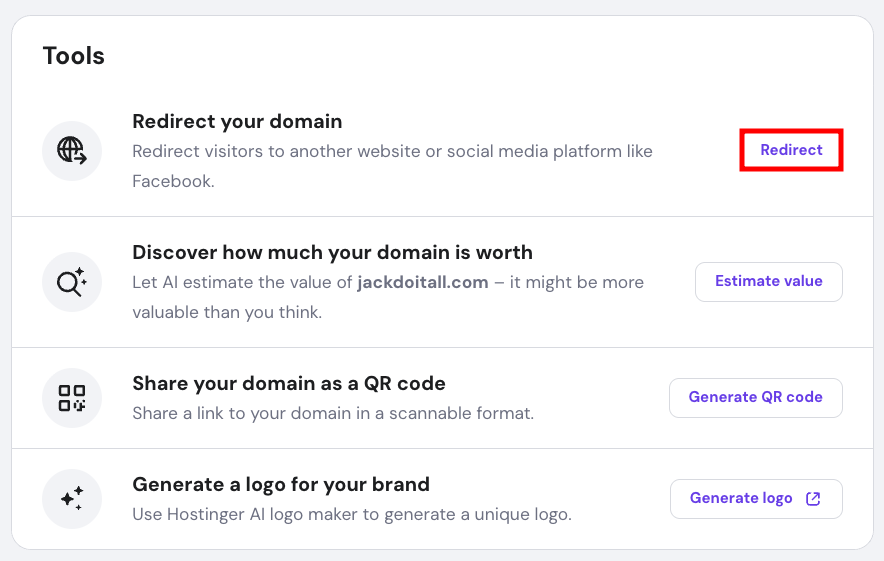
- In the Domain Overview section, scroll down and select Redirect your domain.
- Set the redirect form to Custom, enter the destination URL, and select the redirect type.
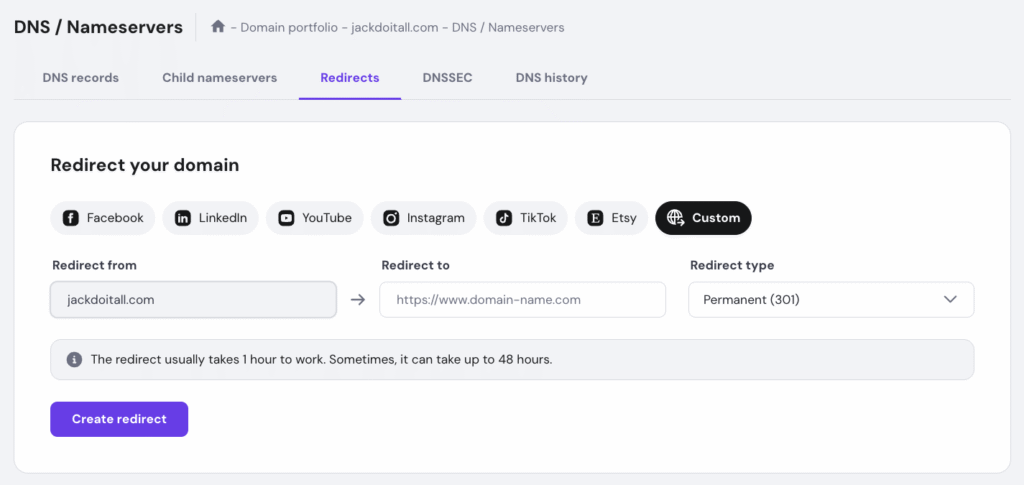
- Hit Create redirect once you’re done.
Using DNS records
The domain name system (DNS) translates domain names into IP addresses. When a user enters a domain name into their browser, the DNS system finds the matching IP address for that domain and directs the user to that website.
To redirect domains with DNS records, create CNAME or A records linking the old domain to the new destination’s domain or IP address.
Here’s how to do it using a Hostinger account:
- Access Advanced → DNS Zone Editor on the left sidebar of the hPanel dashboard.
- Fill in the new DNS record in the Manage DNS records section:
- Type: pick CNAME from the drop-down menu.
- Name (host): enter @, which represents your old domain name.
- Points to: add the destination web address.
- TTL: keep the default TTL value at 14400 seconds.
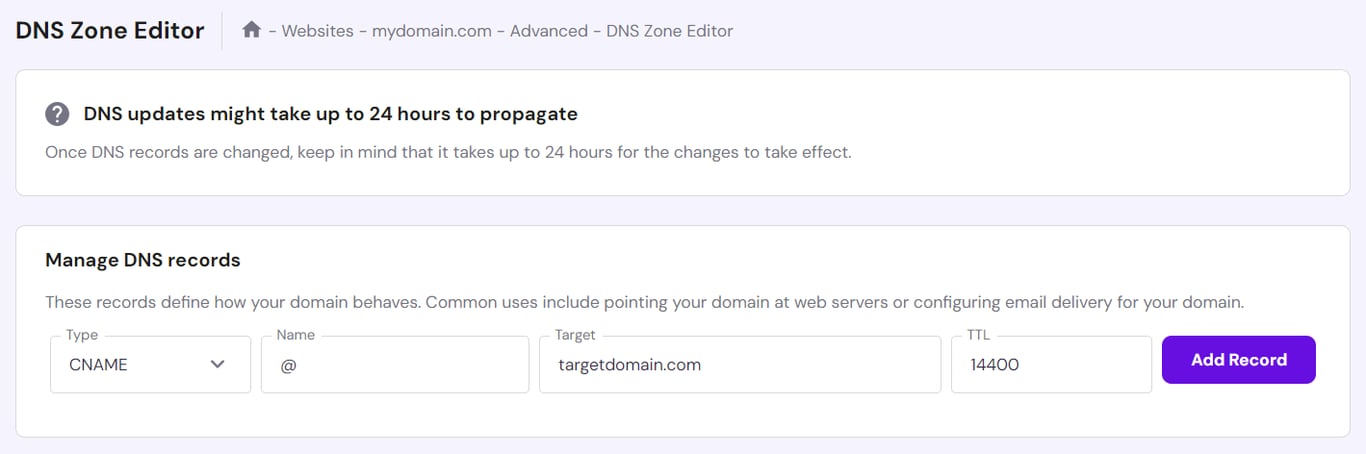
- Select Add Record to save the settings.
- Scroll down to the list of DNS records and Remove any conflicting records set for the same @ host.
DNS propagation takes up to 24 hours to complete. Once it’s done, the old domain will redirect visitors to the new web address. You can monitor your propagation status by location for domains using Hostinger nameservers.
Testing and troubleshooting domain redirects
After setting up the redirect, test it by entering your old domain in different browsers and devices to make sure it leads to the correct URL. You can also use free online tools like What’s My DNS or WhereGoes to verify it’s working properly.
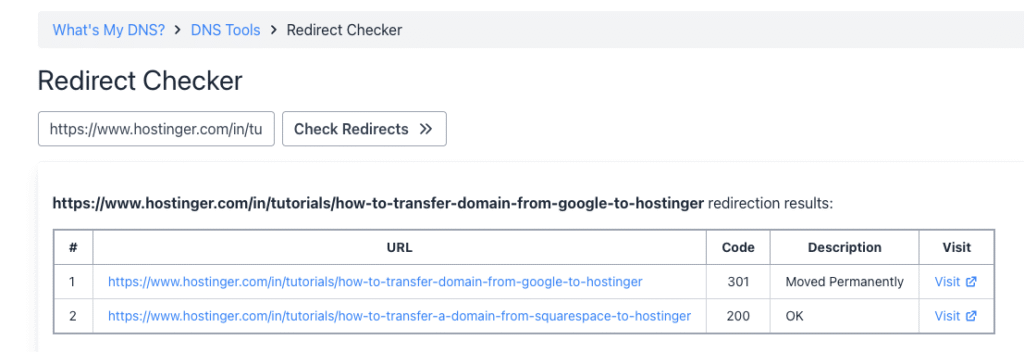
If the domain redirect doesn’t work, try the following troubleshooting tips:
- Check the redirect type. Clarify whether the redirect is intended to be permanent (301) or temporary (302). If you use the wrong redirect type, delete the old one and create a new redirect by following the steps above. Check the next section to learn the difference between the two types of redirects.
- Clear browser cache. Make sure you’re seeing the website’s latest version.
- Check DNS records. If you changed your DNS record, make sure it has fully propagated using a DNS checker.
- Look for typos and incorrect settings. Check whether the redirected URL matches the target URL.
If the error persists, contact your hosting provider or domain registrar for assistance. Hostinger’s Customer Success team is available 24/7 to assist you with any redirection issues.
Types of domain redirects
There are two main types of redirects: 301 (permanent) and 302 (temporary). Not every situation benefits from a 301 redirect domain setup, so it’s important to understand which type to use to protect your SEO performance.
301 redirect
Also known as a permanent redirect, 301 redirect is commonly used when moving a website to a new domain. It passes on link equity and maintains links coming from other websites, allowing you to retain the old domain’s search ranking. This redirect type is also unmasked, meaning visitors will see the URL change in their browsers.
Want to set up 301 redirects in WordPress? Check out our step-by-step guide covering all the available methods.
302 redirect
A 302 redirect is a temporary redirection method often used in the short term for purposes like heavy website maintenance or A/B testing. Although it won’t pass on SEO value to the target URL, visitors will still see the URL change in their browsers.
Masked redirect
A masked redirect or URL frame shows the destination content while retaining the original URL in the browser’s address bar. This redirection type creates the illusion that the content is on the original domain when it’s actually elsewhere.
Although many marketers use masked redirects for affiliate marketing or branding purposes, they can negatively impact SEO in the long run. Search engines might identify them as duplicate content, which can harm the destination domain’s SEO authority.
For these reasons, not all hosting providers and domain registrars support masked redirects. That said, you can edit the .htaccess file to set up a masked redirect manually.
Why would I need to redirect a domain?
Redirecting domains is a common practice during website rebranding or restructuring, domain consolidation, or protocol change. Redirects allow visitors to access the correct website, even if they enter the wrong web address or click on an outdated link. It also helps preserve SEO authority and prevent broken links.
Can I redirect multiple domains to the same website?
You can redirect multiple domain names to the same website. It’s also possible to redirect each one to a specific page on the destination domain.
Do redirects hurt SEO?
When done correctly, redirects don’t hurt your search engine optimization (SEO) efforts. In fact, 301 redirects pass most of a page’s link equity to the new URL, making them essential for maintaining rankings when moving content, changing domains, or fixing broken links.
When it comes to SEO and redirects, problems usually happen only if they’re excessive or set up incorrectly. Too many redirects can slow your site and confuse search engines, which may harm SEO. The key is to use them sparingly, point to the most relevant pages, and include them in your regular SEO audit process to keep everything running smoothly.

Jordana is a Senior Content Writer with a background in Information Systems. She has over five years of experience in WordPress and is casually dabbling with PHP and MySQL. Her passion for writing and technology drives her to create tutorials for anyone wanting to build their online presence. Follow her on LinkedIn.