How to get a free domain name in five steps
May 20, 2026
/
Ariffud M. & Klaudijus J.
/
8 min Read

A free domain name is a web address you can register at no upfront cost. You can get one through hosting bundles, website builders, free subdomain services, or promotional registrar deals.
Each method comes with different conditions. Hosting bundles usually include a free domain for the first year of a standard extension like .com or .net.
Free subdomain services give you an address under someone else’s domain, like yoursite.eu.org. Some standalone registrars also offer lesser-known extensions, though these are often subject to branding or trust limitations.
Getting a free domain works well for startups testing a business idea, and hobby bloggers who want an online presence without upfront costs.
It’s also a practical option for developers building staging environments and budget-conscious users who want to launch before committing to a paid domain.
Here’s how to get a free domain name:
- Choose a free domain type. Decide what fits your goals: a hosting-bundled custom domain, a free subdomain, or a standalone free extension.
- Find reputable providers. Compare providers based on available extensions, renewal policies, and DNS management features.
- Register your free domain. Sign up with the provider and search for your preferred domain name.
- Get a hosting plan with a free domain included. Purchase an annual hosting plan from providers like Hostinger if you want a bundled domain.
- Configure DNS for your domain. Point your nameservers, add DNS records, and wait for propagation.
1. Choose a type of free domain name
If you already understand what a domain name is, the first step to getting a free one is choosing the type that fits your project’s purpose and timeline.
There are three main categories: free country-code extensions (like .tk or .ml), subdomains provided by hosting platforms or website builders (like yoursite.wordpress.com), and custom domains bundled with paid hosting or builder plans for the first year.
Each type comes with its own advantages and drawbacks:
- Free country-code extensions (.tk, .ml, .ga, .cf, .gq). Freenom historically offered these extensions at zero cost without requiring a hosting purchase. However, it stopped accepting new registrations in March 2023 after a lawsuit from Meta, and millions of these domains were shut down in early 2024. Even before the shutdown, these extensions had strong associations with spam and phishing. That reputation often hurts SEO performance and email deliverability.
- Free subdomains (yoursite.wordpress.com, yoursite.wixsite.com, yourname.eu.org). Website builders and platforms offer subdomains on their free plans, and services like EU.org provide free subdomains with no expiration date. Subdomains cost nothing and work well for personal projects or testing. However, they limit branding because your address always includes the provider’s name.
- Hosting-bundled custom domains (.com, .net, .online, .tech). Many web hosting providers and website builders include a free top-level domain (TLD) registration for the first year when you purchase an annual plan. You get a professional, fully custom address. However, renewal fees apply after the first year, often between $10–20/year for popular extensions, depending on the registrar.
Attribute | Free country-code extension | Free subdomain | Hosting-bundled custom domain |
Example | yoursite.tk | yoursite.eu.org | yoursite.com |
Ownership level | Low (registrar retains rights) | Moderate (provider dependent) | Full (registered in your name) |
Branding suitability | Poor (spam associations) | Limited (includes provider name) | Strong (professional TLD) |
Renewal cost | Free (if available) | Free (no renewal) | $10–20/year after first year |
Best use case | Experimental or disposable projects | Personal projects, testing, learning | Business sites, portfolios, blogs |
A free country-code extension only makes sense if you need a disposable domain for a short-term experiment. Since Freenom stopped new registrations, this option is impractical for most users today.
A subdomain works well for personal sites, learning projects, or prototypes where branding is not a priority.
For long-term or business-facing websites, a hosting-bundled domain name offers benefits such as cost savings and stronger credibility. You get a real domain, full DNS control, and the branding advantage of a recognizable extension.
If you’re unsure what to register, try a domain name generator to find available options that match your brand or niche.
2. Find reputable free domain name providers
Finding a reputable free domain name provider means checking the service’s track record, available extensions, DNS management tools, and renewal terms before signing up.
The market for truly free domain registrations has narrowed significantly in recent years, so the options below reflect what’s realistically available today:
- WordPress.com. Provides a free subdomain (yoursite.wordpress.com) on its free plan. If you upgrade to a paid plan, it includes a custom domain for the first year.
- InfinityFree. Offers free hosting with subdomains such as yoursite.great-site.net and yoursite.rf.gd. You can also connect a domain you already own, but InfinityFree doesn’t offer free domain registration.
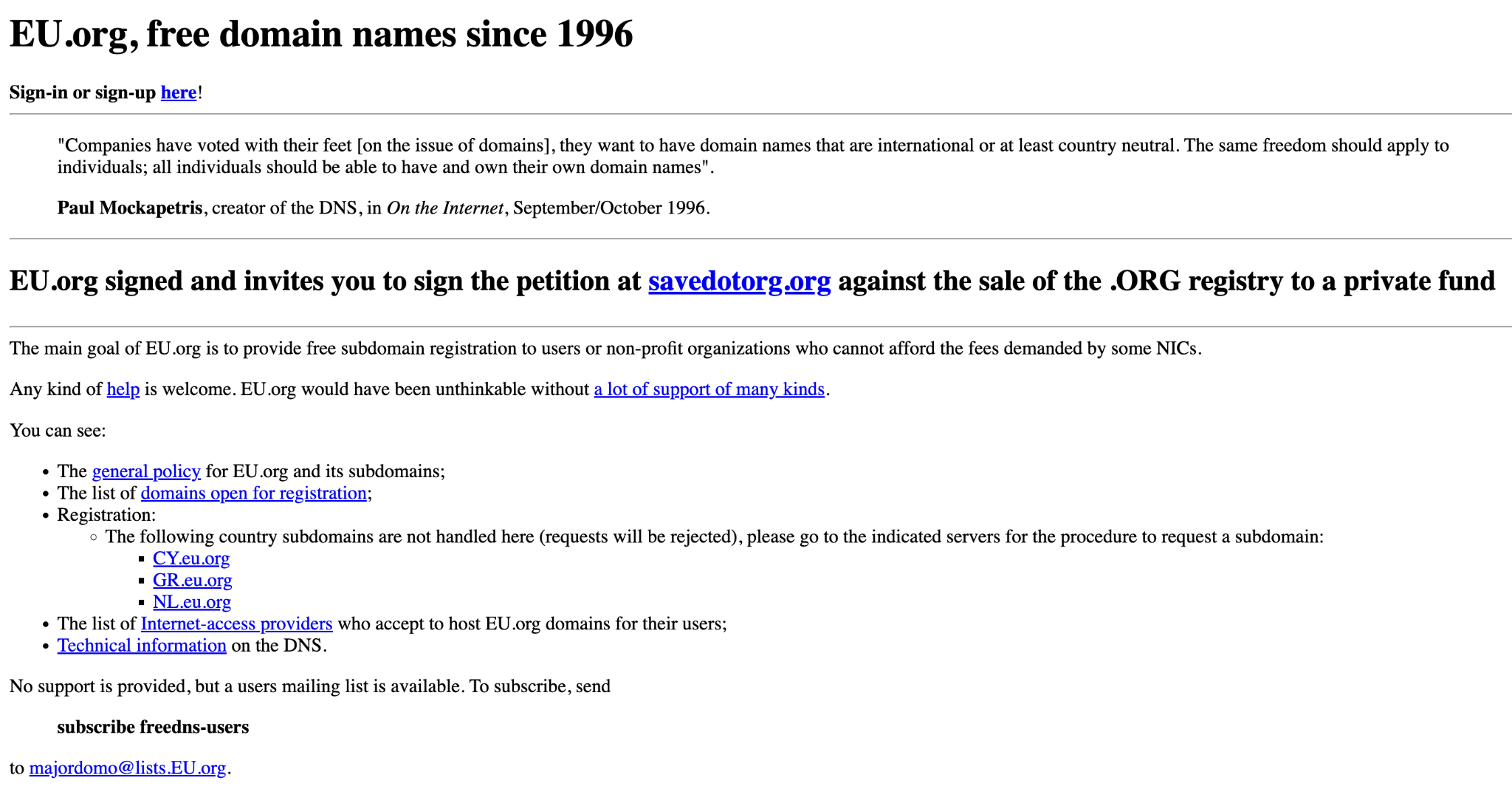
- EU.org. A volunteer-run service that has offered free subdomains (yoursite.eu.org) since 1996. Domains don’t expire and require no renewal. The trade-off is a manual approval process that can take days or weeks, and you must configure your own nameservers before applying.
When comparing providers, check four key factors: the range of available extensions, whether the provider clearly states renewal fees, the level of DNS management access you get (full record editing vs. simple forwarding), and what existing users say about reliability and support.
Reading the terms of service also matters, especially with free services that may restrict domain transfers or revoke registrations without notice. The best domain registrars clearly explain pricing and transfer policies on their signup pages.
Watch out for providers that aggressively upsell during registration, deactivate domains without warning if you miss a renewal window, limit DNS records to basic forwarding only, or hide transfer restrictions in fine print.
These are signs the provider prioritizes locking you in instead of giving you real control.
3. Register your free domain step-by-step
Registering a free domain name usually follows the same process as buying a domain, except you don’t pay for the registration. You search for an available name, create an account with your chosen provider, and complete the setup.
The exact steps differ depending on whether you claim a hosting-bundled domain or register through a standalone free service.
Here are the general steps to register a free domain:
- Search for your domain name. Go to your chosen provider’s domain search tool and enter the name you want. The tool will show whether the domain is available and which extensions you can register.
- Create an account. If you don’t already have one, sign up with your email address, create a password, and enter basic contact information.
- Choose the domain and extension. Select the domain name and extension from the available results. If your first choice is taken, try a variation or a different extension.
- Review the registration terms. Check transfer policies and usage restrictions before continuing.
- Complete the registration. Confirm your account and verify your email address. Some providers activate the domain immediately, while others require manual approval.
Some free domain services include optional paid add-ons during signup, such as WHOIS privacy, DNS management tools, or SSL certificates. Review what’s selected before you confirm registration to avoid unexpected domain costs.
Once your domain is active, secure your provider account by enabling two-factor authentication (2FA). Your domain is only as safe as the account that controls it.
4. Get a free domain included with web hosting or a website builder
Many web hosting providers and website builders include a free custom domain name in their annual subscription plans. This makes it one of the most practical and widely used ways to get a free domain.
Unlike standalone free registrars, hosting-bundled domains give you a professional extension like .com or .net, along with full DNS management and ownership under your name.
Some popular providers that bundle a free domain with their plans include:
- Hostinger. Includes a free domain for the first year with any annual Premium web hosting plan or higher.
- WordPress.com. Includes a free custom domain for the first year on paid Personal plans and higher.
- Wix. Provides a free custom domain for the first year with its Combo plan and higher.
Unlike standalone free domain providers that often register your domain under their own accounts, a hosting bundle registers the domain under your name through an ICANN-accredited registrar.
This means you can transfer your domain to another registrar if needed.
Hostinger’s annual web hosting and Website Builder plans include a free domain with the Premium tier (starting from ₦2900.00/month for a 48-month term) and higher.
You can choose from more than 20 extensions, including .com, .net, .online, .tech, and .store.
The domain also includes free WHOIS privacy protection and unlimited SSL certificates. This offer applies when you choose a 12-month or longer billing cycle.
5. Set up DNS and configure your free domain
Correctly configuring DNS for your free domain requires understanding how DNS works. The process involves pointing your domain to your hosting provider’s nameservers so visitors who type your address reach the correct server.
To set up DNS, open the DNS management panel provided by your domain registrar or free domain service. Then update the domain’s nameservers to match the values your hosting provider provides.
After that, wait for DNS propagation to complete. This usually takes a few hours but can take up to 24–48 hours.
If you claimed your free domain through a Hostinger hosting bundle and host your website on the same account, hPanel automatically configures the nameservers. Navigate to Domains → Manage → DNS / Nameservers to verify the values or add individual records.
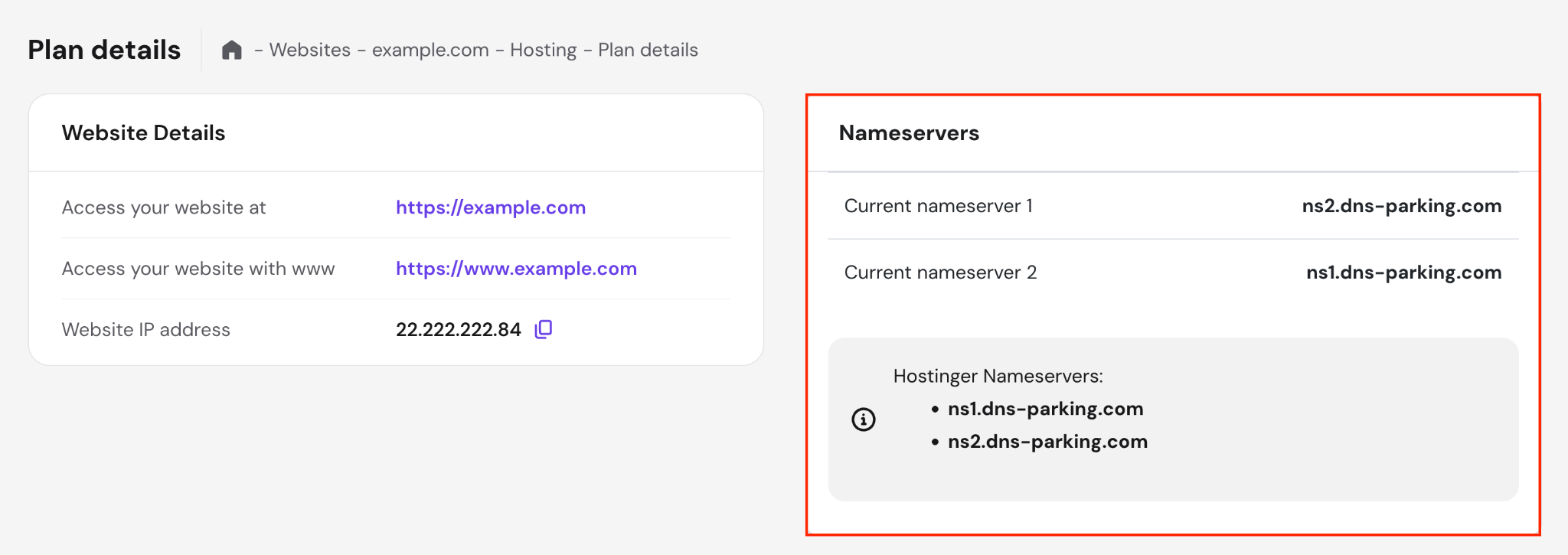
If you registered your free domain elsewhere and want to connect it to Hostinger web hosting, update the nameservers at that registrar to match the values shown in Websites → Dashboard → Hosting Plan → Plan Details → Nameservers. These values vary depending on the domain.
The three most common DNS records are:
- A record. Maps your domain to your server’s IP address, for example, pointing domain.tld to 192.0.2.1.
- CNAME record. Creates an alias for a subdomain, such as pointing www.domain.tld to domain.tld.
- MX record. Routes emails sent to name@domain.tld to the correct mail server.
If your domain doesn’t resolve after configuration, the most common causes include propagation delays, incorrect record values, or cached DNS entries.
Start by checking whether propagation is still in progress. Then verify that record values are correct, especially the IP address. A small typo can prevent the domain from resolving.
You can also flush your local DNS cache to force your system to fetch the latest records. Run:
ipconfig /flushdns # Windows

sudo dscacheutil -flushcache # macOS

sudo resolvectl flush-caches # Linux (systemd-resolved)
Finally, remember that domain registrations may expose your personal contact details in public WHOIS lookups. Consider enabling domain privacy protection from the start to keep that information hidden.
Common mistakes to avoid when getting a free domain
The most common mistakes when getting a free domain include assuming you own a domain you don’t legally control, choosing unreliable extensions, skipping the terms of service, using a free domain for long-term business without a migration plan, and ignoring renewal costs.
These mistakes can cost you your domain, your brand recognition, or both.
- Assuming you own the domain. Some free domain services and subdomain providers register the domain under their own account instead of yours. If the provider shuts down, changes its terms, or reclaims the domain, you can lose the domain and any brand recognition associated with it.
- Choosing unreliable or spam-associated extensions. Free country-code extensions like those formerly offered by Freenom carry spam associations that hurt both search rankings and email deliverability.
- Skipping the terms of service. Some free domain providers prohibit transfers entirely, which means you can’t move your domain to another registrar even if you want to. Others include clauses that allow them to suspend or reclaim domains for vague policy violations, leaving you with little recourse.
- Relying on a free domain for long-term business use. Free domains work well as a starting point, but they rarely suit long-term business use. If you build brand equity around a free subdomain or a low-trust extension, switching to a professional domain later can cost you inbound links, search rankings, and returning visitors.
- Ignoring future renewal costs. Hosting-bundled domains are usually free only for the first year. After that, standard renewal fees apply. If you don’t plan for this, you may face unexpected costs or lose the domain if you miss the renewal window.
To avoid these issues, read the registration terms before signing up and confirm whether the domain registers under your name or the provider’s account.
Plan your upgrade path to a paid custom domain before your site gains traction, and when possible, choose a hosting-bundled domain for full ownership and transfer rights.
Finally, set calendar reminders for renewal deadlines so you don’t accidentally lose a domain you rely on.
How to choose the right domain name
Free domains work well for testing and personal projects, but they come with limitations that can affect long-term branding, SEO performance, and audience trust.
If you’re building something meant to last, like a business, portfolio, or content site, a paid custom domain is worth the investment.
A paid domain gives you full ownership, the ability to transfer between registrars, a more professional appearance, and complete DNS control. Since it’s an investment, choosing the right domain name upfront helps you avoid costly rebranding later.
To do that, aim for names under 15 characters. Shorter addresses are easier to type and remember. Avoid hyphens, numbers, and unusual spellings that make the name harder to say or share verbally.
Pick an extension that matches your audience. .com remains the most recognized and trusted option worldwide. However, alternatives like .online, .store, or country-specific extensions can also work well for niche or regional websites.
Also, check that your chosen name doesn’t infringe on existing trademarks and that matching social media handles are available. Consistent naming across platforms helps strengthen your brand.
The best time to secure a domain is before someone else registers it. Once you find a name that fits your brand, claim it.
Domain Name Checker
Instantly check domain name availability.

Ariffud is a Technical Content Writer with an educational background in Informatics. He has extensive expertise in Linux and VPS, authoring over 200 articles on server management and web development. Follow him on LinkedIn.

As Hostinger's Head of Domains, Klaudijus Januitis is a product leader but also a customer advocate ensuring the product meets user needs. He works closely with engineering, design, and marketing teams to develop and adapt the product and ensure alignment between product strategy and company goals. Klaudijus is also skilled in building relationships with registries and resellers to support joint marketing efforts and ensure successful partnerships. Follow him on LinkedIn.