How to use directoryindex and .htaccess to change your website’s default index page
Mar 09, 2026
/
Merkys M.
/
2 min Read

In this article, we will show you how to change and modify the first page of your website using the DirectoryIndex command in the .htaccess file. Let’s check it out!

How does the index file work?
When you open a website on any browser, a typical web server will look for a file called index.html or index.php in its public_html files to load and deliver that file’s content to your browser.
DirectoryIndex is a command that lets you modify the index files of your website easily in the .htaccess file. It’s used to specify which files should be loaded first by the page when your website is accessed.
You can also set up a second, third, and more files to be loaded by the server next in case there’s any error preventing the designated first page to load.
Locating and accessing the .htaccess file
The first thing you need to do is locate or create a new .htaccess file in the WordPress root directory or in our case, public_html. Here’s how:
- Login to Hostinger’s hPanel, so to your site’s dashboard, and navigate to Files → File Manager.
- You can also configure an FTP client such as FileZilla to access the directory from a local computer.
- Once you’re in the public_html directory, locate the .htaccess file. If it doesn’t exist, you can quickly create one by going to the upper part of the page and selecting the New File function.

- Once you’re prompted with a file creation box, enter .htaccess, then press Create to save the file.
It’s worth mentioning that locating the .htaccess file on cPanel follows a similar process.
Editing .htaccess to add the DirectoryIndex command
To modify the first page loaded by your website using the DirectoryIndex command, follow these steps:
- Head to .htaccess and right-click to Edit.
- Paste the following code at the top of the file to configure your desired index page:
DirectoryIndex example.html
Remember to replace example.html with the page you want to use.
You can also list more than one file in the configuration. In this example, we add first.html, index.html, and index.php to the list.
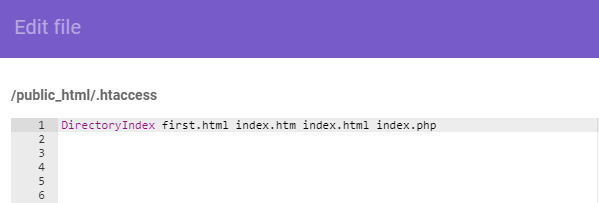
Your specified index files will be read and checked from left to right. First, the server will look for first.html, and if it doesn’t find a file with that name, it continues to index.html and so on.
You can also use this command to set up a temporary error page where your visitors will be directed to in case your page unexpectedly crashes. Here’s an example:
DirectoryIndex index.php page-down.php
Once the desired code is added, don’t forget to save the changes, and the configuration will take effect.
Congratulations, you have successfully changed the default index page of your website by manipulating the .htaccess file!

Conclusion
In this tutorial, we have learned how to effectively change the first page on your website using DirectoryIndex in the .htaccess file. In case you have any other cool tips that you want to share with us, you are welcome to do so in the comments!

Merkys is a server administrator and Linux expert. He keeps everything up & running while tackling advanced server management issues. Besides that, he’s a big fan of blockchain technology, web development, and bodybuilding.