Business email vs personal email: Key differences explained
Jul 27, 2026
/
By Ksenija
/
8 min Read
The difference between business email and personal email is that business email uses a company-owned address for professional communication, while personal email uses free public providers for private, individual use.
Business emails use custom domains such as name@yourcompany.com to support professional communication, brand visibility, and company-level security controls.
Personal emails use free providers such as Gmail, Yahoo, or Outlook.com for private, everyday communication.
Most business email accounts are connected to email hosting services or business workspace platforms such as Google Workspace or Microsoft 365. These platforms provide company-wide admin controls, shared calendars, advanced security settings, and professional collaboration tools.
Personal email accounts rely on public email providers and are designed for individual use. They are simple to create, free in most cases, and managed entirely by the account owner.
What are the advantages of business email vs personal email?
Business email provides companies with greater control, consistency, and operational features than personal email accounts.
It supports branded communication, centralized account management, better email deliverability, and shared collaboration tools that personal email services are not designed to handle at scale.
A custom-domain email address, such as billing@yourstore.com, creates a consistent customer experience across your website, invoices, order confirmations, and support communication.
Customers immediately recognize the business name in the sender address rather than a generic Gmail or Yahoo account.
Business email also gives companies centralized control over employee accounts. An agency owner can create, manage, suspend, or recover email accounts from a single admin panel, eliminating the need for employees to manage everything individually.
Shared access is another major advantage. Customer support teams can use addresses such as support@company.com or sales@company.com so multiple employees can manage the same inbox.
Shared inbox access prevents missed messages when staff members are unavailable or leave the company.
As businesses grow, professional email systems scale more easily than personal accounts.
New employees can receive branded email addresses immediately, departments can use separate inboxes, and internal communication stays organized across teams.
Business email platforms also offer stronger deliverability and sender-reputation controls.
Emails sent from properly configured business domains are less likely to land in spam folders than mass messages sent from free personal accounts.
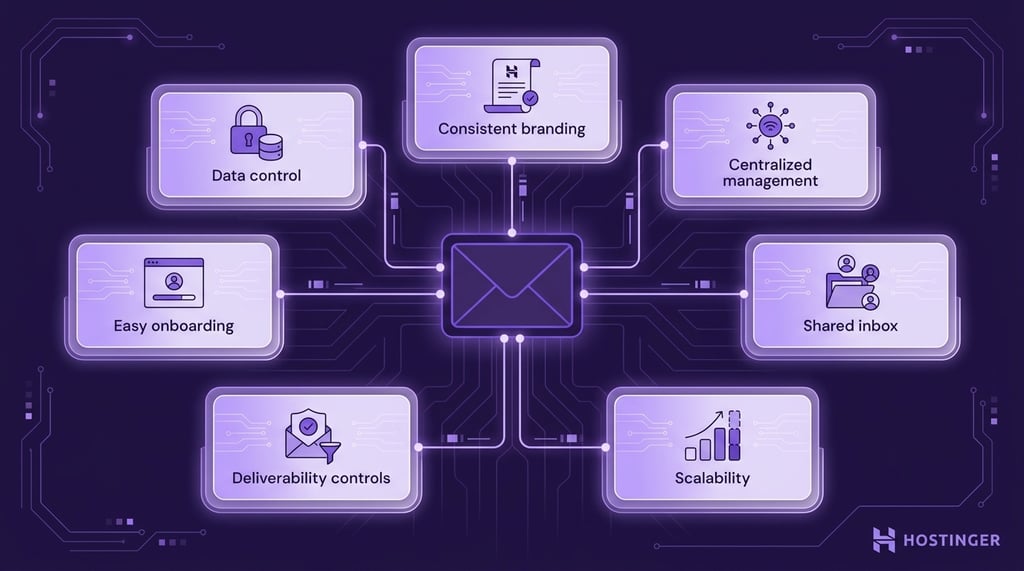
Key advantages of business email:
- Consistent branding across websites, invoices, and customer communication.
- Centralized account management for administrators.
- Shared inbox access for sales, support, and operations teams.
- Better scalability as the company grows.
- Stronger deliverability and sender reputation controls.
- Easier onboarding and offboarding for employees.
- More control over company data and communication history.
What are the disadvantages of business email over personal email?
Business email requires ongoing setup, management, and monthly service costs, while personal email accounts are simpler to create and free to use.
A personal Gmail or Yahoo account takes minutes to create and works immediately. Business email requires a registered domain, an email hosting service or workspace platform, and proper configuration between the domain and email provider before employees can start using their accounts.
Personal email accounts are managed by the individual user. Business email accounts must be managed at the company level.
Businesses need someone to create employee accounts, reset passwords, control permissions, secure company data, and remove access when employees leave.
Business email also introduces a more technical setup than personal email. Companies must configure DNS records, spam protection settings, and email authentication tools to ensure customer emails, invoices, and support replies reach inboxes reliably.
Maintenance becomes more demanding as the business grows. A personal email account is tied to a single user, while business email systems must support multiple employees, shared inboxes, internal communication, and long-term account management across teams.
Which is better for branding: business email or personal email?
Business email is better for branding because it uses a custom domain tied directly to the company name, while personal email uses public providers such as Gmail or Yahoo.
Branded email addresses, such as support@store.com or billing@agency.com, immediately indicate which company sent the message.
The business name appears directly in the sender address, making invoices, support replies, order confirmations, and newsletters easier to recognize in inboxes.
Personal email addresses, such as johncompany@gmail.com, give a less professional impression in professional communication.
Customers see Gmail or Yahoo branding first instead of the company name, which makes the sender appear less established and less connected to the business website or brand identity.
Domain consistency also improves recognition across customer touchpoints. When the website, invoice emails, customer support replies, and newsletter campaigns all use the same domain name, customers can quickly identify legitimate company communication.
This consistency becomes especially important for ecommerce stores, agencies, and service businesses that send regular transactional emails.
A customer receiving an invoice from billing@agency.com can immediately connect the message to the business they worked with, whereas a generic Gmail address forces the customer to verify the sender before opening the email.
Is business email more secure than personal email?
Business email is more secure than personal email because it gives organizations centralized control over accounts, access, and security settings across the entire company.
Business email platforms such as Google Workspace and Microsoft 365 allow administrators to manage employee accounts from a single dashboard.
Companies can enforce password rules, enable security protections for all users, recover accounts, and remove access immediately when employees leave the organization.
Business email services also include built-in tools that help companies protect customer communication, invoices, internal messages, and shared company data.
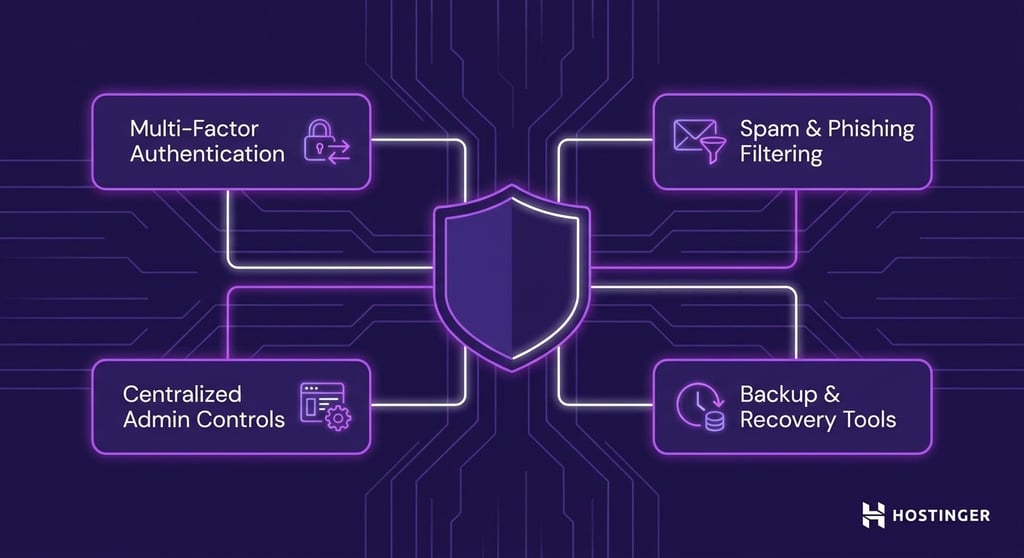
Common business email security features include:
- Multi-factor authentication for employee accounts
- Spam and phishing filtering
- Centralized admin controls
- Backup and recovery tools
Personal email accounts rely on individual users to manage their own security settings, passwords, recovery methods, and spam protection.
This works well for private use, but it gives businesses less visibility and control over company communication, employee access, and account recovery processes.
Is a professional or personal email better for deliverability?
Business email provides better deliverability than personal email as authenticated business domains are more likely to reach inboxes instead of spam folders.
Free personal email providers such as Gmail or Yahoo work well for individual communication, but they may appear less trustworthy for invoices, proposals, customer support replies, password reset emails, or other business-related communication.
Customers expect professional business messages to come from a company domain rather than a generic personal address.
Business email domains build sender reputation over time. When a company consistently sends legitimate emails from the same domain, email providers learn to recognize that domain as a trusted sender.
This improves inbox placement for newsletters, transactional emails, support communication, and internal business messaging.
Business email platforms also support domain authentication methods such as SPF, DKIM, and DMARC, which help verify that emails are legitimately sent from the company domain and reduce spoofing and phishing risks.
Personal email accounts offer less control over sender reputation and authentication because providers manage these systems across millions of users rather than within a single business domain.
Which is better for team collaboration and scalability: Personal email or business email?
Business email is better for team collaboration and scalability because it is designed for multiple employees, departments, and long-term company growth, while personal email accounts are built for individual use.
Business email systems support shared inboxes that multiple employees can access simultaneously.
A customer support team can manage messages through support@company.com instead of relying on one employee’s personal inbox. Sales teams can share access to sales@company.com so inquiries continue moving even when team members are unavailable.
Role-based email addresses also help companies organize communication more efficiently. HR teams can manage recruitment through careers@company.com or hr@company.com, while finance teams can handle invoices and payment questions through billing@company.com.
Employees can change roles or leave the company without disrupting ongoing communication.
Business email platforms also support aliases and shared calendars. Employees can receive emails from multiple branded addresses without managing separate inboxes, while teams can coordinate meetings, schedules, and internal communication through centralized calendar systems.
Centralized account management becomes more important as companies grow. Administrators can create accounts for new employees, manage department access, maintain shared inboxes, and organize communication across multiple teams from one system.
Personal email accounts do not scale well for this type of collaboration. They are tied to individual users rather than departments or company roles, which makes shared communication, employee transitions, and long-term account management harder to organize as the business expands.
Is business email worth the cost long term?
Business email costs more than personal email as it requires a domain name and a paid business email hosting or workspace service, while personal email accounts with basic features are free.
For most businesses, however, the operational benefits outweigh the relatively low monthly cost.
Businesses pay for professional email infrastructure because it supports company operations in ways personal email cannot.
A branded email system allows teams to manage shared inboxes, organize department communication, control employee accounts, and maintain consistent communication across invoices, support emails, internal messaging, and customer interactions.
Email type | Typical cost | What it includes |
Personal email | Usually free | Individual email account through providers like Gmail or Yahoo |
Business email | Monthly subscription per user | Custom-domain email, admin controls, shared tools, collaboration features, and business account management |
Many web hosting providers also bundle business email services with website hosting plans, which reduces the overall cost for small businesses launching a website and a professional email system together.
When to use business email vs personal email
Business email is the better choice for professional communication, customer-facing operations, and team collaboration, while personal email is better for private communication and individual online activity.
Business email works best for situations where customers, clients, or employees interact with the company regularly.
Ecommerce stores use business email for order notifications, invoices, and support communication.
Agencies and freelancers use branded email addresses when communicating with clients, sending proposals, or managing project discussions.
Startups use business email to organize communication across departments such as sales, support, finance, and hiring.
Professional email also improves organization as businesses grow.
Shared inboxes, department addresses, employee account management, and collaboration tools become difficult to manage through personal Gmail or Yahoo accounts once multiple people need access to the same communication channels.
Personal email is sufficient for private communication and everyday online activity. Most people use personal email accounts for family conversations, social media registrations, online shopping, newsletters, streaming accounts, and personal banking.
Personal email also works well for individual networking and casual online communication.
For personal job searching, many people still use free Gmail accounts.
However, freelancers, consultants, and independent professionals benefit from using business email when sending resumes, proposals, portfolios, or client-facing communication because the sender’s address immediately identifies their professional brand or business name.
Scenario | Better choice |
Sending invoices | Business email |
Applying for jobs with resumes | Business email |
Customer support communication | Business email |
Personal banking accounts | Personal email |
SaaS onboarding for a company | Business email |
Family communication | Personal email |
Social media registrations | Personal email |
Ecommerce order notifications | Business email |
Many people end up using both email types together. Freelancers and small business owners often start with a personal Gmail account, then move to getting a business email once they launch a website, begin working with clients regularly, or need more organized communication.
In practice, personal email remains useful for private online activity, while business email handles professional operations and customer-facing communication.
Can you use a personal email for business?
Yes, you can use a personal email for business communication, but it becomes limiting as the business grows and customer communication becomes more important.
For freelancers, side projects, or temporary business use, a personal Gmail or Outlook account is sufficient in the beginning.
A solo designer, consultant, or online seller may use a personal email address while testing a business idea or working with a small number of clients.
The limitations show once the business starts handling regular customer communication, invoices, support requests, or multiple employees. Personal email accounts are built for individual use, not for shared access, department communication, or centralized account management.
A personal email address also separates the business identity from the sender address. Customers receiving invoices, proposals, or support replies from a generic Gmail account may need to double-check who sent the message, especially if the business already has a website or company name.
As the business grows, professional email becomes easier to manage operationally. Business email systems support shared inboxes, role-based addresses, employee account management, and collaboration features that personal email services are not designed to handle efficiently at scale.
How to create a business email
Creating a business email involves registering a domain name, choosing an email hosting provider, creating custom email addresses, and configuring basic email settings for your company.
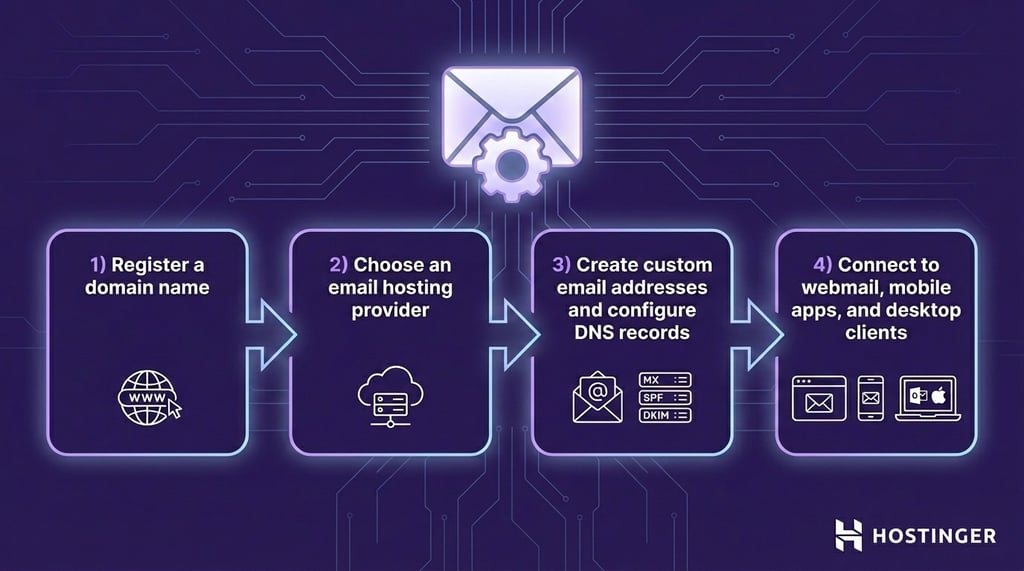
After connecting the domain to the email provider, businesses can create custom email accounts for employees, departments, and shared inboxes.
Business email setup also includes configuring DNS records that authenticate outgoing emails and improve deliverability.
Once configured, business email accounts can connect to webmail dashboards, mobile apps, and desktop email clients such as Outlook or Apple Mail for daily communication across devices.
For a full step-by-step walkthrough, see our dedicated guide on how to create a business email address.
Can you use Hostinger for business email?
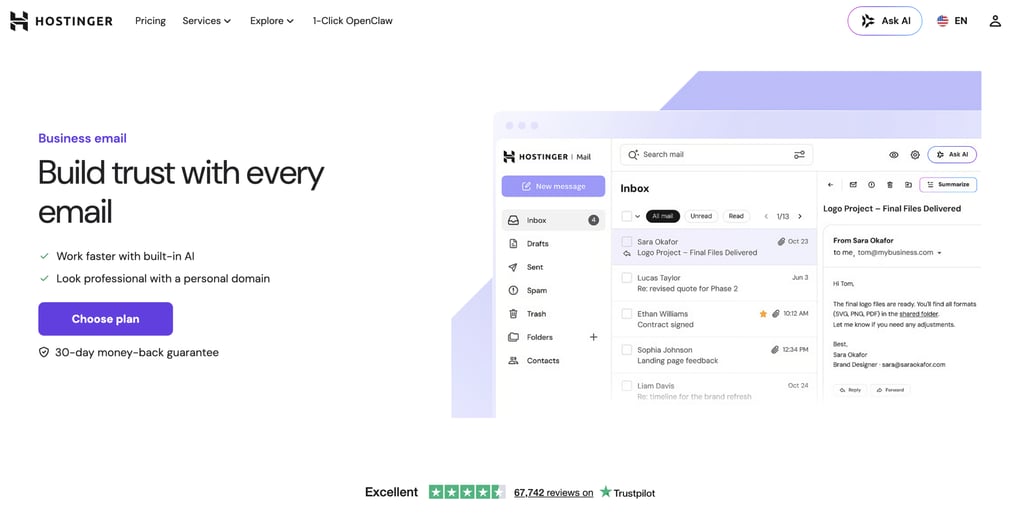
Yes, Hostinger provides business email hosting for professional communication, customer-facing operations, and company account management.
Hostinger business email services support custom-domain email addresses such as support@yourcompany.com or billing@store.com, which help businesses maintain consistent communication across websites, invoices, and customer support channels.
The platform also includes spam filtering and security protections to help reduce unwanted emails and improve account protection for teams and organizations.
Businesses can access their email accounts through Hostinger webmail, mobile devices, and desktop email clients such as Outlook or Apple Mail, making day-to-day communication easier across devices.
Selected Hostinger hosting plans also include email hosting services, allowing businesses to manage their website and professional email accounts from the same platform.
Hostinger additionally provides centralized email management tools that allow businesses to create employee accounts, manage passwords, organize shared inboxes, and control email access across teams.

How can you protect your business email after setup?
You can protect your business email by enabling multi-factor authentication, enforcing strong password policies, limiting account access, monitoring suspicious login activity, and configuring email authentication settings correctly.
Business email accounts quickly become the main channel for invoices, customer communication, password resets, internal approvals, and financial discussions.
Because these accounts handle sensitive business activities, they are common targets for phishing, impersonation, unauthorized access, and business email compromise.
Businesses should strengthen email security early instead of waiting until problems appear.
Even small teams benefit from securing employee accounts, reviewing mailbox permissions regularly, and restricting access to sensitive inboxes such as billing@company.com or finance@company.com.
Important protection steps include:
- Enabling multi-factor authentication for all employee accounts.
- Setting up secure passwords and account recovery policies.
- Reviewing mailbox permissions and shared inbox access regularly.
- Enabling spam, phishing, and suspicious login protection.
- Configuring SPF, DKIM, and DMARC authentication records.
- Creating secure approval workflows for invoices and payment requests.
- Training employees to recognize phishing emails and impersonation attempts.
This article is a localized version of Business email vs personal email: Key differences explained, originally published in English.

Ksenija is a digital marketing enthusiast with extensive expertise in content creation and website optimization. Specializing in WordPress, she enjoys writing about the platform’s nuances, from design to functionality, and sharing her insights with others. When she’s not perfecting her trade, you’ll find her on the local basketball court or at home enjoying a crime story. Follow her on LinkedIn.