Zoho alternatives: How n8n replaces Zoho tools for flexible automation
Mar 10, 2026
/
Dovydas
/
13 min Read
Zoho alternatives provide businesses with more flexibility, customization, and advanced automation compared to Zoho’s ecosystem. Many companies move away from Zoho due to pricing limits, restricted integrations, and lack of deep customization.
In this guide, we’ll explore how n8n, an open-source automation platform, replaces key Zoho tools, from CRM and email to campaigns, analytics, HR, and inventory. You’ll learn:
- How to set up n8n on a Hostinger VPS for complete data control
- Why businesses switch from Zoho to n8n
- How n8n integrates with Odoo, Airtable, Gmail, Brevo, and other tools
- Practical automation workflows for CRM, marketing, projects, and HR
A quick overview of Zoho tool alternatives with n8n
There are many alternatives to Zoho, including Odoo, SuiteCRM, Airtable, Typeform, Xero, ClickUp, and Brevo, each offering different advantages. When considering a Zoho alternative, users generally look for greater customization, better integrations, cost savings, or more advanced automation capabilities.
Below are a few examples of how you can swap out Zoho tools for n8n-powered solutions.
| Zoho Tool | Replacement with n8n |
| Zoho Flow | n8n (Direct replacement) |
| Zoho CRM | n8n + SuiteCRM, Odoo |
| Zoho Mail | n8n + Gmail, Outlook, SendGrid |
| Zoho Campaigns | n8n + Freshdesk, Brevo, Mailgun |
| Zoho Forms | n8n + Typeform, Google Forms |
| Zoho Books | n8n + Xero, Akaunting |
| Zoho Projects | n8n + Notion, Trello, ClickUp |
| Zoho Analytics | n8n + Grafana, Metabase |
| Zoho Inventory | n8n + Odoo, Airtable |
| Zoho People | n8n + BambooHR, Factorial HR |
Keep in mind that these are only some of the possible alternatives. Many other services can work as Zoho replacements when integrated with n8n.
Using n8n as an alternative to Zoho tools
In the table above we highlighted different n8n alternatives to Zoho tools, but in the sections below, we’ll dive deeper into each option. You’ll get a detailed look at their features, benefits, and possible use cases.
Replacing Zoho Flow
Zoho Flow is an automation tool that connects different applications to streamline workflows and reduce manual tasks. However, some users find it lacks flexibility, custom integrations, and the ability to automate beyond predefined templates.
This is where n8n stands out as a more powerful and adaptable alternative.
n8n is an open-source automation platform that gives users full control over their workflows, whether they choose to self-host or use a cloud-based version. Unlike Zoho Flow, which relies on pre-built integrations, n8n allows for custom API calls, conditional logic, and advanced data manipulation, making it a more scalable and versatile replacement.
By switching to n8n, businesses can automate multi-step processes, connect tools that don’t natively integrate, and customize workflows to fit their exact needs.
Here’s what you can achieve with n8n to ease your daily business tasks:
- Set up a trigger – Define what starts the workflow, such as a new lead in a CRM, an email received, or a webhook event.
- Retrieve and process data – Use built-in nodes to fetch, transform, or format data before passing it to another tool.
- Integrate multiple applications – When a new order is placed, send an order confirmation email to the client, automatically update inventory levels, send a notification to the warehouse team, and generate an invoice in the accounting system.
- Use conditional logic – Route data based on set conditions, such as assigning high-value leads to sales while lower-priority leads get an automated email.
- Deploy and monitor – Run workflows in real time or schedule them at set intervals, ensuring seamless automation.
Let’s say your HR team manages a hiring process across multiple platforms. n8n can automatically pull candidate details from a job application form, update an HR database, notify the hiring manager in Slack, schedule interviews in Google Calendar, and send a reminder to the candidate before the meeting. This will guarantee a flawless hiring process.
Zoho Flow works well for basic automation, but n8n eliminates restrictions, giving businesses full control over their integrations and workflows.
By making the switch, teams can reduce even more manual work, automate complex processes, and ensure their tools are always in sync, allowing them to focus on more important tasks.
Replacing Zoho CRM
Zoho CRM is widely used for lead management, sales process tracking, and automating customer interactions. However, Odoo is a great Zoho CRM alternative for those valuing flexibility.
Odoo stands out as a modular business suite that includes a CRM solution, invoicing, and email marketing. Its scalability makes it a strong choice for businesses seeking an all-in-one solution. It integrates well with n8n, allowing process automation while maintaining control over your data.
A typical CRM integration with n8n and Odoo consists of the following steps:
- Connect n8n to Odoo – Set up the Odoo credentials in n8n to establish a secure connection.
- Capture new leads – Set up a trigger node in n8n to collect lead data from a contact form, email, or third-party app.
- Map and transfer lead data – Use an Edit Fields (Set) node to format the information and send it to the corresponding fields in Odoo.
- Automate follow-ups – Add an email node (SMTP, Gmail, or Mailchimp) to trigger an automated follow-up email after a new lead is added.
- Notify your sales team – Integrate with Slack, Telegram, or a project management tool to alert the sales team about new leads.
- Sync data with other tools – Push CRM updates to Google Sheets, a marketing platform, or any other business application.
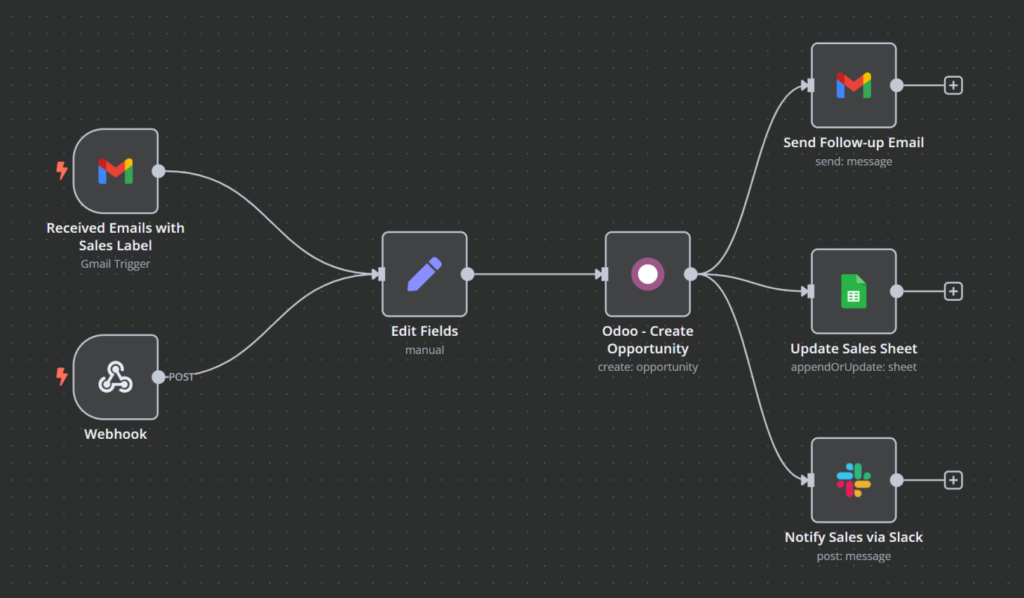
With such a workflow, when a new lead submits a form, n8n captures the data and sends it to Odoo. The CRM assigns the lead to a sales rep, and n8n triggers an automated follow-up email. The sales team receives a notification in Slack, ensuring quick responses and a seamless workflow. Additionally, you can ensure your other tools are in sync with the latest data.
Other Zoho CRM replacements include Airtable and open-source SuiteCRM, both of which integrate with n8n.
Replacing Zoho Mail
Zoho Mail offers email hosting and automation, but businesses looking for more flexibility often turn to Gmail, Outlook, or SendGrid. When combined with self-hosted n8n solution, these services can help automate email management, making communication more efficient and streamlined.
Many businesses prefer Gmail for its reliability, spam protection, and seamless integration with Google Workspace. With n8n, you can set up automation to filter emails, send automatic replies, or forward messages based on specific conditions, reducing manual effort.
For companies using Microsoft 365, Outlook is a solid alternative with built-in productivity tools. SendGrid, on the other hand, is designed for bulk and transactional emails, making it a great option for businesses that rely on high-volume messaging. Both can be integrated with n8n to create custom email workflows.
Here’s how you can automate Gmail with n8n:
- Connect Gmail to n8n – Set up OAuth 2.0 as per Google authentication guidelines in the n8n documentation.
- Set up email trigger – Use Gmail trigger node to monitor your inbox for new messages to start the automation.
- Filter messages – Use the Edit Fields (Set) node to ensure automation only triggers for emails that matter based on sender, subject, or keywords.
- Take action automatically – Forward, add labels, or send automated response emails.
- Make emails shorter – Get a quick summary of the email using the AI node.
- Notify your team – Send a notification over Slack, Telegram, or another messaging platform to ensure a timely response on high-priority emails.
- Store important email data – Save necessary details in Google Sheets, Airtable, or a CRM for future reference.
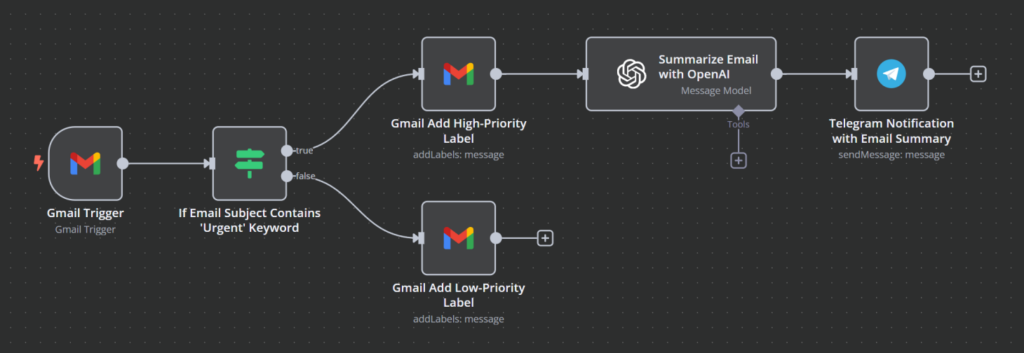
For instance, you can use n8n and Gmail integration to automate email responses and follow-ups. When a new inquiry arrives, n8n can categorize the email based on keywords and the sender’s details. If it matches a specified category, n8n can send an automated response with relevant information. Also, n8n can forward the email to the specialized team and log the request in a support tracker. If no response is sent within a set timeframe, n8n can send a notification to the team manager to avoid missing an important email.
Replacing Zoho Campaigns
Zoho Campaigns is a tool for email marketing and newsletter management. It helps automate campaigns, track engagement, and manage mailing lists. However, Hostinger Reach offers a more intuitive approach with AI-powered email creation, making it especially powerful when integrated with n8n for workflow automation.
Hostinger Reach transforms email marketing by using AI to create professional campaigns instantly. Instead of spending hours designing templates or crafting copy, just describe your campaign goal and Reach will automatically generate compelling content with optimized layouts. This makes it ideal for businesses that want professional email marketing without the complexity.
When connected to n8n, Hostinger Reach can automate sophisticated email workflows based on user actions, such as form submissions, new sign-ups, abandoned cart reminders, or subscription renewals. The AI-powered approach improves engagement while reducing the time spent on campaign creation, helping businesses scale their marketing automation effortlessly.
Reach’s seamless integration capabilities make it perfect for n8n automation, allowing businesses to create dynamic email campaigns that adapt to customer behavior without manual intervention.
To integrate Hostinger Reach with n8n, you would need to:
- Connect Reach to n8n – Use Hostinger Reach API credentials to authenticate the connection in n8n.
- Capture new contacts – Set up a trigger node in n8n to collect form submissions or sign-ups from your website or landing pages.
- Add contacts to Reach lists – Use Reach nodes to automatically segment new leads into appropriate email lists.
- Trigger AI-generated campaigns – Automate personalized welcome emails, follow-ups, or promotional messages using Reach’s AI content creation.
- Monitor engagement – Track opens, clicks, and conversions through Reach’s analytics integrated with n8n workflows.
- Sync data with other tools – Log email activity in Google Sheets, CRMs, or project management tools for comprehensive tracking.
With this integration, when a user submits a form, n8n captures their data, adds them to a Reach mailing list, and triggers an AI-generated, personalized email campaign. The AI ensures each email is professionally crafted and optimized for engagement, while the automation ensures leads receive timely follow-ups without manual intervention.
Replacing Zoho Forms
Zoho Forms is a popular choice for creating web forms to capture leads, collect feedback, and process submissions. However, Typeform’s interactive design and Google Forms’ seamless Google integration make them more versatile, especially when automated with n8n.
For businesses looking for a more engaging and user-friendly alternative to Zoho Forms, Typeform stands out with its one-question-at-a-time format, smooth transitions, and multimedia support, creating a more interactive experience. Its design keeps users focused, improving response rates and data quality. When integrated with n8n, submissions can automatically update CRM records, trigger personalized follow-ups, or log responses in a database.
If you need a simpler, free option, Google Forms is another solid choice that works well paired with n8n. It integrates directly with Google Sheets, Drive, and Gmail, making it ideal for businesses already using Google’s ecosystem.
Here is a sample Typeform integration with n8n:
- Connect Typeform to n8n – Follow the Typeform credentials documentation to authenticate using your Typeform API token or OAuth 2.0.
- Capture new form submissions – Set up a trigger node in n8n to receive responses in real time.
- Process and format data – Use an Edit Fields node to clean up and structure the captured data.
- Send lead details to a CRM – Automatically store responses in HubSpot, Salesforce, or Google Sheets.
- Trigger automated follow-ups – Send confirmation emails or notifications to your team via a preferred communication channel.

An ecommerce business using Typeform for customer inquiries can have n8n automatically add submissions to a support ticket system, notify the customer service team as well as sales, and send an automated response with order details or FAQs. This ensures faster support, keeps inquiries organized, and reduces manual workload.
Replacing Zoho Books
Zoho Books is a popular tool for invoicing, expense tracking, and financial reporting. While it helps businesses manage cash flow, Akaunting and Xero offer greater flexibility with advanced integrations, real-time financial tracking, and more control over accounting processes.
Akaunting is a great option for businesses that need full control over their financial data with a self-hosted, open-source accounting platform. Unlike Zoho Books, it eliminates subscription fees while still allowing users to generate invoices, track expenses, and manage cash flow.
When integrated with n8n, Akaunting becomes a powerful alternative by automating invoice creation, payment reminders, and financial data synchronization.
Xero is another alternative to Zoho for those who prefer a cloud-based solution with real-time financial automation. It offers live bank feeds, multi-currency support, and automated tax compliance. With n8n, Xero can automate invoicing, reconcile payments, and sync financial records instantly, reducing manual work.
Here’s a possible flow of Akaunting + n8n automation:
- Authenticate Akaunting in n8n – Generate an API key through Akaunting to authenticate with n8n.
- Automate invoice creation – Configure a trigger node to generate invoices when a new sale or order is recorded.
- Send payment reminders – Set up scheduled email reminders for unpaid invoices.
- Sync financial data – Store transactions in a CRM, Google Sheets, or an accounting database.
- Notify your finance team – Use Slack or email alerts to track overdue payments.

A subscription-based business can use n8n and Akaunting integration to help manage the renewal cycle. You can set a scheduled trigger for n8n to fetch the subscription details from Google Sheets or CRM, filter for expiring subscriptions, create invoices, and send payment reminder emails.
Replacing Zoho Projects
Zoho Projects is a task and project management solution designed to help teams track progress, collaborate, and streamline workflows. However, while it integrates well within the Zoho ecosystem, it lacks seamless integrations with external tools like Slack or Notion, compared to n8n-powered automation.
That’s why businesses looking for a more flexible or user-friendly alternative often turn to Trello, Notion, or ClickUp to replace Zoho Projects, all of which integrate with n8n to enhance automation.
Trello is a great option for those who prefer a visual, drag-and-drop approach to project management software. Its simple Kanban-style interface makes it easy to organize tasks, set deadlines, and collaborate with team members. When connected to n8n, Trello can automate repetitive tasks, trigger notifications, and modernize project updates.
Notion is a powerful alternative that combines project management with documentation and team collaboration tools for those needing a more structured knowledge base. ClickUp is another Zoho alternative ideal for teams that require more granular task management, built-in time tracking, and customizable dashboards, making it a better choice for handling complex workflows.
Below is an example workflow of n8n paired with Trello:
- Connect Trello to n8n – Set up your Trello API key in n8n for authentication.
- Trigger new tasks automatically – Use a trigger node to create Trello cards when new project requests, form submissions, or emails arrive.
- Move tasks based on status – Automate card movement between lists (e.g. To Do → In Progress) when team members update task statuses.
- Send notifications – Set up Slack, email, or Microsoft Teams alerts for task assignments, deadlines, or project updates.
- Sync with other tools – Connect Trello with Google Sheets, Notion, or a CRM to keep task data organized.
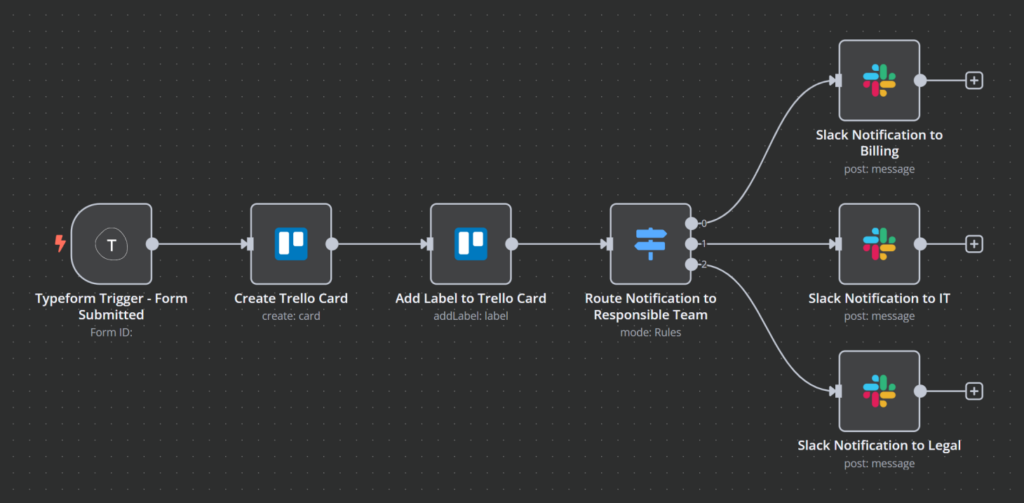
By integrating Trello with n8n, teams can cut down on manual work and keep projects moving without constant check-ins.
For example, when a client submits a support request via a form, n8n can automatically create a Trello card, assign it to the right team, and send a notification for awareness.
While Trello keeps things simple, Notion and ClickUp provide extra customization for those seeking more advanced project management features.
Replacing Zoho Analytics
Zoho Analytics is a business intelligence tool designed to collect and visualize data from various sources. It does offer built-in reporting and dashboard features, but its real-time capabilities are limited. Users looking for more flexibility and external integrations often turn to Grafana or Metabase, which are popular Zoho Analytics alternatives.
Grafana is a widely used open-source platform that allows building dynamic, real-time dashboards. Unlike Zoho Analytics, which focuses on static reports, Grafana excels at monitoring live data from multiple sources. When integrated with n8n, it can continuously pull, process, and update data so your dashboards always display the latest data.
Metabase is another alternative suited for teams in need of a simpler, more user-friendly reporting tool. It enables users to explore and analyze data without requiring complex queries. While not as real-time focused as Grafana, it integrates well with n8n to automate data retrieval and dashboard updates.
Integrating n8n with Grafana usually consists of the following steps:
- Set up a database for Grafana – Since Grafana does not store data on its own, you need to connect Grafana to a time-series database like InfluxDB or PostgreSQL. The database will store the data that n8n processes before Grafana retrieves and visualizes it.
- Connect Grafana to n8n – Use Grafana’s API key to authenticate in n8n.
- Fetch data from external sources – Use n8n to retrieve data from CRMs, marketing tools, or databases using Action nodes. For example, pull lead conversion rates from HubSpot or ad performance data from Google Ads.
- Process and store data – Clean, aggregate, and transform the raw data in n8n before inserting it into the database. This ensures that only structured, meaningful insights appear in Grafana.
- Schedule regular updates – Automate data refresh in n8n at specific intervals, such as every hour or at the end of the day. This prevents dashboards from becoming outdated.
- Trigger alerts for key metrics – Set conditions in n8n to send Slack or email. notifications when critical KPIs, like sales drops or inventory shortages, are detected.
- Visualize in Grafana – Configure Grafana to query the database and display real-time insights in a customizable dashboard.
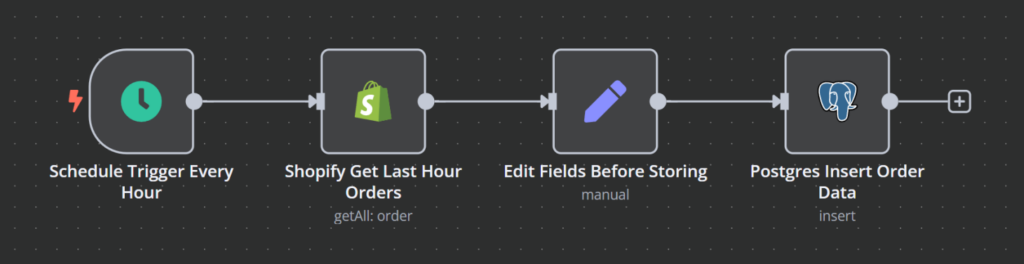
For example, an online retailer can use n8n to fetch Shopify sales data every hour, format it, and store it in PostgreSQL. Grafana then pulls this data to provide real-time revenue tracking. This allows you to always have the latest data to present in that important meeting.
All in all, Grafana is ideal for real-time data tracking, while Metabase offers a simpler approach to reporting. With n8n, both can automate data retrieval and updates, ensuring that dashboards display the latest data without manual effort.
Replacing Zoho People
Managing employee records, tracking time off, and handling human resource (HR) workflows are essential tasks for any business, and Zoho People provides an all-in-one solution for these needs. Although it works well within Zoho’s ecosystem, some businesses look for a more customizable platform, an easier-to-use interface, or broader automation capabilities.
BambooHR is a widely used alternative for small to medium-sized businesses as a well-rounded HR solution. It offers employee data management, time-off tracking, payroll integration, and onboarding tools with an intuitive interface. By integrating BambooHR with n8n, HR teams can automate employee record updates, time-off approvals, and notifications, reducing the administrative workload.
Factorial HR is another strong Zoho alternative, particularly for businesses seeking a more budget-friendly solution. It provides many of the BambooHR features, making it a great choice for startups and growing companies.
If you’re looking to automate HR workflows with BambooHR and n8n, here’s how you can get started:
- Connect BambooHR with n8n – Use an API key from BambooHR to authenticate in n8n.
- Keep employee records updated – Set up workflows in n8n to sync employee data across payroll software and other tools.
- Make time-off requests hassle-free – When an employee submits a request, n8n can log it, contact management via Slack, Microsoft Teams, or email, and update shared calendars.
- Simplify onboarding for new hires – n8n can send a welcome email, create IT setup tasks in Trello, and invite them to relevant Slack channels.
- Never miss important deadlines – Set reminders for HR teams to track contract renewals, upcoming performance reviews, or required training sessions.
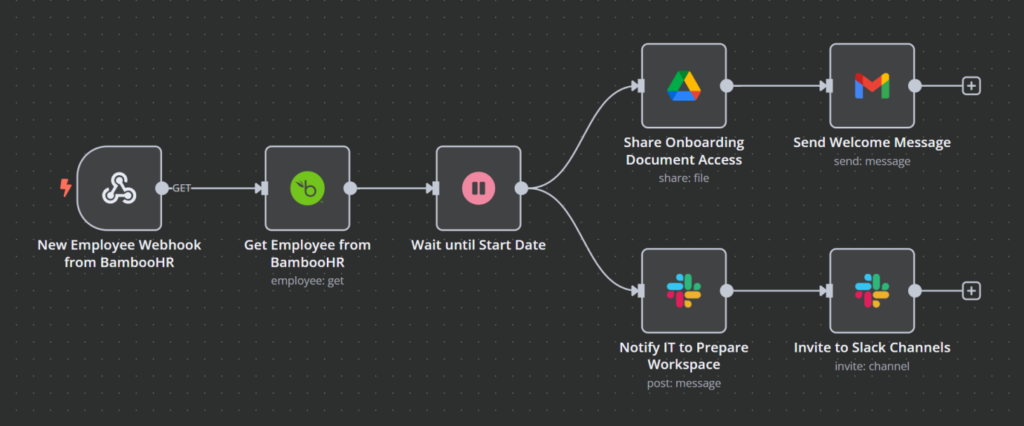
Imagine that you have a new hire joining your company. In such cases, HR has to manually enter their details into payroll, add them to company chat groups, and assign tasks. With n8n, this can happen automatically. A workflow can pull the new employee’s details from BambooHR, send a welcome email with important documents, notify IT to set up their workspace, and update internal systems.
Simply put, BambooHR provides a comprehensive set of HR management tools, while Factorial HR offers a budget-friendly Zoho alternative with similar automation capabilities.
Replacing Zoho Inventory
Zoho Inventory helps businesses track stock levels, manage orders, and organize product data. But users sometimes seek a solution that offers more flexibility, integrates with external tools, and supports advanced automation outside of the Zoho ecosystem. And here, Odoo and Airtable are two strong alternatives to address that.
We’ve already mentioned Odoo in the Zoho CRM alternatives section, but it is also a robust inventory management system. It keeps track of stock in real time, automates reordering, and syncs data across warehouses. It’s ideal for full enterprise resource planning (ERP) functionality to manage complex inventory workflows. By combining Odoo with n8n, teams can automate stock updates, trigger reorder alerts, and keep inventory levels accurate across multiple platforms without manual input.
Airtable, on the other hand, is a lightweight, flexible alternative suited for teams that need a simple, spreadsheet-like solution to track stock and manage orders. While it lacks Odoo’s advanced features, it’s highly customizable and works well for smaller inventories.
To automate inventory tracking with Odoo and n8n, follow these key steps:
- Connect Odoo to n8n – Authenticate using an API key or a password from Odoo.
- Monitor stock levels – Set up n8n workflows to pull inventory data from Odoo and track stock availability.
- Trigger reorder alerts – When stock falls below a set threshold, n8n can automatically send a purchase order email to suppliers and notify the purchasing team in Slack.
- Sync with sales and fulfillment tools – Ensure inventory updates in real-time when new orders come in or products are returned.
- Keep dashboards updated – Push live stock data to Airtable, Google Sheets, or a database for Grafana so teams can monitor inventory levels at a glance.
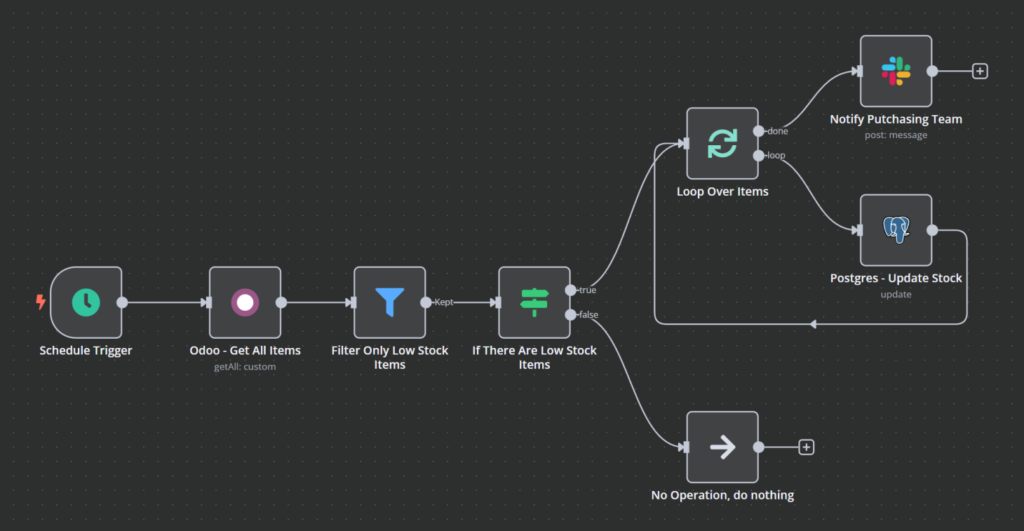
Picture a scenario where an ecommerce business sells high-demand products. Instead of an employee constantly checking stock levels and manually placing reorders, n8n can track inventory in Odoo. It can also notify the purchasing team when stock runs low and send a pre-filled order request to suppliers, avoiding a shortage and a loss of revenue.
To sum up, Odoo is a great fit for businesses needing a structured, ERP-driven approach, while Airtable works well for those looking for a simpler, spreadsheet-style solution.
Why replace Zoho with n8n?
Zoho provides a full suite of tools, but many businesses outgrow it. The most common limitations include:
- Hosting limits – no option for full self-hosting or data control
- Limited integrations – works best only inside Zoho’s ecosystem
- High costs – advanced features require expensive plans
- Customization gaps – little flexibility for complex workflows
If you’re considering switching, explore our n8n installation guide for a step-by-step setup.
Key takeaways
Switching from Zoho to n8n-powered alternatives offers more control over workflow automation. Unlike Zoho’s built-in tools, which can feel restrictive, n8n lets you integrate the platforms you already use and customize automation to fit your exact needs while budgeting wisely. By combining n8n with the right software, businesses can create seamless, automated workflows without being locked into a single provider.
If you’re thinking about trying n8n, you can explore over 1,250 pre-made workflow templates that can be easily installed on a virtual private server (VPS) from Hostinger. The KVM 2 plan at CA$ 12.59/month is a great starting point, and with hPanel, installing n8n with Ubuntu takes just a few clicks.
From there, you can build out more advanced workflows as you explore what n8n can do. The flexibility to connect different tools and automate repetitive tasks means your business can save time and focus on what really matters.


Dovydas has worked in cloud engineering and IT operations, focusing on maintaining and improving complex systems. He’s especially interested in software development and automation and is always looking for ways to make things more efficient and reliable. You can find him on LinkedIn.