How to Create a Custom WordPress Post Template Using the Block Editor and Code
Mar 10, 2026
/
Ariffud M.
/
8 min Read
A WordPress post template is a blueprint that determines the layout and design of your blog posts. They create a unique look and feel for each post or category, going beyond the basic formats.
This WordPress tutorial will guide you through creating these custom post templates. Whether you want to add a personal touch or streamline your content’s presentation, understanding how to use WordPress post templates can help you tailor your site’s aesthetics and functionality.
Download all-in-one WordPress cheat sheet
How to Create a Custom WordPress Post Template
To create your own custom WordPress post template, you can use:
- The block editor – a convenient option for users who want to avoid coding. Its user-friendly interface makes visual layout and design customization easy.
- Code – suitable for those with coding skills or interested in exploring WordPress’s technical aspects. It involves directly editing or creating template files in the theme.
- The theme’s settings – ideal for WordPress themes with built-in options for customizing post templates. It provides a simpler interface to adjust post layouts and elements within the theme’s predefined capabilities.
How to Create a Custom WordPress Post Template Using the Block Editor
Creating single post templates with the WordPress Block Editor, also known as Gutenberg, is simple. Note that this method is only available if you use a block-based theme, such as Twenty Twenty-Four.
Here are the steps:
- Log in to your WordPress dashboard and navigate to Appearance → Editor.
- In the template editor, select Templates → Single Posts.
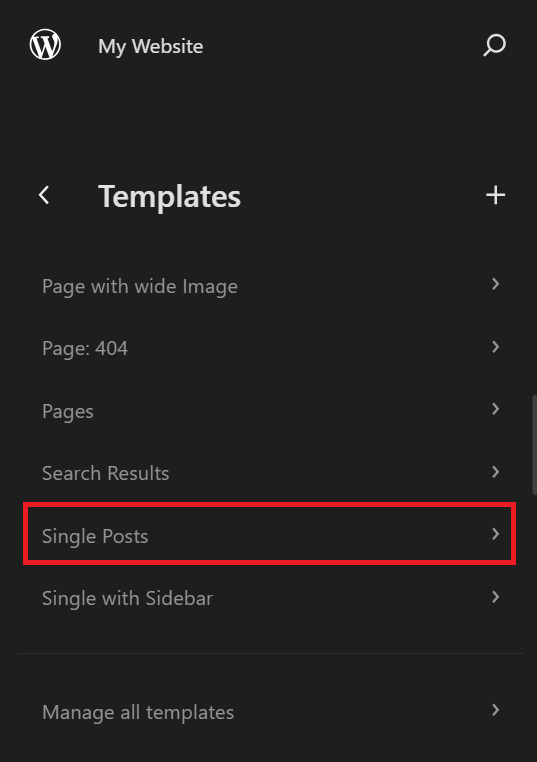
- Click the Edit button to begin customizing the blog post template. The left sidebar will automatically be hidden.

- Select the List View button at the top left of the screen to see all the blocks in the template.
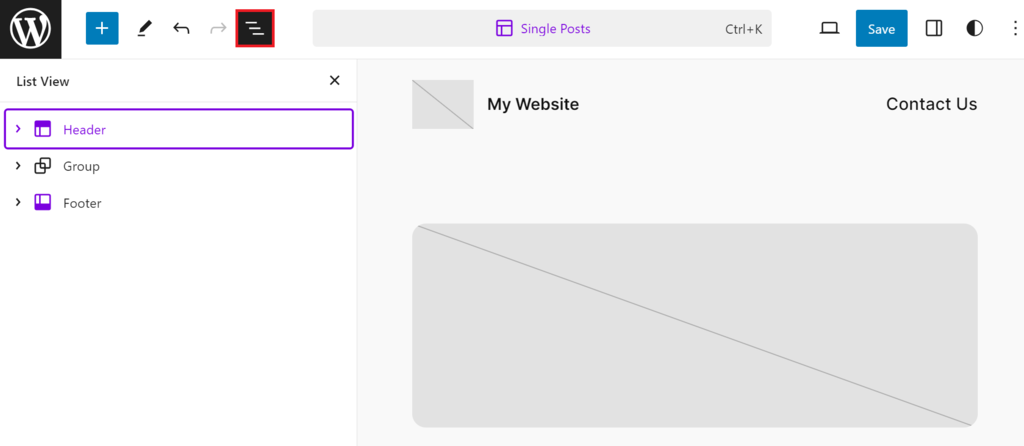
- Click on the block to modify each block, such as changing fonts or styles.
- Use the drag-and-drop feature in the List View panel to reorder the blocks.
- Click the Toggle block inserter button to add a new element, like a contact form or a button.
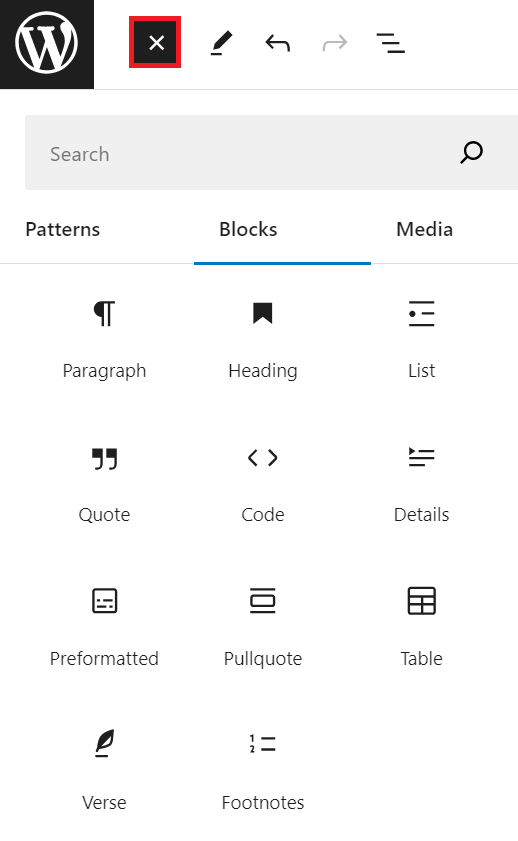
Typically, a single post template will include the following blocks:
- Header – displays elements like your site’s title, logo, and navigation menu. Changes to the Header block affect all pages where it’s used.
- Title – shows the post’s title. This block automatically displays the actual title in live posts.
- Featured Image – used to display a prominent image representing the post’s theme or content.
- Content – the main body of your post. It acts as a placeholder in the template and will show the actual content in live posts.
- Post Meta – contains additional information about your post, such as the author’s name, publication date, categories, and tags.
- Comments – displays comments on your post, promoting reader interaction.
- Footer – typically includes contact information, additional navigation, or a WordPress credit. Like the page header, changes here apply site-wide.
When editing, regularly click the View button to preview the template live. Once satisfied with your WordPress blog layout, click Save to apply your customizations.

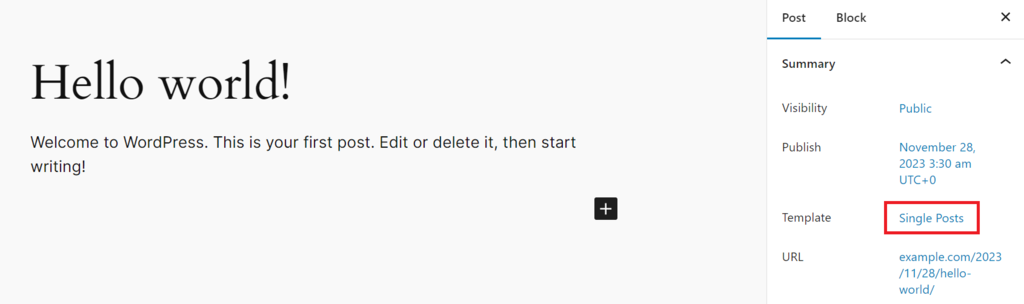
By default, any post you create will use the Single Post template. To verify, add a new post or edit an existing one and navigate to the Settings sidebar. The Template option should be set to Single Posts.
How to Create a Custom WordPress Post Template Using Code
Creating a custom WordPress post template using code offers greater customization. It is best suited for users familiar with PHP or aspiring to be WordPress developers.
For Hostinger’s WordPress hosting customers, you can easily follow this method using our File Manager. It lets you navigate the theme’s folder and create the PHP file directly.

Follow these steps:
- Log in to your Hostinger account and navigate to Websites → Dashboard on your hosting plan.
- From the dashboard, access the File Manager option. This will open a new tab.
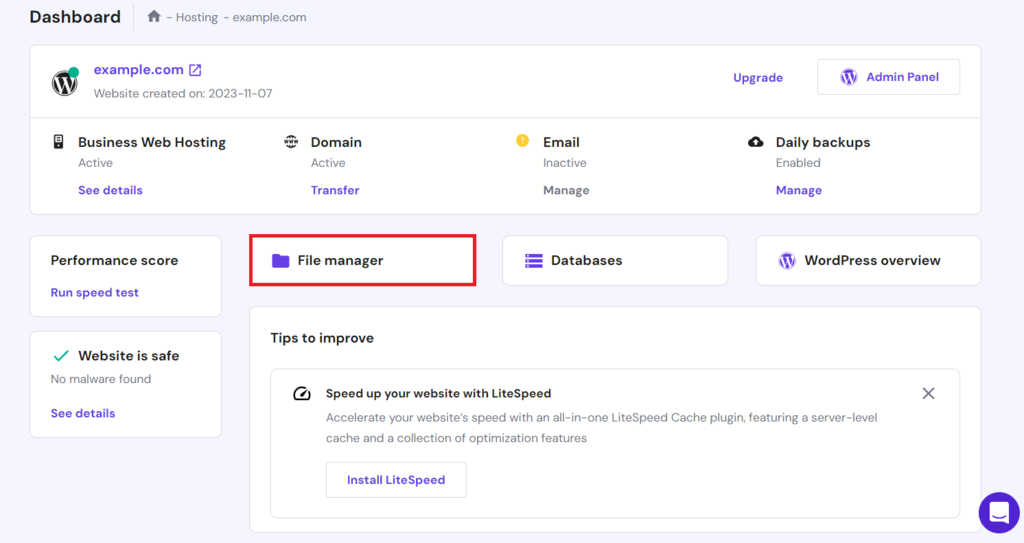
- In the File Manager, go to public_html/wp-content/themes. Here, you’ll find folders for all your installed themes.
- Select the theme you want to customize, like twentytwentyone.

- In your theme’s directory, create a new PHP file. You might name it my-custom-template.php.
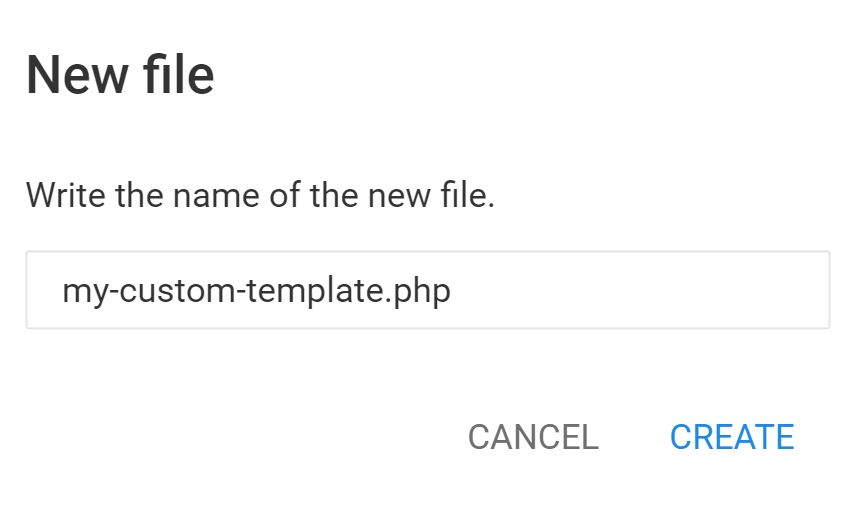
- At the beginning of the file, insert the following code snippet to define it as a new post template:
<?php
/*
* Template Name: My Custom Post
* Template Post Type: post
*/
You can start building your custom blog template from scratch in this file. Some common WordPress functions and structures you may include such as:
- get_header(); – this function includes the header template file.
- if ( have_posts() ) : while ( have_posts() ) : the_post(); – the Loop starts, iterating over each post.
- get_template_part( ‘template-parts/content’, ‘single’ ); – includes one template part for displaying post content.
- the_title(); – displays the post title.
- the_content(); – outputs the post content.
- comments_template(); – includes the comment template.
- the_post_navigation(); – adds navigation links for a previous and a next post.
- get_sidebar(); – includes the sidebar template file.
- get_footer(); – includes the footer template file.
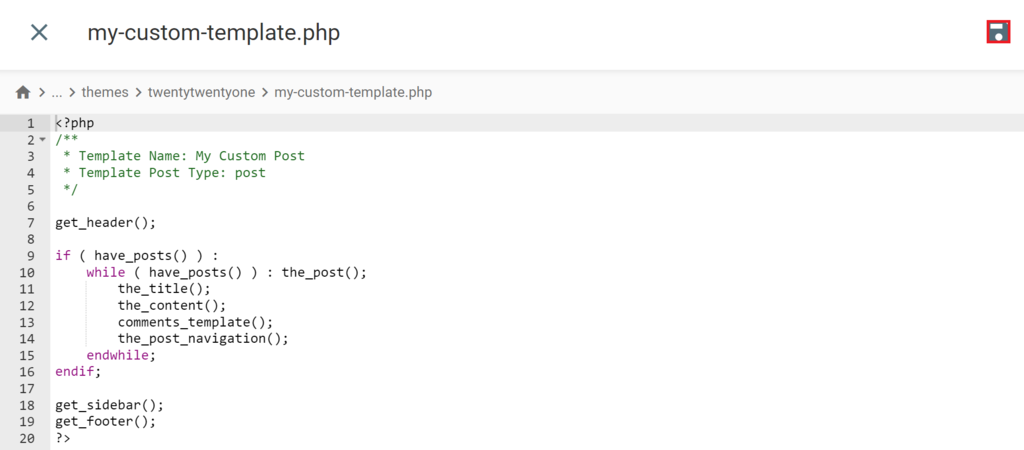
Here’s a simplified structure combining these elements:
<?php
/**
 * Template Name: My Custom Post
 * Template Post Type: post
 */

get_header();

if ( have_posts() ) :
    while ( have_posts() ) : the_post();
        the_title();
        the_content();
        comments_template();
        the_post_navigation();
    endwhile;
endif;

get_sidebar();
get_footer();
?>
Once your edits are complete, remember to click Save to apply all changes.
To use this custom single-post template, access the Settings sidebar while adding a new post or editing an existing one. Then, change the Template from Default template to My Custom Post.
How to Customize WordPress Post Template Using the Theme’s Settings
Creating custom single post templates can be done through your theme’s settings. Each theme may offer different customization options. We’ll use some examples to show how these adjustments can be made.
Customizing the Post Template in the Post Editor
In some WordPress themes like Astra, you can customize post templates directly in the post editor. This is convenient for personalizing blog post templates without leaving the editor.
Here’s how to do it in Astra:
- Begin by opening the post you want to customize.
- In the post editor, locate the Astra Settings button. Astra offers various options to modify the template’s layout.
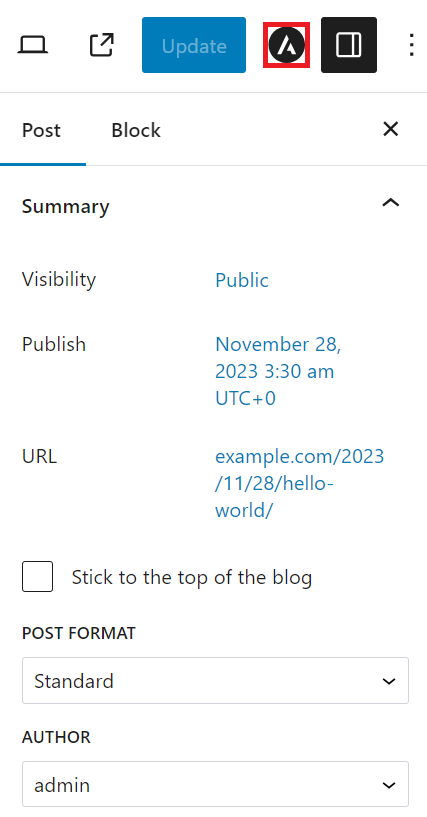
- Choose the Container Layout and Container Style for your post. The chosen style is effective when selecting the Normal or Narrow layout option.
- Adjust the position and appearance of your sidebar. Note that the sidebar is available when the Container Layout is set to Normal.
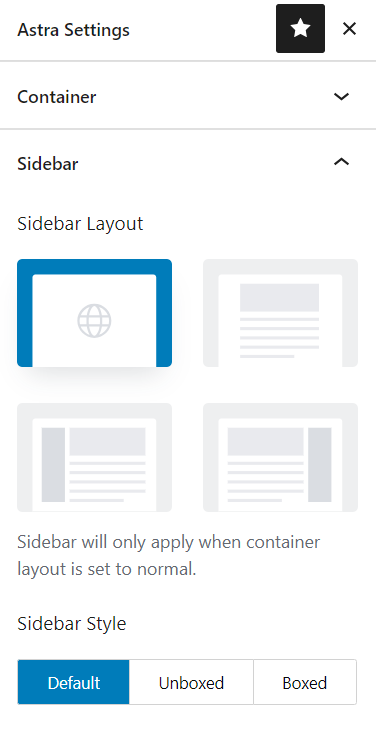
- Astra allows you to disable some elements for individual posts, such as the header, footer, or banner area.
- You can disable the primary or mobile header in the Advanced Settings section. Additionally, you can set a transparent header.

- Once you’ve made your adjustments, click Publish for a new post or Update for an existing one to apply the changes to your live site.
Customizing the Post Template Using Customizer
Editing custom templates through the WordPress Customizer is another efficient method. Themes like Neve offer built-in settings for this. To utilize the Customizer in Neve, follow this step-by-step guide:
- From your WordPress dashboard, go to Appearance → Customize.
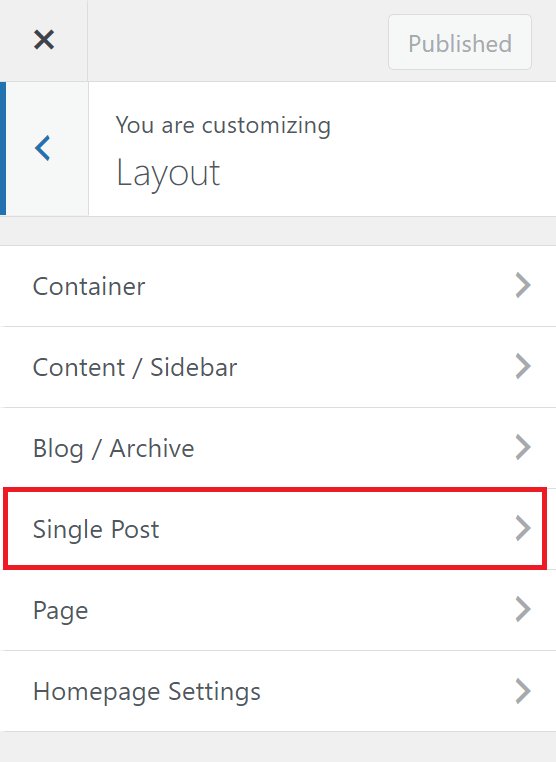
- In the Customizer, select Layout → Single Post to access the settings for individual blog posts.
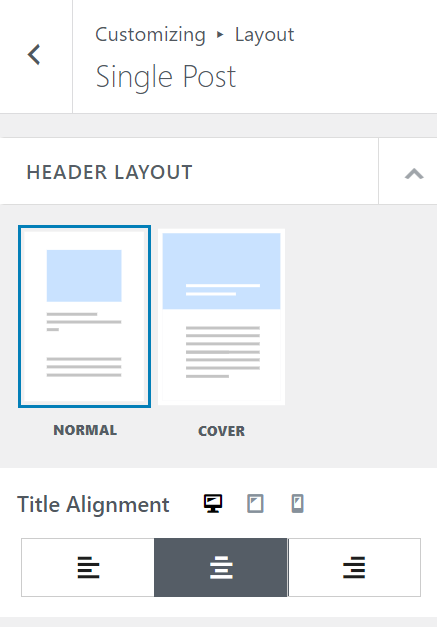
- Choose between NORMAL or COVER for the HEADER LAYOUT. Set the Title Alignment according to your preference.
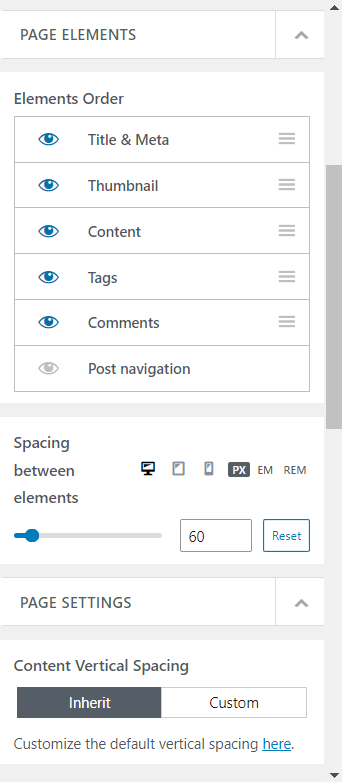
- Modify the order and spacing of elements on the page under PAGE ELEMENTS for a more organized appearance.
- In PAGE SETTINGS, set the Content Vertical Spacing option. Select Inherit for default theme settings or Custom to define your own.
- Under POST META, adjust the meta information order (like date and author), enable the display of author avatars for posts, and choose to show the last updated date instead of the publication date.

- The Comments and Submit Form Section offers options to set titles and customize padding, background color, text color, and the submit button’s style.
- After making adjustments, click Publish to apply and save your changes.
Selecting Other Pre-Made Post Templates
Many WordPress themes, including Influencer Agency, offer a range of pre-made post templates. This feature is ideal for those looking to add variety to their blog’s appearance without engaging in custom design.
To discover themes with pre-made templates in the WordPress repository, follow these steps:
- Go to Appearance → Themes → Add New Theme in your WordPress dashboard.
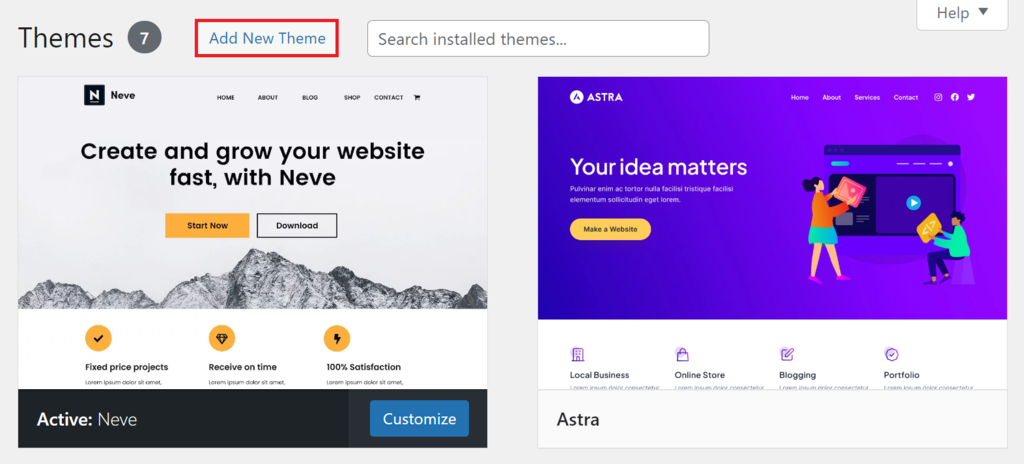
- Click the Feature Filter, select Template Editing, and then click Apply Filters.

After selecting a WordPress theme with multiple templates, you can easily switch between them when creating or editing a particular post. In the post editor, like with several other methods, select one of the available templates in the drop-down menu of the Template section.

When Should You Use a Custom WordPress Post Template?
Custom WordPress post templates adapt the content presentation to its purpose and audience. Choosing a suitable template can significantly enhance the reader’s experience, making your content more engaging and impactful.
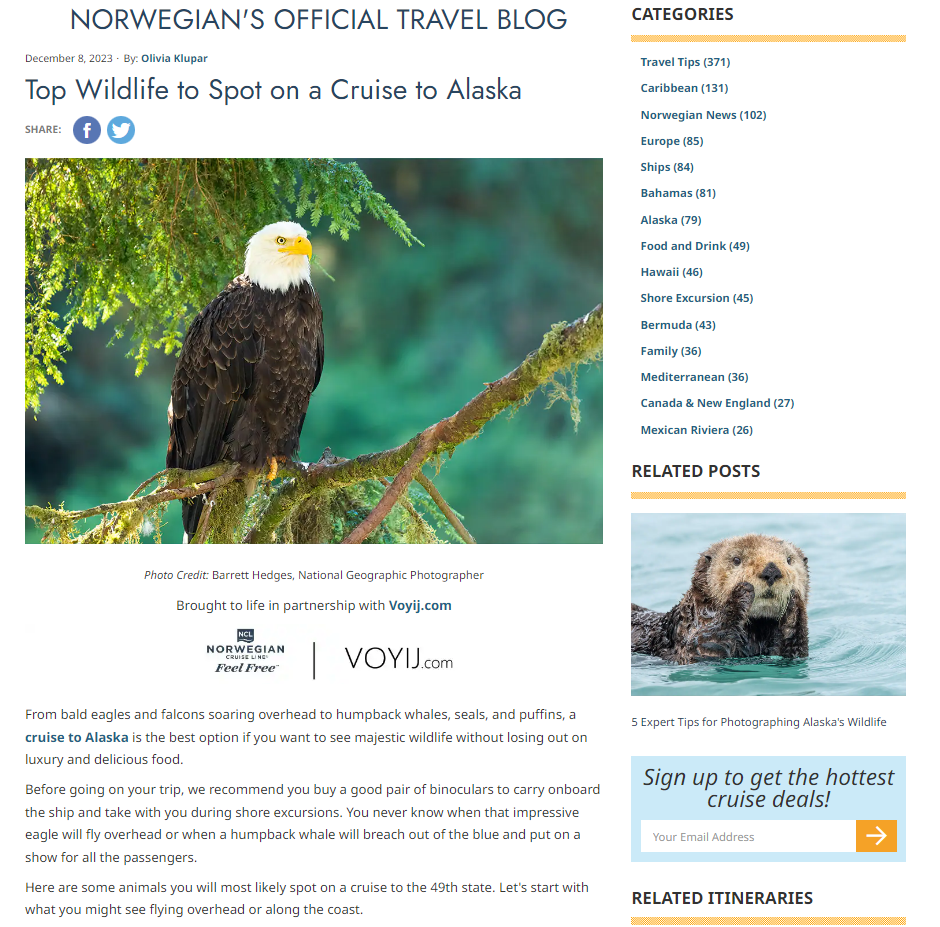
Norwegian Cruise Line‘s website illustrates this perfectly. For their video-centric blog entries, they opted for a dynamic, full-width template that emphasizes the visual impact of the video content. This approach enhances the appeal of their cruise offerings to potential travelers.

In contrast, they employ a more traditional layout for text-heavy content focusing on text and images. This format effectively delivers detailed information, ideal for readers who prefer in-depth textual content.
Yatzer‘s website is another excellent example of custom template versatility. Their agenda-style posts use a format that clearly and accessibly highlights event details, catering to those looking for event specifics.

For their regular blog posts, a full-width layout is utilized. It emphasizes descriptive text and vivid imagery, enriching the storytelling aspect of their content.
Tips for Creating a Good Custom WordPress Post Template
Creating an effective WordPress custom post template involves finding the right balance between functionality and aesthetics. To ensure your template looks appealing and fulfills its intended purpose efficiently, consider the following tips:
Understand the Content Needs
When crafting a custom template, it’s vital to understand the specific needs of your content. Different blog posts or post types often have unique requirements, making it crucial to clearly define the purpose and characteristics of your content.
This understanding will guide your decisions on elements to include in your new template. For instance, recipe blog posts may require a layout that emphasizes step-by-step instructions and food photos compared to standard blogs.
Maintain the Design Consistency
Maintaining design consistency is essential when creating a WordPress blog post template. Your template’s font type, size, and color scheme should harmonize with your site’s web design.
A consistent design approach within the template hierarchy ensures a cohesive and professional appearance across your website. It enhances the user experience and reinforces your brand identity.
Pay Attention to Accessibility
Ensuring accessibility in your WordPress post template design is also crucial. This involves using contrasting colors for text and backgrounds to enhance readability, choosing easy-to-read fonts, and adding screen reader text.
Additionally, it’s important to add descriptive alt text to images. This provides the context for screen readers, making your content accessible to a broader audience, including those with visual impairments.
Prioritizing accessibility in WordPress aligns with web design best practices and becomes a more inclusive and user-friendly website catering to diverse users.
Use a Child Theme
Creating a child theme is important when manually customizing WordPress blog post templates. A child theme inherits the functionality from its parent theme while enabling you to make changes without modifying the original theme’s code.
This preserves your customizations through updates and provides a safer, more flexible environment for design experimentation.
Conclusion
This guide has described various methods to create post templates in WordPress. You’ve learned to use the block editor for a code-free approach, practice coding for more personalized templates, and utilize theme settings for quick customizations.
Each method offers unique advantages, enabling you to custom post templates that suit your site’s style and content structure. Applying these insights will boost your site’s functionality and visual appeal, whether designing a brand new single post template or refining an existing one.
WordPress Post Template FAQ
This section will answer the most common questions about WordPress post templates.
What Is a WordPress Post Template?
A WordPress post template is a predefined layout that dictates how posts are displayed on your website. It serves as the standard format for presenting individual blog posts. These versatile templates allow customization or complete replacement to change the style and presentation of your blog’s content.
Are Custom WordPress Post Templates Compatible With All Themes?
Custom WordPress post templates are generally compatible with most themes. However, theme compatibility can vary, as theme developers may include unique functionalities or specific layout designs. It’s advisable to read the theme’s documentation before integrating custom post templates.
Can I Create a Custom WordPress Post Template Without Coding Skills?
Yes, you can create a custom WordPress post template without coding skills by using a theme builder or a page builder plugin. These tools offer a user-friendly, drag-and-drop interface for visually crafting a custom page template.
How Can I Edit a WordPress Post Template?
To edit a WordPress post template, you can use the theme customizer or access theme files through the WordPress dashboard or a file manager. You can modify a single template for an existing post, make changes that affect other posts, or create a different template for a specific page.

Ariffud is a Technical Content Writer with an educational background in Informatics. He has extensive expertise in Linux and VPS, authoring over 200 articles on server management and web development. Follow him on LinkedIn.


