What is akismet and how to start using it
Mar 10, 2026
/
Nabilla R.
/
6 min Read
Enabling both comments and contact form messages on your page is one good way to improve your visitors’ engagement rate. Unfortunately, they are prone to spam messages, usually consisting of random advertisements and suspicious links that direct you to irrelevant websites.
If left unattended, spam can negatively affect users’ experience and harm your search engine optimization (SEO) effort. Web crawlers see spam comments as red flags, and Google might even remove the content from its search results.
One effective way to block spammers from your WordPress site is by installing an anti-spam plugin, like Akismet Anti-Spam by Automattic. This article will answer everything about the plugin, including what it’s used for, key features, and the installation process.
What Exactly Is the Akismet Anti-Spam Plugin?

The Akismet Anti-Spam plugin is a cloud-based application that filters out spam on your WordPress website. Developed by the same company behind WordPress.com, this plugin has garnered more than 5 million downloads.
Akismet offers several prominent features, such as:
- Scanning through your blogs, comments, and contact forms.
- Displaying URLs in the comment body to identify misleading links.
- Setting a status history for every comment to help identify whether it’s cleared by Akismet or a moderator.
- Allowing moderators to configure spam parameters such as keywords and links.
- A discard feature to block significant spam messages, saving disk space and speeding up your WordPress site.
Akismet identifies spam comments from across websites using anti-spam algorithms. Every time a user posts a comment, Akismet examines it based on its database. If the algorithms identify a comment as spam, it will be removed from your website.
The algorithms also learn from actions taken by users to spot spam email addresses. For example, when many users report a specific comment as spam, Akismet will automatically tag it as spam.
In addition, Akismet allows users to filter out comments manually – the algorithms will then record this action and use it in filtering real users’ comments from the spammy ones.
However, there are times when the algorithms accidentally identify legitimate users as spammers. This issue occurs when a user’s comment is marked as spam on other sites, resulting in false positives. To prevent this from happening, check your moderation queue regularly.
Why Use Akismet?
If you don’t want to activate an anti-spam plugin, you can perform manual comment moderation to prevent comment spam on your WordPress website. That said, it’s a time-consuming process and is prone to human error.
For this reason, installing a plugin is a better alternative. The tool can quickly identify hundreds of comments, forms, and messages and then eliminate the ones that include spam.
Akismet Anti-Spam is our top recommendation among other spam-blocker plugins. Here’s why:
- Reliable – the plugin has blocked more than 500 million spam comments up to this day. With such a vast database, it’s getting better at distinguishing which comments are spam.
- Jetpack and Contact Form 7 integration – by combining these two platforms, the Akismet service can further improve your site’s security and block spam from contact form submissions.
- Statistics monitor – this feature provides data of your site’s spam activities. It displays both monthly and annual spam charts.
- Easy-to-use – the plugin comes as a default plugin for WordPress websites. This allows you to set it up and activate it easily.
Thanks to its wide variety of features that cut down on manual comment moderation, Akismet allows you to focus on creating content and managing the rest of your website.
Akismet Anti-Spam also offers a freemium pricing model, with users being able to purchase premium features to boost its performance. There are dedicated plans for both personal and commercial use, starting from $9.95/month.
How to Set Up the Akismet Anti-Spam Plugin
Akismet Anti-Spam comes as a default application with a WordPress installation. However, the plugin needs an API key upon activation. The following sections will walk you through an easy way to set up Akismet and get it running on your site.
1. Install and Activate Akismet Anti-Spam Plugin
If the plugin is not already installed on your WordPress site, proceed to locate it in the plugin directory.
- Access your WordPress Dashboard and go to the Plugins menu.
- Select the Add New option and type “Akismet Spam Protection” in the search bar.
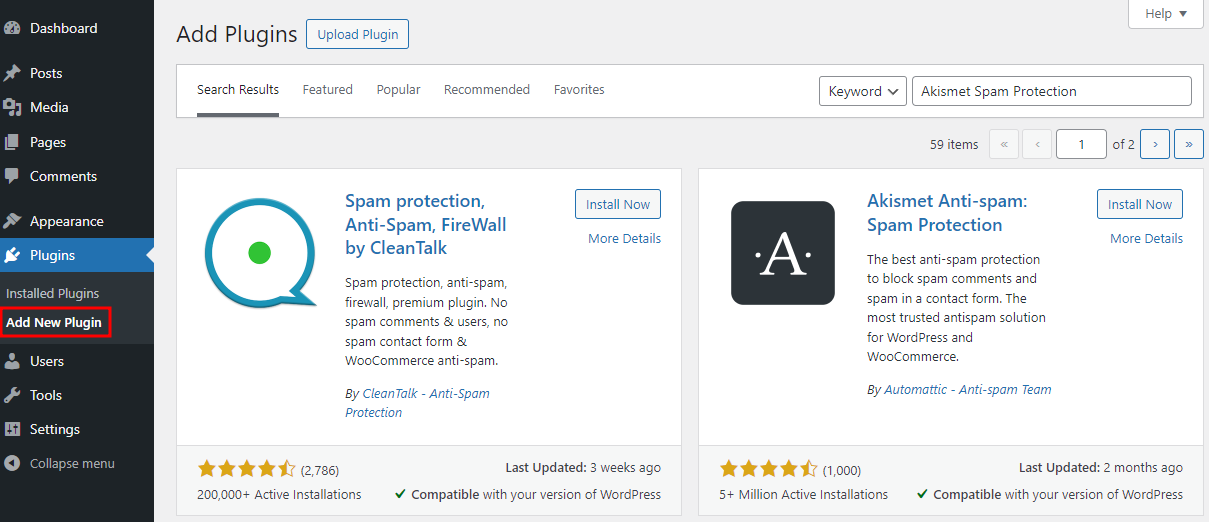
- Click on the Install Now button to start installing the plugin. Once the process is complete, hit Activate.
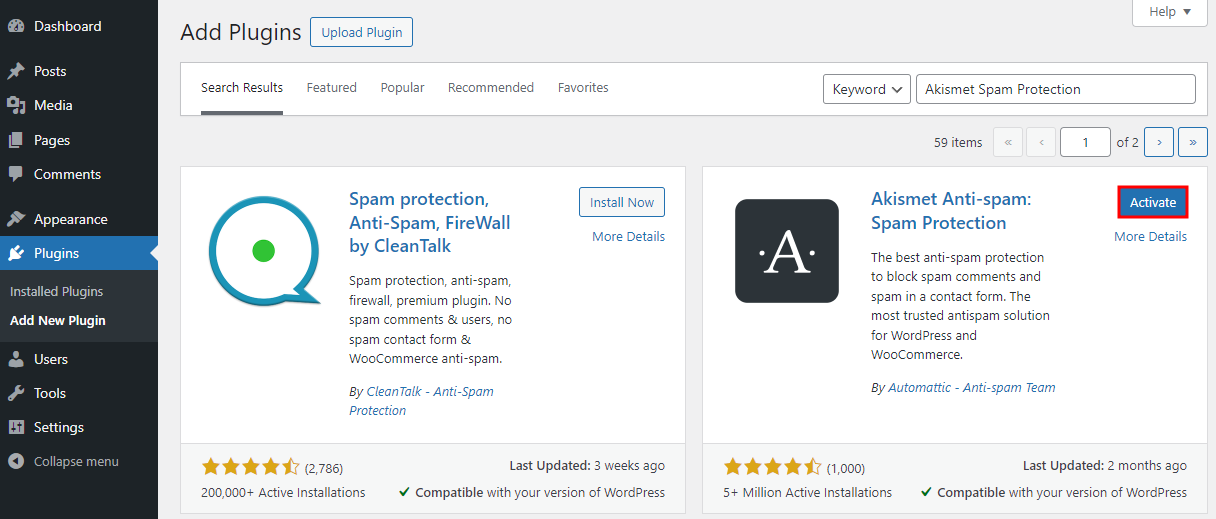
- Upon activation, the software will require you to fill out an API key in the provided field.
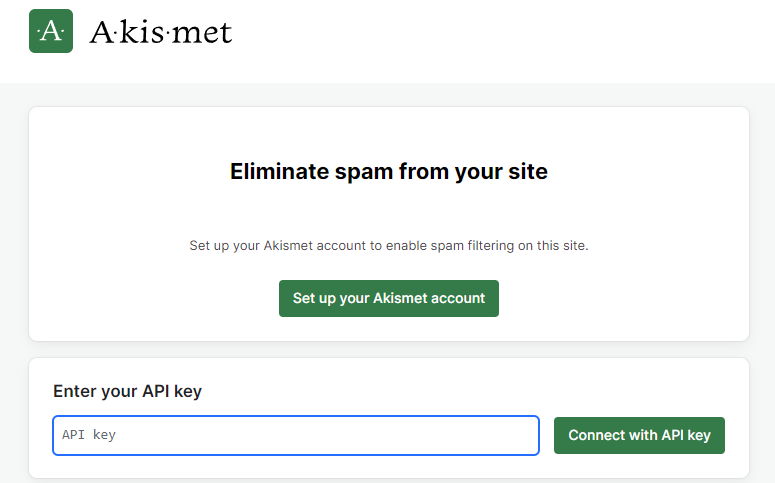
- Keep this window open and follow the steps below to get an API key for the Akismet Anti-Spam plugin.
2. Get the Akismet API Key
An API key works as a password for your Akismet account, and it helps the server recognize you as an authorized user.
With that in mind, it is essential to maintain your API key’s security to prevent any misconduct.
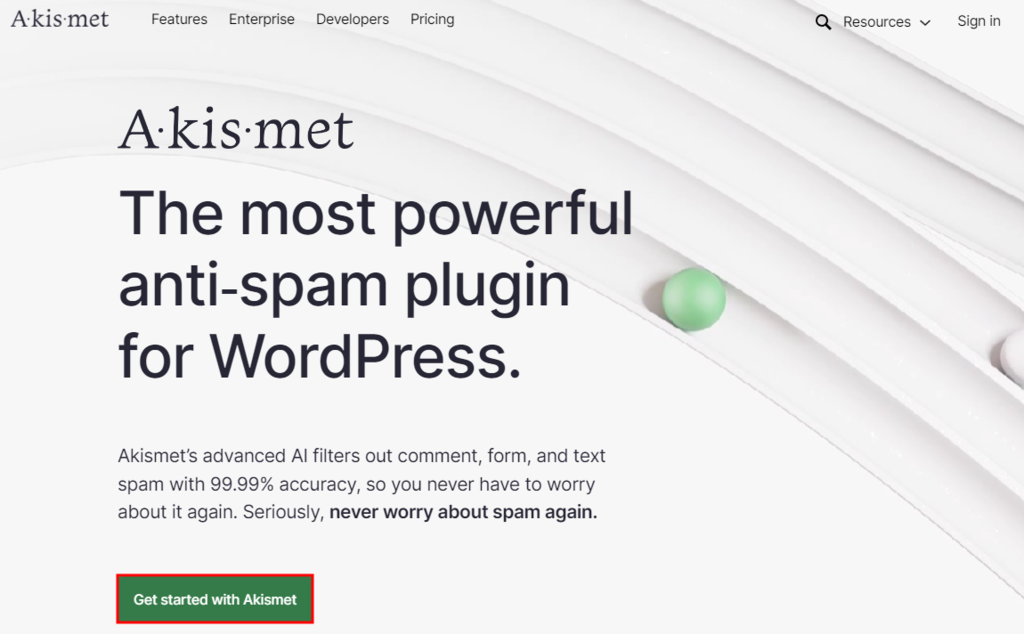
Users can use the same API key for more than one WordPress site, depending on the subscription plan. To get yours, head over to Akismet’s main website.
- Click the Get started with Akismet button to start setting up your account.
- Pick a subscription plan. There are paid subscriptions for larger projects or businesses and a free version for personal use.
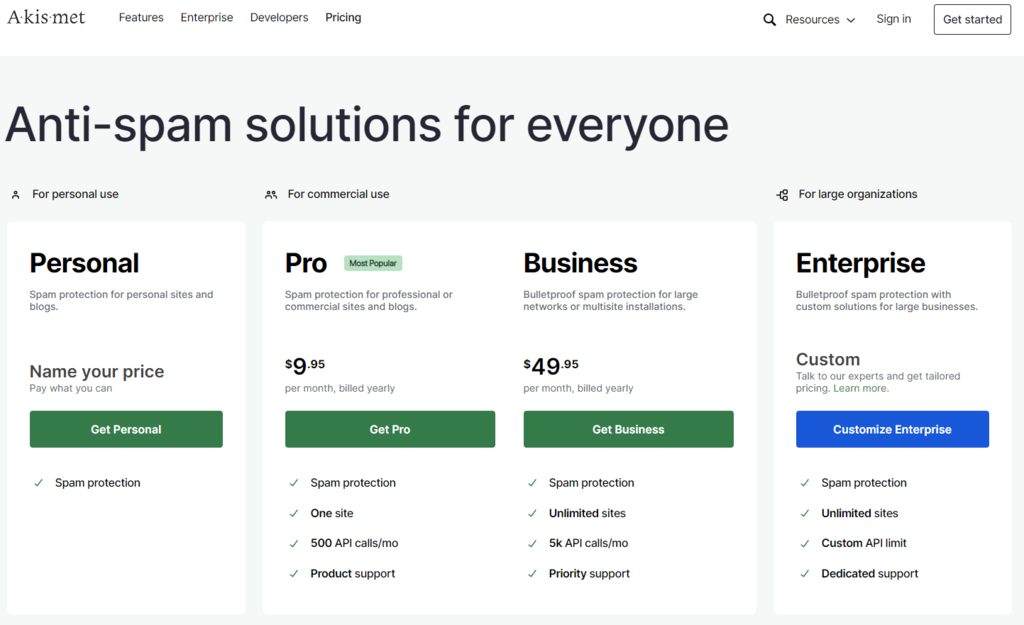
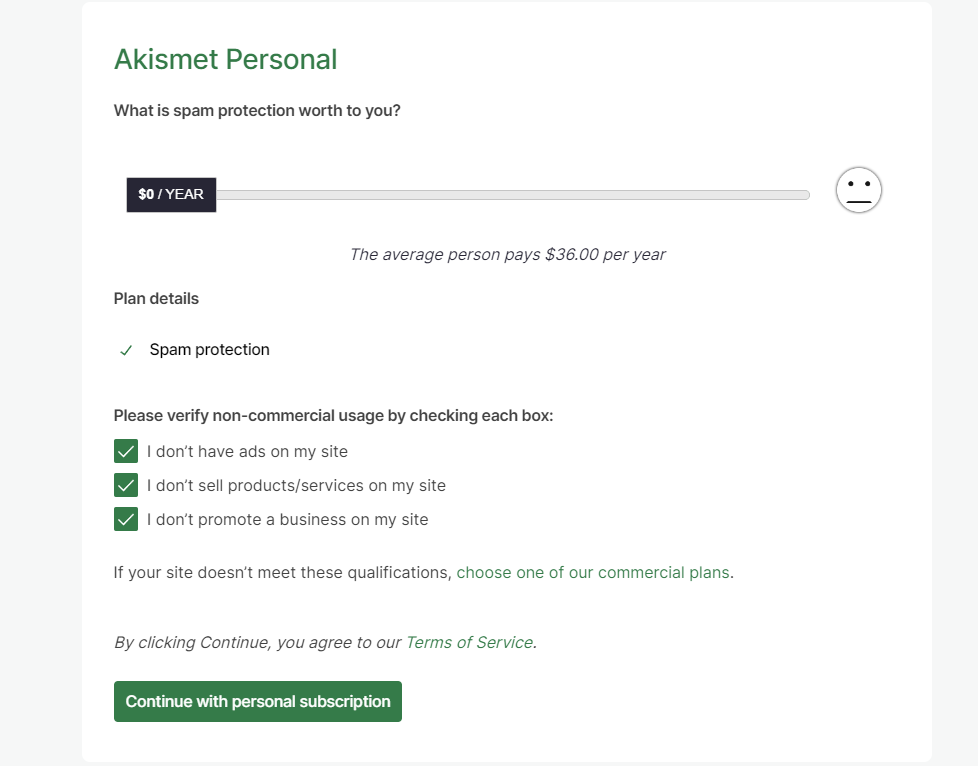
- If you have a personal website that doesn’t display ads, sells products, or engage in business promotion, you can pick the free option. To do so, click on the Get Personal button and drag the price bar to $0.
- Fill out your information in the provided fields. Then, check all the boxes. Once you’re done, click Continue With Personal Subscription.
- Akismet will send a code for verification to your registered email address. Check your email and go back to your account page.
- Enter the confirmation code in the provided field, then hit Continue.
3. Add the Akismet API Key
Once the email has been verified, Akismet will then send a message containing your API key. Follow these next steps to connect your WordPress site with Akismet Anti-Spam.
- Go back to the activation page on your WordPress dashboard. You can also go to the Plugins menu, head to Installed Plugins, locate the Akismet plugin, and press Settings.

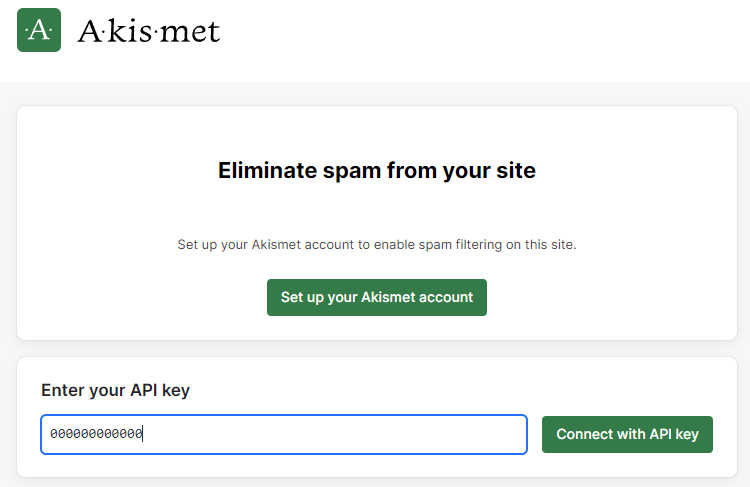
- Fill out your API key and click the Connect with API key button.
- Configure your preferences and save all the changes. You can set the plugin to discard spam automatically or put the spam in the Spam folder for you to review.
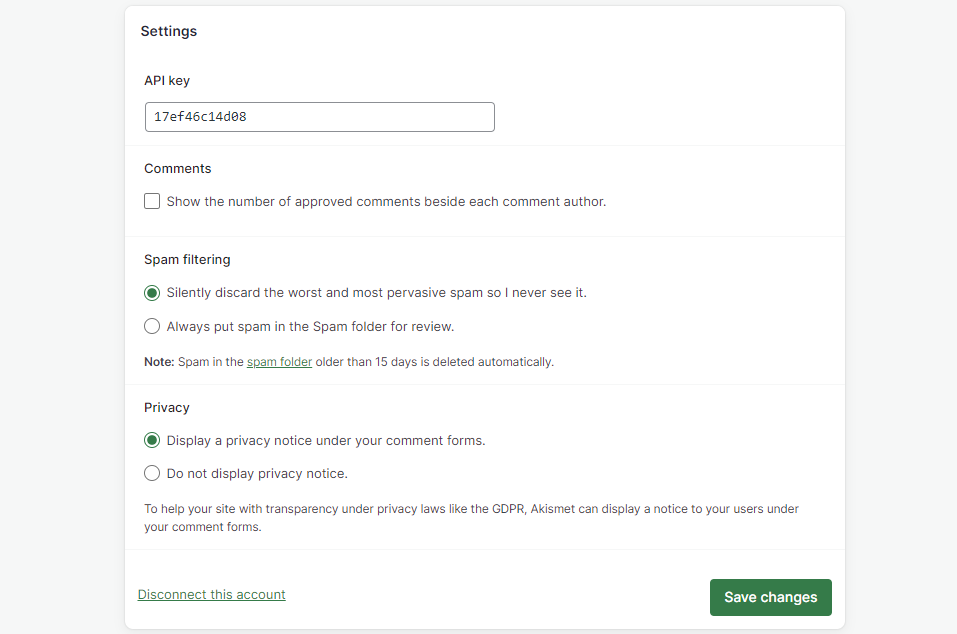
Akismet Anti-Spam has now successfully been added to your site. The plugin will automatically start scanning for spam through your comments and forms as soon as it is activated.
Suggested Reading
Learn more about relevant WordPress plugins and how to use them:
Best WordPress Comment Plugins
Best WordPress Contact Form Plugins
How to Add a Contact Form to WordPress
How to Install WordPress Plugins
Best WordPress Plugins Every Site Needs
Tracking Spam With Akismet
Akismet Anti-Spam enables you to monitor spam activity on your WordPress site. With the free version, you will view basic statistics, such as the total number of spam, missed spam, and false positives.
Meanwhile, subscribing to Akismet Plus and above will grant users access to Advanced Stats, which will show a comprehensive data report of your account as well as diagnostics to pinpoint the troublesome aspects of your site.
To view your Akismet stats, go to your account page and scroll down to the bottom to find the Recent Active Sites menu.

Clicking the highlighted button will take you to the Akismet Stats page. You can choose to view either the monthly or annual data based on your subscription plan.
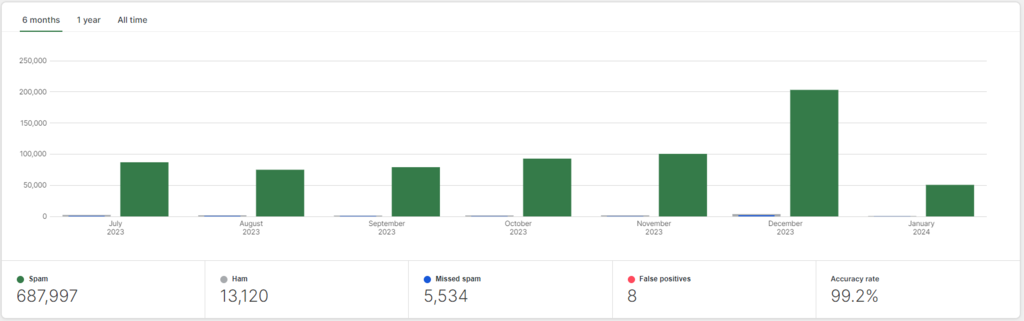
In addition to helping users analyze how well the plugin performs, these statistics are handy for monitoring multiple active websites. The data allows you to supervise your spam levels and take immediate action whenever any suspicious activity surges.

Conclusion
Spam comments or messages are unsolicited responses coming from both automated bots and human spammers. This issue will become inevitable as your website grows in traffic and attracts unwanted attention.
These comments can harm your site’s credibility, reputation, and security. A spammer can also leave malicious links in your comment section and harm your site’s SEO. Fortunately, WordPress CMS provides a handful of anti-spam plugins.
One of the most reliable WordPress spam-blocker plugins is Akismet Anti-Spam. It has an extensive global database and uses advanced anti-spam algorithms.
To recap, let’s walk through each step you need to take to activate Akismet:
- Install Akismet Anti-Spam on your WordPress website.
- Sign up for one of the subscription plans to get an API key.
- Connect Akismet to WordPress using the API key.
- Monitor your site’s statistics from your Akismet account page.
We hope this article helps answer any questions about the Akismet Anti-Spam plugin.
If you have any further questions, feel free to drop a comment in the spam-free section below.
What Is Akismet FAQ
Here are some frequently asked questions about Akismet.
How Does Akismet Block Spam?
Akismet blocks spam by using machine learning algorithms to analyze comments and trackbacks submitted to a website. It compares the content of each submission against a database of known spam, and if it detects spam, it flags it as such or automatically moves it to the spam folder.
Is Akismet Premium Version Worth It?
For most websites, the free version of Akismet is sufficient for blocking spam. However, the premium version offers additional features such as priority support and advanced statistics. If spam is a major issue for your website, then the premium version may be worth it.

Nabilla is a website hosting and development enthusiast. She loves to share her knowledge with others in order to help them grow their online presence. When she's not busy writing, Nabilla enjoys exploring nature and going on adventures. She is passionate about helping people achieve their online goals.


