Types of CSS: inline, external and internal definitions and differences explained
Dec 02, 2025
/
Domantas G.
/
4 min Read

CSS defines the front-end appearance of your website. There are several types of CSS, among them are inline and external CSS.
In short, the main difference between inline CSS and external CSS is that the former is processed faster as it only requires the browser to download one file, while external CSS will require downloading HTML and CSS files separately.
In this tutorial, we’ll go in-depth comparing the three types of CSS styles – inline CSS, external CSS, and internal CSS. We’ll also uncover the advantages and disadvantages of using each method.
Download complete CSS cheat sheet
What Is CSS
Cascading Style Sheets (CSS) is a markup language responsible for how your web pages will look like. It controls the colors, fonts, and layouts of your website elements.
This style sheet language also allows you to add effects or animations to your website. You can use it to display some CSS animations like click button effects, spinners or loaders, and animated backgrounds.
Without CSS, your website will appear as a plain HTML page. Here’s how Twitter will look like if we disable its CSS: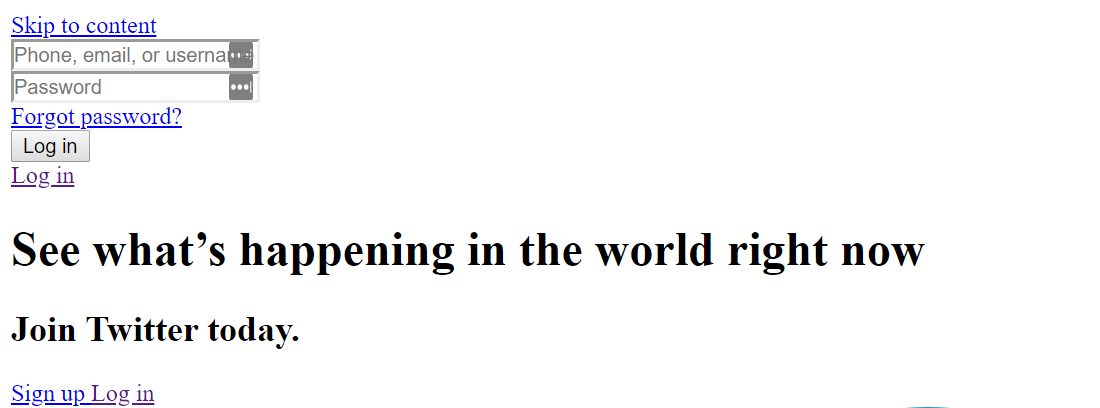
What's the Difference Between Inline, External and Internal CSS Styles?
The main difference between Inline, external and internal CSS Styles is their location and scope of application. Inline CSS styles are included within the HTML document and are specific to individual HTML elements, allowing for targeted styling. Internal CSS styles are included within the head section of an HTML document and apply to the entire document, allowing for consistent styling across multiple elements. External CSS styles are stored in a separate file and can be linked to multiple HTML documents, allowing for global styling across an entire website.
Internal CSS
Internal or embedded CSS requires you to add a <style> tag in the <head> section of your HTML document.
This CSS style is an effective method of styling a single page. However, using this style for multiple pages is time-consuming as you need to put CSS rules on every page of your website.
Here’s how you can use internal CSS:
- Open your HTML page and locate <head> opening tag.
- Put the following code right after the <head> tag
<style type="text/css">
- Add CSS rules on a new line. Here’s an example:
body {
    background-color: blue;
}
h1 {
    color: red;
    padding: 60px;
}

Type the closing tag:

</style>
Your HTML file will look like this:
<!DOCTYPE html>
<html>
<head>
<style>
body {
    background-color: blue;
}
h1 {
    color: red;
    padding: 60px;
}
</style>
</head>
<body>

<h1>Hostinger Tutorials</h1>
<p>This is our paragraph.</p>

</body>
</html>
Advantages of Internal CSS:
- You can use class and ID selectors in this style sheet, like the following example:
.class {
    property1 : value1;
    property2 : value2;
    property3 : value3;
}

#id {
    property1 : value1;
    property2 : value2;
    property3 : value3;
}
- Since you’ll only add the code within the same HTML file, you don’t need to upload multiple files.
Disadvantages of Internal CSS:
- Adding the code to the HTML document can increase the page’s size and loading time.
External CSS
With external CSS, you’ll link your web pages to an external .css file, which can be created by any text editor in your device (e.g., Notepad++).
This CSS type is a more efficient method, especially for styling a large website. By editing one .css file, you can change your entire site at once.
Follow these steps to use external CSS:
- Create a new .css file with the text editor, and add the style rules. For example:
.xleftcol {
   float: left;
   width: 33%;
   background:#809900;
}
.xmiddlecol {
   float: left;
   width: 34%;
   background:#eff2df;
}
- In the <head> section of your HTML sheet, add a reference to your external .css file right after <title> tag:
<link rel="stylesheet" type="text/css" href="style.css" />
Don’t forget to change style.css with the name of your .css file.
Advantages of External CSS:
- Since the CSS code is in a separate document, your HTML files will have a cleaner structure and are smaller in size.
- You can use the same .css file for multiple pages.
Disadvantages of External CSS:
- Your pages may not be rendered correctly until the external CSS is loaded.
- Uploading or linking to multiple CSS files can increase your site’s download time.
Inline CSS
Inline CSS is used to style a specific HTML element. For this CSS style, you’ll only need to add the style attribute to each HTML tag, without using selectors.
This CSS type is not really recommended, as each HTML tag needs to be styled individually. Managing your website may become too hard if you only use inline CSS.
However, inline CSS in HTML can be useful in some situations. For example, in cases where you don’t have access to CSS files or need to apply styles for a single element only.
Let’s take a look at an example. Here, we add an inline CSS to the <p> and <h1> tag:
<!DOCTYPE html>
<html>
<body style="background-color:black;">

<h1 style="color:white;padding:30px;">Hostinger Tutorials</h1>
<p style="color:white;">Something usefull here.</p>

</body>
</html>
Advantages of Inline CSS:
- You can easily and quickly insert CSS rules into an HTML page. That’s why this method is useful for testing or previewing the changes and performing quick fixes to your website.
- You don’t need to create and upload a separate document as in the external style.
Disadvantages of Inline CSS:
- Adding CSS rules to every HTML element is time-consuming and makes your HTML structure messy.
- Styling multiple elements can affect your page’s size and download time.

Conclusion
In this tutorial, you’ve learned the difference between the three types of CSS – internal, external, and inline, and their uses in website development. Given that each type has its own advantages and disadvantages, it’s important to know your goal before using a specific type for your website.
To recap, here are the three types of CSS:
- Internal or embedded – add <style> tag in the <head> section of HTML document
- External – link the HTML sheet to a separate .css file
- Inline – apply CSS rules for specific elements.
We hope that this article helps you understand the differences between the three types of CSS.

Domantas leads the content and SEO teams forward with fresh ideas and out of the box approaches. Armed with extensive SEO and marketing knowledge, he aims to spread the word of Hostinger to every corner of the world. During his free time, Domantas likes to hone his web development skills and travel to exotic places.

Comments
June 21 2019
nice and good post and thanks for posting.
February 24 2020
Both Internal and External CSS
March 02 2020
I'm using external .css file because they are very easy and can be used without getting trouble to the main code
March 16 2020
Hey, thanks for the help
December 04 2020
Thanks for tutorials
December 27 2020
Thanks for this❤️, I'll be using external CSS
April 11 2022
I would be using External