How much does a business email cost?
Jun 12, 2026
/
Bruno S.
/
8 min Read

Business email costs range from less than $1 to $22 per user per month, depending on the number of users, mailbox storage, and the level of bundled productivity suite.
Standalone email hosting usually starts at $0.59 per user per month for basic plans and ranges from $6 to $9 per user per month for providers like Google Workspace and Microsoft 365. A custom domain, like name@domain.tld, is sometimes included or billed separately.
Hidden costs like domain registration, migration, and add-ons can push monthly totals above the base price.
Providers like Hostinger, Zoho Mail, Google Workspace, and Microsoft 365 use different pricing models, including per-user, tiered subscriptions, and bundles. Comparing the options helps you avoid paying for unused features or hitting limits as your team grows.
How much does the cost of a business email range?
Business email costs fall into three broad tiers based on what’s included:
Tier | Monthly cost | What’s included | Example providers |
Entry-level | $1–$3/user | Custom domain email, basic spam filtering, 10–15 GB storage | Hostinger Starter Business Email, Zoho Mail Lite |
Standard | $3–$10/user | More storage, productivity tools, stronger security | Hostinger Premium Business Email, Zoho Mail Premium, Google Workspace Starter, Microsoft 365 Business Basic |
Enterprise | $10+/user | Advanced compliance, unlimited storage, DLP, priority support | Google Workspace Plus, Microsoft 365 Business Premium |
Prices vary because the products differ. While Hostinger and Zoho’s plans are email-centric, Google and Microsoft bundle email with broader productivity tools. Before paying to get a business email, separate the features you need from the tools you are unlikely to use.
Hostinger’s Starter Business Email plan starts at $0.59 per user per month (for a 12-month contract).
Zoho Mail Lite starts at $1 per user per month on an annual plan and includes 10 GB of storage, Internet Message Access Protocol (IMAP) and Post Office Protocol (POP) access, and mobile apps.
Google Workspace Business Starter costs $7 per user per month on an annual plan and includes Gmail, Drive, Meet, Docs, Sheets, and Gemini AI.
Microsoft 365 Business Basic runs $6 per user per month annually and includes Outlook, Teams, SharePoint, and OneDrive. Microsoft also offers a lower-priced option without Teams.
Both suites cost significantly more than standalone email plans because email is just one of many tools bundled in.
What affects business email cost?
Several factors affect business email pricing. Understanding what you need and what you can skip makes your monthly spending easier to predict.
Number of users
Business email is often priced per user per month. In most cases, each person who needs their own inbox requires a paid seat.
The calculation is straightforward: 10 users on a $3-per-month plan cost $30-per-month; those same 10 users on a $7-per-month plan cost $70-per-month.
- 5 users × $0.59-per-month = $2.95-per-month
- 10 users × $3-per-month = $30-per-month
- 25 users × $7per-month = $175-per-month
Per-user pricing makes costs easy to calculate, but the total increases as your team grows. Some providers offer volume discounts for larger teams, so check for that before committing to a plan.
Storage per mailbox
Storage is an important factor to consider when upgrading from an entry-level plan. Plans typically range from 10 GB on entry-level plans to 50 GB on mid-range paid plans. Google Workspace Business Standard allocates 2 TB of pooled storage per user; enterprise plans go higher.
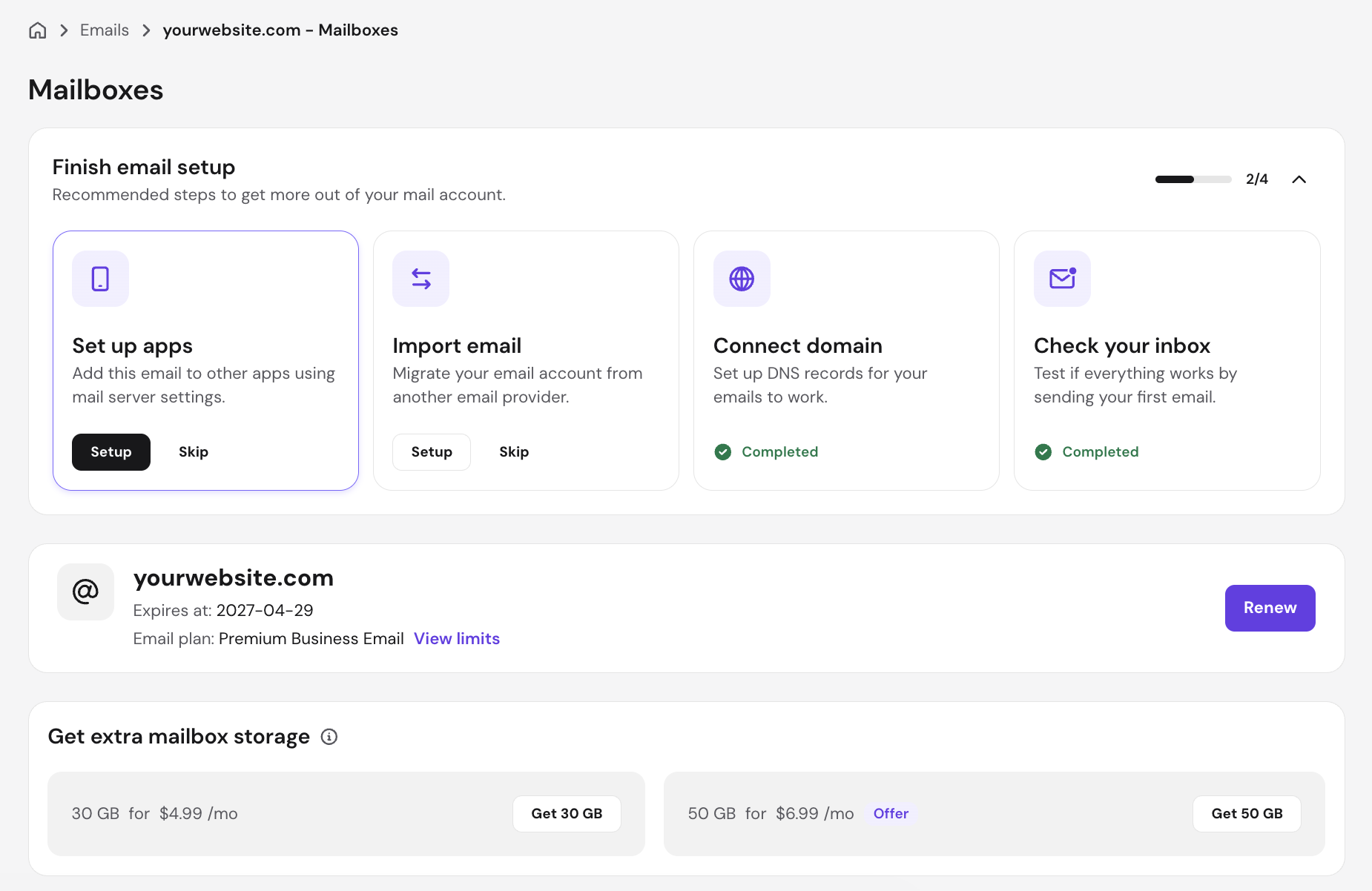
A smaller mainbox is sufficient for text-based communications and occasional attachments. Teams that receive large attachments, such as design files, contracts, and media, should compare higher-storage plans or paid storage add-ons before choosing a provider.
Domain name and branding
A custom domain is what turns a generic address into a professional one: instead of name@gmail.com, you get name@domain.tld. Most email providers require you to own a domain before setting up a business email, and the cost varies by package.
Some plans, like Hostinger’s Premium Business Email, include a domain for the first year. After that, renewal typically costs $10–$15 per year for a .com domain. If your provider doesn’t include a domain, add that separately to your monthly cost estimate.
Security and spam protection
Business email providers commonly include basic spam filtering and Transport Layer Security (TLS) encryption in transit; the difference shows up in the higher tiers.
Advanced security, available on plans such as Microsoft 365 Business Premium ($22 per user per month) and Google Workspace Business Plus ($22 per user per month), includes data loss prevention (DLP), Secure/Multipurpose Internet Mail Extensions email signing, advanced phishing protection, and compliance tools for regulated industries.
If you handle sensitive data (such as financial records, health information, or legal documents), those advanced tiers are a compliance requirement, not an optional upgrade.
Collaboration and productivity tools
Standalone email hosting focuses on mailbox features, while productivity suites bundle email with tools for documents, meetings, storage, and collaboration.
Google Workspace Business Starter at $7 per user per month. It includes Gmail, Google Drive, Docs, Sheets, Slides, and Meet, with a Gemini AI assistant in Gmail. Business Standard adds broader Gemini integration.
Microsoft 365 Business Basic at $6 per user per month includes Outlook, Teams, SharePoint, and OneDrive. Zoho Workplace Standard, at $3 per user per month, bundles Zoho’s productivity suite.
If your team already relies on any of those platforms, using its email service will simplify your workflow. If you only need a custom-domain inbox, a standalone plan such as Hostinger Starter Business Email may cost less, starting at $0.59 per user per month.
Support and uptime guarantees
Hostinger and most mid-tier providers offer a 99.9% uptime guarantee with 24/7 live chat support.
Google Workspace and Microsoft 365 match or exceed that uptime commitment at the standard tier. Enterprise plans from both add priority support with faster-response service-level agreements, typically sub-four-hour response for critical issues.
Higher-priced plans may include additional support channels or priority handling. If an email outage would interrupt sales, customer support, or other time-sensitive work, the cost of priority support is justified.
Scalability and flexibility
Adding a new user should take minutes, not days. Most modern providers handle this instantly through a control panel: you add a seat, you pay for it. Removing users works the same way. With fixed per-user pricing, growing from five to 50 paid seats multiplies the subscription cost by 10. Choosing an appropriate plan early makes future costs easier to predict.
Some providers charge for the full billing period even if you remove a user mid-cycle. Check the cancellation and seat removal terms before committing, especially if your team size changes frequently.
Business email pricing models
Business email providers commonly use three pricing models:
- Per-user pricing charges a flat rate per inbox, per month. It’s the most common model and the easiest to budget for. Every person on the team gets the same plan, storage, and features. This works well when your team is consistently sized.
- Tiered plans offer different feature levels, including Basic, Standard, and Premium. Each tier may add storage, security, or productivity features. The benefit is paying only for what you need.
- Bundled hosting + email is what Hostinger’s web hosting plans offer. Every annual web hosting plan from Hostinger includes a free business email for the first year. If you’re already hosting a website, you get 1 year of professional email at no additional cost. This is worth factoring into total cost calculations, since the effective price of email drops to $0 during that period.
Hostinger’s three plans show this in practice: Starter Business Email ($0.59 per user per month, 10 GB), Premium Business Email ($2.99 per user per month, 50 GB, free domain), and the Premium Business Email Deal ($2.39 per user per month, five mailboxes for the price of four).
Bundles tend to be cheaper than buying separately at the entry level. A standalone plan is more suitable when you only need email or want to choose mailbox features separately.
Hidden costs of business email
The monthly per-user price is rarely the total cost. Four additional costs to check before choosing a plan include:
- Domain registration. A branded email address requires a custom domain, which is sometimes billed separately. Some plans include registration for the first year, but renewal pricing varies by the provider. Check the renewal fee before calculating your long-term cost.
- Migration costs. Switching providers means moving existing emails, contacts, and calendar data. The process can be simple or technical, depending on the type of data. Hostinger provides an email import tool that guides you through transferring messages. Larger migrations generally require additional planning or technical support. If you’re migrating from a legacy system, such as an on-premises Exchange server, factor in IT time or a paid email migration service.
- Paid add-ons. Extra storage, additional aliases, advanced security features, and email archiving are often sold separately rather than bundled into a base plan. Zoho Mail’s eDiscovery and email backup, for example, are Mail Premium features, unavailable on the $1-per-month Mail Lite plan. Read the feature comparison table before purchasing.
- Scaling costs. A five-person team paying $3 per user per month spends $15 per month. The same plan for 50 people costs $150 per month or $1,800/year. Check how your provider bills for users added or removed during a billing cycle.
How to estimate your business email cost
Follow these four steps to calculate your projected monthly cost before committing to a provider.
- Count your users. Every person who needs a business email address is a billable seat. Include current employees plus any contractors or roles you expect to fill in the next 12 months.
- Choose a plan level. Decide whether you need a standalone email or a productivity suite. If email only, start with an entry-level plan. If your team needs shared documents, video calls, or integrated calendars, factor in a standard or bundled plan.
- Multiply the cost per user. Multiply the monthly per-user price by your total user count.
- Add domain and extras. Add domain registration ($10–$15 per year or ~$1 per month) unless it’s included. Add any paid add-ons you’ve identified.
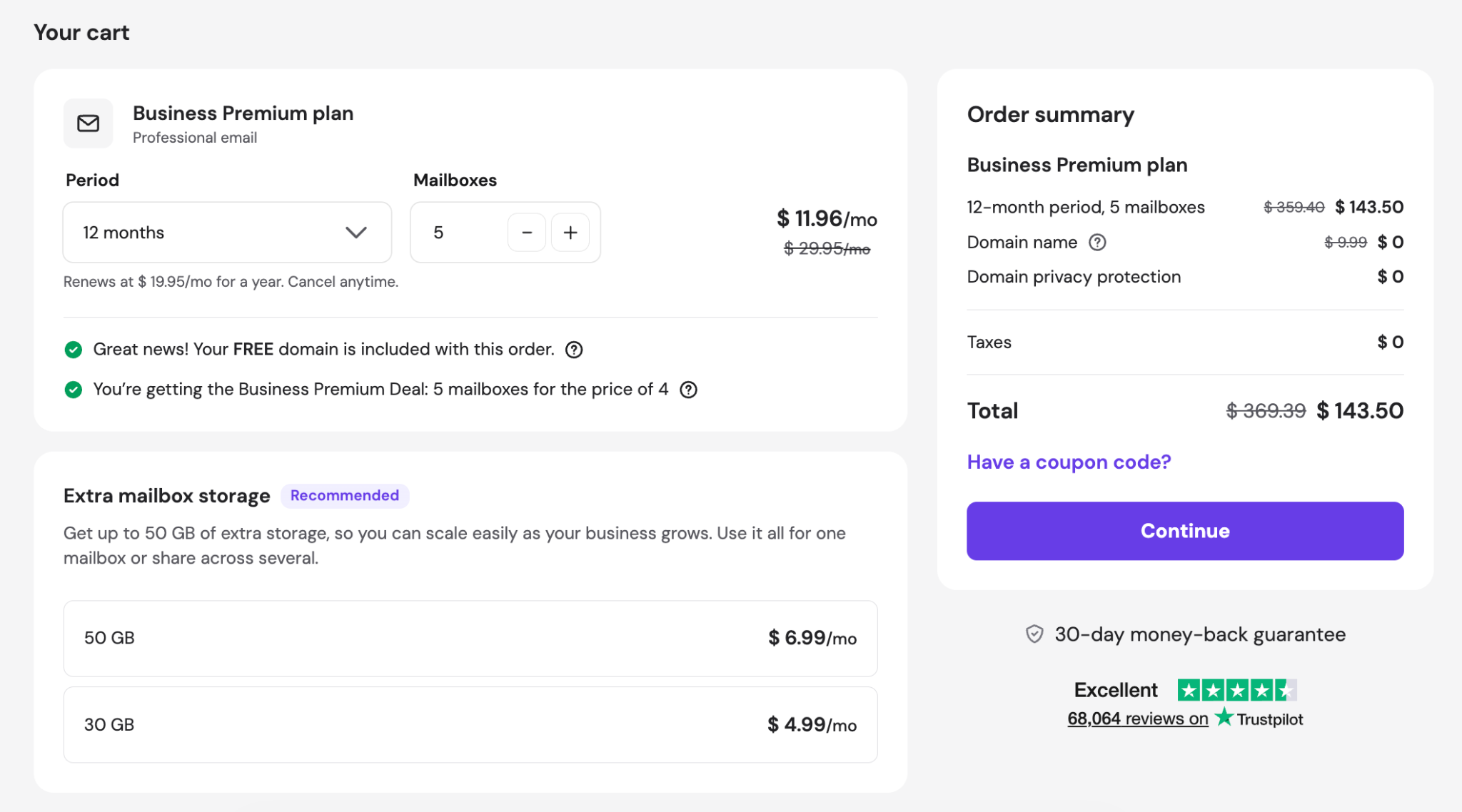
Here are two examples using Hostinger’s plans:
Small team, email only: 8 users × $0.59 per month (Starter Business Email) = $4.72 per month. Domain renewal at ~$1 per /month = ~$5.72 per /month total
Growing team, more storage needed: 20 users × $2.99 per month (Premium Business Email) = $59.80 per month. Domain included free for the first year = $59.80 per month total (year one).

Cost-saving tips to get a business email
To reduce business email costs, start with a basic plan, use a hosting bundle, and commit to annual billing.
- Start with a basic plan. Most teams don’t need enterprise-level security or compliance tools on day one. Hostinger’s Starter plan at $0.59 per user per month covers professional email with a custom domain, 10 GB of storage, and spam protection. Upgrade when you hit an actual limit, not before.
- Use hosting bundles. If you’re building a website and need business email, buy them together. Hostinger’s annual web hosting plans include free business email for the first year, so you won’t pay extra for email. A bundled plan typically costs less than two separate subscriptions for a low-cost business email setup.
- Avoid paying for unused features. Productivity suites are only good value if your team uses the bundled apps. Paying $7 per user per month for Google Workspace when you’re only using Gmail means paying for Drive, Docs, Meet, and Gemini AI you may not need. Zoho Mail Lite at $1 per user per month is a better fit if all you need is a professional inbox with a custom domain.
- Choose a scalable provider. Pick a provider that lets you upgrade and downgrade with ease. Review the billing rules before committing to a longer subscription term. Hostinger, Zoho, and Google Workspace all let you add users as needed without switching plans.
- Commit to annual billing. Some providers charge less when you commit to a longer-term plan. Check the full cost before choosing an annual plan. You can commit to an annual plan if you are confident in your provider.
How to choose the right business email plan
The right plan matches your actual needs, not your projected ones, and not the most comprehensive option on the pricing page.
Start by deciding whether you only need email or also want a productivity suite. If your team already has tools for documents, meetings, and collaboration, a standalone email plan may be more cost-effective.
A standalone email hosting plan can provide a branded inbox without the cost of a full productivity suite. Compare the best email hosting providers if you are still deciding which options fit your team.
Avoid paying for advanced features before you need them. Buy for today and upgrade when you hit a real limit – storage fills up, compliance requirements change, shared inboxes become necessary.
Also, use free trials before committing. Google Workspace offers 14 days, and Hostinger’s 30-day money-back guarantee works the same way. Test with real email traffic: check deliverability, client compatibility, and support response time before locking in for a year.
Finally, match security features to your actual needs.. Tools such as S/MIME encryption, DLP, and eDiscovery may be important for some organizations, but the correct choice depends on the type of data you handle and the regulations that apply to your business.

Bruno is a Content Writer at Hostinger, focused on creating and optimizing helpful, engaging articles about web development and marketing. With a background in journalism, he combines storytelling with practical insights to make complex topics easier to understand. He has also contributed to publications like MacMagazine and Jornal A Tarde. Outside of work, Bruno enjoys exploring art, cooking, and technology.