Best Linux distros for beginners and advanced users
Mar 10, 2026
/
Ariffud M.
/
11 min Read

Linux distributions, or distros, are operating systems built on the Linux kernel. While they all share the same core, each distro includes different environments, package managers, and tools to serve specific user needs – such as ease of use, security, or software development.
There are different types of distros for various user levels and purposes:
Best Linux distros for beginners
- Ubuntu Server. Beginner-friendly for server management, with strong community support.
- Linux Mint. Built on Ubuntu but offers a more traditional desktop layout and minimal setup.
- Manjaro. Based on Arch but more accessible, with a user-friendly interface and automatic hardware support.
Best Linux distros for intermediate users
- Fedora. Known for its fast release cycles, it’s a great choice for developers and testers who want access to the latest software and features.
- openSUSE. Offers a highly flexible and stable environment, with various configurations for developers and system administrators looking to customize their setups.
- Debian. Lightweight and reliable, great for building a clean system or to serve as a base for other distros.
Best Linux distros for advanced users
- Arch Linux. Minimalist and fully customizable, perfect for learning how Linux works under the hood.
- Kali Linux. Security-focused, packed with tools for penetration testing and ethical hacking.
- Rocky Linux. Enterprise-grade and production-ready, best suited for experienced users managing servers.
These are just a few examples of the hundreds of Linux distributions available today, each designed for different needs and preferences.
That’s why in this article we highlight the top 10 Linux distros you should know – for each one, we’ll explain what it specializes in, why you might want to use it, and how it compares to others in its category.
1. Ubuntu Server
- Pricing: free; optional paid support plans start at $25
- Best for: small businesses to large-scale enterprise environments requiring scalable server deployments
Ubuntu Server is a Debian-based operating system built by Canonical for running servers in both small-scale and enterprise environments.
Unlike the desktop version of Ubuntu, it doesn’t have a graphical interface by default, making it lightweight and optimized for server use.
Ubuntu Server offers quick setup, broad hardware compatibility across architectures like ARM, x86, and RISC-V, and a predictable release cycle with long-term support.
Each long-term support (LTS) release includes five years of free security and maintenance updates, which can extend to ten years with Ubuntu Pro.
Compared to other server distros like CentOS Stream, Ubuntu Server balances ease of use, extensive documentation, and enterprise-grade features, making it a strong choice for system administrators and DevOps teams managing scalable workloads.
Key features:
- Web servers. Ideal for hosting websites and web applications.
- Cloud computing. Integrates smoothly with cloud platforms for scalable deployments.
- Containers. Supports Docker and Kubernetes for running containerized apps.
- Enterprise environments. Suitable for businesses that need reliable, secure, and cost-effective server solutions.
2. Kali Linux
- Pricing: free
- Best for: cybersecurity professionals, ethical hackers, and penetration testers seeking a security-tailored OS
A Debian-based distro developed by Offensive Security, Kali Linux serves as a comprehensive platform dedicated to security testing and digital forensics work.
Unlike general-purpose Linux distros such as Ubuntu, Kali Linux is fully optimized for offensive security tasks.
It comes with over 600 pre-installed tools for digital forensics, vulnerability assessment, and network analysis, making it an essential toolkit for security professionals conducting advanced audits, reverse engineering, or wireless intrusion detection.
It prioritizes power and flexibility over ease of use, making it unsuitable for beginners or casual users. Instead, it stands out as a top-tier choice for users with strong Linux and cybersecurity skills, offering capabilities unmatched in its category.
Key features:
- Comprehensive toolset. Includes over 600 tools for penetration testing, security research, and reverse engineering.
- Customizable environment. Supports multiple desktop environments like GNOME, KDE, and Xfce to fit different user preferences.
- Live boot capability. Lets users run Kali directly from a USB drive or CD without installation, enhancing portability.
- Regular updates. Maintained with continuous updates to provide the latest security tools and patches in response to evolving threats.
3. Linux Mint
- Pricing: free
- Best for: beginners and experienced users looking for a user-friendly OS with a familiar, Windows-like interface
Linux Mint is a beginner-friendly Linux distro based on Ubuntu and Debian. It’s designed for ease of use, stability, and a traditional desktop experience.
It works out of the box, with essential apps and multimedia support pre-installed, so users can get started immediately after installation.
With its familiar interface and minimal configuration, Linux Mint is an excellent option for newcomers and Windows users transitioning to Linux.
It offers LTS releases and a choice of three desktop environments:
- Cinnamon. The flagship desktop, combining modern visuals with a classic layout.
- MATE. Lightweight, stable, and customizable, ideal for users who prefer the GNOME 2 experience.
- Xfce. The most resource-efficient option, perfect for older hardware or minimalist setups.
Compared to Ubuntu, Linux Mint removes Snap dependencies and uses a more traditional user interface, which makes it more approachable for those seeking a Windows-like experience.
It also uses fewer system resources, especially when running MATE or Xfce.
Key features:
- Ubuntu/Debian base. Offers security, stability, and access to large software repositories.
- Multimedia support. Includes pre-installed codecs for a seamless media experience.
- Stability. Prioritizes a reliable user experience with long-term support.
- Community support. Backed by an active community and thorough documentation.
4. Fedora
- Pricing: free
- Best for: developers seeking cutting-edge features, rapid updates, and a comprehensive software development and deployment platform.
Fedora is a cutting-edge yet stable Linux distro sponsored by Red Hat.
Often considered a proving ground for technologies that eventually appear in Red Hat Enterprise Linux (RHEL), it’s a popular choice among developers and Linux enthusiasts.
With frequent releases, a modern software stack, and a strong focus on upstream development, Fedora delivers a forward-looking environment without compromising reliability.
Fedora comes in several editions tailored to different use cases:
- Fedora Workstation. A polished desktop with GNOME and a full suite of development tools.
- Fedora Server. Optimized for modular, enterprise-grade server deployments.
- Fedora CoreOS. A minimal, auto-updating system designed for scalable container infrastructures.
- Fedora Silverblue. An immutable desktop ideal for container-focused development workflows.
Compared to Ubuntu LTS or Debian Stable, Fedora offers fresher software and faster updates. This makes it a better fit for developers who want the latest tools on a reliable base.
Finally, Fedora is more streamlined than Arch Linux or openSUSE Tumbleweed, delivering modern technology without the overhead of manual configuration.
Key features:
- Development tools. Ships with the latest toolchains and technologies for modern development workflows.
- Containerization. Built-in support for Docker and Kubernetes enables container-based app development.
- Modular customization. Flexible installation options tailored to development, server, or desktop environments.
- Security. Frequent updates and robust security features maintain a secure system.
5. Debian
- Pricing: free
- Best for: users looking for a stable and versatile desktop, server, and embedded system OS
Debian, first released in 1993 by Ian Murdock, is one of the oldest and most respected Linux distros.
Renowned for its rock-solid stability and strict adherence to free software principles, Debian serves as the foundation for many popular distros, including Ubuntu and Linux Mint.
It supports a wide range of hardware architectures – from x86 and ARM to MIPS and IBM S/390 – making it suitable for everything from legacy machines to modern servers.
Debian offers three release branches, each tailored to different needs:
- Stable. Built for production environments where maximum reliability is essential.
- Testing. Balances newer software with dependable performance.
- Unstable (Sid). Contains the latest packages, ideal for developers and advanced users.
Compared to Ubuntu or Fedora, Debian prioritizes freedom, transparency, and long-term support over convenience and pre-installed tools.
While it may require more manual setup, it remains a trusted choice for developers, advanced users, and organizations that value reliability and flexibility.
Key features:
- Stability and security. Undergoes rigorous testing to ensure a dependable and secure operating system.
- APT package management. The Advanced Packaging Tool (APT) simplifies software installation and updates.
- Community support. A large global community maintains extensive documentation and provides peer support.
- Customization. Easily tailored to diverse use cases, from minimal desktop environments to complex server setups.
6. Arch Linux
- Pricing: free
- Best for: advanced users desiring a minimalist OS that offers complete control over system configuration and software selection
Arch Linux is a rolling-release distro built on the principles of simplicity, transparency, and complete user control. It provides a minimal base system, so users can install only the components they need – nothing more, nothing less.
This granular approach makes Arch a top choice for advanced users and developers who want to understand and configure every layer of their operating system.
From the bootloader to the desktop environment, everything is assembled manually and intentionally.
With its rolling-release model, Arch Linux keeps systems continuously updated, eliminating the need for version upgrades or reinstalls.
However, unlike user-friendly distros like Ubuntu or Linux Mint, Arch is not geared toward beginners. Installing Arch Linux requires using the command line and having a solid understanding of Linux fundamentals.
Compared to other rolling-release options like openSUSE Tumbleweed, Arch offers a more minimalist and hands-on experience, preferred by users who value learning and full system control over convenience.
Key features:
- Pacman package manager. A fast and simple package manager for installing, updating, and removing software.
- Arch User Repository (AUR). A massive, community-maintained collection of user-submitted packages, expanding software availability.
- Rolling release model. Provides continuous access to the latest software without the need for major upgrades.
- Comprehensive documentation. The Arch Wiki delivers in-depth resources for setup, customization, and troubleshooting.
7. Manjaro
- Pricing: free
- Best for: beginners looking for a user-friendly OS that combines the power of Arch Linux with accessible installation and maintenance
Manjaro is a user-friendly Linux distro based on Arch Linux. It’s designed to offer Arch’s flexibility with a more accessible setup.
It features a graphical installer, pre-configured desktop environments (Xfce, KDE Plasma, and GNOME), and excellent hardware support, making it ready to use on desktops, laptops, and even single-board computers.
While preserving Arch’s rolling-release model, Manjaro adds automated stability checks and simplified kernel management, reducing maintenance and lowering the risk of system breakage.
Compared to vanilla Arch, Manjaro removes the steep learning curve and manual setup steps.
Manjaro provides greater control and faster access to the latest software compared to beginner-friendly distros like Ubuntu. This makes it a balanced choice for users who want modern tech with a smoother learning curve.
Key features:
- User-friendly installer. Simplifies installation, making it approachable for users new to Arch-based systems.
- Pre-configured desktop environments. Offers ready-to-use desktops like Xfce, KDE Plasma, and GNOME for a polished user experience.
- Extensive hardware support. Automatically detects and supports a wide range of hardware with minimal user input.
- Access to AUR. Enables installation of thousands of community-maintained packages, expanding software options.
8. Rocky Linux
- Pricing: free
- Best for: enterprise environments and users needing a stable, community-supported OS compatible with RHEL
An enterprise-grade operating system developed by the Rocky Enterprise Software Foundation, Rocky Linux serves as a community-driven, downstream, and binary-compatible replacement for RHEL.
The project emerged after CentOS transitioned to CentOS Stream, leaving a gap for organizations that required production-ready stability and long-term support.
Rocky Linux follows the same release cadence and compatibility as RHEL, which makes it a strong choice for servers, cloud environments, and enterprise workstations.
Unlike RHEL, Rocky Linux is completely free, with no licensing or subscription fees. It offers enterprise-level reliability without vendor lock-in.
Compared to AlmaLinux, another RHEL-compatible distro, Rocky Linux is praised for its open governance model and commitment to being 100% bug-for-bug compatible with RHEL.
It also differs from enterprise-focused distros like Ubuntu Server and SUSE Linux Enterprise (SLE) Server by prioritizing RHEL continuity, making it a trusted option for IT professionals seeking stability, consistency, and complete control over their infrastructure.
Key features:
- RHEL compatibility. Offers full binary compatibility with RHEL, enabling seamless migration and software compatibility.
- Long-term support. Aligns with RHEL’s release cycle to deliver extended maintenance and security updates.
- Community-driven development. Maintained by a transparent, active community that encourages open collaboration.
- Enterprise-grade performance. Provides the stability and performance required for enterprise applications and workloads.
9. OpenSUSE
- Pricing: free; paid licenses are available upon request
- Best for: users requiring a versatile Linux distro that balances stability with access to the latest software
openSUSE is a versatile Linux distro designed to serve both newcomers and experienced users. It comes in two distinct versions, each tailored to different needs:
- openSUSE Leap. A stable, enterprise-grade release that shares its core with SLE. Ideal for users and organizations that prioritize long-term support and reliability.
- openSUSE Tumbleweed. A rolling-release version that provides the latest software updates, perfect for developers and Linux enthusiasts who want cutting-edge features.
One of openSUSE’s standout features is YaST, a powerful system manager available in both graphical and command-line interfaces. It simplifies system configuration and administration, even for complex tasks.
The distro also supports the Btrfs file system, which enables advanced features like system snapshots and rollbacks, improving stability and recovery options.
Compared to distros like Ubuntu or Fedora, openSUSE offers more flexibility between stable and rolling releases and provides stronger built-in configuration tools.
In contrast to Arch-based systems, Tumbleweed combines rolling updates with automated quality assurance, delivering new software without the instability commonly associated with DIY rolling distros.
Key features:
- YaST configuration tool. A full-featured system manager that streamlines configuration and administration tasks.
- Btrfs file system. Enhances system recovery and data integrity through snapshot and rollback support.
- Snapper tool. Manages system snapshots, making it easy to recover from errors or unwanted changes.
- Strong security features. Includes robust encryption options and security frameworks like AppArmor.
10. AlmaLinux
- Pricing: free
- Best for: enterprises and developers seeking a stable, RHEL-compatible OS with a strong focus on community support and long-term viability
AlmaLinux is a free, open-source Linux distro developed by the AlmaLinux OS Foundation as a community-driven replacement for CentOS.
Designed for enterprise use, it offers binary compatibility with RHEL. This ensures seamless integration with existing enterprise software and infrastructure.
AlmaLinux is ideal for servers, cloud deployments, and workstations that require a stable, secure, and predictable operating system without the licensing fees of commercial distros.
Its long-term support provides sustained reliability for critical applications and regulated environments.
Like Rocky Linux, AlmaLinux shares the goal of RHEL compatibility, but it distinguishes itself through commercial backing from vendors like CloudLinux and a focus on transparent governance.
For that reason, many businesses choose AlmaLinux when they want robust enterprise support channels along with open community involvement.
While Ubuntu Server follows a different ecosystem and package management approach, AlmaLinux delivers direct compatibility with RHEL software and workflows, making it a natural fit for teams operating in Red Hat-based environments.
Key features:
- Enterprise-grade stability. Provides a reliable platform for critical business applications.
- Binary compatibility with RHEL. Ensures smooth integration with RHEL-based systems and tools.
- Long-term support. Offers extended support cycles – for example, AlmaLinux 8.x is supported through 2029.
- Community-driven development. Backed by the AlmaLinux OS Foundation and supported by an open, collaborative ecosystem.
How to choose the right Linux distro
To choose the right Linux distro, you need to consider your goals, preferences, and technical experience. Here are a few crucial factors to help you decide:
- Skill level and experience. Some distros, like Manjaro or Linux Mint, are beginner-friendly and easy to set up. Others, like Arch Linux or Kali Linux, are better suited for advanced users who are comfortable with manual configuration and command-line tools.
- Intended use. Consider how you plan to use Linux: whether it’s for desktop setups, software development, server hosting, or security testing. Each distro serves a different purpose. For example, Ubuntu Server is built for server deployments, while Kali Linux is tailored for penetration testing.
- Hardware compatibility. If you’re running Linux on older or low-spec machines, lightweight options like Xfce-based Linux Mint or Debian are a better fit. Make sure the distro supports your hardware out of the box to avoid extra setup work.
- Community and support. A strong community can help you troubleshoot issues and learn faster. Well-established distros like Ubuntu, Fedora, and Debian offer great documentation and active forums where help is just a search away.
- Update frequency and software availability. Some distros, like Arch Linux and Manjaro, follow a rolling release model and always include the latest software. Others, like Debian or Rocky Linux, focus on long-term stability.
If you can’t install Linux directly on your computer due to hardware limitations or prefer not to set up a dual-boot environment, consider running it on a virtual private server (VPS) instead. It’s a simple and safe way to test different distros without changing your local setup.
Hostinger’s VPS hosting is ideal for testing, development, or production workloads. You can choose from available Linux-based OS options and install them with just a few clicks.
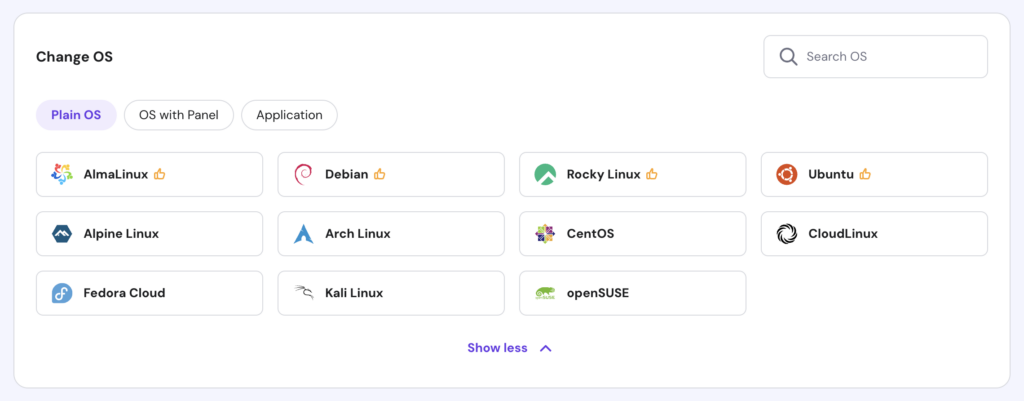
Whether you’re experimenting in a sandbox environment or launching a live project, Hostinger gives you full root access, plus the flexibility and performance you need to get the job done.
If you’re not sure which distro to install on your Hostinger VPS, ask the Kodee AI assistant to list the available Linux OS templates and recommend one based on your needs. For example, you could ask:
I’m a new Linux user and want a simple, user-friendly distro for my VPS. Because my server has limited hardware resources, the distro should also be lightweight. Can you recommend the best one for me?

Can you switch from one Linux distro to another without losing data?
Yes, but it requires careful planning, as the new distro will need a clean installation. To preserve your personal files, back up your data, use a separate /home partition, or store your files externally before making the switch.
What’s next?
Now that we’ve explored the best Linux distributions to suit different needs and experience levels, it’s time to take the next steps. Here’s what you can do:
- Pick a distro and try it out. Create a bootable USB to run it on your computer, test it in a virtual machine, or install it on a VPS for more flexibility and fewer hardware limitations.
- Prepare your VPS environment. If you’re going the VPS route, learn how to set up your VPS for the first time, including accessing your server and performing basic system configurations.
- Learn the Linux command line. Get familiar with essential Linux commands to navigate directories, manage files, and install packages directly from the terminal.
- Secure your server. Keep your environment safe by applying VPS security best practices, such as setting up firewalls, configuring SSH keys, and enabling a malware scanner.
- Start building. Use your VPS to launch a project with your chosen distro – whether you’re hosting a website, setting up a media server, or experimenting with server-side tools like Docker or Node.js.

Ariffud is a Technical Content Writer with an educational background in Informatics. He has extensive expertise in Linux and VPS, authoring over 200 articles on server management and web development. Follow him on LinkedIn.
Comments
August 23 2023
Great article ? Could you please tell me which of the distros you would recommend for the HP 620? I intend to install Linux on a blank hard disk on it. It will be my first time using Linux. I just started learning how to code so that I can become a software engineer someday (still on HTML & CSS). I'd also like to use it for other basic tasks that are typically done on Macs and PCs. I'm also curious to know which of the distros will work on the Microsoft Surface RT? Thanks.
August 25 2023
Hello there, glad you liked it! For HP 620, since it's an older laptop I would say Zorin OS is the way to good, it's lightweight and will get the job done. As for Microsoft Surface RT, it's not meant to have Linux installed on it, however I'm sure there are ways to install it either way, here's a list of viable distros.