How to build a lead nurturing strategy that converts in 8 steps
Sep 15, 2026
/
By Alma
/
12 min Read

A lead nurturing strategy is a system that turns new contacts into buyers through email, content, and other channels on a set schedule.
Companies that do it well produce 50% more sales-ready leads at 33% lower cost per lead. That means fewer leads go to waste and sales spend less time on contacts who aren’t ready. You get more out of the list you already have without raising your ad budget.
A strong lead nurturing strategy starts with clear decisions: who should enter your nurture flow, what they should receive, when sales should step in, and how you’ll measure progress.
- Profile your best-fit buyer and set your lead criteria.
- Pick your automation tools and connect them.
- Match content to each stage of the buyer’s journey.
- Build drip workflows that move leads forward.
- Segment your list for targeted nurturing.
- Score leads to flag who’s ready for sales.
- Set up the marketing-to-sales handoff.
- Track what’s working and improve monthly.
1. Define your ideal buyer persona and lead criteria
Your ideal buyer persona is a short profile of your best-fit customer, plus a one-line rule for what makes a lead “qualified.” Without it, every later step is a guess.
Start with a one-page sketch of the person you sell to: their role, the kind of company they work at, and what they’re trying to do. Add what’s holding them back and what makes them pause before buying.
Then pair that sketch with two filters. Explicit fit covers facts you can verify, such as job title, company size, industry, and country. Implicit fit covers actions like visiting your pricing page or requesting a demo.
The end result is one to three personas and a written rule for “qualified.” This takes two to four hours if you have customer data, or about a week if you need to talk to customers first.
Pull the inputs from what you already have:
- Sales call notes and recorded calls
- CRM (customer relationship management) data on deals you actually won
- Website data showing which pages people visit before they sign up
- Talks with five existing customers
- Short surveys sent to people who bought in the last 90 days
The persona should list demographics, role, seniority, and company size. Add the top three goals, the top three pain points, buying triggers, and the two or three pushbacks that come up most in sales calls.
The “qualified” rule is a single sentence that combines fit and behavior. For example: “A qualified lead is a marketing manager at a B2B (Business-to-Business) SaaS company with 10–200 employees who has downloaded at least one guide and visited the pricing page in the last 14 days.”
Pro Tip
Talk to five existing customers before filling in any field. Patterns often start repeating by the fifth call, which keeps your persona grounded in what real buyers say, not in what you think they think.
2. Choose your lead nurturing tools and automation platform
You need four tools that work together: an email marketing platform or automation tool, a CRM, a landing page builder, and something to track results.
The most important piece is the email marketing automation platform. It sends emails, assigns tasks, and updates lead scores based on what a contact does, without anyone having to press Send each time.
For example, when someone downloads an ebook, the platform sends a follow-up email on its own two days later.
Choose your platform based on list size, team size, and how much sales handoff you need.
| Setup | Best for | Good options | Choose this if you need |
| Starter | Solo marketers and small lists under 2,000 contacts | Hostinger Reach, Brevo, Mailchimp, HubSpot Free | Welcome emails, drip sequences, re-engagement follow-ups, and basic segmentation without a complex CRM setup |
| Growing team | Small teams with 2,000–25,000 contacts | ActiveCampaign, HubSpot Starter, Klaviyo | Stronger automation, better segmentation, and more room to scale |
| Sales-led B2B | Teams with a CRM and sales reps | HubSpot Professional, Salesforce Pardot, Marketo | Lead scoring, sales alerts, lifecycle stages, and automatic handoff to reps |
For a simple starter setup, choose a tool that keeps campaigns, basic segmentation, and your website setup close together.
If you’re already on Hostinger, Hostinger Reach is a good option because it keeps your email campaigns, domain, and site in the same dashboard.
Before you commit, check that the platform can do these four things:
- Sync with your CRM both ways, so contacts, deals, and stages stay current in both tools
- Track which pages each contact visits on your site
- Capture form fills from your website or landing pages
- Build dynamic segments, meaning lists that update on their own as contact data changes, not just frozen snapshots
Once you’ve picked a platform, handle the one-time setup. Connect your domain, add SPF, DKIM, and DMARC records so inbox providers can verify your emails, import your contacts, and add the tracking code. If you use Hostinger for your domain and business email, you can manage those DNS records in the same dashboard.
After setup, test the full path before you build any workflows. Send a test email and confirm it lands in the inbox, submit a form and check that the contact appears in your CRM, then visit two or three pages as that test contact and confirm the page views show up.
If any of those fail, fix them before moving on.
3. Map content to each stage of the buyer’s journey
Mapping content means listing what you already have, then matching each piece to a journey stage and a persona. This keeps your nurture sequence from pushing a sale on someone who’s still figuring out the problem.
The buyer’s journey has three stages.
- Awareness is when the lead knows they have a problem, but doesn’t know what to do about it.
- Consideration is when they’re comparing options.
- Decision is when they’re ready to buy and need a final reason to pick you.
Each stage calls for different content:
- In awareness, use blog posts and checklists to help leads understand the problem.
- In consideration, use comparison guides and webinars to help them evaluate possible solutions.
- In decision, use case studies, demos, and pricing pages to help them confirm the value and take the next step.
But the stage alone isn’t enough. A marketing manager and a sales ops lead can be comparing options at the same time, but they won’t care about the same details.
That’s why each content piece needs two labels: who it’s for and where they are in the buying journey. List every blog post, ebook, webinar, case study, and tool you already have, then tag each one with a reader and a stage.
Plan a day for this review. Aim for at least two useful pieces for each reader at each stage. The empty spots show what you need to create next.
Here’s what a simple content map could look like:
| Reader | Stage | Content type | Example |
| Marketing manager | Awareness | Blog post, checklist | “How to spot a leaky funnel” checklist |
| Marketing manager | Consideration | Webinar, comparison guide | “Automation tools compared” webinar |
| Marketing manager | Decision | Case study, calculator | Customer story with dollar figures |
| Sales ops lead | Awareness | Guide, benchmark report | “Why leads stall before sales handoff” guide |
| Sales ops lead | Consideration | Workflow checklist, comparison guide | “Lead scoring models compared” guide |
| Sales ops lead | Decision | Demo, free trial | Custom product walkthrough |
4. Build your lead nurturing workflows and drip campaigns
Workflows are the automated sequences that send your mapped content on a schedule. They adjust based on what the lead does and update the contact record as they go.
A drip campaign (also called a nurture workflow) is a series of messages triggered by a lead’s actions, such as downloading an ebook. The messages go out over days or weeks. The system waits, sends, checks the response, then either keeps going or takes a different path.
Triggers follow a few patterns:
- Form fill, like a content download, demo request, or newsletter signup
- Page visit, like the pricing, integrations, or comparison page
- Score change, when a lead crosses a scoring threshold
- Inactivity, no action for 30, 60, or 90 days
- Stage change, like a marketing-qualified lead (MQL) becoming a sales-qualified lead (SQL), or a customer up for renewal
For leads who just downloaded content or visited a high-intent page, send every three to five days. For top-of-funnel leads with lighter engagement, weekly is enough.
Your first workflow takes two to four hours to build. Tuning it takes weeks of watching results. A common mistake is making the sequence too long and too pushy. Start with three to five emails, and give something useful before asking for anything.
For example, an awareness ebook download could trigger a five-email sequence:
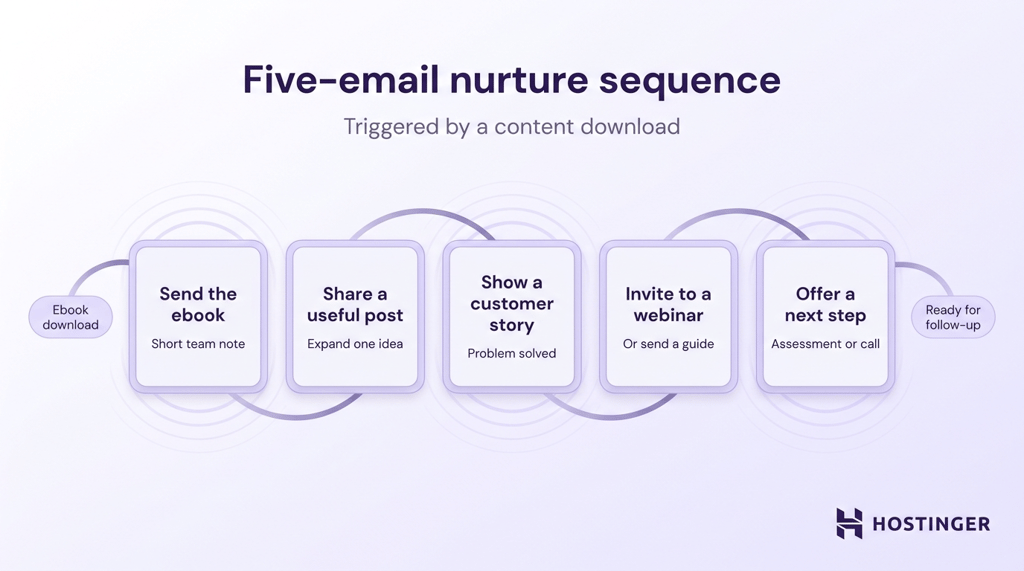
- Send the ebook with a short note from someone on your team.
- Two days later, send a blog post that expands on one part of the ebook.
- Share a customer story showing the same problem solved.
- Invite the lead to a webinar or send a comparison guide.
- Offer a low-commitment next step, such as a free assessment, a calculator, or a 15-minute call.
You can add other channels if they support the same journey: a retargeting ad after the download, a LinkedIn request before the webinar, or an SMS reminder if the lead gave separate SMS consent.
Before launch, check the legal basics. Use a valid, lawful basis before adding contacts to automated sequences, include a clear unsubscribe link in every email, and get a separate opt-in for SMS.
5. Segment your leads for personalized nurturing
Segmenting means splitting contacts into groups based on who they are and what they’ve done, so each person enters the workflow that matches their current intent.
Start with five email list segments that cover the main lead states you need to act on:
- Awareness + opened at least three of the last five emails
- Consideration + visited the pricing page in the last 14 days
- Decision + downloaded a case study but hasn’t booked a demo
- Inactive for 60+ days + was previously engaged
- Reached the score threshold + hasn’t been sent to sales
Each segment should work as a rule. For example: Persona = Marketing manager AND Stage = Consideration AND Pricing page visited in the last 14 days.
Contacts who match the rule enter the segment automatically. Contacts who stop matching it leave automatically.
Check your segments before connecting them to workflows. Each active contact should fall into at least one audience group, like role or company type, and one behavior group, like pricing visit or inactivity. That gives the workflow enough context to send the right message.
Avoid segments under 100 contacts at first. Small groups make open and click rates harder to trust, so you won’t know whether a workflow change actually worked.
6. Set up lead scoring to find sales-ready leads
Lead scoring helps you decide when a contact is ready for sales. Each contact gets points for matching your ideal customer profile and for actions that show buying intent.
Score two things:
- Fit. Who the lead is, such as job title, company size, and industry.
- Intent. What the lead has done, such as visiting your pricing page, downloading a guide, or asking for a demo.
Keep the first version simple. Build the scoring table in about two hours, then add it to your automation tool. Your first threshold will not be perfect. Review it after the first month based on which leads sales accept or reject.
Here’s a starter scoring table:
| Signal | Points | What it tells you |
| Job title matches your ideal customer | +15 | The lead is the right type of buyer |
| Company size is in your target range | +10 | The company is likely a good match |
| Visited the pricing page | +10 | The lead is showing buying intent |
| Downloaded a guide | +5 | The lead is interested but still researching |
| Opened a nurture email | +1 | Light interest; use this as a weak signal because privacy features can inflate opens |
| Inactive for 30+ days | -5 | Interest is cooling |
| Unsubscribed | -20 | The contact should not stay in sales workflows |
Start with a sales-ready threshold of 50 points. When a lead reaches 50, the workflow should mark them as ready for sales, assign the contact to a rep, and send the rep a short summary of the lead’s latest actions.
For example, the notification could say: “Visited pricing page, opened email #4, downloaded the ROI guide.”
7. Align marketing and sales on lead handoff
Marketing and sales need to agree on what happens when a lead becomes ready for sales. Without that agreement, strong leads sit in the CRM too long, or sales gets contacts that are not ready for a call.
The handoff should be automatic. When a lead crosses the score threshold, your automation tool should update the CRM, assign the lead to a sales rep, and send a notification with the lead’s latest actions.
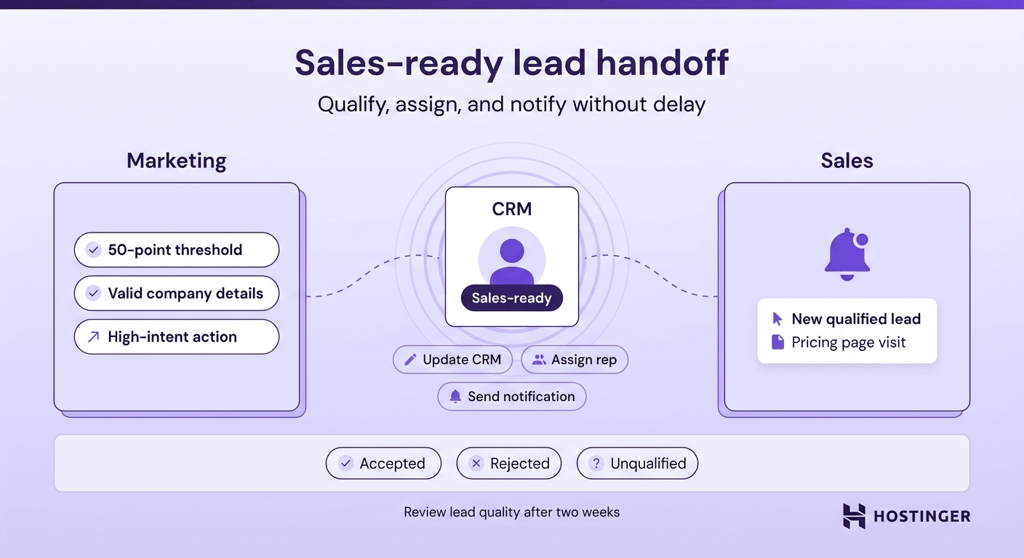
A slow handoff gives warm leads time to lose interest or choose a competitor. That is why the rep notification should go out as soon as the lead crosses the score threshold, not at the end of the day.
Set one meeting between marketing and sales to agree on the handoff rules. Write down:
- What makes a lead ready for sales
- Which CRM fields must be filled before handoff
- How fast sales should respond to high-score leads
- Who owns the lead after handoff
- How sales marks the lead: accepted, rejected, or unqualified
- When marketing and sales review lead quality
For the first version, keep the rule simple. For example: “A lead becomes sales-ready at 50 points, with a valid email, company name, and at least one high-intent action, such as a pricing page visit or demo request.”
Review the handoff after two weeks. If sales rejects too many leads, tighten the score threshold or required fields. If good leads wait too long before sales contacts them, fix the notification or assignment rule.
8. Measure and improve your lead nurturing performance
Tracking performance means checking whether your workflows are moving leads closer to sales, then making one improvement each month based on what the numbers show.
Plan about an hour each week for a quick check and three to four hours each month for a deeper email performance review.
Use email marketing benchmarks as a starting point, but judge your workflows by trend. A steady improvement matters more than hitting every benchmark in month one.
| Metric | What to watch over time | What to change if the trend stays weak |
| Email open rate | Whether opens move toward or stay above 20% | Test subject lines first. If opens stay below 15%, check deliverability or clean your list |
| Click-through rate (CTR) | Whether clicks move toward 3% on broad sends or 8% on targeted nurture | Improve the offer, CTA, or content match |
| Stage-to-stage conversion | Whether more leads move from awareness to consideration to decision | Adjust the content or timing at the stage where leads stall |
| Sales-ready lead acceptance | Whether sales accepts more high-score leads over time | Tighten scoring or require stronger intent signals |
| Lead-to-customer rate | Whether more nurtured leads become customers | Review lead quality before increasing lead volume |
| Sales cycle length | Whether nurtured leads close faster after 90 days | Strengthen consideration and decision content |
| Unsubscribe rate | Whether unsubscribes stay below 0.5% per send | Reduce send frequency or fix segments |
Check engagement weekly, review conversions monthly, and review the full strategy quarterly. Rework a workflow when the open rate stays below 15% or the CTR stays below 1.5% for two review cycles.
Pro Tip
A/B test one thing at a time, whether that's subject line, send time, CTA copy, or content offer. Changing two things at once means you won't know which one moved the number.
Common lead nurturing mistakes to avoid
Your lead nurturing strategy breaks when workflows send the wrong message, sales gets leads too early, or old contacts stay in the system too long.
- Over-emailing. Unsubscribes above 0.5% per send mean your cadence is too aggressive. Reduce send frequency and check the rate again after two weeks.
- Ignoring inactive contacts. A list where 30% or more of contacts have not opened anything in 60 days needs a re-engagement email. Give contacts one clear choice: stay on the list or be removed.
- Sending the same message to everyone. Flat click rates across different audience groups point to generic content. Match each email to the reader, buying stage, and segment before adding it to a workflow.
- Skipping list cleaning. Bounce rates above 2% show that old or invalid contacts are hurting deliverability. Remove contacts who have been inactive for 180 days or more every quarter.
- Treating every interested lead as sales-ready. When sales rejects more than 40% of the handed-off leads, the threshold is too low. Raise the score requirement or require stronger intent signals, like pricing page visits or demo requests.
- Leaving workflows unchanged. A sequence that has run for 12 months without updates likely no longer matches your current product, pricing, or audience. Review the emails, links, and offers before sending more leads through it.
- Keeping leads in workflows too long. Leads that sit in a sequence for six months without new activity should not keep receiving the same nurture emails. Move them to a quarterly newsletter or remove them from nurture.
How long does lead nurturing take to show results?
A working lead nurturing setup should show early engagement within 2 weeks, more sales-ready leads within 30 to 60 days, and measurable sales impact within 3 to 6 months.
The timeline depends on how quickly people buy from you. A B2B SaaS company with a 90-day sales cycle and 500 leads a month will see sales impact closer to six months. A B2C (Business-to-Consumer) ecommerce store with same-day buyers and 10,000 monthly leads can see results in four to six weeks.
Your starting point also matters. A team with strong content, a clean list, and fast sales follow-up will learn faster than one still fixing deliverability issues, missing content, or unclear handoff rules.
If you see no opens, clicks, or replies in the first two weeks, check whether your emails are reaching the inbox, whether the list is still active, and whether the content matches what those leads need right now.
Lead nurturing vs. lead generation: What’s the difference?
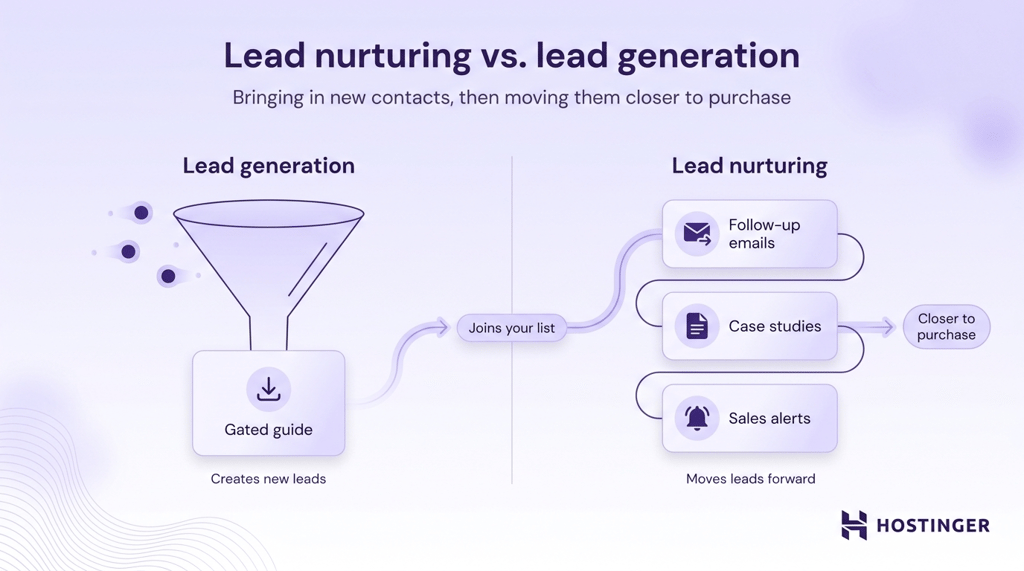
Lead generation brings in new contacts. Lead nurturing moves existing contacts closer to a purchase.
They support different parts of the same sales process. B2B lead generation fills the top of the funnel with new leads. Lead nurturing helps the right contacts keep moving after they join your list.
For example, a gated guide can generate a new lead. The follow-up emails, case studies, score changes, and sales alerts after the download are lead nurturing.
B2B vs. B2C lead nurturing: How the approach differs
B2B nurturing supports longer sales cycles, team-based decisions, and more research before purchase. That means more educational emails, such as guides, webinars, case studies, and product demos. A strong B2B email strategy should match that longer decision process.
B2C nurturing moves faster. The buyer is one person, and the goal is to bring them back to checkout with product pages, reviews, discounts, cart reminders, and social proof.
| Area | B2B | B2C |
| Cycle length | Weeks to months | Hours to days |
| Buyers | Several people, often a team or committee | Usually one person |
| Content | Guides, webinars, case studies, demos | Product pages, discounts, reviews, cart recovery |
| Channels | Email, LinkedIn, sales calls | Email, SMS, retargeting |
| Handoff | To a salesperson | Straight to checkout |
Use your sales cycle to choose the right approach. Short cycles of about a week and low-order values fit B2C nurturing. Cycles over 30 days or purchases involving several people require a B2B approach, with more time for education, comparison, and sales follow-up.
Your first 90 days: What to check and when to change course
The first 90 days are for checking whether your lead nurturing strategy works end to end, then improving one weak point at a time.
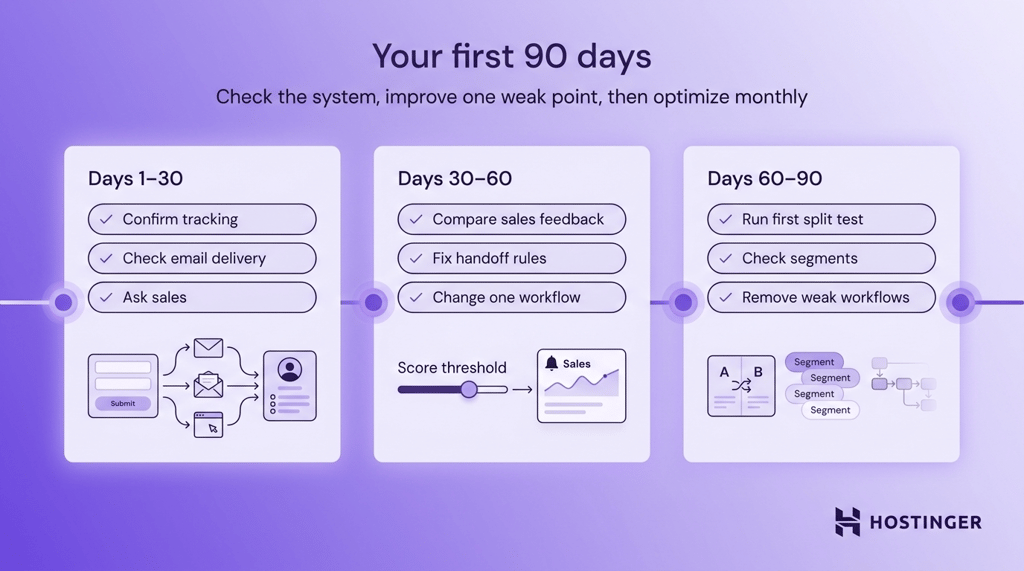
Days 1–30. Check the basics before changing the strategy. Form fills should create contact records, the welcome workflow should send, and your tracking script should log page visits.
Confirm your sending domain is authenticated, and emails reach the inbox. If you registered your domain and business email through Hostinger, check your SPF and DKIM records in Hostinger dashboard.
Watch deliverability and engagement daily. Ask sales whether the first-hand-off leads look ready for a call.
Days 30–60. Compare your score threshold with sales feedback. If sales rejects too many leads, raise the threshold or require stronger intent signals. If strong leads are waiting too long, fix the assignment or notification rule.
Make one workflow change based on what you find. That could mean changing the send timing, replacing a weak email, or routing one segment into a better sequence.
Days 60–90. Run your first A/B test on one part of the workflow, such as the subject line, send time, CTA, or content offer. Add a workflow for your second main audience only after the first one is working.
Check segment membership too. Leads should move into and out of segments based on their behavior, not stay stuck in the wrong group.
Each month, review four numbers: unsubscribe rate, sales-ready lead volume, sales acceptance, and sales feedback on lead quality. If one of those moves in the wrong direction for two months, review the scoring table, content map, or handoff rules.
At the 90-day mark, use the data to refine segments, adjust the score threshold, and remove workflows that aren’t helping leads move forward. From there, keep improving the system monthly.
This article is a localized version of How to build a lead nurturing strategy that converts in 8 steps, originally published in English.

Alma is an AI Content Editor with 9+ years of experience helping ideas take shape across SEO, marketing, and content. She loves working with words, structure, and strategy to make content both useful and enjoyable to read. Off the clock, she can be found gaming, drawing, or diving into her latest D&D adventure.