What is Vue.js? How Vue.js works
Jun 12, 2026
/
By Ksenija
/
7 min Read

Vue.js is a progressive JavaScript framework for building interactive user interfaces and single-page applications.
Developers use Vue.js to build dynamic frontend interfaces that update as users interact with an application.
It supports both small interactive website sections, such as forms and search filters, and full single-page applications, such as SaaS dashboards, ecommerce platforms, and content-driven websites.
Core concepts of Vue.js that control how the interface behaves and updates:
- Reactive data binding synchronizes the interface with application data automatically
- Components organize the interface into reusable sections
- Directives add dynamic behavior directly inside HTML
- Ecosystem tools support features such as routing, state management, testing, and application scaling
What is Vue.js
Vue.js is an open-source frontend framework designed around incremental adoption, so developers can use it for a single interactive feature on a page or scale it to power an entire web application.
Common use cases include dashboards, search interfaces, ecommerce pages, booking systems, forms, and real-time content sections that update without reloading the page.
Vue.js creator and former Google engineer Evan You designed the framework so developers already familiar with HTML, CSS, and JavaScript could start building interactive interfaces quickly without learning a large amount of framework-specific syntax upfront.
Its open-source community continues to expand the ecosystem with plugins, integrations, and development tools used across modern web projects.
Vue.js vs React vs Angular
Vue.js is a progressive framework, React is a UI library, and Angular is a full frontend framework. Developers use all three to build interactive web applications, but they follow different development approaches and offer different levels of structure, flexibility, and built-in functionality.
Vue.js focuses on gradual adoption and approachable structure, React focuses on flexible UI development through libraries and components, and Angular provides a complete framework with built-in tools for large application architectures.
The biggest difference between them is how much structure they provide out of the box.
Vue.js sits between React and Angular in terms of flexibility and built-in tooling.
React gives developers more freedom to choose libraries and project structure, while Angular includes a larger set of official tools and architectural patterns from the start.
Vue.js, React, and Angular compared side by side:
Feature | Vue.js | React | Angular |
Type | Progressive framework | UI library | Full frontend framework |
Learning curve | Easier for beginners familiar with HTML, CSS, and JavaScript | Moderate | Steeper due to TypeScript and framework complexity |
Structure | Balanced structure with flexible adoption | Highly flexible | Strongly structured |
Built-in tools | Official routing and state management tools available separately | Requires additional libraries for routing and state management | Includes routing, forms, HTTP handling, dependency injection, and more |
Language | JavaScript | JavaScript | TypeScript |
Common use cases | SaaS apps, dashboards, ecommerce frontends, content-driven sites | Interactive UIs, SPAs, large frontend ecosystems | Enterprise systems, large-scale business platforms |
Best suited for | Teams that want approachable structure and flexibility | Teams that want maximum customization | Teams managing large applications with strict architecture |
How Vue.js works
Vue.js works by connecting application data to the user interface and updating the page automatically when that data changes.
When a user clicks a button, types into a form, adds an item to a cart, or changes a filter, Vue identifies the affected data and refreshes only the related parts of the interface.
To handle these updates efficiently, Vue uses systems that control how data connects to the interface, how components communicate, how changes are tracked, and how Vue updates the page dynamically.
Connecting data to the user interface
Vue connects application data directly to the interface shown in the browser. Developers define reactive data inside Vue components, and Vue automatically tracks changes and updates the related content on the page.
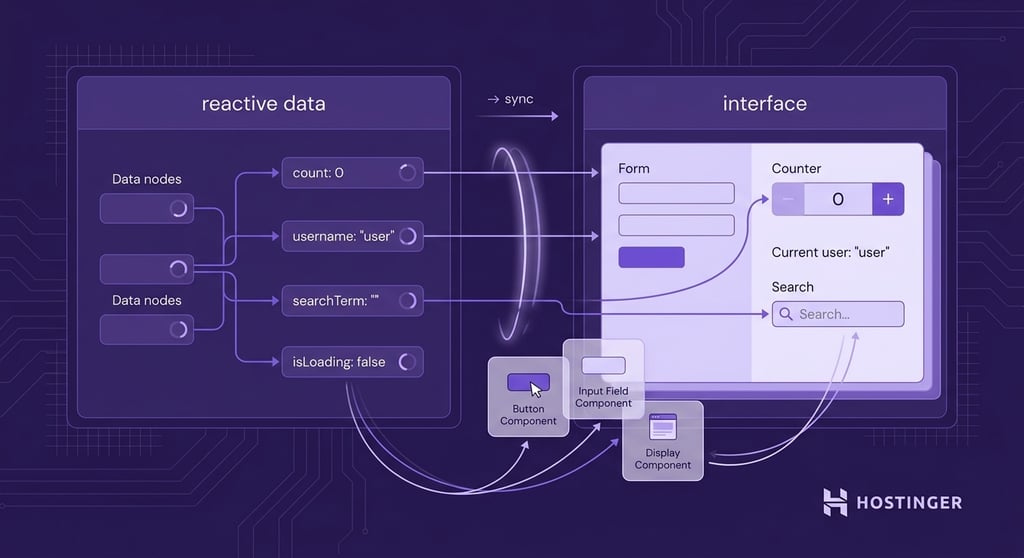
If a user adds a product to a cart, the total price updates immediately. If someone types into a search bar, the results can change while they type. A button click can instantly update a counter on the page.
The reactive system keeps the interface synchronized with application data automatically. Developers do not need to manually update HTML elements every time a value changes, which simplifies UI development and reduces repetitive code.
Organizing the interface into reusable components
Vue applications are built from reusable components, which are self-contained interface blocks that include their own template, logic, and styling. Developers combine these components to build complete application interfaces.

Common examples include navigation bars, product cards, login forms, search boxes, notification panels, and checkout sections.
A product card component can display product information across dozens of pages while using the same structure and behavior everywhere in the application.
Reusable components also simplify updates as projects grow. If a company changes the design of its navigation menu or search form, developers only need to update the component once instead of editing every page manually.
Tracking changes with the reactivity system
Vue includes a reactivity system that monitors application data and detects when values change. When an update happens, Vue identifies which parts of the interface depend on that data and refreshes only the related content.
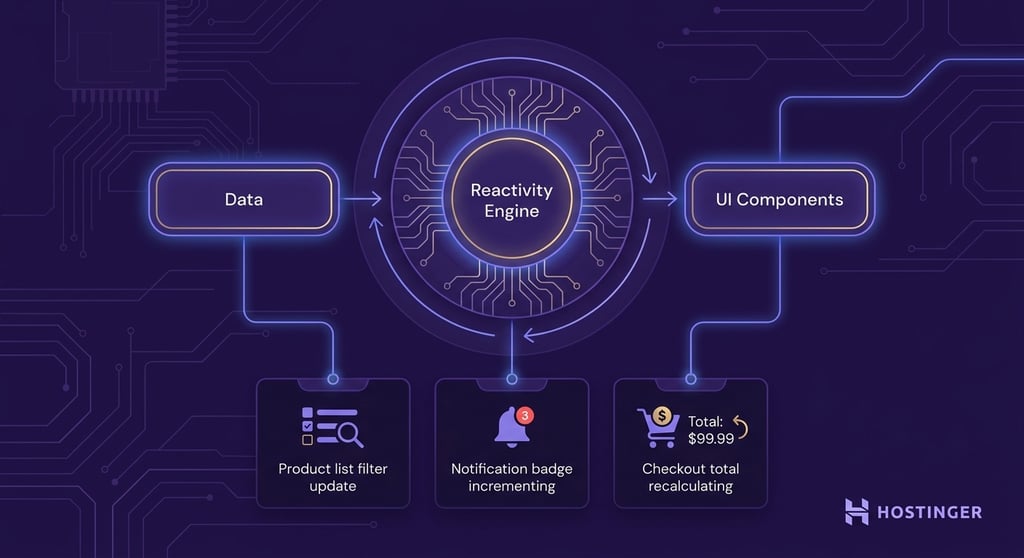
Developers see this behavior whenever an interface updates instantly after a user action. A product list may refresh instantly after someone changes a category filter, while a new message can increase a notification badge automatically.
In an ecommerce app, adjusting product quantities immediately recalculates the checkout total.
Vue handles these updates automatically in the background. Developers update the data inside a component, and Vue synchronizes the related interface sections without requiring manual page refreshes or direct DOM manipulation.
Updating only the changed parts of the page
The virtual DOM is a lightweight copy of the page structure that Vue keeps in memory while the application runs.
When data changes, Vue compares the updated virtual DOM with the previous version to identify which interface elements changed. It then updates only those specific parts of the page instead of reloading the entire interface.

A notification counter is a simple example. If the unread message count changes from 2 to 3, Vue updates only that number while leaving the rest of the page untouched.
The same process happens when refreshing a product list, updating a shopping cart total, or changing a user status indicator.
The selective updating process reduces unnecessary browser work and helps applications be faster and smoother during user interactions.
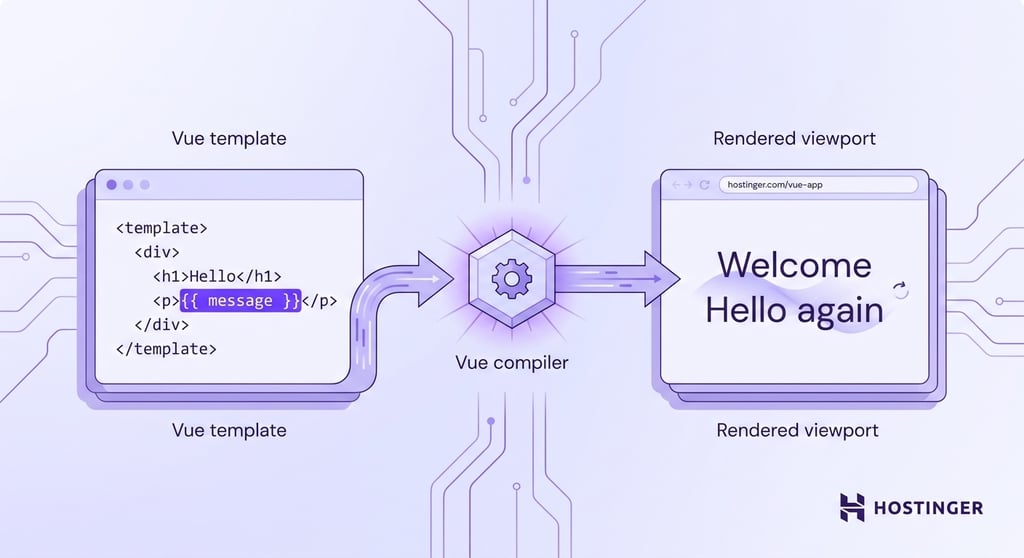
Converting templates into rendered output
Vue templates look similar to standard HTML, which makes the interface easier to read and write during development.
Behind the scenes, Vue converts these templates into JavaScript functions that generate the visible interface in the browser.
Developers write readable template syntax while Vue handles the rendering process automatically.
A template expression such as {{ message }}displays the current value of a variable inside the component. If the value changes from "Welcome" to "Hello again", Vue updates the displayed text immediately without requiring a manual page refresh.
Templates also support directives that add behavior directly inside HTML. The v-if directive shows or hides elements based on conditions, v-for repeats elements from a list, and v-model keeps form inputs synchronized with application data automatically.
Managing component lifecycle events
Vue components appear, change, and disappear as users move through an application.
Opening a product page displays new content on the screen, while closing a pop-up removes it from the interface. Notifications, forms, and dashboards also refresh continuously as application data changes.
Vue gives developers ways to run actions during these moments automatically. A component can load account information as soon as a page opens, trigger an animation after rendering, or stop background activity after the component is removed from the screen.
Lifecycle events make component behavior easier to manage because each part of the interface handles its own updates, loading, and cleanup while it is active.
Sharing data between components
Vue components pass information to each other through props and emitted events. Props pass data from a parent component to a child component, while emitted events allow child components to send updates back to the parent.
Components often exchange data while users interact with the application. A search bar can send the current keyword to a product list so the visible results refresh while the user types. In a shopping cart, changing the quantity of one item can immediately update the checkout total.
Props and emitted events work well when nearby components need to exchange information. Larger applications sometimes store shared data in a central location using tools such as Pinia, which helps different parts of the application access the same information more easily.
Vue.js use cases
Vue.js is used to build interactive web applications ranging from small interface features to large frontend platforms with thousands of users.
Vue.js works best for the following web application types:
- Single-page applications (SPAs). Vue.js is widely used for SPAs, where Vue Router handles navigation between views so users move through the application without refreshing the browser. Common examples include SaaS dashboards, project management tools, admin panels, analytics platforms, and social feeds.
- Progressive web apps (PWAs). Vue.js supports PWAs that behave like mobile apps in the browser. Users can install them on their devices, receive push notifications, and continue using some features offline through cached content. Businesses often use Vue.js PWAs for ecommerce stores, food delivery services, booking systems, and productivity tools where mobile-friendly performance is important.
- Mobile applications. Developers can use Vue.js to build cross-platform mobile apps through frameworks such as Ionic Vue and NativeScript Vue. This allows teams to reuse Vue knowledge while building applications for both Android and iOS. Mobile interfaces such as delivery tracking apps, booking platforms, and customer portals share frontend logic between web and mobile versions.
- Server-rendered applications. Vue.js also supports server-side rendering (SSR) through frameworks such as Nuxt. With SSR, the server generates the initial page content before sending it to the browser, improving load time and helping search engines crawl the content more easily. This approach is common for blogs, documentation websites, online marketplaces, and content-heavy platforms where SEO and initial performance are important.
- Modern frontend platforms and APIs. Vue.js is frequently used as the frontend layer for headless CMS platforms, SaaS products, AI-powered interfaces, and API-driven applications. A Vue frontend can display data from external services in real-time while keeping the interface responsive and interactive.
How to deploy your Vue.js app
Vue.js applications need to be converted into optimized production files before deployment. The build process prepares the application for live hosting by generating compressed frontend assets that browsers can load efficiently.
To deploy your Vue.js app:
1. Run the production build command
Use the following command inside your Vue.js project:
npm run build
This command prepares the application for deployment by creating optimized frontend files inside the dist/ folder.
2. Upload the generated production files
After the build finishes, upload the contents of the dist/ folder to your hosting environment. This folder contains the compiled HTML, CSS, and JavaScript files that browsers load when users visit your site.
3. Deploy the application through a hosting provider
Vue.js applications can run on modern web app hosting platforms such as Hostinger, which supports frontend frameworks, automated deployments, GitHub integration, managed SSL certificates, CDN delivery, and global hosting infrastructure.
4. Configure routing for single-page applications
Applications using Vue Router history mode should configure a fallback to the index.html file. This allows routes such as /dashboard or /profile to continue working correctly after users refresh the page or open direct links.
For NGINX, add this to your server block:
location / {
   try_files $uri $uri/ /index.html;
}
For a more detailed walkthrough covering hosting setup, deployment workflows, and production configuration, follow our guide on how to host a web application.

This article is a localized version of What is Vue.js? How Vue.js works, originally published in English.

Ksenija is a digital marketing enthusiast with extensive expertise in content creation and website optimization. Specializing in WordPress, she enjoys writing about the platform’s nuances, from design to functionality, and sharing her insights with others. When she’s not perfecting her trade, you’ll find her on the local basketball court or at home enjoying a crime story. Follow her on LinkedIn.