What is a welcome email? How to set it up
Apr 20, 2026
/
By Alma
/
12 min Read
A welcome email is the first automated message someone gets after signing up for your email list, subscribing through your website or landing page, or creating an account for your product or service. Most brands use it to say hello, explain what the reader signed up for, and point them to the next step.
Right after someone signs up, they’ve made a small commitment to hear from you. They’re paying attention. That’s exactly why they’re far more likely to open this email than anything you send later. This is your best shot to show what you’re about and why they should keep reading.
The strongest welcome emails do four things well: a good subject line that gets opened, a simple and personal greeting, a clear explanation of what the reader will get, and a call to action that’s easy to follow.
The best part: sending it doesn’t require any manual work. Most email marketing tools do it automatically the moment someone signs up. It triggers the system, the system sends the email, and it’s in their inbox within seconds.
What is a welcome email?
A welcome email is the first message someone receives after signing up for your newsletter, making a purchase, or joining your platform. It’s your brand’s opening move, and it does three things: onboards the reader, builds early trust, and gets them to engage before that initial interest fades.
Think of it as the email that answers the questions every new subscriber has the moment they sign up. Who are you? What did I just sign up for? What happens next? Answer those clearly, and you’ve already done more than most brands bother to do.
It’s also the entry point of your entire email marketing funnel. Before someone becomes a loyal customer, they’re a new subscriber who knows very little about you. The welcome email is what bridges that gap.
The timing of the welcome email is just as important. Ideally, it should “welcome” the subscriber within minutes of sign-up. At that moment, they’re curious and paying attention. If you wait too long, that interest fades, and engagement rates usually drop as more time passes after the initial action.
New subscribers are also sizing you up from the very first email. Personalization – using their name, or referencing exactly what they signed up for – shows you were paying attention.
What is the key difference between a welcome email and an onboarding email?
A welcome email is typically the first marketing message sent soon after signup. An onboarding email sequence is a series of messages sent over days or weeks to guide users through your product.
Welcome email | Onboarding email sequence | |
Format | Typically, a single email | 3–10+ emails |
Goal | First impression, brand intro | Step-by-step product adoption |
Timing | Sent instantly | Spread over days or weeks |
Best for | Newsletters, simple signups | SaaS tools, complex products |
For a newsletter or a basic signup, one email is enough. Say hello, set expectations, done. Many brands still extend that first welcome into a short series of emails, but it always starts with a single, clearly defined welcome message.
For something with a learning curve – a SaaS tool, a course platform – one email won’t cut it. Here’s what a simple onboarding sequence might look like:
- Day 0 – Welcome email: who you are, what they signed up for, one link to get started
- Day 2 – Core feature walkthrough: the one thing they need to try first
- Day 5 – A real customer case study: someone like them who got a result
- Day 7 – A soft check-in: “Still need help getting started?”
A welcome email and an onboarding email aren’t mutually exclusive. Both are lifecycle emails – messages triggered by where someone is in their relationship with you. Choosing between a single email and a full sequence is one of the first decisions you’ll make when setting up your automated email campaigns.
How a welcome email works
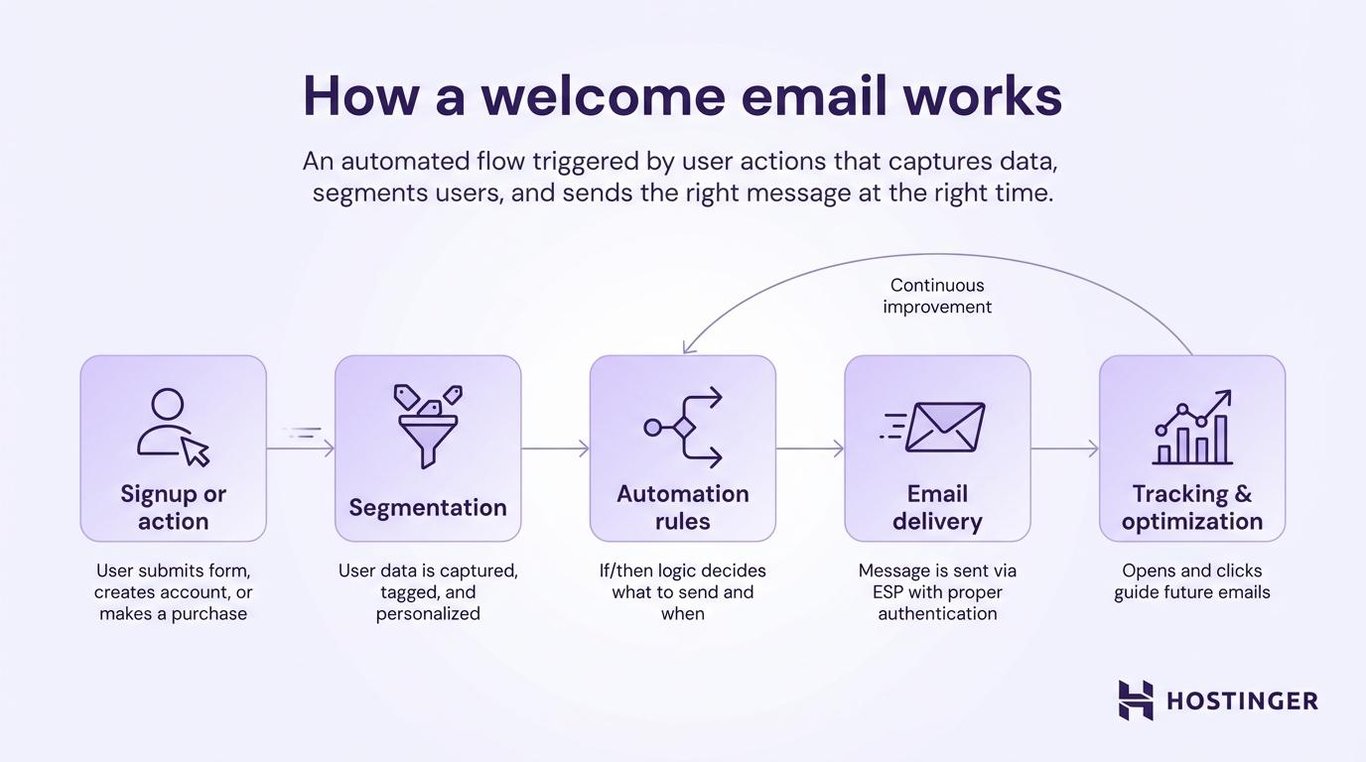
A welcome email runs on a simple chain of events. When someone signs up, your email platform automatically triggers a preset sequence. It captures their details, organizes them according to the rules you’ve set, and sends the right welcome email at the right time.
You only need to set this up once, and from then on, the system handles it for every new subscriber.
1. User signup or trigger event
Everything starts when a user takes action. They could be joining a newsletter, creating an account on your platform, or completing a purchase.
Any of these actions is the trigger. Your email platform watches for it and kicks off the automation instantly. Name, email, signup source – all captured through a form, API, or checkout page.
2. Data processing and segmentation
Your email tool sorts incoming data and decides what to do next.
Someone who signed up through a discount pop-up gets tagged differently from someone who came through a blog post. Those tags matter because they decide which welcome email goes out. A first-time buyer gets a different message than a returning subscriber. That’s email list segmentation doing its job.
The same data also feeds personalization. Your tool pulls in attributes such as the subscriber’s name, location, or signup source and automatically inserts them into the email. That’s how “Hi Sarah” ends up in the subject line without you typing it yourself.
3. Email automation workflow activation
Think of this as a set of if/then rules – what gets sent, when, and to whom. Most tools let you build that visually, like a flowchart. Here’s a simple example:
- Someone signs up → wait 2 minutes → send welcome email
- They open it → wait 2 days → send a feature walkthrough
- They don’t open it → wait 1 day → resend with a different subject line
If you’re adding a delay, keep it short. According to Campaign Monitor, welcome emails perform best when sent almost instantly after signup – a minute or two is fine, but engagement tends to drop the longer you wait, especially after a few hours.
You can also set conditions, such as sending a follow-up email only if they didn’t open the first one, or skipping the discount email if they already purchased.
Once it’s built, the whole welcome email flow runs on its own.
4. Email delivery and inbox placement
The email goes out via SMTP – the standard protocol for sending email – or directly through your email service provider (ESP).
Authentication settings like SPF and DKIM prove to inbox providers that you’re a real sender. Get that right from the start, and your emails land in the inbox, not spam.
5. User interaction and tracking
After the email goes out, your platform tracks email marketing metrics like who opened it, who clicked, and who ignored it.
That data shapes everything that comes after it. Low open rate on the welcome email means the subject line isn’t working, so you test a new one. High open rates, but no clicks, mean the CTA needs work.
Over time, what you learn from this one email feeds directly into how you write the next one, which segments you build, and what you offer new subscribers. It’s a feedback loop that gets tighter the more you pay attention to it.
What are the types of welcome emails?
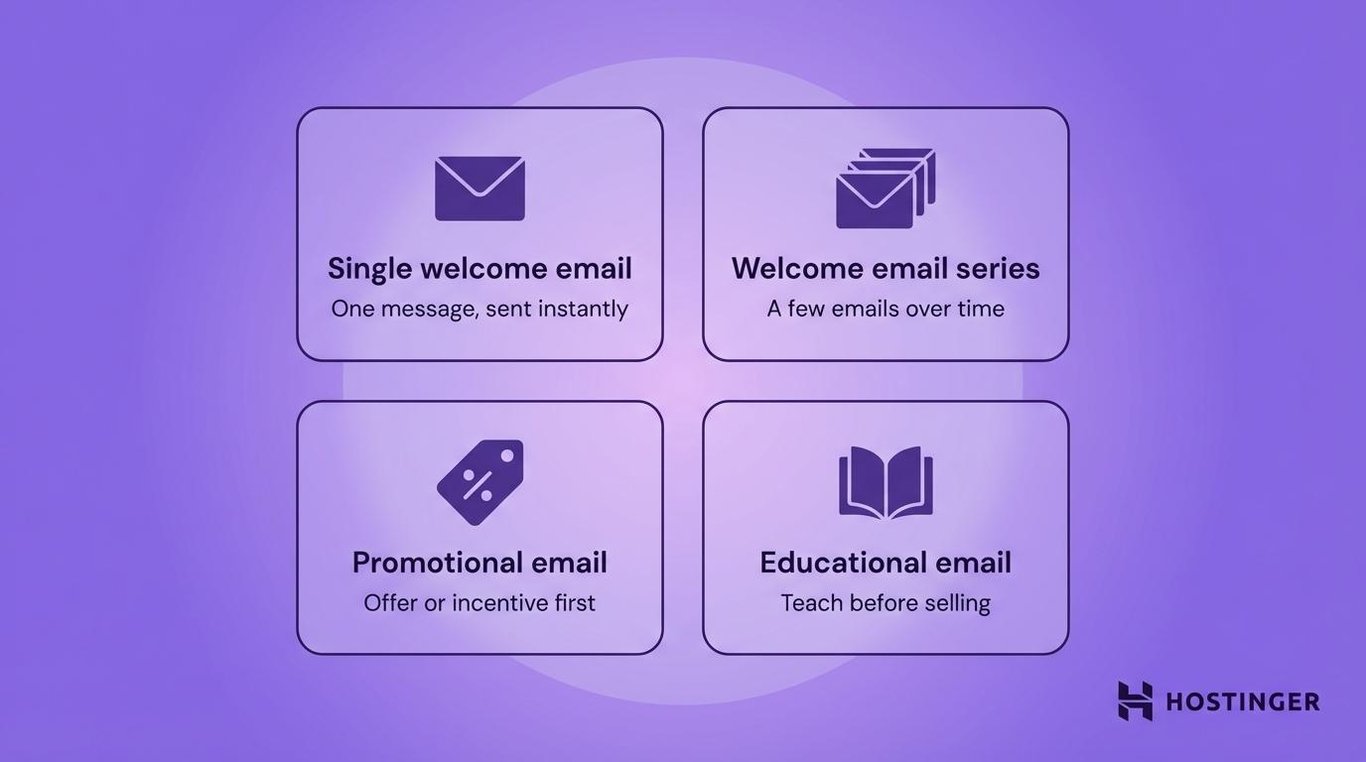
Not every welcome email looks the same. Depending on your business, your audience, and what you want the reader to do next, the right type can look very different. Here are the four most common ones.
Single welcome email
This is the simplest format – one email, sent immediately after someone signs up.
A single welcome email works well for blogs, newsletters, and basic services where a quick introduction is all you need. You say hello, tell the reader what they signed up for, and point them to the next step. A strong newsletter strategy usually starts with exactly this – one well-written email that sets the tone for everything that follows.
Welcome email series
Sometimes one email isn’t enough, especially when you need to build trust before asking for something.
A welcome email series spaces things out over several days. The first email introduces your brand. The second delivers something valuable – a guide, a tip, a resource. The third nudges the reader toward engagement. The fourth has a clear CTA. Each email does one job, and together they move someone from new subscriber to genuinely interested reader without feeling rushed.
Promotional welcome email
A promotional welcome email leads with an offer, such as a welcome email discount, free shipping, or a limited-time deal. It’s the go-to format for ecommerce welcome emails.
A 15% off code sent right after signup gives a new subscriber a concrete reason to buy today instead of “maybe later.” Many high-performing ecommerce email marketing programs treat promotional welcome emails as among their highest-converting messages, because they reach people at peak interest with a clear reason to act.
Educational welcome email
An educational welcome email skips the pitch entirely and focuses on helping the reader get value right away.
It’s the standard approach for SaaS companies and any product that takes time to learn. Instead of leading with a discount, it leads with a tutorial, a feature walkthrough, or a short guide. The goal is a quick first win. It’s getting the user to try something and see a result.
Key elements of an effective welcome email
Besides being well-timed, a welcome email works when it’s personal, clear, and easy to act on. The best email marketing practices all point to one thing: specificity beats generality. That’s especially true here, where you have the reader’s full attention for exactly one moment.
1. Subject line and preview text
The subject line is the only part of your email that people see before deciding to open it.
Readers aren’t looking to be impressed. They just want to know what’s inside. “Your account is ready – here’s what’s next” will always do more work than a vague teaser. The preview text – that short line next to the subject in the inbox – should add context, not repeat the same line.
Here are a few welcome email subject line examples that work well:
- “Welcome to [Brand] – here’s your 10% off”
- “You’re in. Here’s how to get started.”
- “Hi [Name], your free guide is inside”
2. Personalization and tone
A personalized welcome email goes beyond a name at the top.
Pull in behavior data – what they downloaded, which page they signed up on, and what product they viewed. Those details tell your email tool what message to serve, and they tell the reader you were paying attention. Someone who signed up after reading a blog post about email marketing should get a different welcome than someone who signed up during checkout.
Your tone matters just as much. Email personalization only lands when the voice matches the brand. A casual, friendly tone in a B2B software welcome email feels out of place. A stiff, corporate one in a lifestyle brand does too.
Match your tone to your audience to make the email feel like it was written specifically for them.
3. Value proposition and messaging
The body of the welcome email should answer one question: what do I get out of this?
Start with a genuine thank-you – it sets the right tone without being performative. Then get direct and specific. Tell subscribers exactly what they’ll receive, how often, and why it matters to them. That’s the value proposition email in its simplest form: what’s in it for them, stated plainly.
If you made a promise during signup – a discount, a guide, a free resource – deliver it here. Don’t make them hunt for it. And set expectations clearly. A subscriber who knows what’s coming is far less likely to unsubscribe when it arrives.
4. Call-to-action (CTA)
Keep your welcome email to one CTA. When readers have too many directions to choose from, most of them choose none.
You should also use specific language to make the welcome email CTA work. “Create your first project” converts better than a generic “Get started.” “Claim your 15% off” gives people a reason to click, but “Learn more” gives them nothing.
The email CTA should also be visible without scrolling. Most readers decide whether to act within the first few seconds. If they have to scroll to find the button, most won’t.
What are some of the best welcome email examples?
The best welcome emails make the next step obvious in a way that feels natural to the brand. Here’s what that looks like across three industries:
Ecommerce welcome email example – Patagonia
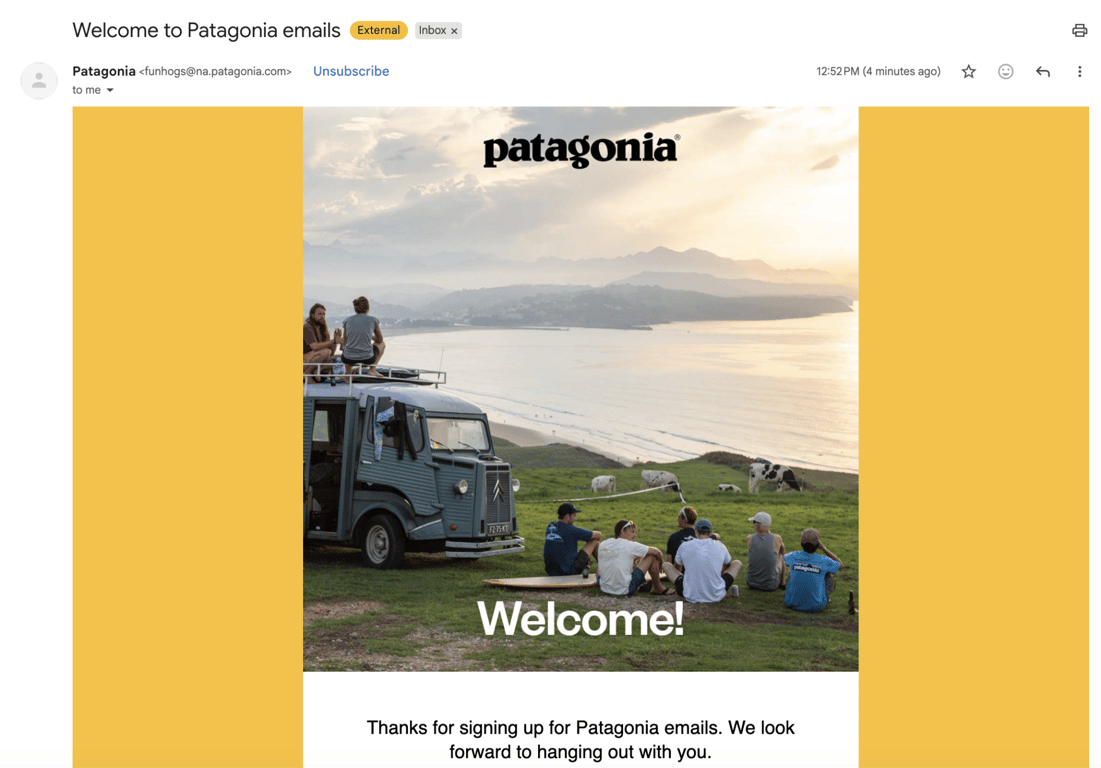
Patagonia’s welcome email doesn’t show a single product. The whole thing is outdoor photography – mountains, rivers, people moving through open landscapes. By the time the CTA appears, the reader is already sold on the idea of belonging to something bigger than a clothing brand.
That only works because the name carries enough weight on its own. For most stores, a 10%–15% discount code upfront is the smarter move. If your brand isn’t immediately recognizable, give people a concrete reason to buy now rather than put it off. Your marketing for ecommerce strategy should tell you which side you’re on.
SaaS welcome email examples – Asana
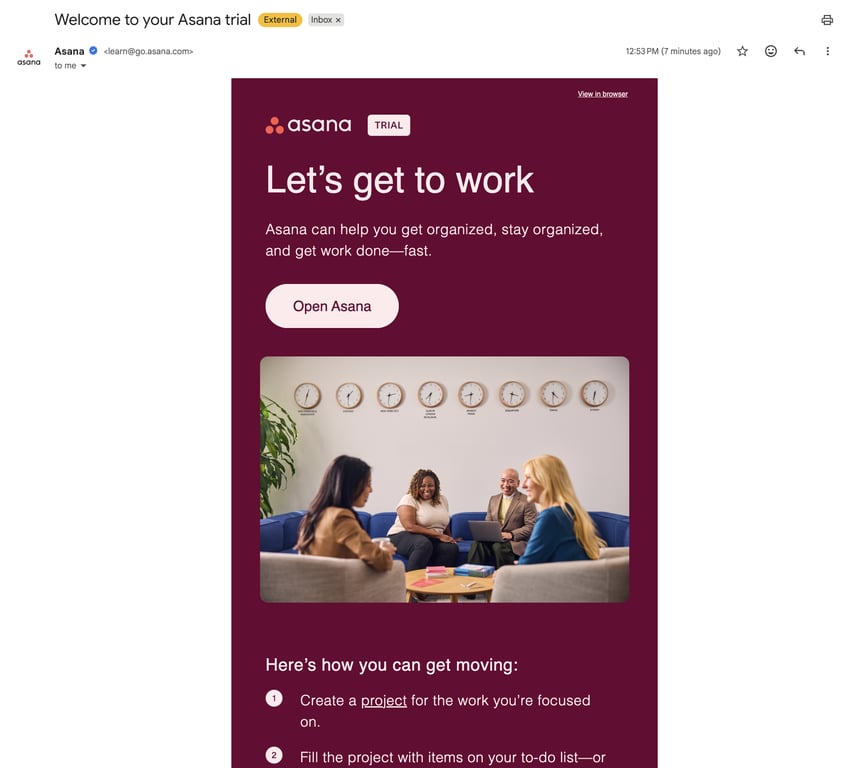
Asana’s welcome email opens with: “Let’s get to work.” Then, under it, a short, one-sentence intro about what the platform can help you with, followed by the CTA button. The welcome email tells you the reason you signed up, reflected straight back at you – followed by three steps to create your first task.
It works because it goes straight to the point. The reader isn’t there to learn about Asana. They’re there to get something done.
Newsletter welcome email examples – Morning Brew
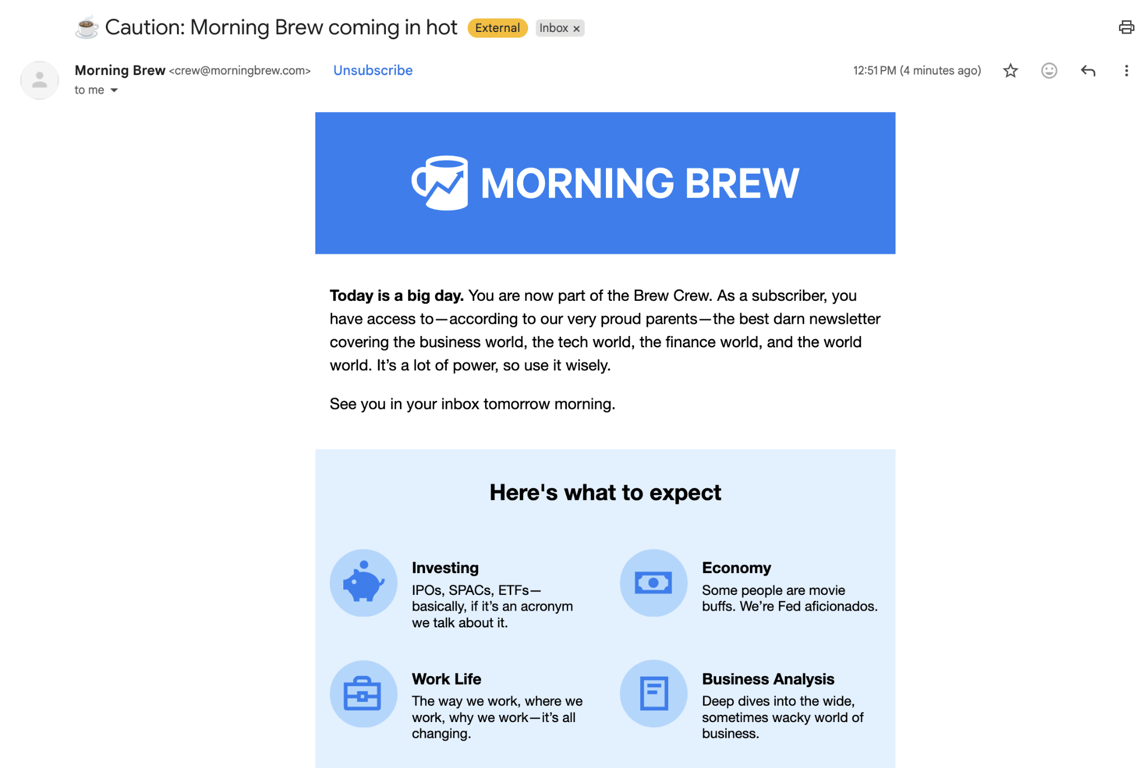
Morning Brew’s welcome email is short, warm, and immediately useful. It confirms the signup, tells you when to expect the newsletter, and points to other Brew content – podcasts, niche newsletters, social channels. Their brand emoji (☕) sits in the subject line, which sounds trivial until you realize it makes every future email instantly recognizable in a crowded inbox.
Newsletter readers have one main question when they sign up: what did I just agree to, and when will I hear from you? Morning Brew answers both within the first two sentences.
Common mistakes in welcome emails
Most welcome email mistakes aren’t hard to spot once you know what to look for. Here are the ones that come up most often.
1. Lack of personalization
A welcome email without personalization feels like a mass blast, because it is one.
Starting with “Hello, subscriber” tells the reader they’re just one of thousands on a list. That’s a hard first impression to recover from. The fix is using what you already know about them. Their name is the obvious starting point, but referencing what they signed up for makes an even bigger difference. Someone who downloaded a free guide should see it in the email. Someone who signed up for a discount should find it waiting for them.
Most email tools handle this with a simple tag in your template – a small setup that makes every send feel personal.
2. Not segmenting your list
Sending the same welcome email to everyone is one of the most common email marketing mistakes.
A first-time buyer and a newsletter subscriber have different expectations. When your welcome email speaks to why someone signed up, it feels relevant. When it doesn’t, it gets ignored. Most email tools let you set up separate welcome emails for different signup sources – it’s worth doing from the start.
3. Weak or unclear CTAs
A vague CTA is one of the most common reasons welcome emails don’t convert.
“Learn more” doesn’t tell the reader anything. “Get started” isn’t much better. People need to know exactly what happens when they click. “Claim your 15% off” works. “Create your first project” works. The more specific the action, the easier the decision.
Keep your email to one CTA, too. Each extra CTA you add makes it harder for the reader to commit to any of them.
4. Delayed delivery
A delayed welcome email misses the whole point of sending one.
The moment someone signs up, they’re thinking about you. That doesn’t last long. Send your welcome email right away, and it feels like a natural response to their action. Send it hours later, and most people have already moved on – or worse, they’re wondering if their signup even went through. That uncertainty doesn’t make them wait. It makes them leave.
Set it to trigger automatically at the moment of signup, and you won’t have to think about it again.
5. Not mobile-friendly
A welcome email that breaks on mobile is a poor welcome email, regardless of how good the copy is.
According to Hostinger’s email marketing statistics, more than half of all emails are opened on a phone. Small fonts, oversized images, and tiny buttons make the email frustrating to read. A single-column layout, readable font sizes, and a large enough CTA button to tap easily are the basics.
Most email tools include a mobile preview. Use it before every send.
What is the best tool to create automated welcome emails?
Email marketing platforms are where you build your welcome email, set up the automation, and track its performance. When you’re picking a platform, these are the features that are important for welcome emails:
- Visual automation builder (drag-and-drop builder). Without it, you’re creating and sending emails manually every time someone signs up. With it, you only need to build the flow once, and it runs automatically in the background. Look for a tool that lets you map everything out visually so you can see what happens after signup at a glance, without writing any code.
- Segmentation. This is what stops you from sending a first-time buyer the same email as a long-time newsletter subscriber. The more relevant your welcome email feels, the more likely it is to be opened and acted on.
- A/B testing. Instead of guessing whether your subject line is working, you test two versions and let the results tell you. Most people skip this early on, but it’s one of the simplest ways to improve performance over time.
- Analytics. You need to see what’s happening after the email goes out – open rates, click rates, conversions. Without that data, you’re guessing at what to fix.
You don’t need the most advanced email marketing platform right away. Start with an email marketing tool that automatically sends welcome emails and provides basic performance data. The email marketing software options range from simple to fully featured – pick the one that matches where you are now, not where you hope to be in a year.
Is Hostinger Reach good for launching welcome emails?
Hostinger Reach is built for exactly this – building, automating, and tracking welcome emails without needing any technical background.
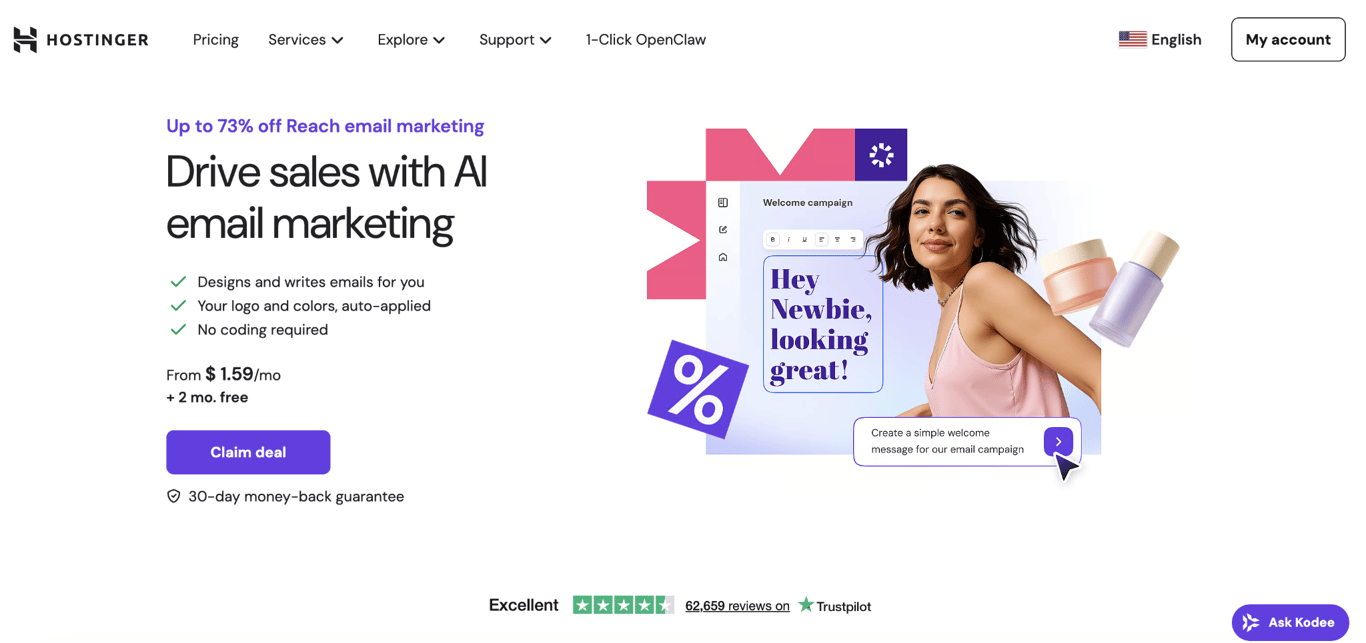
It covers every part of the process in one place. The AI-powered template creator helps you design a professional welcome email in minutes, even if you’ve never written one before. Once it’s ready, you set up a trigger so every new signup gets the email instantly.
From there, segmentation handles the rest, making sure each subscriber gets the message that matches why they signed up.
The analytics dashboard keeps everything visible in one place – open rates, clicks, and conversions – so you always know what’s working and what to improve next. There’s also an AI subject line tool that suggests improvements based on real performance data, which takes the guesswork out of one of the most important parts of the email.
If you’re already hosting with Hostinger, Reach connects directly to your site. Your site and email setup work together, so you don’t need to connect multiple tools.
Role of welcome emails in content marketing
Welcome emails are among the most effective tools in content marketing because they reach subscribers at the moment they’re most open to hearing from you.
Welcome emails are opened far more often than regular marketing emails. What you put in front of them at that moment shapes how they see your brand from that point on.
Here’s what that looks like in practice. A fitness brand signs someone up for a free meal plan. The welcome email delivers it, links to a beginner workout guide, and tells them to expect a newsletter every Monday. In three actions, the reader knows what the brand is about, has already gotten something useful, and knows when they’ll hear from you again.
A welcome email that delivers on its promise – a guide, a discount, a simple “here’s what to expect” – sets the tone for trust. Every email you send after it builds on that foundation.
It works best as part of a broader content marketing strategy, though. One email can only do so much. When it points to the right content and channels and sets the right expectations, it becomes the first step in a relationship that actually goes somewhere.

Alma is an AI Content Editor with 9+ years of experience helping ideas take shape across SEO, marketing, and content. She loves working with words, structure, and strategy to make content both useful and enjoyable to read. Off the clock, she can be found gaming, drawing, or diving into her latest D&D adventure.