What is a scalable web application and how it works
Jun 26, 2026
/
Ksenija
/
11 min Read
A scalable web application is one that can handle increasing numbers of users, requests, and data without a significant drop in performance or reliability.
As more users access the application, more requests are processed, or more data is stored, the application continues to operate efficiently by using additional resources and distributing workloads across its infrastructure.
A new feature, successful marketing campaign, seasonal event, or expanding customer base can increase demand within days or even hours.
An application designed for growth absorbs that demand without slowing down or becoming unavailable.
Application servers process requests, databases manage growing volumes of information, load balancers distribute traffic, caching layers reduce unnecessary processing, and cloud infrastructure provides additional computing resources when capacity needs to expand.
Each component introduces its own challenges. Databases can become bottlenecks, overloaded servers can create single points of failure, and inefficient application logic can consume resources faster than infrastructure can grow.
Developers address these challenges through architectural decisions that allow applications to scale efficiently as demand changes.
Scalability is the result of designing systems, infrastructure, and application components that continue performing reliably as requirements evolve.
Why scalability matters
Scalability allows a web application to support increasing demand without sacrificing performance, reliability, or user experience.
As applications grow, scalability helps organizations accommodate more users, larger workloads, and changing business requirements without repeatedly redesigning their infrastructure.
Key benefits of a scalable web application include:
- Supporting user growth. A scalable application can serve more users as adoption increases without requiring a complete rebuild.
- Maintaining performance during traffic spikes. Marketing campaigns, product launches, viral content, and seasonal events can generate sudden increases in traffic. Scalability helps applications remain responsive during periods of high demand.
- Enabling business growth. New customers, additional products, and expansion into new markets increase infrastructure requirements. Scalable systems allow organizations to grow without technical limitations becoming a barrier.
- Handling larger volumes of data. User accounts, uploaded files, transaction records, and analytics data all consume resources. Scalability ensures storage and processing capacity can grow alongside application workloads.
- Improving cost efficiency. Scalable applications allocate resources based on demand, helping organizations avoid paying for unused capacity while maintaining sufficient resources during peak periods.
- Protecting user trust and revenue. Performance issues become business problems when they prevent users from completing purchases, accessing services, or finishing important tasks. A scalable application maintains a consistent user experience as demand grows, helping organizations retain customers, protect revenue, and avoid reputational damage from slowdowns and outages.
Key characteristics of scalable web applications
Scalable web applications are designed to increase capacity, adapt to changing workloads, and remain available when infrastructure components fail.
Effective software design supports these goals by helping applications use resources efficiently, recover from failures, and accommodate changing demand.
Elasticity
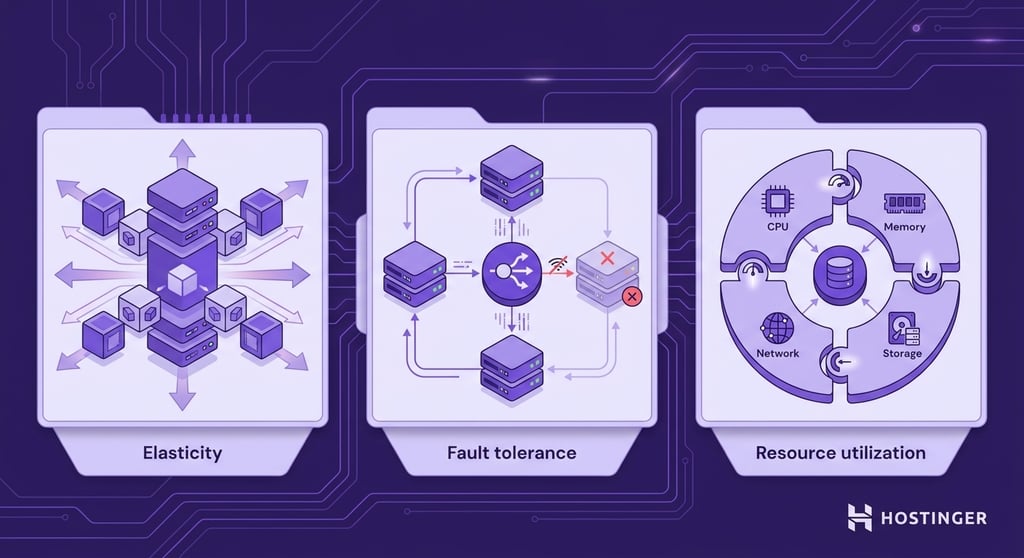
Elasticity is the ability of a system to scale available computing capacity up or down as demand changes.
When traffic increases, additional resources such as application instances, containers, or virtual machines can be added to handle the extra workload.
When demand decreases, those resources can be removed to avoid unnecessary consumption of infrastructure capacity.
Changing demand is one of the main challenges of building a web application for scalability.
User activity fluctuates throughout the day, marketing campaigns can generate sudden traffic spikes, and seasonal events can dramatically increase workloads for short periods.
Elastic systems adapt to these changes without requiring permanent infrastructure upgrades.
Pro tip
Use auto-scaling policies to automate elastic behavior. Cloud providers like AWS, Google Cloud, and Azure let you define rules that automatically add or remove instances based on metrics such as CPU usage or request rate — no manual intervention required.
Fault tolerance
Fault tolerance is the ability of an application to continue operating when one part of the system fails. Scalable applications are designed to withstand hardware failures, software issues, and network disruptions without becoming completely unavailable.
Fault tolerance relies on redundancy and failover.
Redundancy provides backup resources that can perform the same task if a component becomes unavailable.
Warning! Redundancy only protects against failure if components are truly independent. Servers sharing the same database, network switch, or availability zone can all fail together. Ensure redundant components are distributed across separate infrastructure to avoid a single point of failure.
Failover transfers traffic or workloads from the failed component to a healthy one, allowing the application to continue operating.
For example, an application can run across multiple servers behind a load balancer. If one server fails, the load balancer sends requests to the remaining servers. Users can continue accessing the application while the failed server is repaired or replaced.
Efficient resource utilization
Efficient resource utilization is the ability to use computing resources effectively without overloading some components or leaving others underused.
CPU capacity, memory, storage, and network resources should be allocated according to application demand.
When requests, data processing tasks, and background jobs are spread appropriately across available resources, the application can maintain performance without requiring unnecessary infrastructure capacity.
How do applications increase capacity?
Scalable applications increase capacity in two ways: by adding more resources to existing infrastructure or by adding more infrastructure resources.
These approaches are known as vertical scaling and horizontal scaling. Each method helps applications handle higher workloads, but they differ in how capacity is expanded and the practical limits they impose.
| Feature | Horizontal scaling | Vertical scaling |
| Capacity increases by | Adding more servers or application instances | Adding more resources to an existing server |
| Infrastructure model | Multiple servers share the workload | A single server becomes more powerful |
| Scalability limits | Capacity can continue growing by adding resources | Capacity is limited by hardware constraints |
| Availability | Higher availability through redundancy | Availability depends on a single server |
| Complexity | More infrastructure to manage | Simpler to implement and maintain |
| Best suited for | Applications expecting sustained growth | Smaller applications or predictable workloads |
Horizontal scaling
Horizontal scaling increases an application’s capacity by adding more servers or application instances to share the workload.
When demand grows, requests are distributed across multiple resources rather than being handled by a single server.
For example, an application running on one server can process only as many requests as that server’s CPU, memory, and network resources allow.
Horizontal scaling removes that limitation by spreading requests across several servers. If traffic doubles, additional servers can be added to absorb the extra workload.
The main advantage of horizontal scaling is that capacity can grow gradually as demand increases. Organizations can add resources as needed rather than replace existing infrastructure with more powerful hardware.
Horizontal scaling also improves availability. If one server becomes unavailable, other servers can continue handling requests, reducing the likelihood of service interruptions.
Vertical scaling
Vertical scaling increases an application’s capacity by adding more resources to an existing server.
Upgrading CPU power, memory, storage, or network capacity allows the server to handle a larger workload without adding additional machines.
A simple example is moving an application from a server with 4 CPU cores and 8 GB of RAM to a server with 16 CPU cores and 32 GB of RAM.
The application continues running on a single machine, but the additional resources allow it to process more requests and support more users.
The main advantage of vertical scaling is simplicity. Capacity can be increased without redesigning the application, distributing workloads across multiple servers, or introducing additional infrastructure components.
For smaller applications, upgrading server resources is often the fastest way to accommodate growth.
Vertical scaling has practical limits, however. Every server has a maximum amount of CPU, memory, and storage that can be installed.
Once those limits are reached, increasing capacity requires a different approach. For applications that expect sustained growth, horizontal scaling offers greater long-term flexibility because new servers can be added as demand increases.
Common architectures used to build scalable applications
The way an application is structured affects how it responds to growth. Architectural decisions influence how workloads are distributed, how components communicate, and how easily capacity can be increased when demand rises.
Monolithic architecture
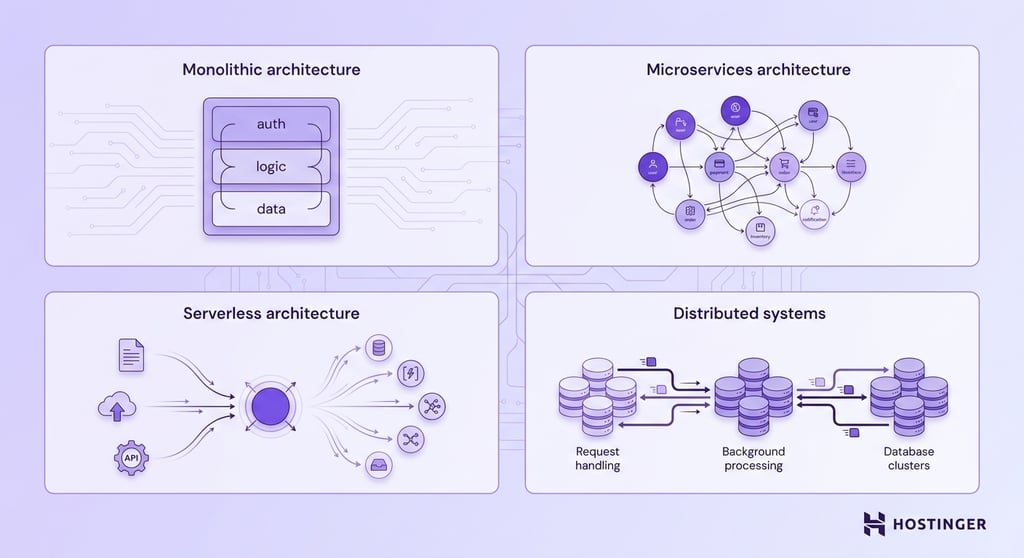
A monolithic application combines all functionality into a single codebase and deployment unit.
User authentication, business logic, data access, and other application features run as part of the same system.
Monolithic architectures are straightforward to develop, deploy, and maintain during the early stages of a project.
A single application is easier to test, monitor, and update because all components exist within the same environment.
Growth introduces challenges, however. Scaling requires deploying additional copies of the entire application, even when only one component is experiencing increased demand.
Large codebases also become more difficult to modify as teams, features, and dependencies grow.
Warning! In a monolithic architecture, a bug or failed deployment affects the entire application. There is no way to isolate a faulty update to a single component. If the deployment fails, the whole system may become unavailable. Implement robust rollback procedures and staging environments to reduce this risk.
Microservices architecture
A microservices architecture divides an application into smaller, independent services. Each service is responsible for a specific function and can be developed, deployed, and scaled separately.
Independent scaling is one of the biggest advantages of microservices. An application experiencing heavy demand in one area can allocate additional resources to the affected service without increasing capacity across the entire system.
The additional flexibility comes with greater operational complexity.
Communication between services, monitoring, deployment management, and data consistency requires more planning than in a monolithic architecture.
Serverless architecture
A serverless architecture runs application code only when a specific event occurs. An event could be a user submitting a form, uploading a file, making an API request, or completing a purchase.
Once the task is completed, the computing resources used to process it are released.
Cloud providers manage the underlying infrastructure, including server provisioning, resource allocation, and scaling.
Developers focus on writing application logic while the platform handles the resources required to execute it.
Serverless architectures are well-suited to applications with unpredictable traffic patterns, as computing resources are allocated only when needed.
An image-processing service, for example, can process thousands of uploaded files during a busy period and consume very few resources when activity decreases.
The trade-off is reduced control over the execution environment. Serverless platforms impose limits on execution time, resource usage, and application behavior.
Applications that run continuously or require extensive control over infrastructure may be better suited to other architectural approaches.
Important! Serverless functions can experience cold starts — a delay that occurs when a function is invoked after a period of inactivity, as the platform needs time to initialize the execution environment. For latency-sensitive applications, consider strategies such as scheduled warm-up requests or provisioned concurrency to reduce cold start impact.
Distributed systems
A distributed system is an application that runs across multiple computers that work together to perform a shared task.
For example, one group of servers might handle user requests, another might process background tasks, and a separate database cluster might store application data.
Each component performs a specific function while communicating with the rest of the system.
Distributing workloads allows applications to support larger volumes of traffic, data, and processing activity than a single machine could handle alone.
The approach also improves resilience because a failure in one component does not necessarily bring down the entire application.
The trade-off is complexity. Distributed components must communicate reliably, data must remain synchronized across systems, and troubleshooting becomes more difficult because failures can occur across multiple services, servers, or locations.
Best practices for building scalable web applications
Building a scalable web application requires decisions that support long-term growth. Application design, infrastructure choices, and web app performance optimization practices all affect how efficiently a system can handle increasing demand.
Build modular systems
Organize application functionality into modules that can be developed, tested, deployed, and scaled independently.
Clear module boundaries reduce coupling between features and make growth easier to manage over time.
When defining modules:
- Group code around business domains. User management, payments, search, reporting, and content management should each have their own logic, validation rules, and data access patterns.
- Establish clear data ownership. Each module should be responsible for its own data. If another module needs access to that information, expose it via an API, event stream, or dedicated read model rather than allowing direct database access.
- Use asynchronous processing for background work. Tasks such as email delivery, image processing, report generation, and third-party integrations should run through queues or background workers.
- Review module boundaries regularly. Components that accumulate unrelated responsibilities become harder to test, deploy, and scale. Split oversized modules before they turn into bottlenecks.
Warning! Allowing modules to access each other's databases directly creates hidden dependencies that are difficult to untangle as the application grows. Schema changes in one module can silently break another, making deployments riskier and independent scaling nearly impossible.
Use caching strategically
Focus caching efforts on data that is read frequently and updated infrequently. Serving that information from a cache reduces database queries, lowers backend load, and improves response times for high-traffic pages.
When implementing caching:
- Start with the highest-traffic queries. Use database monitoring tools to identify the queries consuming the most time or generating the most requests, then cache their results before optimizing less frequently used operations.
- Cache data at the closest practical layer. Store static assets in browser or CDN caches, API responses in application caches, and frequently queried records in an in-memory cache such as Redis or Memcached.
- Define cache invalidation rules before deployment. Decide exactly when cached content should be refreshed, whether through time-based expiration, event-driven updates, or manual invalidation.
- Measure cache effectiveness. Monitor cache hit rates and database query volume after implementation. A cache that rarely serves requests adds complexity without reducing backend load.
- Limit caching to data that can tolerate short periods of staleness. Requests that require real-time accuracy, such as payment processing or inventory updates, should retrieve fresh data from the source system.
Optimize database performance
Databases are a common scalability bottleneck, especially as traffic and data volumes increase. Regular database reviews help identify performance issues before they affect users.
To improve database performance:
- Index frequently queried columns. Review slow-query logs and query execution plans to identify columns used in <code>WHERE</code>, <code>ORDER BY</code>, and <code>JOIN</code> clauses that would benefit from indexing.
- Eliminate inefficient queries. Audit application code for unnecessary joins, nested queries, and repeated database calls. Consolidate queries where possible and avoid retrieving data that the application does not use.
- Reduce unnecessary data retrieval. Replace <code>SELECT * </code>queries with explicit column selections and implement pagination for large result sets.
- Separate read and write workloads. Route reporting, analytics, search, and other read-heavy operations to database replicas while reserving the primary database for writes and transactions.
- Manage data growth proactively. Define retention policies for logs, audit records, and historical data. Archive or remove records that are no longer required by operational workloads.
- Test database performance before major releases. Run load tests using realistic datasets and traffic patterns to identify query bottlenecks, connection limits, and resource constraints before they affect production systems.
Pro tip
When routing reads to database replicas, account for replication lag — the delay between a write on the primary database and its appearance on replicas. For operations where a user immediately reads data they just wrote (such as form submissions or profile updates), route those reads to the primary database to avoid returning stale results.
Leverage content delivery networks (CDNs)
Configure a CDN to serve static assets such as images, videos, JavaScript files, stylesheets, and downloadable documents.
Serving those files from CDN edge locations reduces the number of requests that reach the origin server and prevents static content from competing with application workloads for server resources.
Review which assets generate the most traffic and move them behind the CDN first. Large media files and frequently accessed resources usually produce the biggest reduction in bandwidth usage and origin server load.
Set cache-control headers carefully to control how long assets remain cached. Files that change infrequently can be cached for extended periods, while frequently updated assets should use shorter cache durations or versioned filenames to ensure users receive the latest content.
Monitor CDN cache hit rates and origin traffic after deployment. Frequent requests reaching the origin server for cacheable content usually indicate misconfigured caching rules, missing headers, or assets that should be cached more aggressively.
Automate infrastructure management
Automate infrastructure provisioning and configuration through infrastructure-as-code tools such as Terraform, AWS CloudFormation, or Pulumi.
Defining servers, networks, databases, and security rules in code creates a repeatable deployment process and reduces the risk of configuration differences between environments.
Automate application deployments through CI/CD pipelines. Every code change should follow the same process for testing, validation, and deployment, reducing the likelihood of manual errors during releases.
Consistent deployment workflows also make it easier to scale development teams without introducing operational complexity.
Configure automated scaling policies for workloads with predictable resource requirements.
CPU utilization, memory consumption, request volume, and queue length are common metrics used to trigger the creation or removal of infrastructure resources.
Regularly review infrastructure changes through version control and code reviews. Treating infrastructure configuration like application code makes changes easier to track, test, and roll back when problems occur.
Build security into scaling strategies
Apply the principle of least privilege across applications, services, and infrastructure. Give each service access only to the specific databases, APIs, storage systems, and internal resources it needs. If an account or service is compromised, restricted permissions reduce the damage an attacker can cause.
Centralize authentication and authorization through a single identity and access management system.
As applications expand, separate permission systems across services create inconsistent access rules, increase administrative overhead, and make security audits more difficult.
Store secrets in dedicated secret management platforms instead of source code repositories, configuration files, or deployment scripts.
API keys, database credentials, and encryption keys should be rotated on a regular schedule and made available only to approved services and users.
Protect public-facing services with rate limiting and traffic filtering. Rate limits restrict excessive requests from individual users or IP addresses, helping prevent abuse, reduce the effectiveness of automated attacks, and protect backend systems from traffic spikes.
Review security controls whenever new infrastructure components are added. New servers, databases, APIs, cloud services, and third-party integrations increase the number of potential entry points into the application.
Evaluate each addition against existing security requirements before deployment to maintain a consistent security posture across the environment.
Future trends in scalable web applications
Scalability is becoming increasingly automated, distributed, and data-driven. Infrastructure platforms are taking over tasks that once required extensive manual configuration, while application architectures are becoming more adaptive to changing workloads.
Key software development trends that are shaping scalable web applications include:
- Edge computing. Edge computing processes requests closer to the user instead of routing every request to a centralized server or data center. Content delivery networks, edge functions, and distributed application services use this approach to reduce latency and improve response times for users in different geographic regions.
- Containerization and Kubernetes. Containers package an application together with its dependencies so it can run consistently across different environments. Kubernetes is a container orchestration platform that automates deployment, scaling, load distribution, and recovery across large groups of servers, making distributed applications easier to manage.
- AI-driven infrastructure scaling. AI-driven scaling uses machine learning models to analyze historical and real-time usage patterns to predict demand increases and allocate resources proactively.
- Multi-cloud architectures. A multi-cloud architecture distributes workloads across multiple cloud providers. Organizations use this approach to improve resilience, reduce vendor lock-in, and maintain greater flexibility when deploying applications globally.
- Serverless computing. Serverless platforms execute application code only when requests occur. Developers deploy functions or services without managing the underlying servers, while the platform automatically allocates resources and scales capacity based on demand.
- AI-assisted application development. AI tools are changing how web applications are created and deployed. Platforms such as Hostinger’s Horizons AI website builder automate parts of the development and deployment process, allowing developers to launch applications more quickly. While these tools do not make applications scalable on their own, they reduce the complexity of adopting modern infrastructure and deployment practices.


Ksenija is a digital marketing enthusiast with extensive expertise in content creation and website optimization. Specializing in WordPress, she enjoys writing about the platform’s nuances, from design to functionality, and sharing her insights with others. When she’s not perfecting her trade, you’ll find her on the local basketball court or at home enjoying a crime story. Follow her on LinkedIn.