What is Angular and how it works?
May 19, 2026
/
By Ksenija
/
8 min Read
Angular is a front-end framework built with TypeScript, maintained by Google, and designed for developing structured single-page web applications
It is widely used for enterprise platforms, SaaS products, dashboards, internal business systems, and large web applications with complex interfaces.
Unlike lightweight UI libraries that focus only on rendering, Angular includes a complete development framework with built-in tools for routing, form handling, HTTP requests, state management, testing, and dependency injection.
Core concepts that define how Angular works:
- Modules organize application features into logical sections.
- Components control individual parts of the user interface.
- Templates define the HTML structure and dynamic rendering logic.
- Services handle shared business logic and reusable functionality.
- Dependency Injection (DI) supplies components with the services they need automatically.
Together, these features make Angular a structured framework for building scalable and maintainable web applications.
What is Angular?
Angular is a front-end framework for building structured client-side web applications. It is designed for single-page applications (SPAs), where users interact with the interface without full page reloads.
Angular development is based on three core technologies: TypeScript for application logic, HTML for templates, and CSS for styling. The framework organizes these technologies into reusable parts that simplify development and maintenance.
Applications built with Angular follow a structured architecture based on components, modules, services, and templates. This structure makes large codebases easier to manage, test, and scale over time.
Angular is widely used for enterprise software because it provides consistent development patterns, built-in tooling, and long-term maintainability. Large teams use Angular to build web applications that require structured interfaces and real-time data handling, such as dashboards, admin systems, and SaaS platforms.
Angular vs React vs Vue
Angular, React, and Vue are all front-end frameworks used to build interactive web applications. Each one takes a different approach to application structure, tooling, and development workflow.
Angular is a complete front-end framework with built-in tools for routing, forms, HTTP requests, testing, and state management.
Meanwhile, React focuses on building user interfaces and relies more on external libraries.
Vue sits between the two, offering a lightweight framework with a simpler learning curve and flexible structure.
Feature | Angular | React | Vue |
Type | Full front-end framework | UI library | Lightweight framework |
Main language | TypeScript | JavaScript / TypeScript | JavaScript |
Structure | Strongly structured | Flexible | Simple and flexible |
Built-in tools | Extensive built-in tooling | External libraries required for many features | Moderate built-in tooling |
Learning curve | Steeper | Moderate | Easier for beginners |
Typical use cases | Enterprise platforms, dashboards, admin systems | Interactive interfaces, social platforms, mobile apps | Small to medium web applications, prototypes |
Team scalability | Strong for large teams | Depends on project structure | Works well for smaller teams |
Six core building blocks of Angular
Angular applications are built around six core building blocks: components, modules, templates, directives, services, and routing.
Together, these parts organize the interface, application logic, navigation, and shared functionality inside an Angular application.
1. Components
Components are reusable sections of the user interface that control how a specific part of an Angular application looks and behaves.
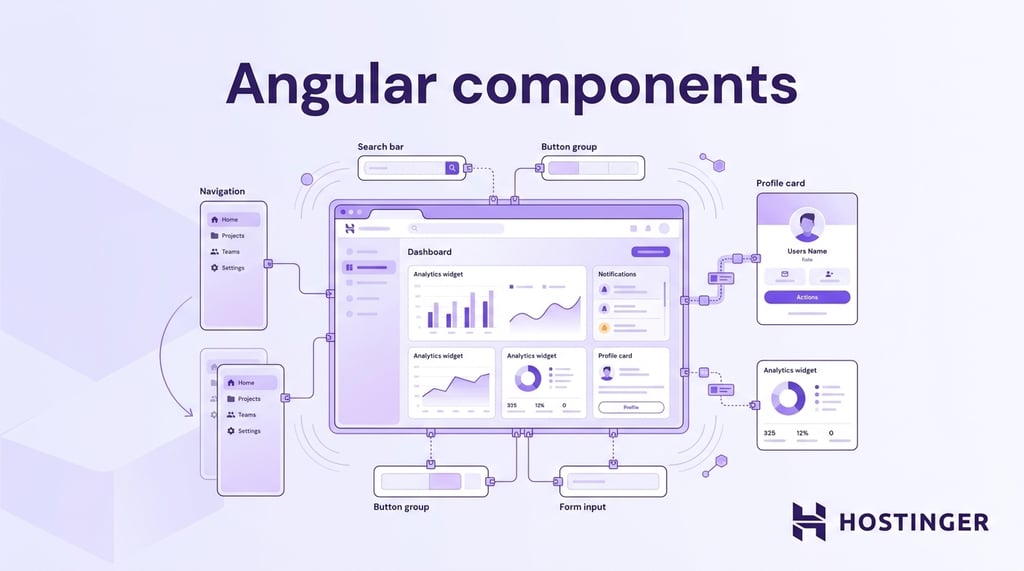
A component combines three parts:
- An HTML template that defines the layout
- A TypeScript class that handles logic and data
- CSS styles that control appearance
Angular applications are built by combining many small components into a complete interface. This keeps the code easier to organize and reuse.
A dashboard page might contain separate components for a navigation menu, a sales chart, a notifications panel, and a user profile card.
Each component works independently while still connecting to the larger application.
2. Modules
Modules are containers that group related components, services, and routing into separate sections of a project. While older Angular applications rely heavily on modules to organize features, Angular 17 introduced standalone components as the default architecture – meaning new projects can be built without modules entirely.
Modules remain relevant for maintaining legacy codebases and large enterprise applications built before this shift.
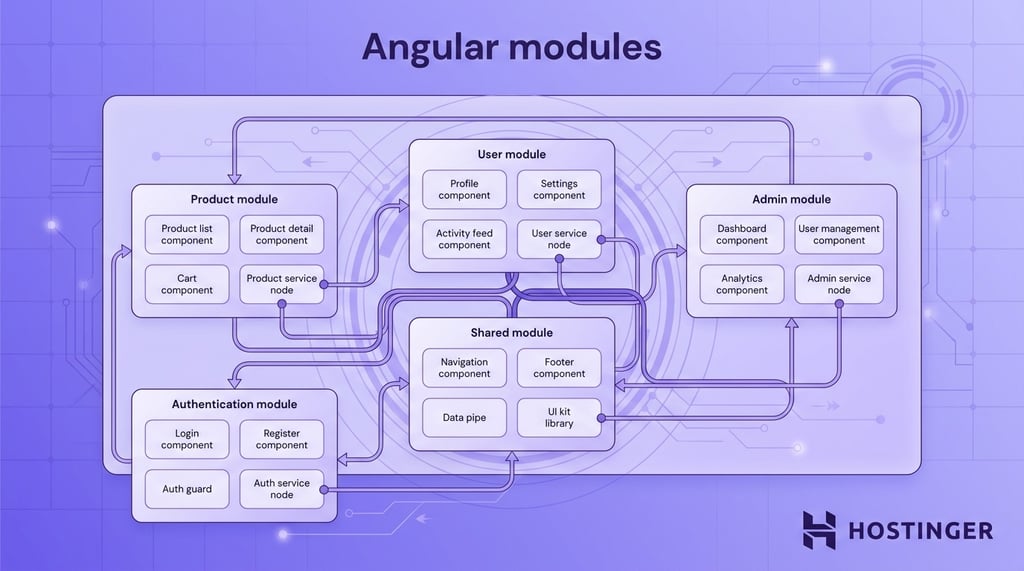
Angular applications contain multiple modules, with each one handling a specific feature or area of the system. This structure keeps large codebases easier to manage as applications grow.
For instance, an ecommerce application would include:
- A user module for login and profile management
- A product module for catalog pages and product details
- An admin module for inventory and reporting tools
Modules also help development teams work on different application areas without constantly modifying the same files.
3. Templates and data binding
Templates define the visual layout of an Angular component, while data binding connects that layout to application data. Together, they control how information appears and is updated in the user interface.
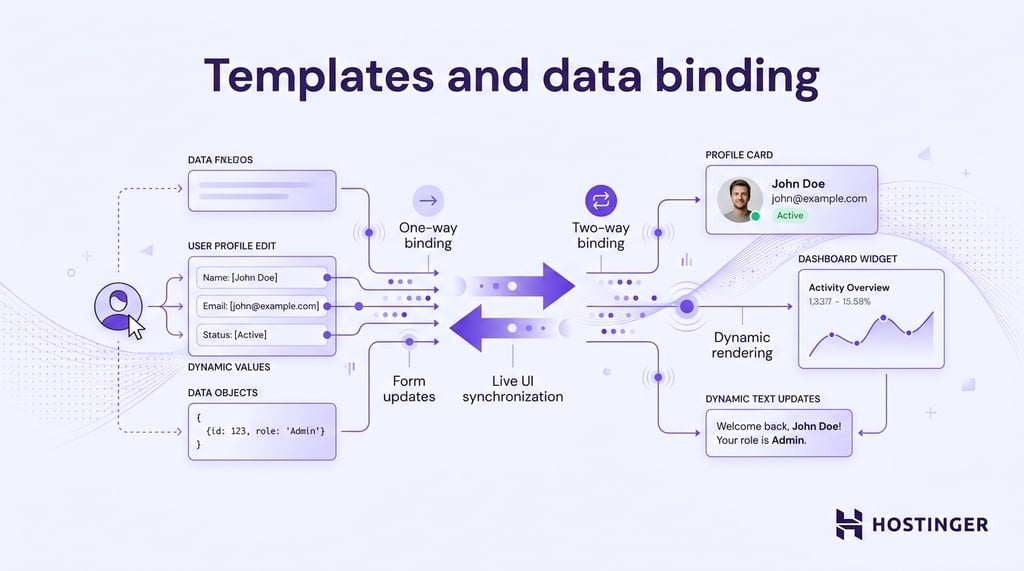
Angular templates use HTML along with Angular-specific syntax to display dynamic content, handle user actions, and automatically update the interface when data changes.
Data binding keeps the interface synchronized with application data. When a value changes in the application, Angular updates the relevant part of the UI without requiring a page reload.
Angular supports:
- One-way data binding for displaying data in the interface
- Two-way data binding for synchronizing form inputs with application data
If a user updates their name in a profile form, Angular can immediately display the updated name across the application interface.
4. Directives
Directives are instructions that control how elements behave or appear inside an Angular application. They extend standard HTML with dynamic functionality that responds to application data and user interaction.
Angular uses directives to modify the interface without manually changing the HTML structure through JavaScript. Some directives add or remove elements from the page, while others change styles, classes, or element behavior.
Common uses for directives include:
- Showing or hiding content
- Displaying lists of items
- Applying dynamic styling
- Disabling buttons
- Rendering elements based on conditions
For example, a product page might use a directive to display an “Out of Stock” message only when inventory reaches zero.
5. Services and dependency injection
Services are reusable classes that store shared logic and data within an Angular application, while dependency injection (DI) is the system Angular uses to automatically provide those services to components.
These two concepts work together to keep application logic centralized and reusable across different parts of the application.
Services commonly handle:
- API requests
- User authentication
- Data storage
- Logging
- Shared application state
A user service might retrieve account information from an API and provide that data to profile pages, dashboards, and navigation menus across the application.
Dependency injection allows Angular to provide the same service wherever it is needed, without requiring developers to create separate instances manually in every component. This reduces repeated code and keeps applications easier to organize, maintain, and test.
6. Routing
Routing is the system Angular uses to navigate between different views inside an application. It links specific URLs to components, so users can navigate between pages without reloading the browser.
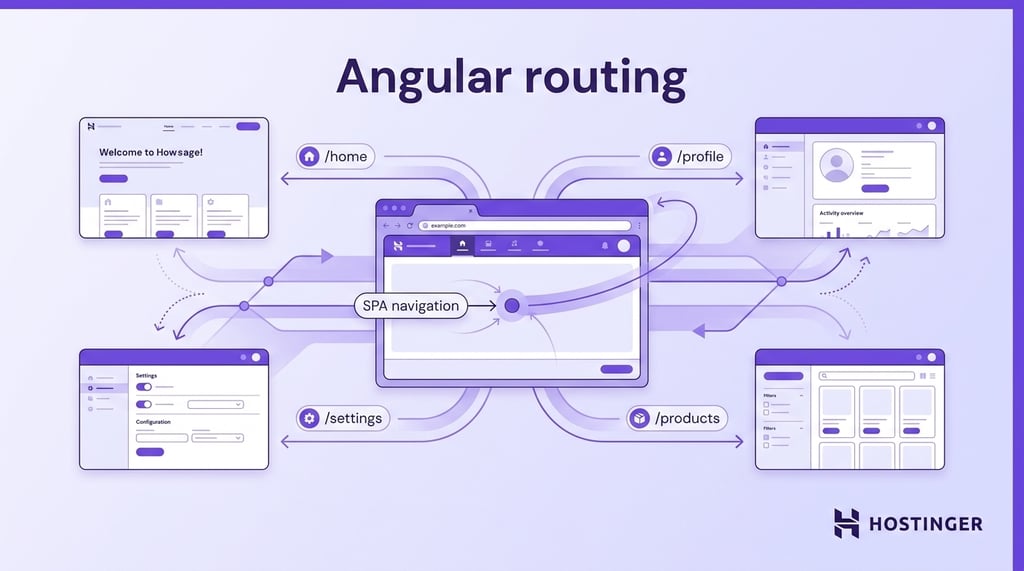
Routes define which component Angular should display for a given URL path. This creates the smooth navigation behavior commonly found in single-page applications.
For instance, an application might include routes such as:
/home
/profile
/settings
/products
How Angular works internally
Angular applications work by connecting components, templates, services, directives, and routing into a system that updates the user interface dynamically as application data changes.
When an Angular application loads in the browser, the framework compiles templates and TypeScript code into JavaScript that browsers can execute.
The application then renders components into visible interface elements such as navigation menus, forms, dashboards, and product pages.
Templates connect the interface to application data through data binding. When application data changes, Angular applications use a process called change detection to identify which parts of the interface need updating.
Only the affected sections refresh, allowing users to interact with the application without full-page reloads.
For example, if a user changes their profile name, the updated value can immediately appear across profile pages, navigation menus, and account settings without reloading the browser tab.
Angular applications also use dependency injection to provide shared services wherever they are needed. Components can access functionality such as authentication, API communication, or shared user data without repeatedly recreating the same logic throughout the application.
Routing controls navigation between different views by linking URLs to components. When users move between pages such as /home, /profile, or /settings, the routing system loads the correct interface section while the rest of the application continues running in the browser.
These internal systems allow Angular applications to deliver fast navigation, reusable application structure, and dynamic user interfaces within a single-page application architecture.
Key features of Angular
The main features of Angular include TypeScript support, Angular CLI, reactive programming with RxJS, built-in routing, dependency injection, and Ahead-of-Time (AOT) compilation.
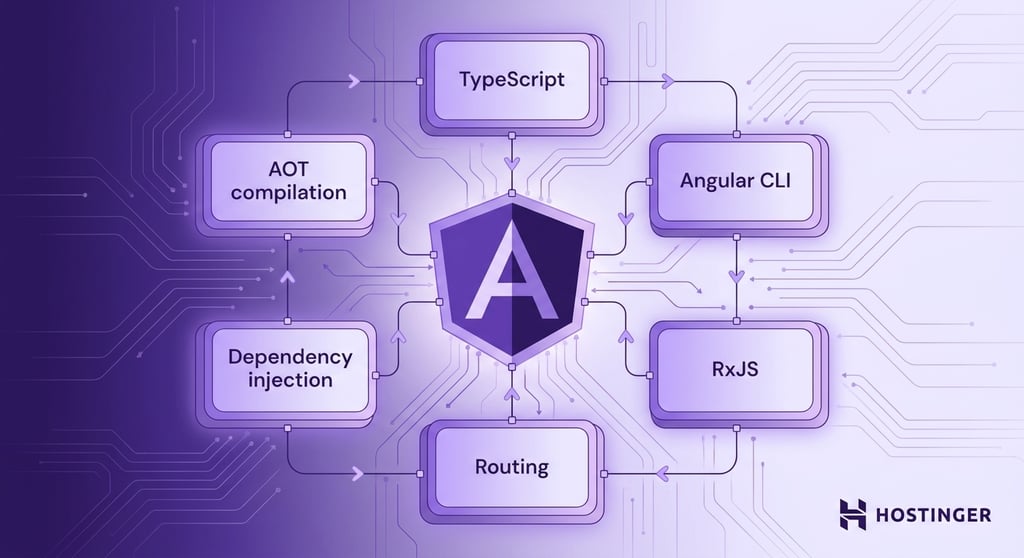
Together, these features help developers build structured, scalable, and high-performance web applications.
TypeScript support
TypeScript is the primary programming language used in Angular applications. It extends JavaScript with features such as static typing, interfaces, and class-based structure.
Static typing allows developers to define the expected shape and type of data before the application runs. This helps identify errors during development instead of discovering them later in production.
TypeScript also improves readability and maintainability in large applications where multiple developers work on the same codebase.
Clear data structures and typed variables make application behavior easier to understand and debug.
This solves common problems in large projects, including inconsistent data structures, hidden bugs, and difficult-to-maintain code.
For example, developers can define a user object with required properties such as name, email, and role instead of working with loosely structured data that may contain missing or incorrect values.
Angular CLI
Angular CLI (Command Line Interface) is a command-line tool for creating, configuring, and managing Angular projects.
The CLI automates many development tasks, including project setup, component generation, testing, building, and local development server management.
Developers can create components, services, and modules using simple terminal commands instead of configuring files manually.
This reduces repetitive setup work and maintains consistent project structure across applications and teams.
RxJS and reactive programming
RxJS is a library Angular uses to manage asynchronous data and event streams. Reactive programming is a programming approach in which applications respond to changes in data over time.
Angular applications use RxJS to work with data sources such as API responses, form input, search fields, notifications, and real-time updates.
RxJS allows developers to process asynchronous operations in a more organized and predictable way, especially when multiple events happen simultaneously.
This helps solve problems related to handling complex asynchronous workflows and coordinating data updates across different parts of the application.
As an example, an application can process live search input while simultaneously handling API requests and updating search results in real time.
AOT compilation
Ahead-of-Time (AOT) compilation is the process Angular uses to compile application templates and code before the application runs in the browser.
During the build process, Angular converts templates and TypeScript code into optimized JavaScript. This reduces the amount of work required when users open the application.
AOT compilation improves load speed, rendering performance, and application stability by detecting template and compilation errors earlier in development.
This helps reduce runtime errors and improves the initial loading experience in production applications.
In production environments, applications built with AOT compilation usually load faster because the browser receives precompiled application code instead of compiling templates during runtime.
Advantages of using Angular
Angular provides several advantages for building structured, scalable, and maintainable web applications, especially in projects with complex interfaces and large development teams.
Key advantages of Angular include:
- Structured architecture – Angular organizes applications into components, modules, and services, which keeps large codebases easier to manage and navigate.
- Code reusability – Reusable components and services reduce repeated code and simplify feature development across different parts of the application.
- Built-in tools – Angular includes routing, forms, HTTP communication, testing utilities, and dependency injection by default, which reduces reliance on external libraries.
- Scalability for large applications – Angular’s architecture supports long-term project growth, making it suitable for enterprise systems, dashboards, and large business platforms.
- Strong tooling support – Tools such as Angular CLI, TypeScript integration, and debugging utilities simplify development workflows and automate repetitive tasks.
Angular use cases
Angular is used to build different types of web applications, especially projects that require structured architecture, dynamic interfaces, and long-term scalability.
Common Angular use cases include:
- Enterprise applications – Large business platforms with dashboards, reporting systems, user management, and complex workflows.
- Single-page applications (SPAs) – Interactive applications that update content dynamically without reloading the browser.
- Progressive web apps (PWAs) – Web applications that support offline access, push notifications, and app-like experiences.
- Mobile apps with Ionic – Cross-platform mobile applications built with Angular and the Ionic framework.
How to deploy your Angular app
Angular applications must be compiled into production-ready files before deployment. The build process generates optimized HTML, JavaScript, and CSS files that can run efficiently in a hosting environment.
To prepare and deploy an Angular application:
- Set the build command to: ng build
- Use the generated production files from: dist/[project-name]
- Deploy the contents of the dist folder through your hosting provider
- Configure a fallback to index.html for single-page applications so Angular routes continue working after page refreshes or direct URL access
Hostinger web app hosting supports Angular and other modern JavaScript frameworks, including React, Next.js, Vue.js, and Vite. The platform includes managed infrastructure, automatic deployments through GitHub integration, managed SSL certificates, built-in CDN and DDoS protection, daily backups, and global server locations for faster application delivery.
Developers can also deploy applications directly from IDEs or upload projects through GitHub without managing server infrastructure manually.
If you want a broader introduction to hosting web applications, explore our full guide on how to host a web application.

This article is a localized version of What is Angular and how it works?, originally published in English.

Ksenija is a digital marketing enthusiast with extensive expertise in content creation and website optimization. Specializing in WordPress, she enjoys writing about the platform’s nuances, from design to functionality, and sharing her insights with others. When she’s not perfecting her trade, you’ll find her on the local basketball court or at home enjoying a crime story. Follow her on LinkedIn.