What is email compliance? How to comply with email regulations
Apr 06, 2026
/
Alma
/
6 min Read

Email compliance means your emails follow the laws and standards that protect subscriber data and prevent spam. Non-compliance can lead to fines, but the real risk is getting your domain blacklisted.
When that happens, your emails stop landing in inboxes, cutting off one of your highest-performing channels – email makes more money per dollar spent than other channels like social media or paid ads.
Most email laws share the same core idea: get permission before sending, be honest about who you are, and make it easy to unsubscribe. The rules go by different names depending on where your subscribers are – the General Data Protection Regulation (GDPR) in Europe, the CAN-SPAM Act in the US, Canada’s Anti-Spam Legislation (CASL) in Canada – but the intent behind all of them is the same.
Understanding the key elements of email compliance, which laws apply to your audience, and how compliance connects to security helps you build an email program that lasts.
Email compliance key characteristics
Compliant emails share seven core elements, and missing any one of them can put you in breach of the laws that apply to your audience.
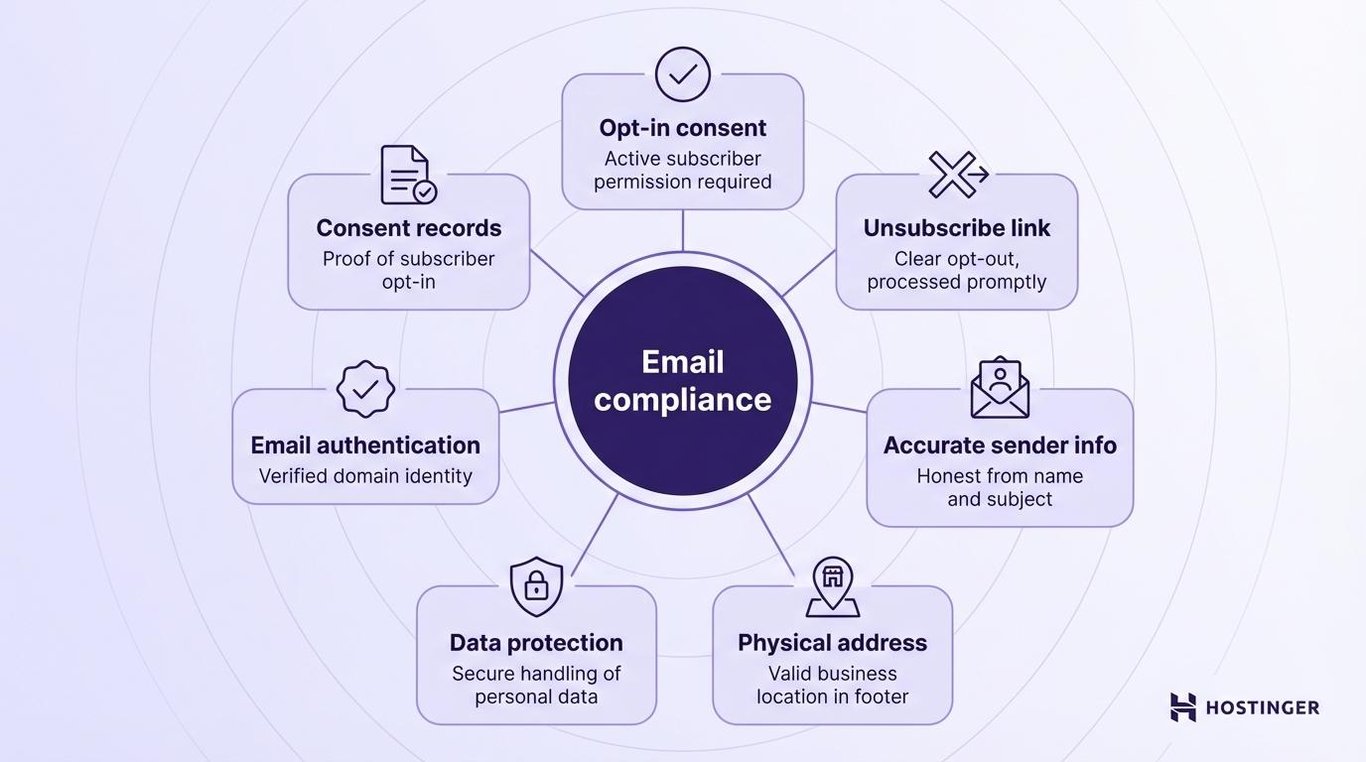
- Opt-in consent. The most fundamental element of email compliance. The subscriber actively chose to hear from you – under GDPR and CASL, that means clear, active opt-in before you send a single marketing message. Under the CAN-SPAM Act, you can email first, but you must offer a clear way out.
- Working unsubscribe link. Every commercial email must have one. CAN-SPAM gives you 10 business days to act on opt-out requests. GDPR requires it to happen right away.
- Accurate sender information. Your “From” name, reply-to address, and subject line must all be honest and match your brand.
- Physical address. Your valid business address must appear in the email footer. This is a legal requirement under most email laws.
- Data protection. Personal data – names, email addresses, anything your subscribers share with you – must be stored and transmitted securely.
- Email authentication. Think of this as proving your identity to inbox providers like Gmail or Outlook. It verifies that emails sent from your address actually come from you, not someone impersonating your brand.
- Consent records. Log when and how each subscriber opted in. You may need this evidence during a compliance audit.
Good email security sits alongside compliance. Security protects your email accounts and your subscribers from outside threats. Email compliance makes sure the emails you send follow the rules.
How to ensure email compliance
Ensuring email compliance comes down to six steps: know your rules, obtain proper consent, write honest emails, manage unsubscribes, protect subscriber data, and set up email authentication.
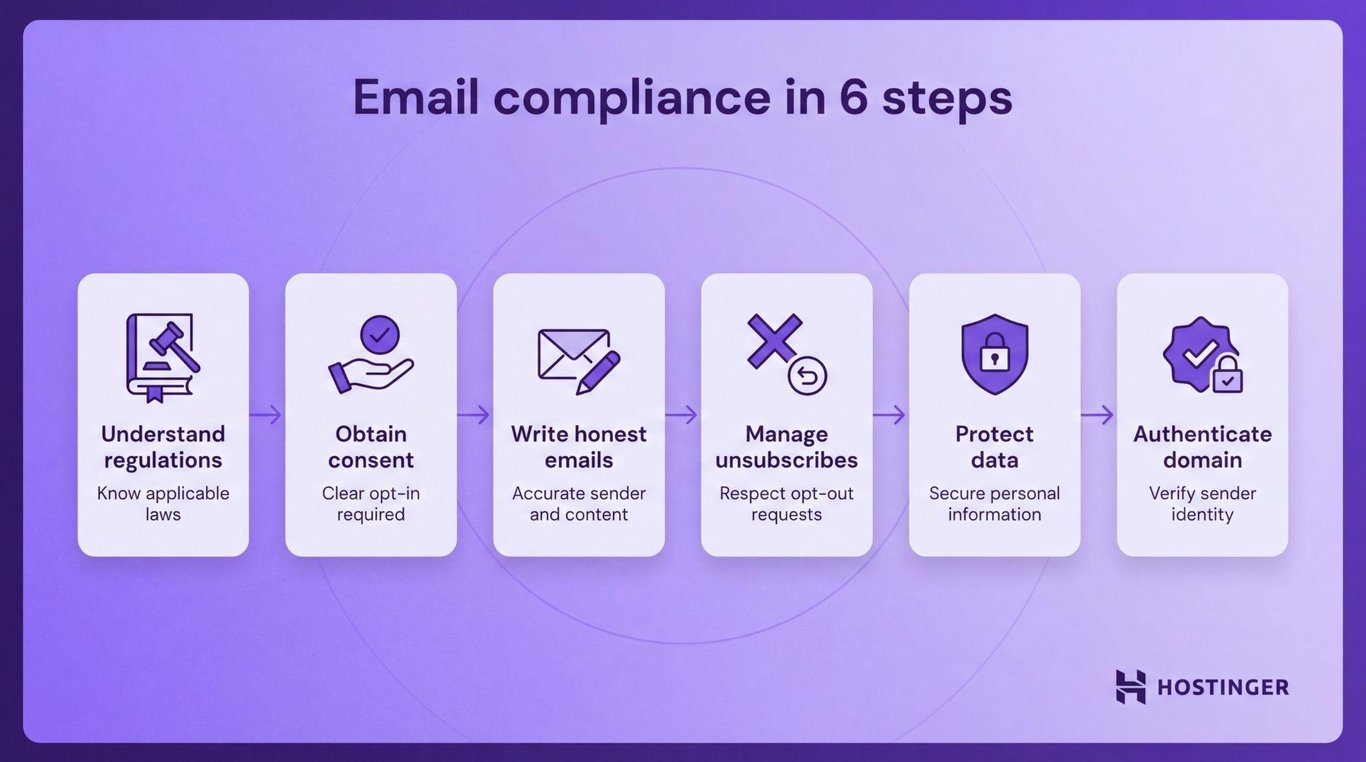
1. Understand applicable email regulations
Start by figuring out which laws apply to you. The answer depends on where your subscribers are located, not where your business is based.
If you email people in the EU, follow the GDPR. Subscribers in Canada fall under CASL. A US audience means CAN-SPAM applies. Most businesses operate across multiple regions, so map your audience before you build your email compliance process.
2. Obtain proper consent from recipients
Never email someone who didn’t ask to hear from you. Use a sign-up form with a clear, unticked opt-in checkbox.
Double opt-in is even better. After someone signs up, they receive a confirmation email and must click a link to verify their address. This confirms they actually want your emails and gives you solid proof of consent if you’re ever questioned about it.
Pro Tip: Under CAN-SPAM, you technically can send marketing emails without prior opt-in, as long as you clearly identify yourself, avoid deceptive subject lines, include a valid physical address, and give recipients an easy way to unsubscribe that you honor within 10 business days.
3. Create compliant email content and format
Everything visible in your email – the subject line, sender name, and footer – has to be honest and accurate.
Misleading subject lines directly violate both CAN-SPAM and GDPR. They also damage subscriber trust the moment someone opens your email and realizes it doesn’t match what was promised.
4. Implement unsubscribe and preference management
Every email needs a working unsubscribe link. Once someone opts out, honor their choice promptly. CAN-SPAM allows up to 10 business days. GDPR requires it to happen right away.
A preference center takes this further. Instead of a hard unsubscribe, subscribers can choose what they receive and how often they receive it. You keep more of them, and they stay engaged.
5. Ensure data security
Any personal data you collect – names, email addresses, browsing behavior – needs to be stored securely. Email encryption protects sensitive information by scrambling the contents of an email so only the intended recipient can read it.
In the US, the Health Insurance Portability and Accountability Act (HIPAA) requires healthcare businesses to protect patient information in emails, which, in practice, means encrypting any message that contains health data.
The Payment Card Industry Data Security Standard (PCI DSS) works similarly for payments: if you’re sending cardholder data over email anywhere in the world, it must be encrypted.
Keep your privacy policy current and link to it in your emails. Subscribers have a right to know how their data is used.
6. Use secure email authentication
Email authentication is how inbox providers like Gmail and Outlook verify that an email actually came from you. Three tools handle this together — SPF, DKIM, and DMARC:
- Sender Policy Framework (SPF) works like a guest list. You publish a list of approved senders for your domain, and inbox providers check every incoming email against it.
- DomainKeys Identified Mail (DKIM) works like a wax seal on a letter. It stamps every email you send with a hidden signature that proves the message came from you and wasn’t tampered with on the way.
- Domain-based Message Authentication, Reporting, and Conformance (DMARC) tells inbox providers what to do when an email fails either of the above checks – block it, send it to spam, or flag it – and sends you a report so you can see if anyone is misusing your domain.
Your email service provider will tell you exactly what to set up, but you’ll make the changes where you manage your domain, usually through your domain registrar.
Types and examples of email compliance regulations
Email laws fall into two broad categories. The first covers marketing rules – consent, opt-outs, and sender identification – and includes laws like GDPR, CAN-SPAM, and CASL. The second covers data protection in specific industries, such as healthcare and finance, and includes laws such as HIPAA and PCI DSS.
CAN-SPAM Act (USA)
The CAN-SPAM Act sets the rules for commercial emails sent to recipients in the United States. It’s less strict than GDPR. You don’t need opt-in consent before you send. But it does require:
- Accurate “From” names and subject lines
- A valid physical address in every email
- A clear, working unsubscribe link
- Opt-out requests honored within 10 business days
Violations can result in fines of up to $53,088 per email.
GDPR email rules (Europe)
GDPR is the EU’s main data privacy law. For email, it requires clear, active opt-in consent before you send any marketing message. Pre-ticked checkboxes don’t count.
Subscribers also have the right to access their data, request corrections, and ask to be removed entirely. Fines can reach €20 million or 4% of global annual revenue, whichever is higher.
CASL (Canada)
Canada’s Anti-Spam Legislation requires either express or implied consent before sending commercial emails. Implied consent expires after two years, so you can’t rely on it indefinitely. Every message must clearly identify who you are and include a way to unsubscribe.
Penalties can reach $10 million CAD per violation. Many marketers treat CASL as the stricter benchmark, even for audiences outside Canada.
Other relevant regulations
Beyond the big three, your obligations depend on your industry and where your subscribers live.
- California Consumer Privacy Act (CCPA) – California, USA. Gives consumers the right to know what personal data you’ve collected and request it be deleted.
- Australia Spam Act 2003 – Australia. Requires consent, clear sender identification, and a 5-day window to process unsubscribe requests.
- Lei Geral de Proteção de Dados (LGPD) – Brazil. Brazil’s data privacy law, similar to GDPR. Requires explicit consent before sending marketing emails.
- HIPAA – US healthcare. Requires healthcare businesses to protect patient information in emails, which in practice means encrypting any message that contains health data.
- PCI DSS – Global finance. If you’re sending cardholder data over email anywhere in the world, it must be encrypted.
If your audience spans multiple regions, meet the strictest standard that applies to them. That’s usually GDPR or CASL.
Differences between email compliance and email security
Email compliance is about following the rules. It covers consent, what goes in your emails, how you store subscriber data, and how you handle unsubscribes. It’s driven by legal obligation.
Email security is about stopping threats. It protects your accounts, your email setup, and your subscribers from phishing (fake emails designed to steal personal information), spoofing (when someone fakes your email address to send messages impersonating your brand), and malware (harmful software hidden in attachments or links).
Email compliance | Email security | |
Goal | Follow legal rules | Defend against threats |
Focus | Consent, data privacy, opt-outs | Phishing, malware, spoofing |
Driven by | Laws and regulations | Security risks and breaches |
Key tools | Opt-in forms, consent records, unsubscribe links | SPF, DKIM, DMARC, encryption, spam filters, login alerts |
While email compliance and email security solve different problems, you need both. One doesn’t replace the other. A perfectly compliant email can still be read by someone it wasn’t meant for. A secure email setup can still fire off emails without proper consent. Both need to work together.
Next step: Start your compliant email marketing campaign
Email compliance is the foundation. Building your first email marketing campaign on top of it is the logical next move.
Start with the right platform. A proper ESP like Hostinger Reach – which uses AI to handle email design and personalization automatically – takes care of most compliance basics from the start. Unsubscribe links, footer address fields, and list management are usually built in.
Then build your email list the right way:
- Use opt-in forms on your website, blog, or checkout page.
- Enable double opt-in so every subscriber confirms their address.
- Avoid bought lists for marketing emails. Under GDPR and similar opt‑in laws, contacts on a purchased list have not given valid, explicit consent to receive marketing from your brand, which is likely to put you in breach of those rules.
- Keep your sign-up form short; a name and email address are enough.
Once you’re set up, create honest content with clear subject lines and one main call to action. Test before you send. Clean your list regularly by removing inactive subscribers. It keeps spam complaint rates low and makes sure your emails actually reach inboxes.
Compliance isn’t a one-time box to tick – it’s an ongoing habit that protects your list, your reputation, and your ability to reach people who actually want to hear from you.

Alma is an AI Content Editor with 9+ years of experience helping ideas take shape across SEO, marketing, and content. She loves working with words, structure, and strategy to make content both useful and enjoyable to read. Off the clock, she can be found gaming, drawing, or diving into her latest D&D adventure.