How to build a SaaS product without coding
Apr 20, 2026
/
Simon L. & Ariffud M.
/
10 min Read
Building a SaaS product without coding is possible using no-code and vibe coding platforms. These AI-powered tools write the code for you based on your descriptions, so you can go from idea to a working web app without any programming knowledge.
Here are the steps to build a SaaS product without coding:
- Spot a problem worth solving. Identify a problem people face regularly and come up with a software solution for it.
- Analyze the market. Study your target customers and existing competitors to find gaps your product can fill.
- Narrow down your core features. Focus on the functionality that directly solves your customers’ primary pain point.
- Plan your timeline and budget. Break the project into phases and account for development, testing, and launch costs.
- Sketch a wireframe and prototype. Map out your product’s layout and build an interactive preview before development.
- Build a minimum viable product (MVP). Create the simplest working version of your idea to start gathering real feedback.
- Host and publish your MVP. Deploy your app so users can access it online.
- Run a small test and gather feedback. Test with a limited group and collect structured input to guide improvements.
- Expand the product. Prioritize and implement feedback to build out your product’s features.
- Test thoroughly before launch. Verify functionality, compatibility, performance, and security.
- Go to market. Build anticipation and launch with a prepared strategy.
1. Brainstorm an idea
Every great SaaS product starts with a problem that needs solving. Here are some ways to brainstorm SaaS ideas:
Personal frustrations
Think about the frustrations you encounter in your work or daily life. What tasks feel unnecessarily complicated? Where do you see your colleagues struggling? Do any of the digital tools you use feel outdated or inadequate?
Great products often come from entrepreneurs who solve their own problems first. If you’re facing these challenges, there’s a good chance others are too.
Industry pain points
Think of a specific industry you know well and explore how people work, the tools they use, and the challenges they face.
For example, if you’ve worked in restaurants, you might spot inefficiencies in how servers communicate with the kitchen or how managers schedule staff.
Borrow from other industries
Look at how apps used in different industries solve problems and see if those solutions could work in your field.
For example, could the way dating apps match people inspire a better way to match job seekers with companies? How might a fitness app that tracks progress help students track learning goals?
Quick exercise
Go through each brainstorming method and write down a few ideas from each.
The best SaaS solutions address a problem people face regularly. One-time solutions usually don’t work well as SaaS products, because people won’t maintain a subscription once their problem is solved.
2. Research the market
Now that you’ve brainstormed your ideas, explore what’s already out there. This research helps you understand your future customers better and spot gaps your product can fill.
Understand your market
Start by getting to know your potential customers. Join online communities, read forum discussions, and engage in conversations on social channels where your target audience hangs out.
The goal is to understand their daily challenges, their aspirations, and what drives their decisions.
For example, if you’re developing a meal-planning web app, don’t just assume busy people want quick recipes.
Are they picky eaters? Do they have allergies? Are they looking for ways to teach their kids about nutrition? Addressing these nuanced insights can set your product apart.
Check out existing products
Existing solutions show you what people like and what’s missing in the market:
- Try similar products. What delights you? What frustrates you? Your own experience as a customer can spark ideas for your own product.
- Test complementary products. For example, if you want to create a meditation web app, test in-person classes, books, and YouTube channels related to meditation to get unique ideas for your product.
- Read customer reviews. Head to review sites like G2 or Capterra and look for problems and complaints that show up regularly. Pay attention to missing features customers keep asking for. Each frustrated comment is a potential customer telling you exactly what they need.
3. Define the core functionality
The core functionality is all of your product’s key features that directly solve your target customer’s primary pain points.
To define your core features, ask yourself:
- What is the one problem my product must solve?
- What is the simplest way to solve this problem?
Come up with ideas that directly solve the problem your customers face.
For example, if you’re creating a project management web app for freelancers, the key features might be:
- A simple dashboard to track active projects and deadlines.
- A time-tracking tool that connects to specific projects.
These key features solve specific problems related to project management for freelancers. While features like team chat, invoice generation, or expense tracking might be valuable additions, they aren’t essential for basic project management.
Focusing on core functionality first lets you launch faster, get user feedback sooner, and build a solid base for adding more features later.
If you want to skip straight to development, there are platforms that let you build SaaS with AI without writing a single line of code.
4. Set a work timeline and budget
A realistic timeline and a clear budget can keep your project on track and prevent costly delays.
Set a work timeline
Break your project into clear phases and plan when you’ll perform key tasks like development, testing, and marketing. Always add extra time for unexpected challenges, as even the best-planned projects can hit roadblocks.
A typical timeline might look like this:
- Month 1-2. Research and planning.
- Month 3-4. Development and testing.
- Month 5. Feedback and improvements.
- Month 6. Marketing and launch.
Set a budget
Think beyond just development costs. Include equipment, marketing, legal help, and a web hosting plan with a domain name so you can start promoting your SaaS product and collecting email addresses before launch.
Create three budget scenarios:
- Basic budget. The money you must have before you start. It covers the essentials of your business, such as basic development tools, initial business setup, and fundamental marketing.
- Target budget. While your basic budget gets you started, your target budget adds other elements like better design, professional marketing, and more testing time.
- Maximum budget. A spending ceiling that helps you make smart decisions about new opportunities. When you spot a great marketing strategy or want to add a feature, you’ll know immediately if you can afford it.
5. Create the wireframe and prototype
Wireframes and prototypes help you visualize your idea before spending time and money on development.
What are wireframes?
Wireframes are rough sketches of your SaaS product. Like drawing a simple floor plan, wireframes show where everything will go without worrying about colors or fine details.
They help you:
- Plan how users will find what they need.
- Spot potential problems early.
- Show your team and partners exactly what you’re thinking.
- Focus on designing the right elements before building them.
Creating your first wireframe
Start with the basics and gradually add detail:
- Grab a notebook and sketch out a basic design of your product.
- Choose a tool like Moqups or Balsamiq to create digital versions.
- Focus on a simple layout and develop your navigation system within it. Aim for the most intuitive way to move users through your product.
- Use basic shapes and placeholder text to represent different elements.
Understanding prototypes
While wireframes are rough sketches, prototypes bring your software design to life. They’re an interactive test drive of your product, so users can click through and experience the flow before a single line of code is written.
Prototypes help you:
- Get feedback from potential customers.
- Show stakeholders how your product will work.
- Test different navigation paths and refine the experience.
- Perfect the experience before building out the features.
Using tools like Adobe XD or Figma, you can create a realistic preview of how your product will work when it’s ready.
6. Create a minimum viable product (MVP)
A minimum viable product (MVP) is the simplest version of your idea that you can share with people. Think of it like a first draft – it won’t be perfect, but it’ll help you receive user feedback.
Use a no-code platform like Hostinger Horizons to quickly bring your idea to life. Describe your product’s core functionality, and AI builds the first version of your SaaS product for you.
For example, if you want to build a language learning web app, use a prompt like this:
Create an engaging and fun language learning web app for children to learn Spanish
Within minutes, it will transform your prompt into a working product.
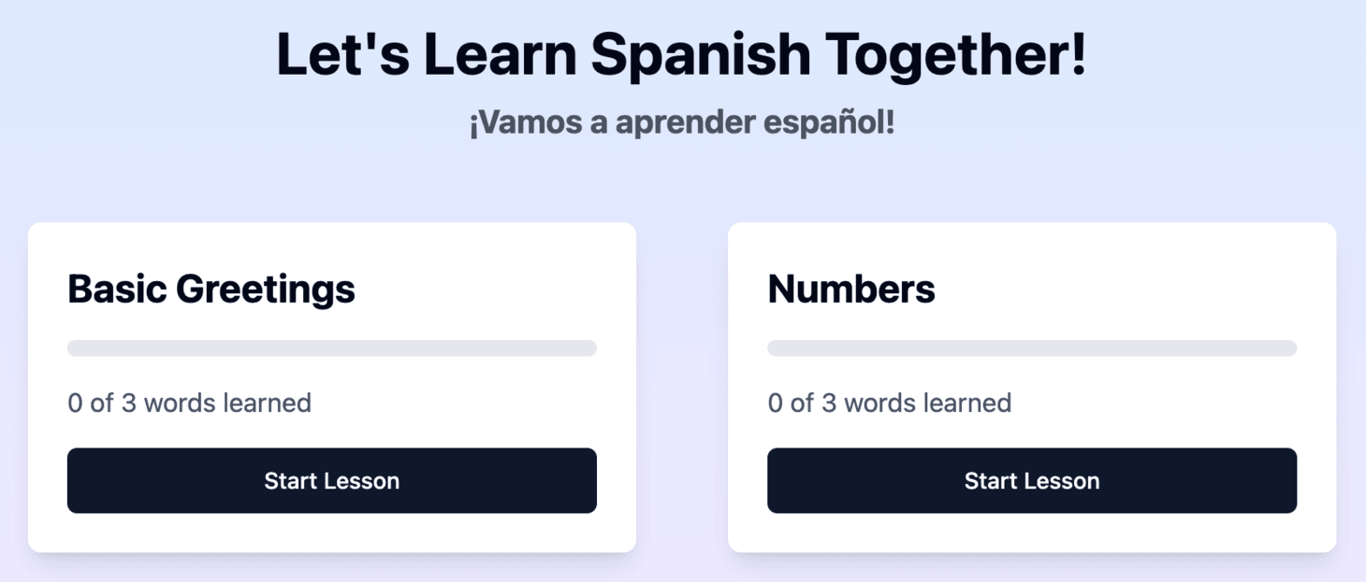
Need to add specific elements? Just describe what you want:
Add sections about animals and colors
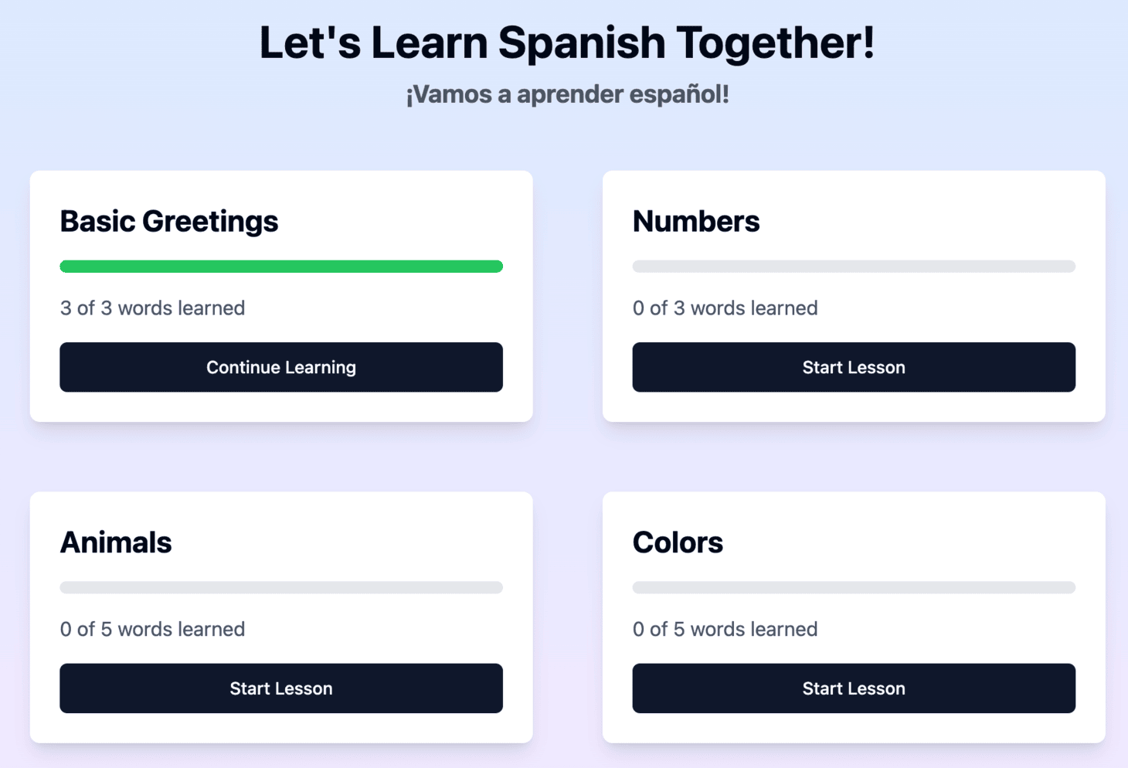
Think of Hostinger Horizons as your development partner. It turns your web app ideas into reality without requiring you to know how to code.
Once your MVP is ready, you can publish it and gather real user feedback.
For inspiration, check out our picks of MVP real-life examples to gather ideas for your own project.
7. Host and publish your MVP
For people to use your MVP, you need to publish (deploy) and host it. Typically, SaaS deployment requires third-party hosting providers, server configuration, and security setup – all of which demand advanced technical knowledge.
This process can be a significant roadblock for entrepreneurs with great web app ideas but limited technical expertise.
Hostinger simplifies this with built-in hosting and deployment. After building your MVP with Hostinger Horizons, you can host it on a custom domain with a few clicks. No need for complicated setup or third-party integrations.
8. Conduct a small test and gather feedback
Testing your MVP with a small group helps you catch problems early and avoid costly mistakes later.
Create your test group
Join niche-related social media pages, Discord servers, or Reddit communities and share your journey.
Invite people to participate in testing and reach out to anyone who shows interest. Keep the test group to 10–15 people so you can easily monitor their progress.
How to get actionable feedback
Set up a simple system that combines several feedback methods:
- One-on-one chats where users share their opinions.
- Group chats where users can discuss their experiences.
- Surveys to ask more specific questions
Ask questions that can reveal both problems and opportunities:
- Where did you get stuck?
- What did you like?
- What would you tell a friend about this product?
- What was your first impression?
Remember, you don’t need to act on every piece of feedback. Focus on any common themes that will help you improve your core functionality.
9. Develop the SaaS product
Next, organize the feedback you received to prioritize which features to build. There are four categories to consider.
High-impact, low-effort feedback
These are changes that significantly improve the user experience without taking much time to implement.
High-impact features fix core issues or solve problems your testers mentioned repeatedly.
Low-effort features can be built quickly, don’t depend on other features, and don’t require major changes to what already exists.
For example, if you’re building a recipe web app, users might frequently mention if they can’t adjust serving sizes. Adding this feature only requires a simple prompt in Hostinger Horizons:
Add a way for users to adjust serving sizes for each recipe and adjust the recipes accordingly
Which results in this change:
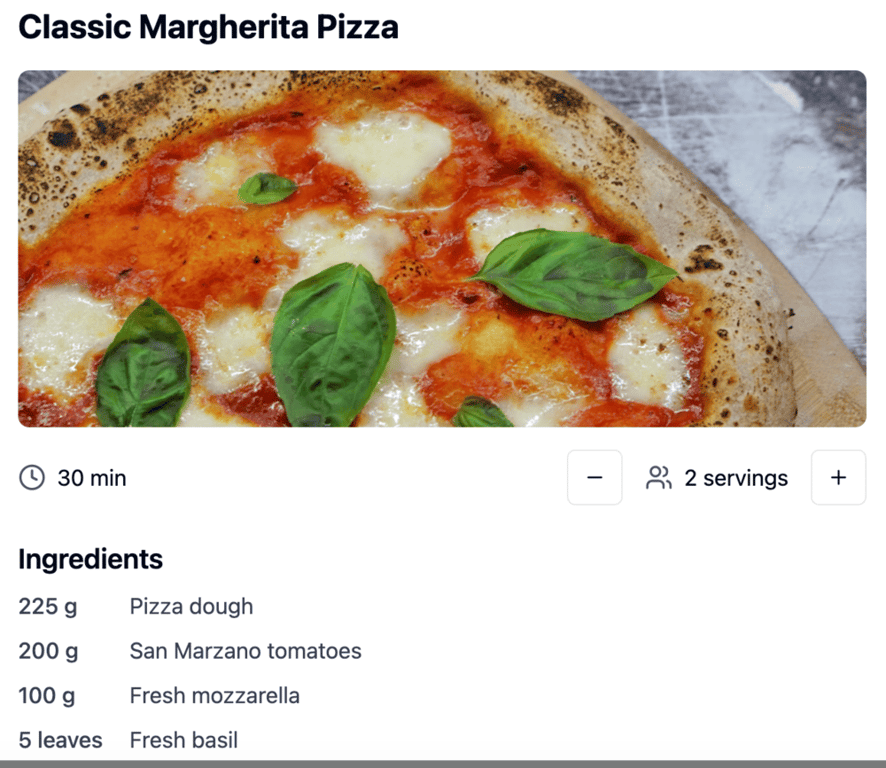
It’s a quick win that creates immediate value for your users.
High-impact, high-effort feedback
These features are worth building, but require more planning. Break them into smaller tasks rather than tackling a complex feature all at once.
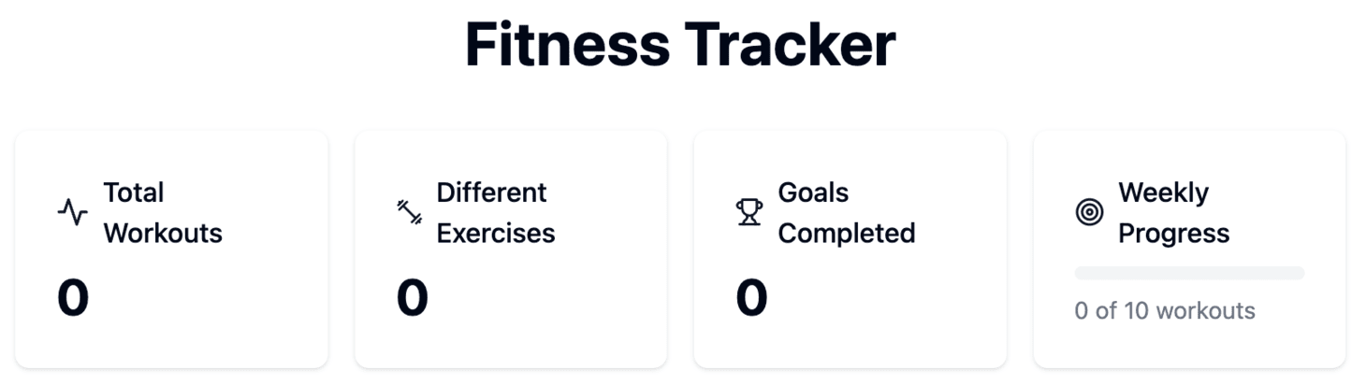
For example, users of a fitness web app might request detailed progress tracking with charts and analysis.
The first step is to build a goal-setting feature where users define what they want to achieve.
Here’s a prompt you can use in Hostinger Horizons to build this feature:
Add a way for users to set goals
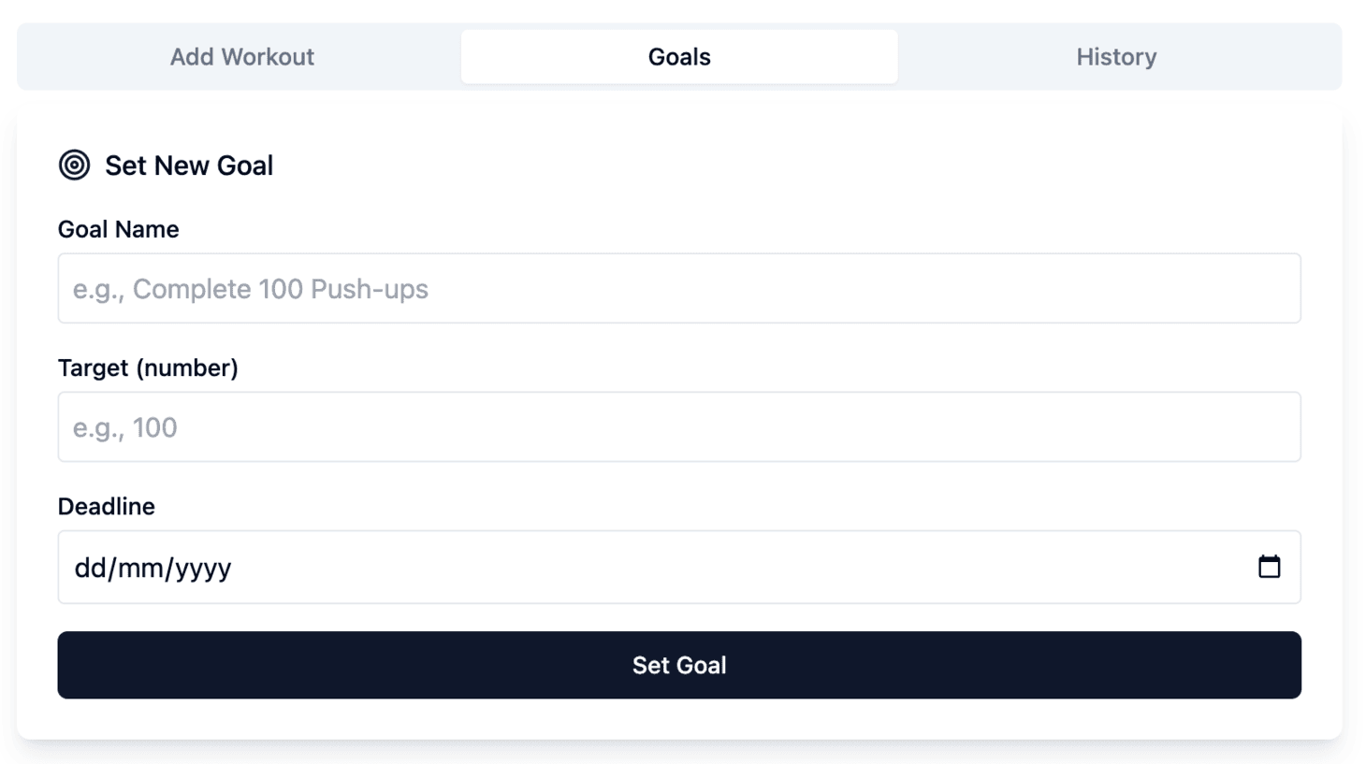
Then, add weekly measurement tracking to see their progress toward that goal using this prompt:
Add a weekly progress tracker
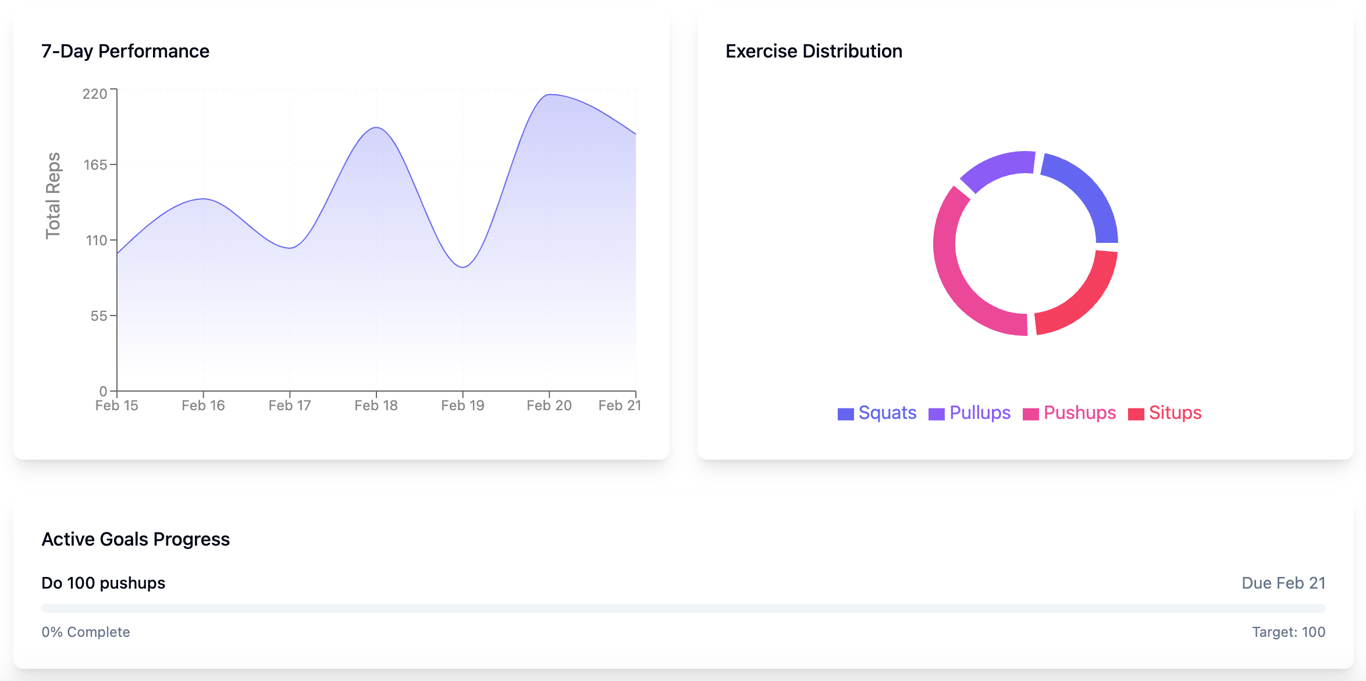
Finally, create detailed performance analytics that show clear visuals with this simple prompt:
Have a visual way to show performance and progress
Low-impact, low-effort feedback
These small improvements won’t affect core functionality but add a nice touch with minimal work.
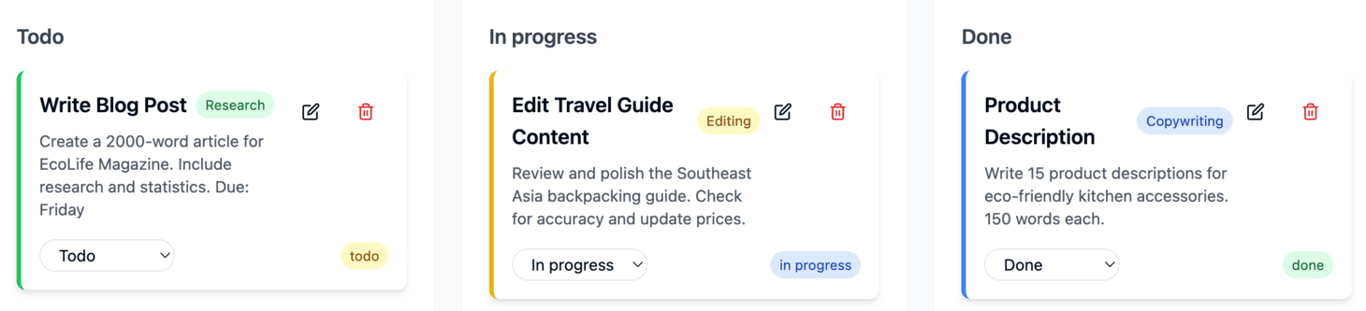
For example, users of a task management web app might request custom task colors.
In Hostinger Horizons, you can make these changes with a simple prompt like this:
Add different colors for each task category
Low-impact, high-effort feedback
These requests are less useful to the majority of your users.
For example, users might request cryptocurrency tracking with a personal finance web app. Instead of building it immediately, you should ask yourself whether this aligns with your product vision and whether it solves a problem for a majority of your users.
Keep track of them to see if they become more prominent as your user base grows, but don’t prioritize them early.
10. Conduct thorough testing
Thorough testing takes your SaaS product from development to a successful launch. This phase identifies issues and ensures a positive user experience from day one.
Why thorough testing matters
Performing thorough web app testing before your launch date helps you prevent customer frustration and costly post-launch emergencies.
You’ll also protect your reputation, reduce support headaches, and maintain a smooth user experience that keeps customers subscribed to your product.
What you need to test
Your initial small tests were to develop your core functionality. Comprehensive testing determines whether your full product is ready for release.
There are four areas to cover:
- Functionality. Check each part of your product to make sure it works as planned.
- Compatibility. Test how well your product works across different devices, browsers, and operating systems.
- Performance. Check how fast, stable, and efficient your product is under different conditions.
- Security. Find weaknesses in your product before they can be exploited.
You don’t need everything to be perfect before going live, as improvements can always come after launch. The goal is to release a reliable, user-friendly product that works well from day one.
11. Launch your SaaS product to the market
Now that your product is ready to go, it’s time to tell the world about it.
In the weeks leading up to your launch, prepare yourself and build excitement by:
- Sharing behind-the-scenes content on social media and in forums.
- Creating educational content about the problems your product solves.
- Starting a small community on Discord for your most enthusiastic fans.
- Offering special incentives for early buyers, such as lifetime discounts or extra features.
- Developing support resources like a knowledge base, onboarding guides, and video tutorials.
- Scheduling launch announcements with relevant communities, on social media, and on platforms like Product Hunt, where people discover new tech tools.
It’s far better to be overprepared for your launch than to scramble to catch up afterward.
What is the best AI tool to build SaaS?
The best AI tool for building SaaS depends on how much technical involvement you want. For entrepreneurs with no coding background, end-to-end no-code builders like Hostinger Horizons, Bolt.new, and Lovable let you generate a working web app from a text description alone.
For developers who prefer writing code but want AI assistance, tools like GitHub Copilot and Tabnine speed up development by providing intelligent code suggestions inside popular IDEs.
See our guide to the best AI tools for web app development for a complete breakdown of options across different use cases.
Is Hostinger Horizons good for building SaaS?
Hostinger Horizons stands out as one of the strongest options for no-code SaaS development because it handles the full stack, frontend, backend, database, and hosting, from a single interface.
Most no-code platforms require you to connect separate services for backend logic and data storage (like Supabase or Airtable), which adds complexity and ongoing costs.
Horizons includes integrated backend development out of the box, so you’re not stitching together third-party tools or managing API connections.
Starting from ₦30900.00/month, it’s a cost-effective choice for solo founders and small teams who want to validate an idea quickly without overcommitting to infrastructure costs.
How to turn my SaaS into a successful business?
To turn your SaaS into a successful business, you must understand what causes products to stall and what the common traits of successful SaaS products look like.
In many cases, the reason why software projects fail is not because the product is bad, but because of poor planning, scope creep, underestimating technical debt, or losing sight of the core user problem.
On the growth side, the SaaS products that succeed long-term tend to share a few common traits: a tight focus on a specific user problem, consistent feedback loops with real customers, and a willingness to iterate quickly.
Staying informed on software development trends also helps you make smarter decisions about where to invest, whether that’s AI-powered features, better onboarding, or expanding into new markets.
That said, what separates a successful SaaS business from an abandoned one is how well you understand your users and how consistently you solve their problems better than anyone else.

Simon is a dynamic Content Writer who loves helping people transform their creative ideas into thriving businesses. With extensive marketing experience, he constantly strives to connect the right message with the right audience. In his spare time, Simon enjoys long runs, nurturing his chilli plants, and hiking through forests. Follow him on LinkedIn.

Ariffud is a Technical Content Writer with an educational background in Informatics. He has extensive expertise in Linux and VPS, authoring over 200 articles on server management and web development. Follow him on LinkedIn.