Prompt engineering for developers: Techniques, examples, and best practices
Aug 25, 2026
/
By Alma
/
13 min Read
Prompt engineering for developers is the practice of writing structured instructions that tell AI models exactly what you need and getting usable, reliable results back. You move beyond vague questions and, instead, design inputs that produce outputs your code can actually work with.
How you phrase a prompt directly affects the quality of the model’s output. A specific, well-structured prompt can generate working code, debug a function, or process data in seconds. A vague one gives you filler you’ll end up throwing away.
To get reliable results from every prompt, you’ll want to:
- Use prompting techniques like zero-shot, few-shot, and chain-of-thought to get consistent output
- Adapt real Python code examples for your own OpenAI API calls
- Follow a clear process for writing prompts that return structured, accurate results
- Avoid the common mistakes that waste tokens and time
- Wire prompts into your applications with chaining, tool calling, and templates
What is prompt engineering for developers?
As a developer, you use prompt engineering to control what AI models produce by shaping the input they receive. That input is called a prompt: a question, a set of instructions, or a block of context you send to a large language model (LLM).
The model reads your prompt and generates a response based on patterns from its training data. For everyday users, this might mean asking ChatGPT a better question. For you, it means designing prompts that run inside applications, handle edge cases, and produce structured output your code can parse.
Think of it like writing a function. You define clear inputs and expected outputs. Prompt engineering follows the same logic, except your “function” is an LLM like GPT-4o, Claude, or an open-source model like LLaMA.
You won’t write one perfect prompt and walk away. You test, adjust, and refine until the model consistently delivers what your application needs.
What are the benefits of prompt engineering for developers?
Well-crafted prompts give you more control over AI output without touching the model itself. In many cases, you don’t need to fine-tune or retrain anything. You just write better instructions.
That one change gives you:
- More accurate output. Specific prompts reduce vague or off-topic responses. When you tell the model exactly what format, types, and structure you need, you get code that compiles, JSON that validates, and data that matches your schema.
- Fewer hallucinations. LLMs sometimes generate information that sounds right but isn’t. Clear constraints and context in your prompt lower the chance of made-up facts or functions that don’t exist. Hallucinations are when the model confidently presents false information as if it were true.
- Faster development cycles. A good prompt can replace hours of manual coding for tasks like generating boilerplate, writing documentation, or transforming data formats. You can prototype features in minutes that would normally take days to build from scratch.
- Built-in automation. You can use prompts to power workflows that run without human input, like generating changelog entries from git commits, auto-documenting new API endpoints, or converting error responses into user-friendly messages.
- Lower API costs. Shorter, focused prompts use fewer tokens, which are the chunks of text an API charges you for. Fewer tokens mean a smaller bill.
But to write prompts that consistently deliver these results, you need to understand how the model actually processes your input.
How prompt engineering works in large language models
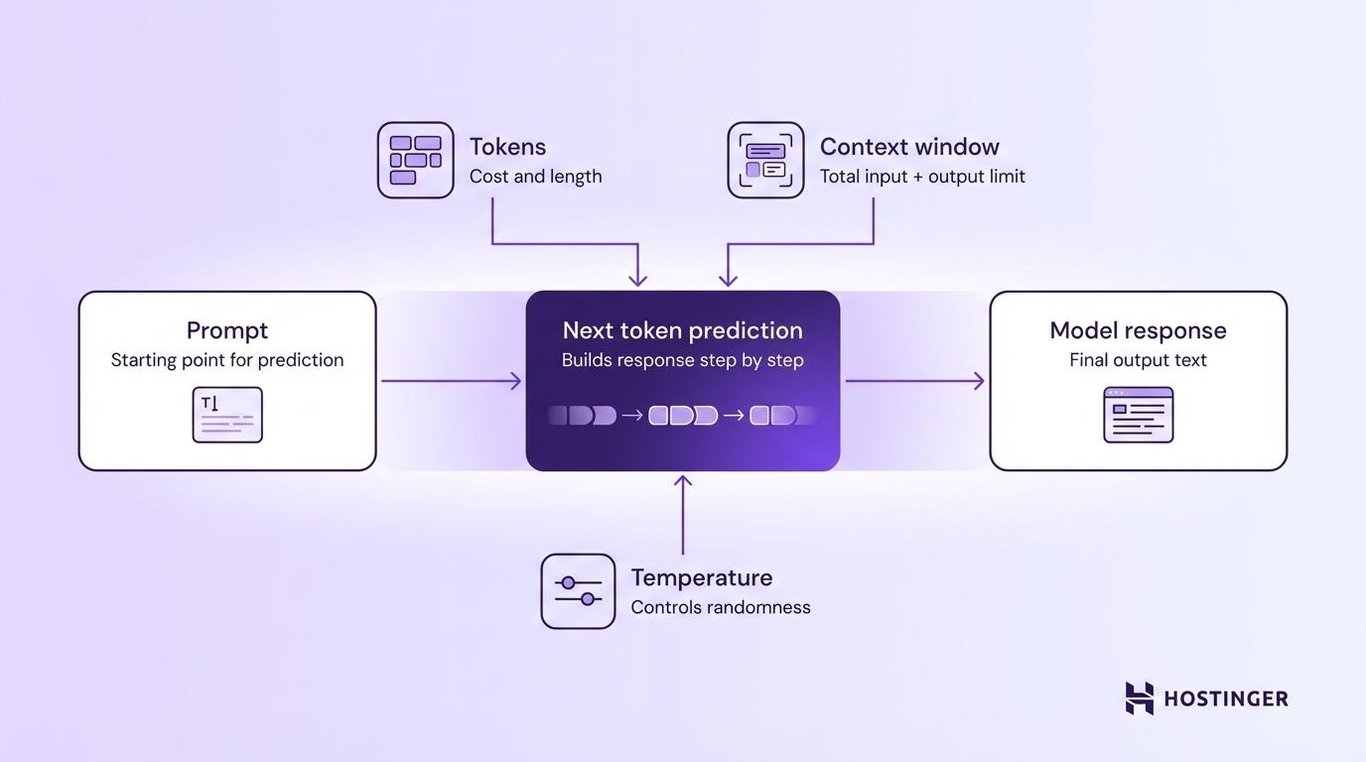
LLMs generate text by predicting the next token based on all the tokens that came before it. Your prompt is the starting point for that prediction, so the way you write it directly affects the response.
Three core settings control how the model handles your prompt:
Tokens are the basic units that the model reads and writes. A token is roughly 4 characters or about three-quarters of a word in English. The sentence “How do I fix this bug?” is about seven tokens. You pay per token on most APIs, so shorter prompts and responses cost less.
Context window is the total number of tokens the model can handle in a single request, your prompt plus the response combined. GPT-4o supports a 128,000-token context window, but the maximum number of tokens the model can generate in its response is a separate, smaller cap.
If your prompt is too long, the model either cuts it short or loses track of details at the beginning. For complex tasks, stay well under the limit so the model has enough room for a full response.
Temperature controls how creative or predictable the output is. It’s typically a value between 0 and 1. Setting it to 0 gives you the most consistent answers, which is good for code generation. Values around 0.7-1.0 work better for creative tasks like brainstorming. Going above 1 increases randomness further but is rarely useful in production.
While these three settings give you direct control over how the model behaves, the right prompting techniques put that control to use.
Core prompt engineering techniques developers use
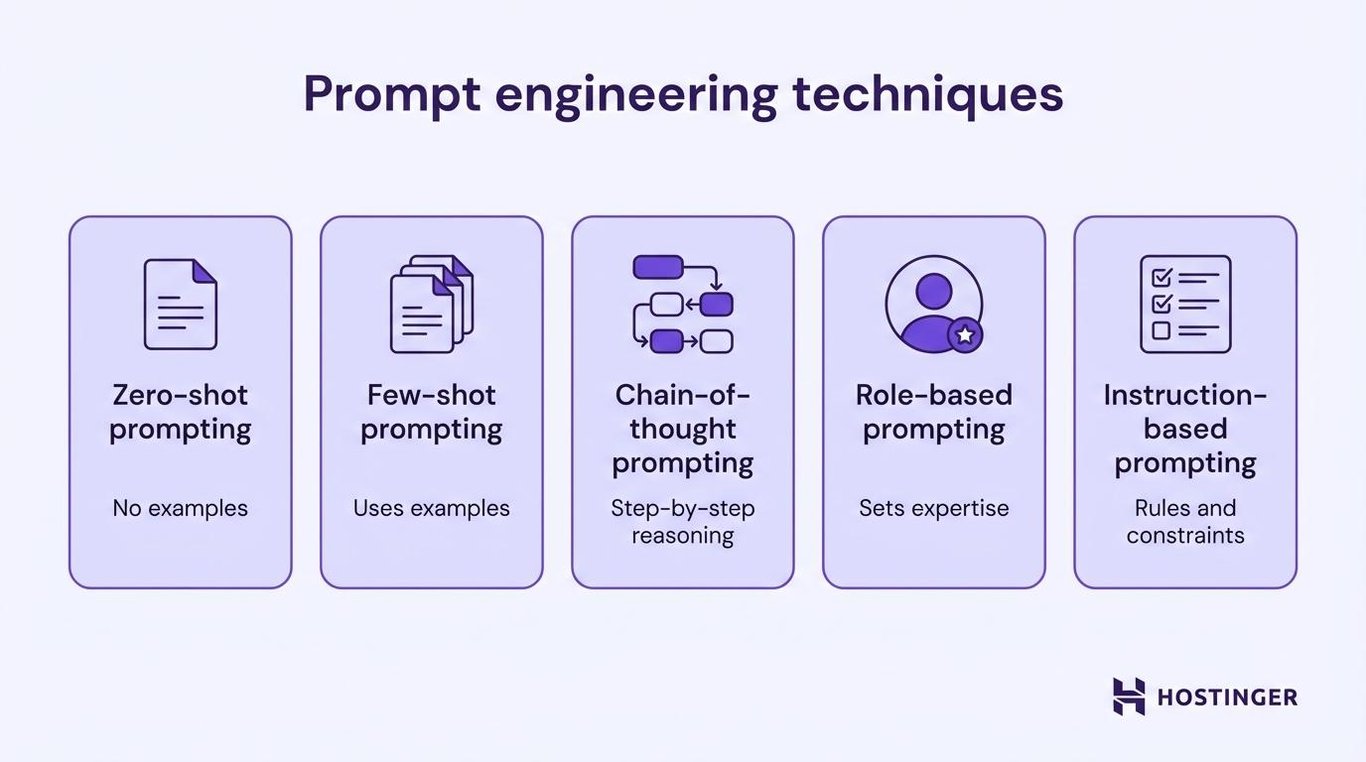
Five techniques cover the majority of what you’ll need as a developer working with LLMs.
Zero-shot prompting
Zero-shot prompting gives the model a task with no examples, just a clear instruction. The model relies entirely on its training to understand what you need.
Use this for straightforward tasks where the expected output is obvious.
Prompt:
Classify the following error log entry as "database", "authentication", or "network".

Entry: "Connection refused: failed to reach replica at 10.0.3.12:5432 after 3 retries."
Output:
database
Once the task gets more nuanced, you’ll want to add examples, which is where few-shot prompting comes in.
Few-shot prompting
Few-shot prompting includes a handful of examples in your prompt so the model can follow a pattern. You show the model what “good output” looks like before asking it to produce something new.
Prompt:
Convert these product descriptions to JSON format.

Description: "Blue running shoes, size 10, $89.99"
JSON: {"product": "running shoes", "color": "blue", "size": "10", "price": 89.99}

Description: "Red leather wallet, $45.00"
JSON: {"product": "leather wallet", "color": "red", "size": null, "price": 45.00}

Description: "Black wireless headphones, $129.50"
JSON:
Output:
{"product": "wireless headphones", "color": "black", "size": null, "price": 129.50}The model learns the pattern from your examples and applies it to new inputs. This works especially well for formatting tasks, data extraction, and classification, anywhere you need consistent structure across many inputs.
Two to three examples usually give you a solid improvement over zero-shot, but more than five rarely add much.
Zero-shot and few-shot both control what you tell the model. But some tasks need more than examples. They need the model to reason through a problem, not just match a pattern.
Chain-of-thought prompting
Chain-of-thought prompting asks the model to reason through a problem step by step before giving a final answer. You’ll want this for tasks that involve logic, math, or multi-step decisions.
Without step-by-step instructions, the model often jumps straight to an answer and gets it wrong. With chain-of-thought, it walks through the reasoning and catches mistakes along the way.
Prompt:
A developer has 3 microservices. Service A takes 200ms, Service B takes 350ms, and Service C takes 150ms. Services A and B run in parallel, then Service C runs after both finish.

Think through this step by step. What is the total response time?
Output:
Step 1: Services A and B run in parallel. The slower one (Service B at 350ms) determines the wait time. Parallel time = 350ms.

Step 2: Service C runs after both A and B finish. It takes 150ms.

Step 3: Total response time = 350ms + 150ms = 500ms.
Adding “think through this step by step” to a prompt is one of the simplest upgrades you can make. It works especially well for debugging logic, calculating costs, and evaluating trade-offs in code architecture.
Chain-of-thought controls how the model thinks. But you can also control who it speaks as.
Role-based prompting
Role-based prompting assigns the model a specific identity or expertise level before you give it a task. A “senior backend developer” prompt produces a very different response than a plain, unframed one.
Without a role:
Explain how to handle API rate limiting.
Output: A generic, surface-level overview that reads like a textbook entry.
With a role:
You are a senior backend developer mentoring a junior teammate.

Explain how to handle API rate limiting in a Node.js application.

Include practical code patterns they can use right away.
Output: A specific, actionable explanation with retry logic, exponential backoff patterns, and code snippets, written at a level the junior developer can actually follow.
A “senior developer” prompt produces different output than a “technical writer” prompt, even for the same topic. In the OpenAI API, this role usually lives in the system message you send with each request. Use this technique whenever the audience or expertise level matters.
A role shapes the persona, but you often need to go further and control the output itself: its format, its length, and exactly what it should or shouldn’t include.
Instruction-based prompting
Instruction-based prompting provides the model with explicit rules that serve as guardrails for the response.
Prompt:
Analyze the following Python function for potential issues.

Rules:

- List each issue as a numbered item
- For each issue, explain the risk in one sentence
- Suggest a fix in one sentence
- Do not rewrite the entire function
- Keep your response under 200 words

def get_user(id):

    user = db.query(f"SELECT * FROM users WHERE id = {id}")

    return user[0]
Output:
1. SQL injection vulnerability. User input is inserted directly into the query string, which lets attackers execute arbitrary SQL.

   Fix: Use parameterized queries — db.query("SELECT * FROM users WHERE id = %s", (id,)).

2. No error handling for empty results. If the query returns no rows, user[0] raises an IndexError.

   Fix: Check if user is empty before accessing the first element.

3. Using SELECT * instead of specific columns. This returns unnecessary data and exposes sensitive fields.

   Fix: Select only the columns your application needs.
Use this technique when the model’s response feeds directly into your app or another process.
Prompt engineering examples for developers
These examples show how the techniques above work inside real code, from API calls to debugging to automation. Understanding how to write effective AI prompts makes these patterns easier to apply across different projects.
Using prompt engineering with the OpenAI API
You can send a structured prompt to the OpenAI API with just a few lines of Python. You define the model’s role in the system message and your request in the user message.
from openai import OpenAI

client = OpenAI()

response = client.chat.completions.create(

    model="gpt-4o",

    temperature=0.2,

    messages=[

        {

            "role": "system",

            "content": "You are a Python expert. Return only code with brief comments. No explanations outside the code block."

        },

        {

            "role": "user",

            "content": "Write a function that validates email addresses using regex."

        }

    ]

)

print(response.choices[0].message.content)
Notice three things. The system message sets the role and output constraints. The low temperature (0.2) keeps the output consistent. And the instruction “No explanations outside the code block” prevents the model from adding filler text you don’t need.
You’ll use this same structure, system role + focused user prompt + low temperature, for most API calls.
Generating code with structured prompts
You get much better code from an LLM when your prompt spells out what the code should do, what tools to use, and how to structure the output.
Prompt:
Write a Python function called "fetch_weather" that:

- Accepts a city name as a string parameter

- Makes a GET request to the OpenWeatherMap API

- Returns a dictionary with keys: "city", "temperature_celsius", "description"

- Handles HTTP errors with try/except and returns None on failure

- Uses the requests library
Output:
import requests

def fetch_weather(city: str) -> dict | None:

    api_key = "YOUR_API_KEY"

    url = f"https://api.openweathermap.org/data/2.5/weather?q={city}&appid={api_key}&units=metric"

    try:

        response = requests.get(url)

        response.raise_for_status()

        data = response.json()

        return {

            "city": data["name"],

            "temperature_celsius": data["main"]["temp"],

            "description": data["weather"][0]["description"]

        }

    except requests.exceptions.RequestException:

        return None
The prompt worked because it listed every requirement as a bullet point. The model didn’t have to guess about the return format, error handling, or which library to use. In production, you’d load the API key from an environment variable and set a request timeout, but the prompt itself stays the same.
Structured prompts don’t just help you write new code. You can use the same approach to find and fix bugs in code you’ve already written.
Debugging code using prompts
You can find bugs faster with a prompt than by manually tracing through logic. Paste the broken code, describe the expected behavior, and let the model find the issue.
Prompt:
This function should return the average of a list of numbers, but it returns 0 for the input [10, 20, 30]. Find the bug and explain the fix.

def calculate_average(numbers):

    total = 0

    for num in numbers:

        total += num

        average = total / len(numbers)

return average
Output:
Bug: The line "average = total / len(numbers)" is inside the for loop.

It recalculates the average on every iteration using an incomplete total.

Fix: Move the division outside the loop.

def calculate_average(numbers):

    total = 0

    for num in numbers:

        total += num

    average = total / len(numbers)

return average
Describe what the code should do and what it actually does. That contrast helps the model find the problem.
Beyond writing and fixing code, you can also use prompts to handle repetitive tasks that would otherwise eat up your afternoon.
Automating tasks with prompts
You can turn repetitive manual work into automated pipelines with prompts. Two common examples:
Data processing, converting CSV rows to JSON:
Convert each row of this CSV data into a JSON object. Return a JSON array.

name,email,role

Sarah Chen,sarah@example.com,developer

James Park,james@example.com,designer
Output:
[

  {"name": "Sarah Chen", "email": "sarah@example.com", "role": "developer"},

  {"name": "James Park", "email": "james@example.com", "role": "designer"}

]
Documentation generation, creating docstrings from code:
Generate a Google-style docstring for this Python function:

def retry_request(url, max_retries=3, delay=1.0):

    for attempt in range(max_retries):
        try:

            response = requests.get(url)

            response.raise_for_status()

            return response.json()

        except requests.exceptions.RequestException:

            if attempt < max_retries - 1:

                time.sleep(delay * (attempt + 1))

    return None
Output:
def retry_request(url, max_retries=3, delay=1.0):

    """Sends a GET request with automatic retry on failure.

    Attempts the request up to max_retries times, with increasing

    delay between attempts (linear backoff).

    Args:

        url: The endpoint URL to request.

        max_retries: Maximum number of attempts. Defaults to 3.

        delay: Base delay in seconds between retries. Defaults to 1.0.

    Returns:

        Parsed JSON response as a dictionary, or None if all retries fail.

"""
Both of these tasks take minutes to do by hand. With a well-structured prompt, they take seconds. And you can embed the prompt in a script that runs independently.
Prompt engineering best practices for developers
A consistent process matters more than any single technique. These prompt engineering best practices give you a repeatable system for writing prompts that work across models and projects, from first draft to tested result.
- Describe the exact output you need. “Write a function” gives you something generic. “Write a Python function that takes a list of dictionaries and returns only entries where the ‘status’ key equals ‘active'” gives you something usable. More detail means less guessing.
- Include your project context in every prompt. Tell the model what your project does, what stack you’re using, and what constraints apply. “I’m building a REST API in FastAPI with PostgreSQL” gives the model enough background to write relevant code.
- Specify the response format. If you need JSON, say “return valid JSON.” If you need a numbered list, say so. When the response feeds into another system, spell out the exact structure: field names, data types, nesting.
- Add examples when the task is nuanced. Two or three input-output pairs show the model what “correct” looks like far better than a paragraph of instructions. This is especially true for classification, formatting, and data extraction.
- Separate instructions from data with clear markers. Use triple backticks, XML tags, or labeled sections to tell the model which part is instructions and which part is content to process.
- Replace vague words with measurable criteria. Words like “good,” “better,” and “relevant” mean different things to different models. “Write concise code” is vague. “Keep the function under 20 lines with no nested loops” is clear.
- Test the output and fix the prompt. Your first prompt is rarely your best. Test the output, spot where it falls short, and adjust. Add constraints, rephrase instructions, or break complex prompts into smaller steps.
Common prompt engineering mistakes to avoid
Common prompt engineering mistakes include vague instructions, missing project context, overloaded prompts, and skipping the output format. You usually won’t spot these in the prompt itself. They show up when the model’s response comes back wrong.
- Vague prompts return vague output. “Make this code better” sounds reasonable, but the model doesn’t know if you mean performance, readability, or security. You get a mix of random changes, some helpful, some not, and spend more time sorting through the output than you saved.
- Missing context sends the model guessing. A prompt asking to “handle authentication” returned a PHP session example for a project built in Node.js with JWT. One line of context (“I’m using Node.js with JWT”) would have prevented a completely unusable response.
- Overloading a single prompt dilutes everything. When you ask the model to refactor a function, add tests, write docs, and suggest performance improvements in one go, each part gets less attention. You end up with mediocre versions of five things instead of a solid version of one.
- Skipping output format breaks your parser. Without format instructions, the same prompt can return JSON one time, a markdown table the next, and a paragraph the third. If your code expects
JSON.parse()to work, a surprise paragraph crashes the pipeline. - Not testing with varied inputs hides edge cases. A prompt that parses addresses perfectly for your test case might break on international formats, missing fields, or unusual characters. Test your prompts with the messiest inputs your users will actually send.
- Trusting model output without validation. The model can return code that looks correct but doesn’t compile, or JSON with missing keys your schema requires. Always validate model output in your code before passing it downstream.
Expert tip
Pro Tip: Treat your prompts like unit tests. Each prompt should have a clear expected output. When the result doesn't match, debug the prompt the same way you'd debug code: isolate the issue, change one thing, and test again.
Writing solid prompts is one half of the work. The other half is connecting them to your actual codebase so they run as part of your application.
How developers integrate prompt engineering into applications
You connect prompt engineering to your application through a simple pipeline: your app collects user input, wraps it in a prompt template, sends that prompt to an AI model’s API, and returns the parsed response. You can further optimize prompts with prompt tuning to improve reliability over time.
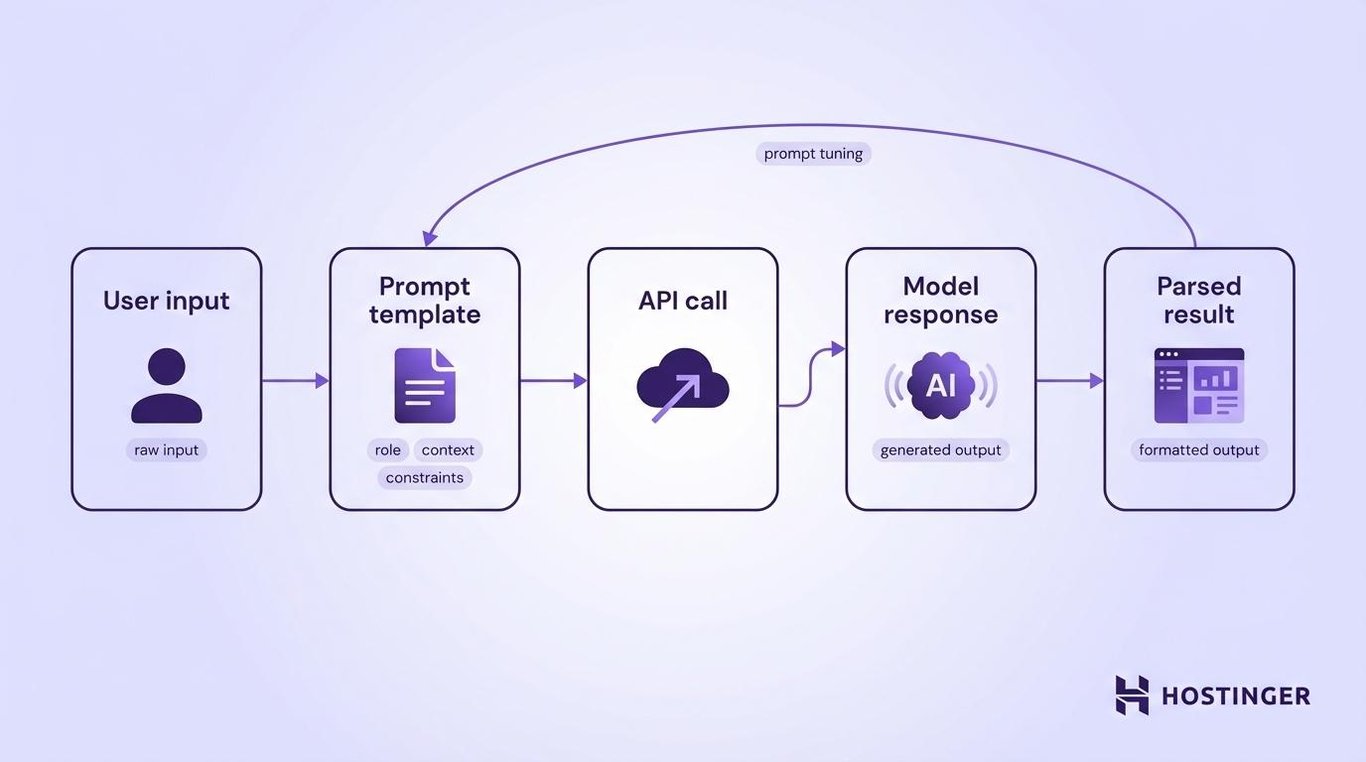
Most production applications need more than a single prompt-and-response cycle, so you’ll combine chaining, tool calling, and templates.
Prompt chaining in multi-step workflows
Prompt chaining breaks a complex task into smaller prompts that run one after another. The output from one prompt becomes the input for the next.
Say you’re building a feature that turns customer feedback into task items. You use three chained prompts to handle this cleanly:
- First prompt → Summarize the raw feedback into key themes
- Second prompt → Classify each theme by urgency (high, medium, low)
- Third prompt → Generate a task list with assigned priority levels
Each prompt handles one task, which means less room for error than cramming everything into a single request. The trade-off is extra API calls, which add latency and token costs, so use chaining when accuracy matters more than speed.
Chaining handles multi-step logic, but sometimes a step needs live data from an outside source. Tool calling lets the model reach out to your functions mid-conversation to get that data.
Using tools and function calling with prompts
Modern LLM APIs let the model call external functions during a conversation. Instead of making up an answer, the model recognizes when it needs real data and triggers a function you’ve defined.
For example, you give the model access to a get_order_status(order_id) function. When a user asks, “Where’s my order #4521?”, the model doesn’t make up a shipping status. It calls your function, gets the actual data, and builds a response from it.
In the OpenAI API, you define available tools in your request. The model returns a structured description of which function to call and with what arguments (via a tool_calls field in today’s API). Your code runs the function, sends the result back, and the model writes a natural-language response.
You can use this pattern to build AI assistants that check databases, call third-party APIs, or run calculations.
As you add chains and tool calls, the number of prompts in your codebase grows fast. You need a way to manage them without digging through source code every time something changes.
Creating reusable prompt templates
A prompt template separates the fixed instructions from the variable input, so you can update one without touching the other:
REVIEW_TEMPLATE = """You are a senior code reviewer.

Review the following {language} code for:

- Security vulnerabilities

- Performance issues

- Readability improvements

Respond in JSON format with keys: "issues" (array of objects with

"type", "line", "description", "suggestion").

Code to review:

{code}

"""

def review_code(language: str, code: str) -> str:

    prompt = REVIEW_TEMPLATE.format(language=language, code=code)

# Send prompt to API and return response
You can store templates as separate files, version them in Git, and swap them without redeploying your application.
At this point, you have the prompting techniques, the API patterns, and the tools to wire them into production. The remaining question is how to keep sharpening these skills.
How can developers become prompt engineers?
A developer can become a prompt engineer by treating prompts like production code. You build them into your applications, version them, test them against edge cases, and improve them over time.
- Start experimenting now. Pick a task you do manually, like writing docs, reviewing code, or formatting data, and try automating it with prompts. One afternoon of testing teaches you more than a week of reading.
- Use AI APIs directly. Sign up for an OpenAI, Anthropic, or open-source model API and start building. Writing prompts inside your own code teaches you faster than any playground.
- Build a small project. Create a CLI tool that summarizes git diffs, a Slack bot that answers questions from your docs, or try prompting with Hostinger AI Builder to build a full web app using natural language. A working project forces you to solve real problems.
- Track what works and what doesn’t. Keep a log of your prompts and results. Over time, you’ll develop a feel for what works with different models and tasks.
- Learn the full stack. Prompt engineering connects to API design, data processing, and application architecture. The more you understand how AI fits into a real system, the better your prompts get.
That’s the long game. But you can start seeing results today. Pick one technique you just learned, like few-shot prompting or chain-of-thought, and apply it to something you’re already working on. Swap a vague prompt for a structured one in an existing API call, or try chaining two prompts where you’ve been cramming everything into one.
You don’t need a new project to start. You just need one prompt that’s already underperforming.


Alma is an AI Content Editor with 9+ years of experience helping ideas take shape across SEO, marketing, and content. She loves working with words, structure, and strategy to make content both useful and enjoyable to read. Off the clock, she can be found gaming, drawing, or diving into her latest D&D adventure.