What is a good open rate for email?
Apr 23, 2026
/
Ksenija
/
7 min Read
A good email open rate falls between 17% and 28%, with anything above 25% considered strong performance.
This range varies across industries, audiences, and email types. Some audiences open emails more often than others, which changes what counts as a strong result.
Subject lines, timing, list quality, and message relevance directly affect how often people open emails.
What is an email open rate?
An email open rate is an email marketing metric that shows the percentage of delivered emails that recipients opened.
The formula looks like this:
open rate = opens ÷ delivered emails × 100
If, let’s say, you send 100 emails and 80 are delivered, and 20 of those 80 are opened, your open rate is 25%.
Email platforms track opens by adding a tiny hidden image to every email you send. This image is not visible to the reader.
When someone opens your email, their email app loads all the content inside it, including that hidden image. That load sends a signal back to your email platform, which counts it as an open.
Some tools also look at clicks. If someone clicks a link in your email, it confirms the email was opened, even if the image is blocked.
Open tracking is useful in bulk email marketing, where you send one email to a large list and need a quick read on engagement, but it is not perfectly accurate because some email apps block images, preload them automatically, or protect user privacy in ways that affect the count.
What is a good email open rate?
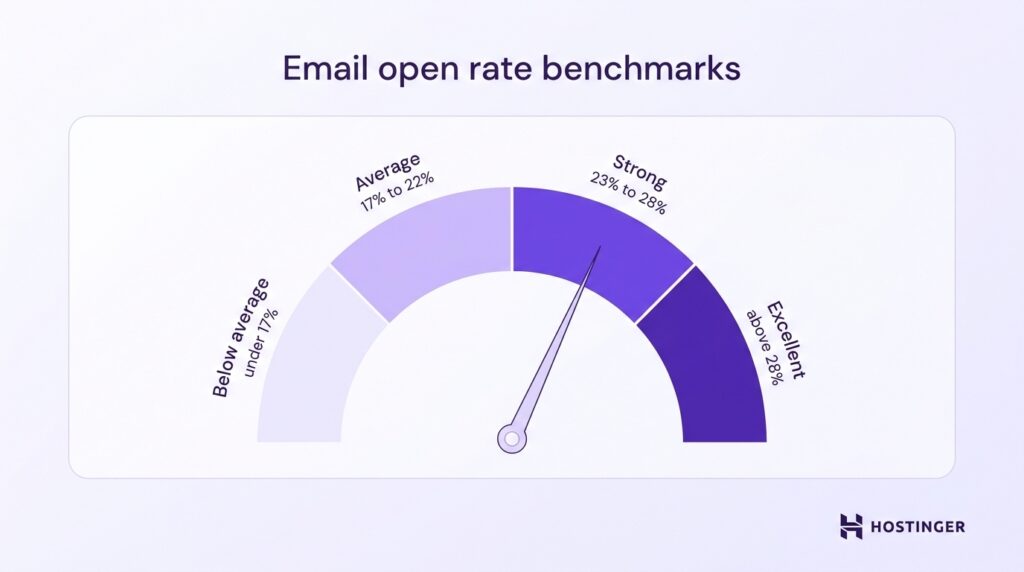
Based on Campaign Monitor benchmark data, a good email open rate falls between 17% and 28%, with the overall average at about 21.5%.
Here’s how to read that range in practice:
- Below average – under 17%
- Average – 17% to 22%
- Strong – 23% to 28%
- Excellent – above 28%
A “good” open rate still changes based on your situation. Industry sets the baseline. Emails from schools, nonprofits, and financial services reach higher open rates because people expect and rely on those messages. Retail and eCommerce emails compete with constant promotions, which lowers open rates.
List quality directly impacts performance. A list of recent subscribers who signed up and engage with your emails will produce high open rates. A list filled with older, inactive contacts will pull your numbers down because those people ignore your emails.
List size also shapes your results. A list of 500 engaged subscribers can reach 30% or higher. A list of 50,000 contacts that includes both active and inactive users, bringing the open rate closer to the overall average.
Average email open rates by industry
Email open rates vary by industry, so compare your results with those of businesses that send the same types of emails to a similar audience.
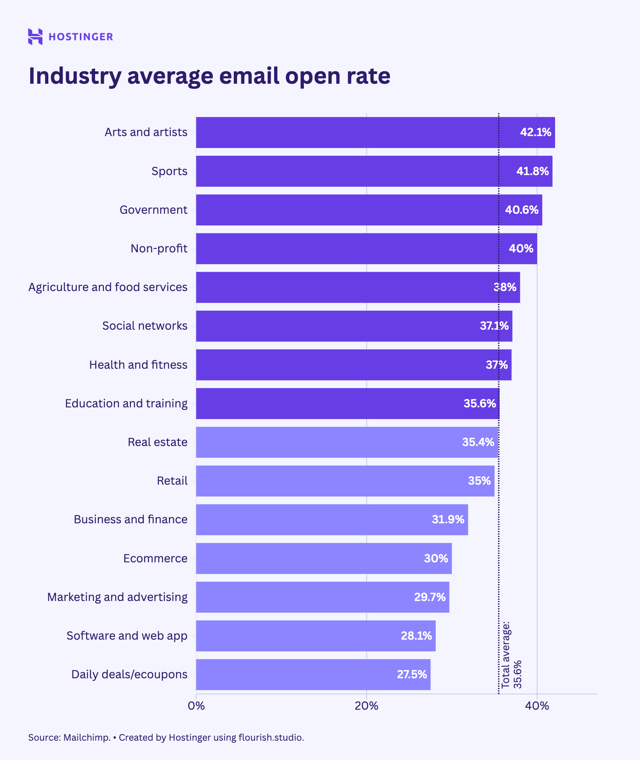
There is a clear gap between industries. Arts and artists (42.1%), sports (41.8%), and government (40.6%) sit at the top, with nonprofits close behind at 40%. Ecommerce drops to 30%, and SaaS (software and web apps) sits at 28.1%, which shows a noticeable decline as you move toward more commercial and promotional email types.
The difference comes down to audience behavior and intent. Industries like arts, sports, and government reach higher open rates because people actively follow updates in those areas.
Ecommerce emails compete with frequent promotions, which lowers attention. SaaS emails focus on product updates, accounts, or workflows, which keeps engagement steady but lower than interest-driven industries.
What affects email open rates?
Your open rate depends on your subject line, sender name, list quality, timing, and whether your emails reach the inbox.
Subject line quality
Subject line quality directly affects open rates by shaping the reader’s first decision: open the email or skip it.
A strong subject line is clear, specific, and relevant to the person receiving it. People open emails when they understand what the message is about and see a reason to care.
A vague line like “Update” gives them almost nothing to work with. A clearer subject line like “Your April invoice is ready” or “3 ways to reduce cart abandonment” tells them what to expect right away.
Relevance is just as important as clarity. Your subject line should match the reader’s interest, stage, or relationship with your brand.
Someone who just signed up for your newsletter is more likely to open “Welcome to our weekly SEO tips” than a broad line like “Hello from our team.” Someone who left items in their cart will respond better to “You left 2 items behind” than a generic sales message.
Personalization can help when it adds useful context. Using a first name, company name, product name, or recent action makes the email feel more connected to the reader.
“Anna, your free trial ends tomorrow” works because it is specific and timely. Personalization loses value when it feels automatic or adds no real meaning, such as “Anna, check this out.”
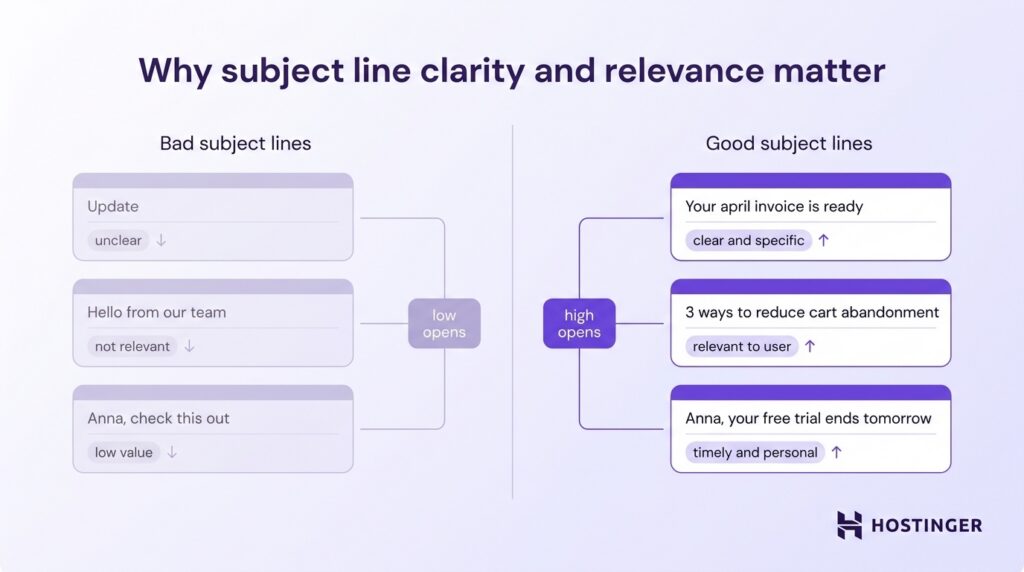
The best subject lines make one promise and keep it simple. Give the reader a clear reason to open the email. Say what they will get, why it is relevant, or what action they need to take.
Sender name and reputation
Sender name and reputation shape open rates because people decide very quickly whether an email looks familiar and safe to open.
A recognizable sender name builds trust. When people see a name they recognize, they are more likely to open the email because they already associate it with your brand, company, or team.
Hostinger, Hostinger Support, or Anna from Hostinger all clearly signal to the reader who sent the message. A vague sender name like Info, Team, or No-Reply feels less personal and easier to ignore.
Recognition works best when you stay consistent. If you send one email from Hostinger, the next from the Marketing Team, and the next from a person’s name with no company name, readers have to stop and figure out who you are.
That extra friction lowers the opening rates.
Reputation adds another layer. Email providers look at how people respond to your messages over time. If subscribers open your emails, click links, and keep your messages in their inbox, your sender reputation stays strong.
If large numbers of people ignore your emails, mark them as spam, or unsubscribe after opening, your reputation drops. That hurts future campaigns because fewer emails reach the inbox.
Audience quality
Audience quality directly impacts open rates because the right people open emails, while the wrong list drags performance down.
The strongest email lists are built through opt-ins. These are people who gave you permission to contact them by signing up through a form, downloading a resource, starting a free trial, or checking a box at checkout.
They know who you are and expect to hear from you, so they are far more likely to open your emails.
Bought lists create the opposite result. The people on those lists did not ask for your emails, do not recognize your brand, and often ignore your messages or mark them as spam. That hurts open rates right away and damages future performance as well.
Inactive users lower your open rate, even if they once subscribed willingly. A contact who signed up a year ago and has not opened your last 10 emails is still on your list, but they are no longer part of your active audience.
When you keep sending to large numbers of inactive subscribers, your total delivered emails go up while opens stay flat. That pulls the rate down.
So, if, for instance, you send an email campaign to 1,000 engaged subscribers and 300 open it, your open rate is 30%. If you add 2,000 inactive contacts to that list and still get 300 opens, your open rate drops to 10%.
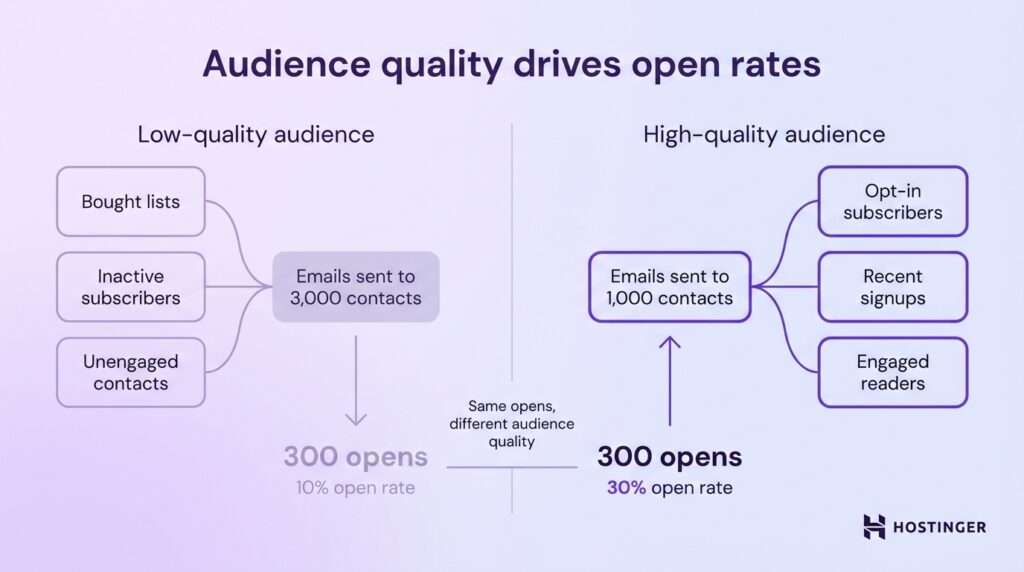
Focus on subscribers who asked to hear from you and still engage with your emails. Remove or re-engage inactive contacts before they weaken your results.
Timing and frequency
Timing and frequency affect open rates because people open emails when the message arrives at a useful moment and shows up often enough to stay familiar.
If your email lands at the wrong time, it gets buried before the reader sees it. Send your email when your audience is more likely to check their inbox.
A B2B newsletter sent during work hours reaches people while they are already in email mode. A weekend sales email works better for an online store when customers are browsing and ready to buy.
Frequency shapes how people respond over time. A consistent schedule helps readers recognize your emails and know when to expect them. Sending once a week builds familiarity and keeps your brand visible.
Sending too often lowers engagement. People start skipping your emails, unsubscribing, or ignoring them altogether. A daily stream of updates overwhelms most subscribers, while a weekly or monthly email provides a clear, manageable touchpoint.
Deliverability
Deliverability is the rate at which your emails reach the inbox instead of the spam folder.
This directly affects open rates because people cannot open emails they never see. If your message lands in spam, gets blocked, or ends up in a filtered folder, your chances of getting opened drop immediately.
So, if you send 1,000 emails and 950 are delivered to the inbox, more people have a real chance to open them. If a large share of those emails ends up in spam, your open rate will still fall, even if the subject line and content are strong.
Deliverability is shaped by your sender reputation, list quality, and sending practices. To improve email deliverability, send emails from a trusted domain, focus on subscribers who signed up, and avoid practices such as spam complaints and purchased lists that trigger spam filters.
Limitations of email open rates
Open tracking relies on conciled image loading, which creates gaps in how opens are recorded. Some email apps block images, so real opens go uncounted. Others load images automatically, which records opens even when the email is not actually read.
Apple Mail Privacy Protection increases this problem by using a privacy feature that hides whether someone actually opened your email.
When this setting is enabled, Apple sometimes marks emails as “opened” before the person even looks at them.
So if you send an email to 100 people, Apple may automatically mark 40 of them as opened, and your email tool will show 40 opens.
In reality, some of those people never opened the email at all.
At the same time, another group may open your email with images turned off. Those opens are real, but they are never counted.
These gaps create two problems:
- False opens from automatic image loading
- Missed opens when tracking is blocked
Use open rate as a directional metric, not an exact one. It helps you compare campaigns, test subject lines, and track trends over time. It does not show the exact number of people who read your emails.
What to focus on instead of just open rate
Open rate gives you a quick signal, but it does not show the full result of your email campaign.
You need to look at what people do after they open the email.
Click-through rate shows whether your message and call to action were strong enough to move people forward.
Conversions show whether readers completed the action you wanted, such as signing up, booking a demo, or making a purchase.
Revenue per email shows how much value each campaign generates, which gives you a clearer view of business impact.
A campaign with a lower open rate can still perform better if it drives more clicks, sales, or signups. That is why open rate works best as one metric within a bigger picture. To track and improve these results, you need a tool that shows what is happening beyond opens.
Email marketing tools like Hostinger Reach help you track metrics such as click-through rates, conversions, and revenue per email, manage your audience, and improve your campaigns in one place. With AI-generated emails, scheduling, and performance tracking, you can focus on clicks, conversions, and real results beyond opens.
For a deeper look at the metrics that show real email performance, read our guide to email marketing KPIs.

Ksenija is a digital marketing enthusiast with extensive expertise in content creation and website optimization. Specializing in WordPress, she enjoys writing about the platform’s nuances, from design to functionality, and sharing her insights with others. When she’s not perfecting her trade, you’ll find her on the local basketball court or at home enjoying a crime story. Follow her on LinkedIn.