How to fix the installation failed: destination folder already exists Error in WordPress in 4 proven ways
Mar 10, 2026
/
Jordana A.
/
3 min Read
Download all-in-one WordPress cheat sheet
“Destination Folder Already Exists” is a common WordPress error that generally occurs during plugin or theme installation. WordPress shows this error message to prevent a destination folder with the same name and path from being overwritten.
When a plugin or theme’s installation fails, it leaves behind an empty destination folder. The same happens when an old plugin or theme’s folder isn’t removed properly due to an interruption. This rogue folder stops WordPress from completing the installation.
Keep reading as we will cover several methods to easily solve the “Destination Folder Already Exists” error in WordPress.
| Error code | Installation Failed: Destination Folder Already Exists |
| Error type | Client-side error |
| Error variations | Destination Folder Already Exists |
| Error causes | Incomplete plugin or theme installation Interrupted plugin or theme uninstallation |
What Is the Installation Failed: Destination Folder Already Exists Error?
“Installation Failed: Destination Folder Already Exists” error occurs when WordPress detects a duplicate folder in your site’s directory. This issue can arise under various circumstances, but the resolution remains consistent: delete the existing folder to proceed with the theme or plugin installation.
4 Ways to Fix Installation Failed: Destination Folder Already Exists
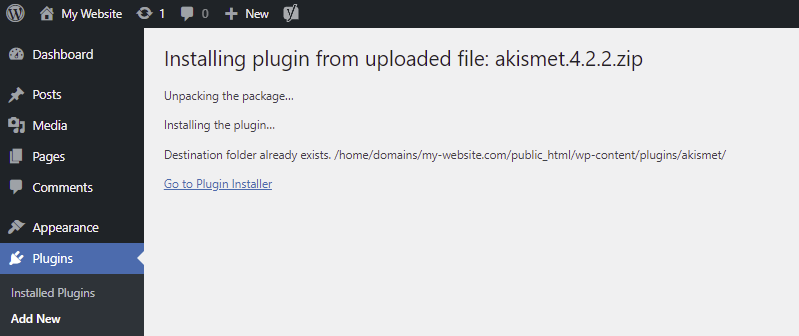
Despite the inconvenience, “Destination Folder Already Exists” is a WordPress error with an easy fix ‒ it involves removing the unused destination folder. You can do so by accessing your WordPress website’s server and removing the folder manually.
First, back up your WordPress website to avoid losing any data in the event of misconfiguration. Then, pick one of the following four methods to solve the WordPress error.

Fix the Destination Folder Already Exists Error via the WordPress Dashboard
When you install a plugin or a theme manually, WordPress extracts the .zip file in a folder with the same name. If WordPress detects an identical folder with the same path, a comparison between the two will appear.
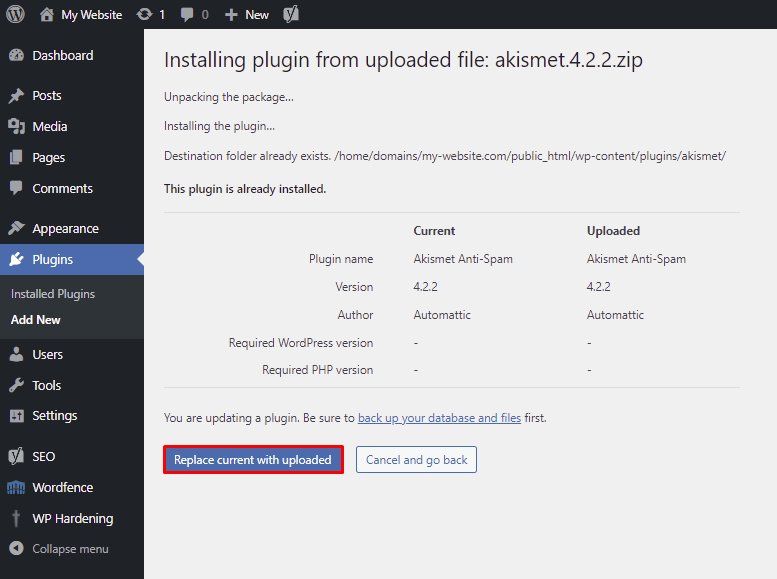
In this case, WordPress will ask for permission to overwrite the old plugin or theme folder. Select Replace current with uploaded and the “Destination Folder Already Exists” error message should be resolved.
Keep in mind that you will only see this warning page if the installation process is done from the WordPress admin area using a plugin or a theme’s .zip file.
Fix Destination Folder Already Exists via hPanel
Fixing the “Destination Folder Already Exists” error manually involves establishing a connection with your website’s server and removing the folder that’s causing the issue.
Hostinger users can follow these steps to solve the error using hPanel’s File Manager:
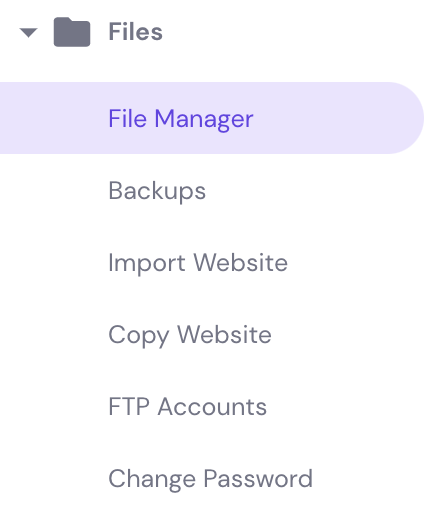
- Navigate to File Manager under the Files section of your hPanel dashboard.
- Access your WordPress files from the root directory. On most hosts, you’ll be looking for the public_html directory. There, locate the wp-content folder that contains all the files of plugins and themes installed on your WordPress website.

- Open either the themes or plugins folder and find the folder that’s causing the issue.
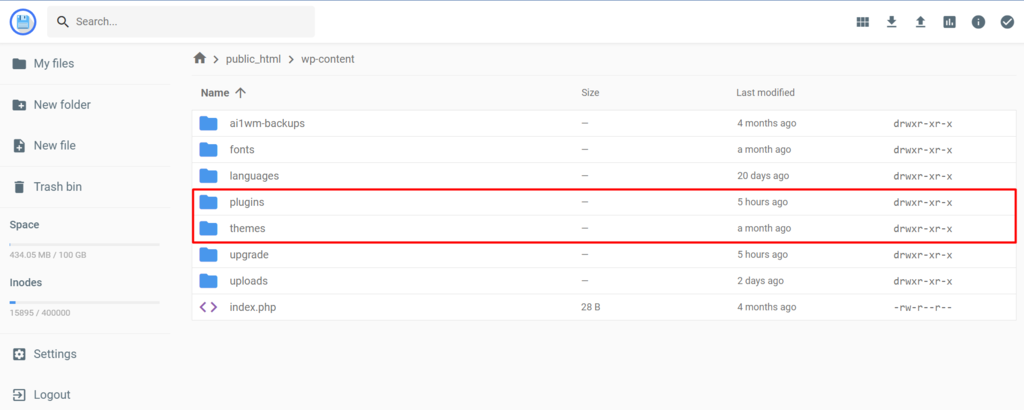
- Right-click on the folder named after the plugin or theme you want to install and click Delete.
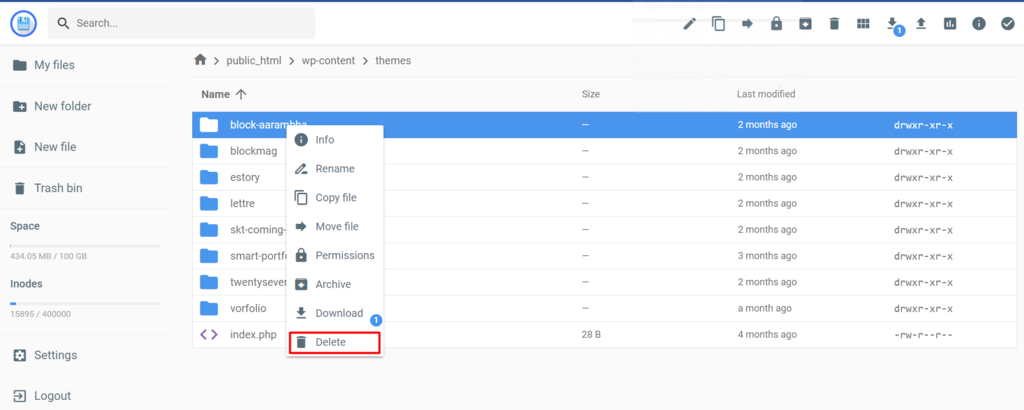
- Attempt reinstallation to check whether the error has been resolved.
Fix Installation Failed: Destination Folder Already Exists via cPanel
If your hosting provider uses cPanel, you can access your WordPress files through its File Manager. The process is similar to that of hPanel’s File Manager.
Here’s how to solve the “Destination Folder Already Exists” error using cPanel’s File Manager:
- Navigate to File Manager located in the Files section of your cPanel dashboard.
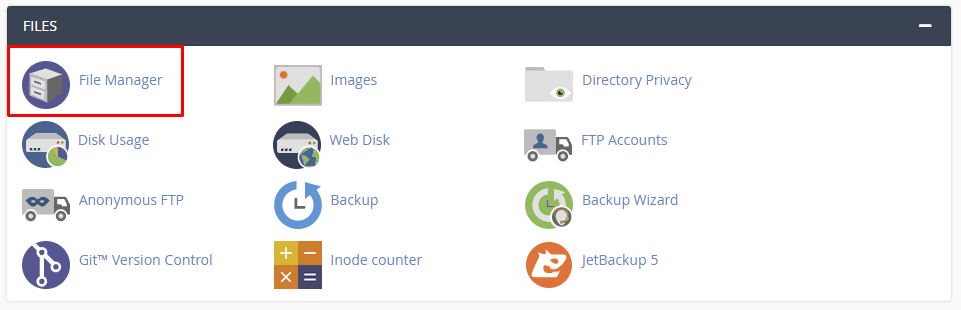
- Access the wp-content folder within your root directory (public_html).
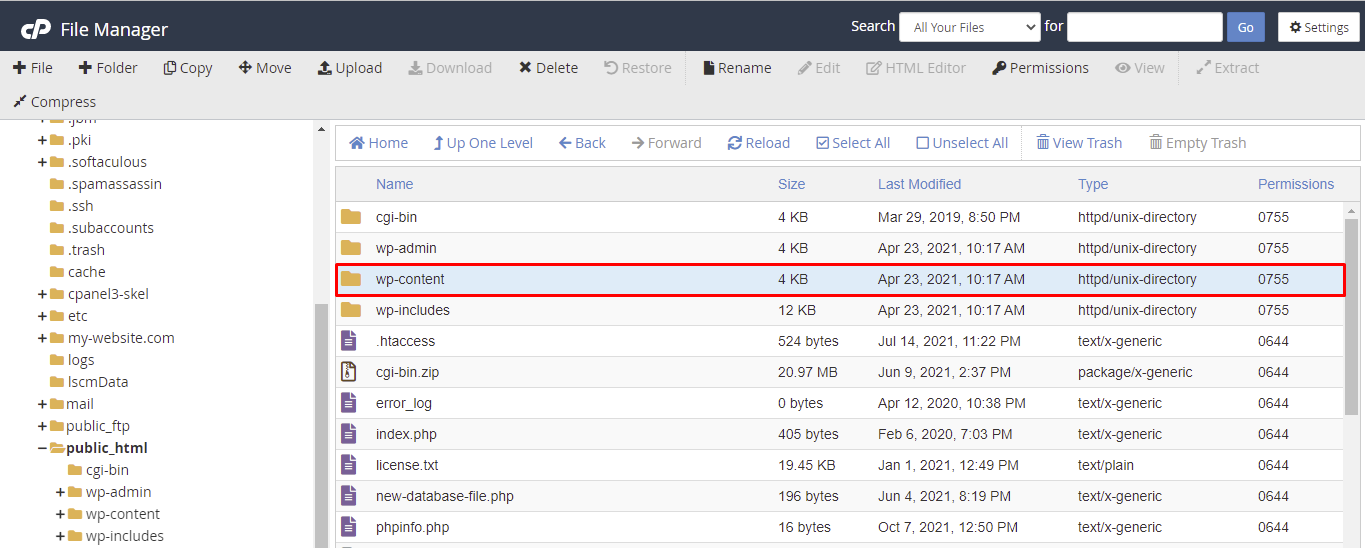
- Open either the themes or plugins folder and find the folder that’s causing the issue.
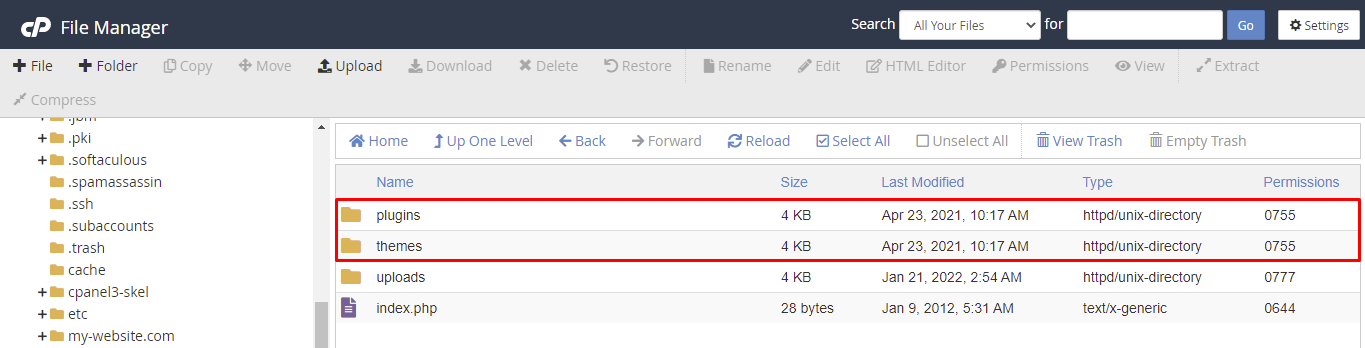
- Right-click on the folder named after the plugin or theme you want to install and click Delete.
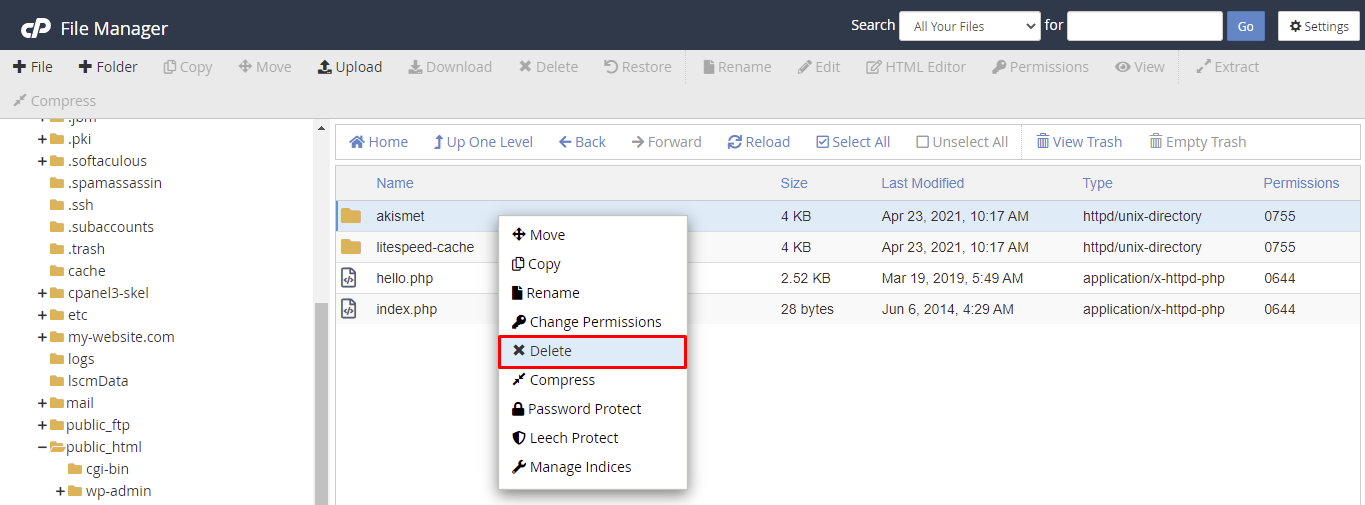
- Attempt reinstallation to check whether the error has been resolved.
Fix Installation Failed: Destination Folder Already Exists via an FTP Client
If your WordPress site is hosted on a VPS server, you can access your website files via an FTP client. After configuring the best FTP client for your needs, follow these steps to solve the “Destination Folder Already Exists” error:
- Establish an FTP connection to access the website’s server.
- Navigate to public_html -> wp-content -> plugins or themes and locate the folder that’s causing the issue.
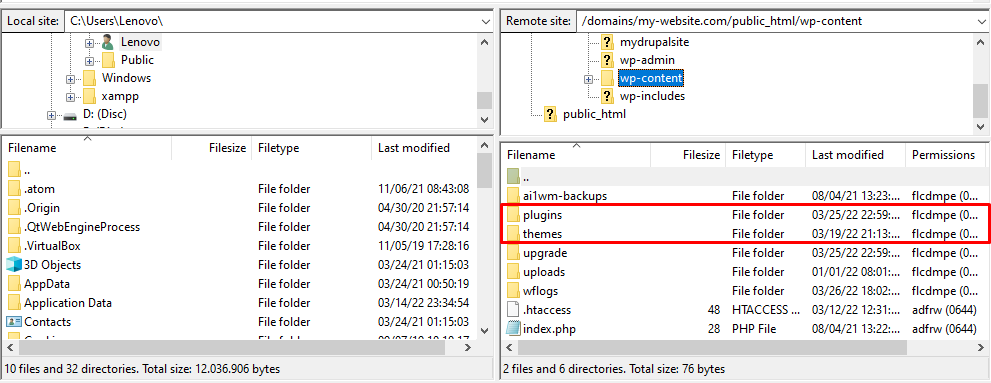
- Right-click on the folder named after the plugin or theme you want to install and click Delete.
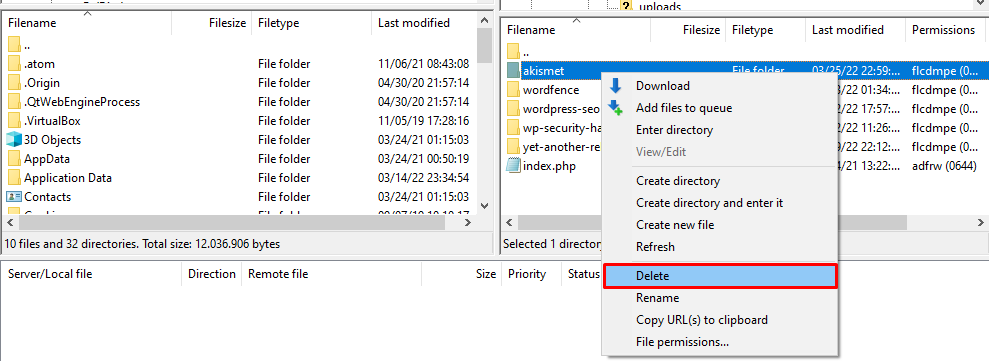
- Attempt reinstallation to check whether the error has been resolved.
Conclusion
The “Destination Folder Already Exists” error occurs when WordPress detects an already existing folder with the same during a theme or plugin installation process. Fortunately, you’ll only need to remove the rogue folder named after the software you want to install to solve this issue.
We hope this article has helped you solve this WordPress error. Good luck.
Learn How to Solve Other WordPress Errors
How to Fix "Briefly Unavailable for Scheduled Maintenance" Error
How to Fix Missed Schedule Error in WordPress
How to Fix Mixed Content on WordPress
How to Fix Broken Links on WordPress
How to Solve 404 WordPress Error
How to Fix White Screen of Death on WordPress
How to Solve WordPress Not Sending Emails

Jordana is a Senior Content Writer with a background in Information Systems. She has over five years of experience in WordPress and is casually dabbling with PHP and MySQL. Her passion for writing and technology drives her to create tutorials for anyone wanting to build their online presence. Follow her on LinkedIn.


