Paperclip use cases: 10 ways to automate operations with AI agents
Apr 17, 2026
/
By Ariffud M.
/
9 min Read

Paperclip use cases involve orchestrating multiple AI agents to run business operations autonomously. Rather than relying on a single chatbot or assistant, Paperclip lets you build an entire organization of AI agents, each with defined roles, goals, and reporting lines.
It acts as the management layer that keeps every agent aligned with your business objectives while tracking costs, logging decisions, and enforcing governance rules.
The problem it solves is real. Paperclip’s creator built it after running an automated hedge fund with 20+ AI agent sessions open at once, each working in isolation with no shared context, no cost tracking, and no way to recover state after a crash.
That’s what happens when you scale AI agents without an organizational layer. Paperclip provides that layer by modeling companies rather than pipelines, giving you org charts, ticketing, budgets, and delegation out of the box.
Practical Paperclip use cases include:
- Building autonomous startups with virtual company structures.
- Automating software development with multi-agent sprints.
- Controlling AI costs with per-agent budget enforcement.
- Managing AI-powered marketing departments.
- Running 24/7 operations on a virtual private server (VPS).
- Operating privacy-first, self-hosted AI systems.
- Handling customer support with auditable ticket workflows.
1. Building a fully autonomous startup
One of the most ambitious Paperclip use cases is structuring a virtual company from the ground up. You define an org chart with roles like CEO, CTO, and marketing lead, assign an AI agent to each position, and set a top-level goal like reaching a specific monthly recurring revenue (MRR) target.
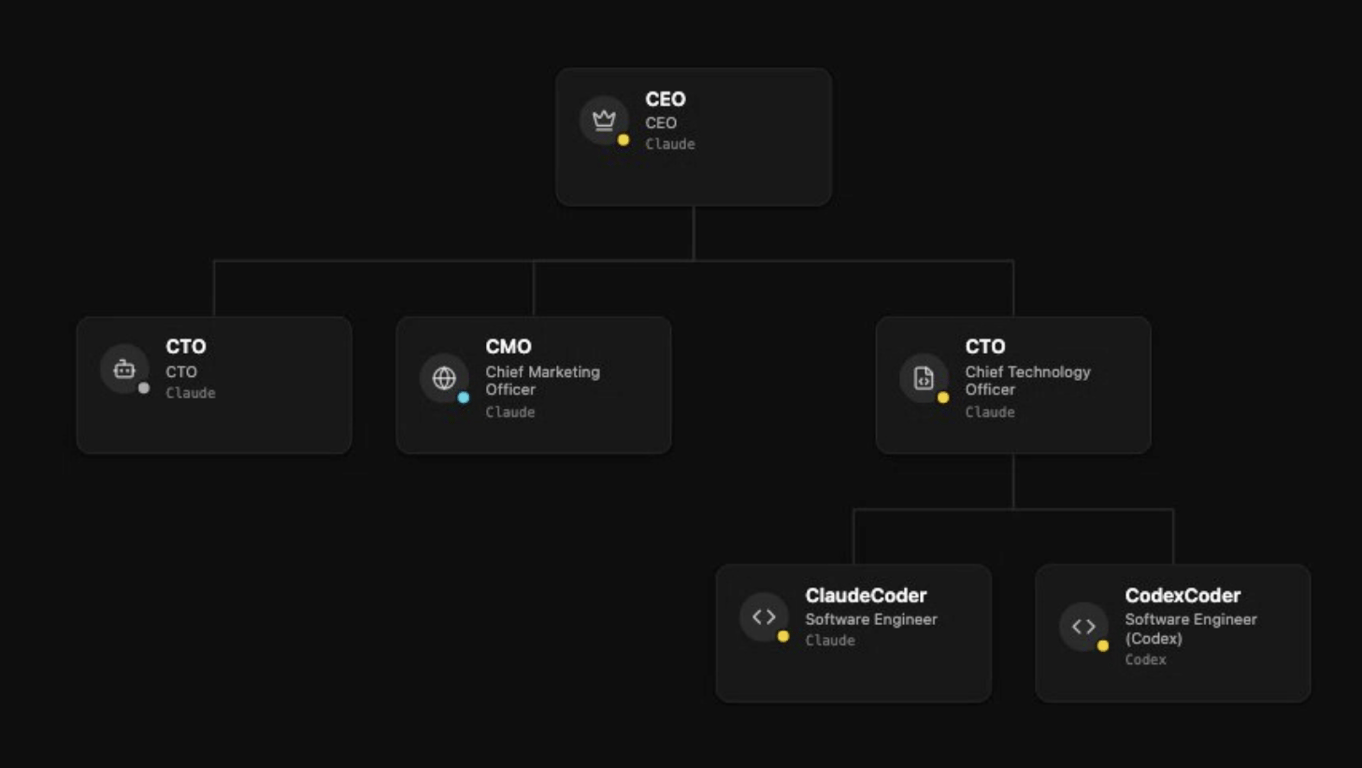
Tasks flow through this hierarchy naturally. The CEO agent breaks the main goal into strategic objectives, delegates them to department heads, and those agents further delegate to specialized workers.
Every task carries full goal ancestry, meaning each agent always understands not just what it needs to do, but why it matters in the context of the larger mission.
Here’s how it plays out in practice. Let’s say your goal is to grow MRR to $10,000. The CEO agent might create a project called “Launch freemium tier,” then assign the CTO agent to build the feature while the marketing lead agent plans a launch campaign.
The CTO further delegates: one developer agent handles the billing integration, another builds the onboarding flow. Every piece of work traces back to that original revenue target, so no agent drifts into irrelevant tasks.
The initial setup takes real thought, though. You need to define clear roles, establish reporting lines, and set budgets before launching.
Starting with two or three agents and expanding once the basic flow works is a much better approach than trying to spin up a 15-agent organization on day one.
Expect to spend time refining system prompts as you learn how agents interpret their roles.
2. Automating software development workflows
Paperclip lets you assign engineering agents to handle coding, debugging, testing, and deployment as a coordinated team.
A typical setup might look like this: a tech lead agent receives feature requests, breaks them into tickets, and delegates them to developer agents running on Claude Code, Codex, or other adapters.
Each agent picks up tasks from a shared queue, works on them, and reports progress through structured tickets. When a developer agent completes a feature, it updates the ticket status, creates follow-up tasks for testing, and notifies the tech lead for review.
If the review fails, the tech lead reassigns the ticket with specific feedback, and the developer agent iterates.
The advantage over single-agent tools is coordination. When three developer agents are working on the same project, Paperclip ensures they don’t duplicate effort or overwrite each other’s work.
Each agent sees the full task board, knows what other agents have checked out, and understands how its task fits into the larger project goal. That kind of awareness is impossible when you’re juggling separate agent sessions manually.
One practical tip: keep developer agents focused on a single responsibility. An agent that handles both frontend and backend work tends to produce inconsistent results compared to two agents with tightly scoped roles.
You can also integrate this with containerized environments, and understanding what Docker is will help you see how Paperclip packages its services for consistent deployment across different servers.
3. Managing AI-powered marketing teams
Paperclip allows for building a marketing department with no human team members. You assign agents to specific functions like content creation, SEO basics, social media management, and email outreach. Each agent has a defined role and reports progress through the shared ticketing system.
The mechanism that makes this work is heartbeat scheduling. You configure each agent to wake up at set intervals (for example, every six hours), check its task queue, execute any pending work, and return to idle.
Your content agent produces blog drafts. Your SEO agent reviews keyword performance and adjusts targeting. Your social media agent schedules posts. All of this runs on autopilot.
Where it gets interesting is the feedback loop. If you connect an analytics agent that monitors traffic and engagement data, it can create new tasks based on what’s actually working.
Blog posts about a specific topic driving three times more traffic? The analytics agent flags the pattern and creates a task for the content agent to produce more on that theme. No manual dashboard review needed.
The key to making this work is keeping agent roles tightly scoped. A content agent that also tries to handle analytics and scheduling will produce mediocre results across all three. Specialized agents with clear responsibilities perform better and are easier to debug when output quality drops.
4. Running customer support operations
Here’s a scenario that shows why structured orchestration matters for support. A customer submits a billing question. A frontline agent classifies it, checks the account status using an API tool, and resolves it with a templated response.
Ten minutes later, a different customer reports a complex bug. The frontline agent recognizes it’s outside its scope, creates a new ticket tagged as “engineering escalation,” and assigns it to a specialist agent with codebase access.
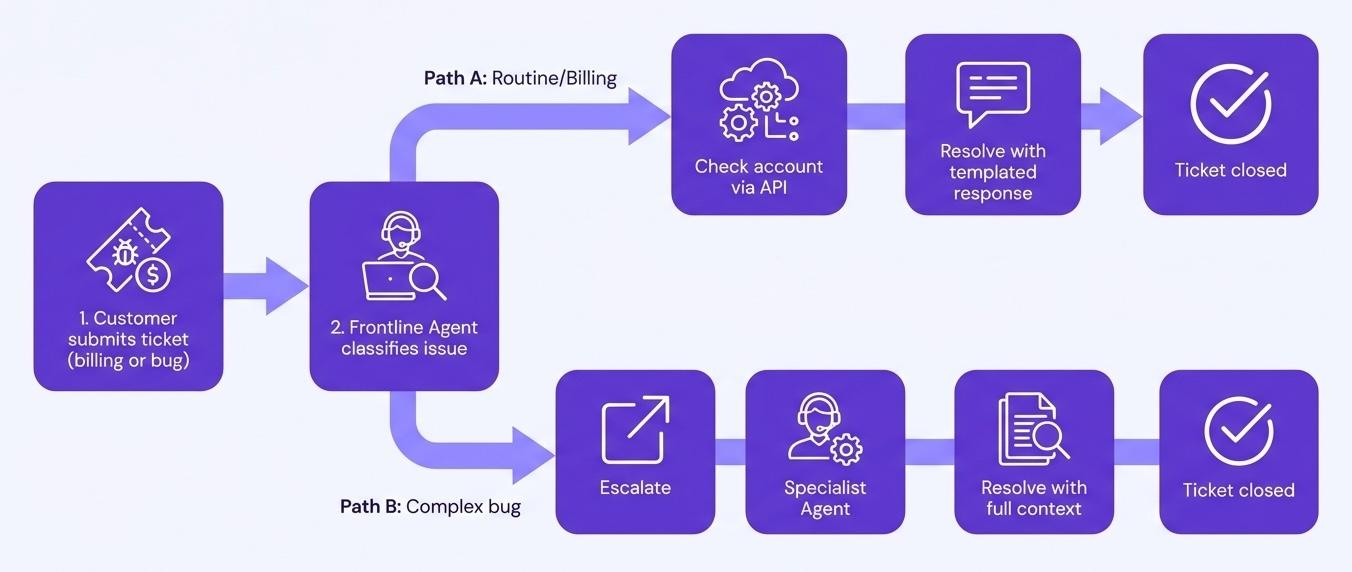
This is how Paperclip’s ticketing model works in practice. Every customer interaction becomes a ticket with a clear owner, status, and thread.
Agents respond, update statuses, and route issues based on rules you define. The frontline agent handles routine questions, and anything it can’t resolve gets escalated with full context attached so the next agent doesn’t start from scratch.
What sets this apart from a basic chatbot is traceability. Every tool call, API request, and decision point gets logged in an append-only audit trail.
If a customer disputes a response three weeks later, you can pull up the exact sequence of actions: what the agent checked, what data it found, and why it gave that specific answer.
For regulated industries or teams with compliance requirements, this level of documentation would be incredibly time-consuming to maintain manually.
Over time, reviewing these logs also reveals patterns. If 40% of escalations involve the same issue category, that’s a signal to either improve the frontline agent’s instructions or create a dedicated agent for that problem type.
5. Automating data research and analysis
You can already ask a large language model to search the web and pull competitor pricing or summarize recent regulatory changes. But that still means you’re the one doing it, writing the prompt, and piecing the results together every time.
Paperclip turns that manual research routine into an automated workflow that runs on a schedule without your involvement.
A practical setup might include three agents:
- A collector that scrapes pricing pages, news feeds, or public filings on a recurring schedule.
- A synthesizer that compares new data against historical trends and flags anomalies.
- A reporter that compiles findings into a summary document.
The collector passes raw data to the synthesizer, which passes insights to the reporter.
This is especially valuable for recurring intelligence needs. Instead of spending two hours every Monday pulling competitor pricing data, your research team handles it automatically and delivers a formatted report by the time you start your week.
If a competitor drops prices by 20% on a Tuesday afternoon, the collector flags it on its next run.
The key constraint to keep in mind is that research quality depends heavily on how well you define what agents should look for and where.
Vague instructions like “monitor the market” produce vague results. Specific instructions like “list the pricing tiers on these five competitor pages and compare them to our current rates” produce actionable intelligence.
6. Controlling AI costs with budget governance
Without cost controls, here’s what happens: an agent hits an edge case, enters a retry loop, and burns through $300 in API calls at 3 AM before anyone notices.
This isn’t hypothetical. Runaway agent costs are one of the most common problems teams encounter when scaling autonomous AI systems.
Paperclip addresses this with per-agent and per-department spending limits. You set a monthly budget for each agent, and when it hits the cap, it stops.
The dashboard shows token usage broken down by agent, task, project, and goal, so you can see exactly which work is expensive and which is efficient.

This granularity matters more than you might expect. You might discover that your content agent costs $15/month while your code review agent costs $200/month because it processes large files with every review.
That insight lets you optimize: maybe you restructure the code review workflow to send smaller, targeted file sections instead of entire repositories.
Compare this with the alternative, which is checking your API provider’s billing page periodically and hoping nothing went wrong between checks.
Paperclip’s approach is proactive: you define the boundaries upfront, the system enforces them automatically, and you get detailed reports on where every dollar went.
7. Creating and managing custom AI agents
Paperclip doesn’t lock you into a fixed set of agent types. When a new need arises, you create an agent directly from the dashboard: give it a name, pick an adapter – Claude Code for engineering, Codex for code generation, Gemini for research – point it at a working directory, and define its responsibilities through a system prompt.
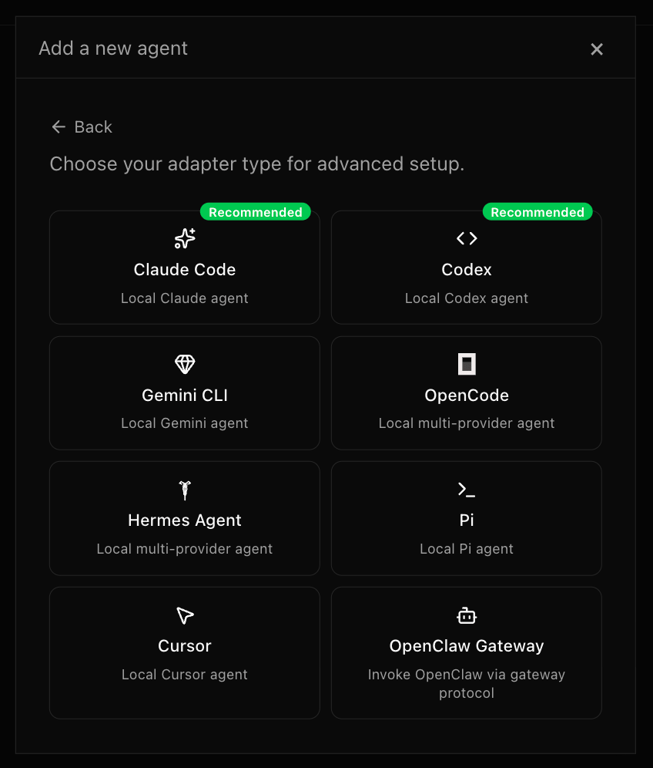
The practical value shows up when your needs evolve. Say you launched with an engineering team and a marketing team, but now you need competitive intelligence.
Instead of reconfiguring existing agents, you create a new research department: a lead researcher agent that plans what intelligence to gather, and two specialist agents that execute the actual research tasks.
Each new agent slots into your existing org chart with its own reporting line and budget.
Governance stays tight throughout. Agents can’t spin up sub-agents without your approval – if a CEO agent decides the company needs a new designer, it proposes the hire and waits for sign-off.
You can also restrict which tools each agent can access, set cost thresholds that require manual approval, and pause or terminate any agent at any time.
8. Running 24/7 autonomous operations
Running Paperclip locally works fine for testing, but it breaks down quickly in practice. Close your laptop, lose power, or restart for an update, and every agent stops mid-task. Scheduled heartbeats miss their windows. Work that was supposed to happen overnight simply doesn’t.
A VPS deployment fixes this. Your agents run on guaranteed resources around the clock: the reporting agent compiles yesterday’s metrics before you wake up, the monitoring agent flags a broken API integration at 4 AM and creates an engineering ticket, the content agent publishes a scheduled post timed for a different time zone. All of this runs whether you’re online or not.
Reliability also means surviving restarts. Paperclip stores agent memory, task context, and your entire organizational structure in a PostgreSQL database backed by a volume mount.
Container restarts, server reboots, and Paperclip updates don’t wipe your progress. Your agents pick up right where they stopped.
And because Paperclip ships with an embedded PostgreSQL option, you don’t even need to set up a separate database for your first deployment.
For anyone serious about autonomous workflows, VPS hosting is the foundation that makes every other use case on this list actually work in practice, because a heartbeat scheduled for 3 AM needs a server that’s actually running at 3 AM.
9. Managing complex projects with AI org structures
Consider a product launch that needs engineering, design, and marketing to work in parallel. Without structure, you end up with agents duplicating effort, missing dependencies, or working on tasks that another agent has already completed.
Paperclip’s hierarchical org chart prevents this.
The CEO agent owns the launch goal and breaks it into three projects: “build the product,” “design the landing page,” and “prepare the launch campaign.” Each project gets assigned to a department lead agent, who further breaks it into individual tasks with clear dependencies.
The design agent can’t finalize the landing page until the engineering agent confirms the feature set. Paperclip tracks these relationships, so agents don’t start work that depends on unfinished upstream tasks.
Visibility into all of this comes through the dashboard. You can see which tasks are in progress, which are blocked, which agents are active, and how budgets are tracking across every department.
Instead of asking each agent for a status update, you get a unified view of the entire operation.
10. Operating privacy-first AI systems
Every prompt you send to a third-party AI platform becomes data that lives on someone else’s servers. For businesses working with proprietary strategies, client information, or regulated data, that’s a non-starter.
Self-hosting Paperclip on a VPS keeps everything on infrastructure you control.
Your agent logs, task histories, organizational structures, and the actual content agents produce all stay on your server. You connect your own API keys directly to providers like Anthropic or OpenAI, with no intermediary handling or storing your prompts. The only data that leaves your VPS is the API call to the model provider itself.
This matters most for teams in finance, healthcare, legal, or any field with strict data handling requirements. The append-only audit trail Paperclip maintains also stays on your hardware, giving you full control over retention and access policies.
Strengthening your VPS security ensures these AI operations stay properly protected.
Being MIT-licensed and fully open source adds another layer of trust. You can audit every line of code running your AI workforce, verify that no telemetry sends sensitive data anywhere unexpected, and fork the project to customize it for your specific compliance needs.
How to get started with Paperclip on a VPS
The fastest way to deploy Paperclip is through a pre-configured Docker template.
Hostinger’s Application Catalog, for example, handles the container setup, PostgreSQL database, networking, and environment variables automatically.
You provide your admin credentials and API keys for your preferred language model providers, click deploy, and the system spins up on port 3100. The embedded PostgreSQL database means there’s no separate database to configure for your first deployment.
Once the system is running, open the Paperclip dashboard from your VPS and log in with the admin credentials you set during deployment.
The onboarding flow walks you through three steps: creating your organization (company name plus a mission or goal), setting up your first AI agent (name, adapter type like Claude Code or Codex, working directory, and model configuration), and defining your first task with a clear title and description.
Keep that first task specific. “Research competitors” is too vague. “List the pricing tiers of these three competitors and compare them to ours” gives the agent something concrete to work with.
From there, set budgets per agent, define reporting lines between your agents, and let the workflows run.

Resist the urge to build everything at once. Get a CEO and one specialist agent working reliably, then add agents one at a time.
Each new agent introduces new interactions to debug, and it’s much easier to isolate issues when you add complexity gradually.
For a full step-by-step walkthrough, learn how to set up Paperclip on a VPS. It covers everything from deployment through Docker Manager to creating your first agent team.
This article is a localized version of Paperclip use cases: 10 ways to automate operations with AI agents, originally published in English.

Ariffud is a Technical Content Writer with an educational background in Informatics. He has extensive expertise in Linux and VPS, authoring over 200 articles on server management and web development. Follow him on LinkedIn.